Solved "not genuine windows" message keeps appearing

gwhiskers

New member
Local time
6:58 PM
Messages
8
Approx 10 weeks ago I upgraded the hard drive on my laptop. in doing the upgrade, I used a cloning software program in hopes that all would be copied over to the new drive successfully, but apparently not.
I have tried to reslove online per the windows activation technologies error message and have had zero success. anyway,I've run the mga program and will appreciate any help you can give me to help me get my oem machine in MS good graces again. Here is the data:

Code:
Diagnostic Report (1.9.0027.0):
-----------------------------------------
Windows Validation Data-->
Validation Code: 0x8004FE21
Cached Online Validation Code: 0x0
Windows Product Key: *****-*****-2QWT6-HCQXJ-9YQTR
Windows Product Key Hash: PVjSC5x6njvqunmbCY3lOD7rYDo=
Windows Product ID: 00359-OEM-8992687-00007
Windows Product ID Type: 2
Windows License Type: OEM SLP
Windows OS version: 6.1.7601.2.00010300.1.0.003
ID: {2B41FACC-E2C9-412C-8F19-46F4FCBAFFCA}(3)
Is Admin: Yes
TestCab: 0x0
LegitcheckControl ActiveX: N/A, hr = 0x80070002
Signed By: N/A, hr = 0x80070002
Product Name: Windows 7 Home Premium
Architecture: 0x00000009
Build lab: 7601.win7sp1_gdr.151019-1254
TTS Error: 
Validation Diagnostic: 
Resolution Status: N/A
Vista WgaER Data-->
ThreatID(s): N/A, hr = 0x80070002
Version: N/A, hr = 0x80070002
Windows XP Notifications Data-->
Cached Result: N/A, hr = 0x80070002
File Exists: No
Version: N/A, hr = 0x80070002
WgaTray.exe Signed By: N/A, hr = 0x80070002
WgaLogon.dll Signed By: N/A, hr = 0x80070002
OGA Notifications Data-->
Cached Result: N/A, hr = 0x80070002
Version: N/A, hr = 0x80070002
OGAExec.exe Signed By: N/A, hr = 0x80070002
OGAAddin.dll Signed By: N/A, hr = 0x80070002
OGA Data-->
Office Status: 100 Genuine
Microsoft Office Standard Edition 2003 - 100 Genuine
OGA Version: N/A, 0x80070002
Signed By: N/A, hr = 0x80070002
Office Diagnostics: B4D0AA8B-604-645_B4D0AA8B-604-645_025D1FF3-364-80041010_025D1FF3-229-80041010_025D1FF3-230-1_025D1FF3-517-80040154_025D1FF3-237-80040154_025D1FF3-238-2_025D1FF3-244-80070002_025D1FF3-258-3_E2AD56EA-765-d003_E2AD56EA-766-0_E2AD56EA-134-80004005_E2AD56EA-765-b01a_E2AD56EA-766-0_E2AD56EA-148-80004005_16E0B333-89-80004005_B4D0AA8B-1029-80004005
Browser Data-->
Proxy settings: N/A
User Agent: Mozilla/4.0 (compatible; MSIE 8.0; Win32)
Default Browser: C:\Users\owner\AppData\Local\Google\Chrome\Application\chrome.exe
Download signed ActiveX controls: Prompt
Download unsigned ActiveX controls: Disabled
Run ActiveX controls and plug-ins: Allowed
Initialize and script ActiveX controls not marked as safe: Disabled
Allow scripting of Internet Explorer Webbrowser control: Disabled
Active scripting: Allowed
Script ActiveX controls marked as safe for scripting: Allowed
File Scan Data-->
File Mismatch: C:\Windows\system32\wat\watadminsvc.exe[7.1.7600.16395], Hr = 0x80092003
File Mismatch: C:\Windows\system32\wat\watux.exe[7.1.7600.16395], Hr = 0x80092003
File Mismatch: C:\Windows\system32\sppobjs.dll[6.1.7601.17514], Hr = 0x80092003
File Mismatch: C:\Windows\system32\sppc.dll[6.1.7601.17514], Hr = 0x800b0100
File Mismatch: C:\Windows\system32\sppcext.dll[6.1.7600.16385], Hr = 0x800b0100
File Mismatch: C:\Windows\system32\sppwinob.dll[6.1.7601.17514], Hr = 0x80092003
File Mismatch: C:\Windows\system32\slc.dll[6.1.7600.16385], Hr = 0x800b0100
File Mismatch: C:\Windows\system32\slcext.dll[6.1.7600.16385], Hr = 0x800b0100
File Mismatch: C:\Windows\system32\sppuinotify.dll[6.1.7600.16385], Hr = 0x80092003
File Mismatch: C:\Windows\system32\slui.exe[6.1.7601.17514], Hr = 0x80092003
File Mismatch: C:\Windows\system32\sppcomapi.dll[6.1.7601.17514], Hr = 0x800b0100
File Mismatch: C:\Windows\system32\sppcommdlg.dll[6.1.7600.16385], Hr = 0x800b0100
File Mismatch: C:\Windows\system32\sppsvc.exe[6.1.7601.17514], Hr = 0x80092003
File Mismatch: C:\Windows\system32\drivers\spsys.sys[6.1.7127.0], Hr = 0x80092003
File Mismatch: C:\Windows\system32\drivers\spldr.sys[6.1.7127.0], Hr = 0x80092003
File Mismatch: C:\Windows\system32\systemcpl.dll[6.1.7601.17514], Hr = 0x800b0100
File Mismatch: C:\Windows\system32\user32.dll[6.1.7601.19061], Hr = 0x800b0100
Other data-->
Office Details: <GenuineResults><MachineData><UGUID>{2B41FACC-E2C9-412C-8F19-46F4FCBAFFCA}</UGUID><Version>1.9.0027.0</Version><OS>6.1.7601.2.00010300.1.0.003</OS><Architecture>x64</Architecture><PKey>*****-*****-*****-*****-9YQTR</PKey><PID>00359-OEM-8992687-00007</PID><PIDType>2</PIDType><SID>S-1-5-21-1495455123-425448887-4059553890</SID><SYSTEM><Manufacturer>ASUSTeK Computer Inc.        </Manufacturer><Model>K60IJ               </Model></SYSTEM><BIOS><Manufacturer>American Megatrends Inc.</Manufacturer><Version>203    </Version><SMBIOSVersion major="2" minor="5"/><Date>20090826000000.000000+000</Date></BIOS><HWID>CEC23907018400F8</HWID><UserLCID>0409</UserLCID><SystemLCID>0409</SystemLCID><TimeZone>Pacific Standard Time(GMT-08:00)</TimeZone><iJoin>0</iJoin><SBID><stat>3</stat><msppid></msppid><name></name><model></model></SBID><OEM><OEMID>_ASUS_</OEMID><OEMTableID>Notebook</OEMTableID></OEM><GANotification/></MachineData><Software><Office><Result>100</Result><Products><Product GUID="{91120409-6000-11D3-8CFE-0150048383C9}"><LegitResult>100</LegitResult><Name>Microsoft Office Standard Edition 2003</Name><Ver>11</Ver><Val>B2704D2A8DD6066</Val><Hash>D5hhCMvAO/LQUvYLs2QeJC3VYFQ=</Hash><Pid>70141-051-8501293-56987</Pid><PidType>1</PidType></Product></Products><Applications><App Id="16" Version="11" Result="100"/><App Id="18" Version="11" Result="100"/><App Id="1A" Version="11" Result="100"/><App Id="1B" Version="11" Result="100"/></Applications></Office></Software></GenuineResults>  
Spsys.log Content: 0x80070002
Licensing Data-->
Software licensing service version: 6.1.7601.17514
Name: Windows(R) 7, HomePremium edition
Description: Windows Operating System - Windows(R) 7, OEM_SLP channel
Activation ID: d2c04e90-c3dd-4260-b0f3-f845f5d27d64
Application ID: 55c92734-d682-4d71-983e-d6ec3f16059f
Extended PID: 00359-00178-926-800007-02-1033-7600.0000-2092009
Installation ID: 089810778311418700309870013020671226804374023755732136
Processor Certificate URL: [url=http://go.microsoft.com/fwlink/?LinkID=88338]SpcService Web Service[/url]
Machine Certificate URL: [url=http://go.microsoft.com/fwlink/?LinkID=88339]RacService Web Service[/url]
Use License URL: [url=http://go.microsoft.com/fwlink/?LinkID=88341]UseLicenseService Web Service[/url]
Product Key Certificate URL: [url=http://go.microsoft.com/fwlink/?LinkID=88340]PkcService Web Service[/url]
Partial Product Key: 9YQTR
License Status: Licensed
Remaining Windows rearm count: 3
Trusted time: 3/8/2016 4:08:01 PM
Windows Activation Technologies-->
HrOffline: 0x8004FE21
HrOnline: N/A
HealthStatus: 0x000000000001EFF0
Event Time Stamp: 3:1:2016 17:14
ActiveX: Registered, Version: 7.1.7600.16395
Admin Service: Registered, Version: 7.1.7600.16395
HealthStatus Bitmask Output:
Tampered File: %systemroot%\system32\sppobjs.dll
Tampered File: %systemroot%\system32\sppc.dll|sppc.dll.mui
Tampered File: %systemroot%\system32\sppcext.dll|sppcext.dll.mui
Tampered File: %systemroot%\system32\sppwinob.dll
Tampered File: %systemroot%\system32\slc.dll|slc.dll.mui
Tampered File: %systemroot%\system32\slcext.dll|slcext.dll.mui
Tampered File: %systemroot%\system32\sppuinotify.dll|sppuinotify.dll.mui
Tampered File: %systemroot%\system32\slui.exe|slui.exe.mui|COM Registration
Tampered File: %systemroot%\system32\sppcomapi.dll|sppcomapi.dll.mui
Tampered File: %systemroot%\system32\sppcommdlg.dll|sppcommdlg.dll.mui
Tampered File: %systemroot%\system32\sppsvc.exe|sppsvc.exe.mui
Tampered File: %systemroot%\system32\drivers\spsys.sys

HWID Data-->
HWID Hash Current: MAAAAAEAAQABAAIAAAABAAAAAwABAAEA6GEQT2yA0jNOo4aJlAmeg4JsUPfaskbK
OEM Activation 1.0 Data-->
N/A
OEM Activation 2.0 Data-->
BIOS valid for OA 2.0: yes
Windows marker version: 0x20001
OEMID and OEMTableID Consistent: yes
BIOS Information: 
  ACPI Table Name OEMID Value OEMTableID Value
  APIC   082609  APIC1043
  FACP   082609  FACP1043
  DBGP   082609  DBGP1043
  HPET   082609  OEMHPET 
  BOOT   082609  BOOT1043
  MCFG   082609  OEMMCFG 
  SLIC   _ASUS_  Notebook
  ECDT   082609  OEMECDT 
  OEMB   082609  OEMB1043
  GSCI   082609  GMCHSCI 
  SSDT   PmRef  CpuPm
 

My Computer

Computer type
Laptop
Computer Manufacturer/Model Number
asus k60IJ
OS
windows 7 home premium 64 bit
CPU
dual core cpu 2.1 ghz
Motherboard
4 gb
Hard Drives
1 TB seagate
Antivirus
windows defender
Browser
ie 8 and chrome
Hi Gwiskers,
Believe your problem is caused by your intel rapid set drivers,
Please download the latest drivers from here
https://downloadcenter.intel.com/download/20768

After you've installed rerun the report it should be a lot smaller, (repost it thanks)
All the file mismatches and tampered files will have gone and you'll be good to go.

Roy
 

My Computer

Computer type
PC/Desktop
Computer Manufacturer/Model Number
medionl/Aspire 6930G/acer x55a
OS
W7 home premium 32bit/W7HP 64bit/w10 tp insider ring
CPU
E5300 dual core
Motherboard
medion MS7366
Memory
3gb
Graphics Card(s)
Nvidia Geforce 7100 Nforce 630i
Monitor(s) Displays
avixc
Internet Speed
n (isp resticted to 72)
Antivirus
mse/pands
Browser
palemoon
Other Info
Belkin Fd7050 n USB using Railink RT2870 drivers, more upto date
Thanks Torchwood
I've tried updating the drivers from Intel, and get an error which says my platform is not supported. I really don't understand that...my laptop seems to meet all the equipment qualifactions. I could post the whole intelRST.log file if it would help but the following section of the file seems to say what the problem is, but I really don't understand the code at all:

Code:
2016:03:10 11:26:02:339:   Scanning x64\iaStorAC.inf (Name: RAID64, Version: 12.5.0.1066)
2016:03:10 11:26:02:348:     Section with the best match: INTEL.NTamd64.5.2
2016:03:10 11:26:02:358:       Device: PCI\VEN_8086&DEV_2822&CC_0104 (Intel(R) Desktop/Workstation/Server Express Chipset SATA RAID Controller)
2016:03:10 11:26:02:367:       Device: PCI\VEN_8086&DEV_282A&CC_0104 (Intel(R) Mobile Express Chipset SATA RAID Controller)
2016:03:10 11:26:02:376:     MUP OS bits: 0x36D50
2016:03:10 11:26:02:387: E Win32 exception occurred!!
2016:03:10 11:26:02:397:     Error code: 0x4E24 (20004)
2016:03:10 11:26:02:548:     Error text: ''
2016:03:10 11:26:02:635:     Extended error text: 'Error in device matching'
2016:03:10 11:26:02:698:     Debug info: 'Setup.cpp (156)'
2016:03:10 11:26:02:828:   Showing dialog: FINISH
2016:03:10 11:30:12:399:   Dumping properties (21 total)
2016:03:10 11:30:12:409:     RST_SERVICE=1
2016:03:10 11:30:12:419:     RST_UI=1
2016:03:10 11:30:12:429:     RST_TRAY=1
2016:03:10 11:30:12:443:     IIF_HASICC=0
2016:03:10 11:30:12:452:     IIF_LOGFOLDER=C:\Users\owner\Intel\Logs
2016:03:10 11:30:12:462:     IIF_SETUPVERSION=2.0.34.0
2016:03:10 11:30:12:473:     IIF_PACKAGEVERSION=12.5.0.1066
2016:03:10 11:30:12:483:     IIF_SETUPPATH=C:\Users\owner\Downloads
2016:03:10 11:30:12:492:     IIF_CACHELOC=C:\ProgramData\Intel\Package Cache\{409CB30E-E457-4008-9B1A-ED1B9EA21140}
2016:03:10 11:30:12:502:     IIF_OS=6.1
2016:03:10 11:30:12:512:     IIF_OSSERVICEPACK=1
2016:03:10 11:30:12:528:     IIF_IS64=1
2016:03:10 11:30:12:544:     IIF_NET20=1
2016:03:10 11:30:12:558:     IIF_NET30=1
2016:03:10 11:30:12:567:     IIF_NET35=1
2016:03:10 11:30:12:577:     IIF_NET40CLIENT=1
2016:03:10 11:30:12:586:     IIF_NET40FULL=1
2016:03:10 11:30:12:596:     IIF_NET45CLIENT=1
2016:03:10 11:30:12:605:     IIF_NET45FULL=1
2016:03:10 11:30:12:615:     IIF_INSTALLFOLDER=C:\Program Files\Intel\Intel(R) Rapid Storage Technology
2016:03:10 11:30:12:624:     IIF_SETUPMODE=INSTALL
2016:03:10 11:30:12:636:   Exit code: 1603
2016:03:10 11:30:12:655:   >>> Log End
 

My Computer

Computer type
Laptop
Computer Manufacturer/Model Number
asus k60IJ
OS
windows 7 home premium 64 bit
CPU
dual core cpu 2.1 ghz
Motherboard
4 gb
Hard Drives
1 TB seagate
Antivirus
windows defender
Browser
ie 8 and chrome
next

Hi Gwhiskers,
lets have a go at this then

Roy
 

Attachments

  • sata fail.PNG
    sata fail.PNG
    9.8 KB · Views: 0

My Computer

Computer type
PC/Desktop
Computer Manufacturer/Model Number
medionl/Aspire 6930G/acer x55a
OS
W7 home premium 32bit/W7HP 64bit/w10 tp insider ring
CPU
E5300 dual core
Motherboard
medion MS7366
Memory
3gb
Graphics Card(s)
Nvidia Geforce 7100 Nforce 630i
Monitor(s) Displays
avixc
Internet Speed
n (isp resticted to 72)
Antivirus
mse/pands
Browser
palemoon
Other Info
Belkin Fd7050 n USB using Railink RT2870 drivers, more upto date
thanks for sticking with me on this.
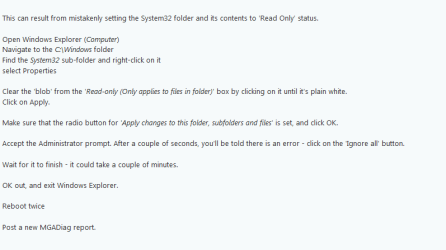
I followed your directions to take the read only off the system32 sub-folder.
Here is the new MGADiag file.

Code:
Diagnostic Report (1.9.0027.0):
-----------------------------------------
Windows Validation Data-->
Validation Code: 0x8004FE21
Cached Online Validation Code: 0x0
Windows Product Key: *****-*****-2QWT6-HCQXJ-9YQTR
Windows Product Key Hash: PVjSC5x6njvqunmbCY3lOD7rYDo=
Windows Product ID: 00359-OEM-8992687-00007
Windows Product ID Type: 2
Windows License Type: OEM SLP
Windows OS version: 6.1.7601.2.00010300.1.0.003
ID: {2B41FACC-E2C9-412C-8F19-46F4FCBAFFCA}(3)
Is Admin: Yes
TestCab: 0x0
LegitcheckControl ActiveX: N/A, hr = 0x80070002
Signed By: N/A, hr = 0x80070002
Product Name: Windows 7 Home Premium
Architecture: 0x00000009
Build lab: 7601.win7sp1_gdr.151019-1254
TTS Error: 
Validation Diagnostic: 
Resolution Status: N/A
Vista WgaER Data-->
ThreatID(s): N/A, hr = 0x80070002
Version: N/A, hr = 0x80070002
Windows XP Notifications Data-->
Cached Result: N/A, hr = 0x80070002
File Exists: No
Version: N/A, hr = 0x80070002
WgaTray.exe Signed By: N/A, hr = 0x80070002
WgaLogon.dll Signed By: N/A, hr = 0x80070002
OGA Notifications Data-->
Cached Result: N/A, hr = 0x80070002
Version: N/A, hr = 0x80070002
OGAExec.exe Signed By: N/A, hr = 0x80070002
OGAAddin.dll Signed By: N/A, hr = 0x80070002
OGA Data-->
Office Status: 100 Genuine
Microsoft Office Standard Edition 2003 - 100 Genuine
OGA Version: N/A, 0x80070002
Signed By: N/A, hr = 0x80070002
Office Diagnostics: B4D0AA8B-604-645_B4D0AA8B-604-645_025D1FF3-364-80041010_025D1FF3-229-80041010_025D1FF3-230-1_025D1FF3-517-80040154_025D1FF3-237-80040154_025D1FF3-238-2_025D1FF3-244-80070002_025D1FF3-258-3_E2AD56EA-765-d003_E2AD56EA-766-0_E2AD56EA-134-80004005_E2AD56EA-765-b01a_E2AD56EA-766-0_E2AD56EA-148-80004005_16E0B333-89-80004005_B4D0AA8B-1029-80004005
Browser Data-->
Proxy settings: N/A
User Agent: Mozilla/4.0 (compatible; MSIE 8.0; Win32)
Default Browser: C:\Users\owner\AppData\Local\Google\Chrome\Application\chrome.exe
Download signed ActiveX controls: Prompt
Download unsigned ActiveX controls: Disabled
Run ActiveX controls and plug-ins: Allowed
Initialize and script ActiveX controls not marked as safe: Disabled
Allow scripting of Internet Explorer Webbrowser control: Disabled
Active scripting: Allowed
Script ActiveX controls marked as safe for scripting: Allowed
File Scan Data-->
File Mismatch: C:\Windows\system32\wat\watadminsvc.exe[7.1.7600.16395], Hr = 0x80092003
File Mismatch: C:\Windows\system32\wat\watux.exe[7.1.7600.16395], Hr = 0x80092003
File Mismatch: C:\Windows\system32\sppobjs.dll[6.1.7601.17514], Hr = 0x80092003
File Mismatch: C:\Windows\system32\sppc.dll[6.1.7601.17514], Hr = 0x800b0100
File Mismatch: C:\Windows\system32\sppcext.dll[6.1.7600.16385], Hr = 0x800b0100
File Mismatch: C:\Windows\system32\sppwinob.dll[6.1.7601.17514], Hr = 0x80092003
File Mismatch: C:\Windows\system32\slc.dll[6.1.7600.16385], Hr = 0x800b0100
File Mismatch: C:\Windows\system32\slcext.dll[6.1.7600.16385], Hr = 0x800b0100
File Mismatch: C:\Windows\system32\sppuinotify.dll[6.1.7600.16385], Hr = 0x80092003
File Mismatch: C:\Windows\system32\slui.exe[6.1.7601.17514], Hr = 0x80092003
File Mismatch: C:\Windows\system32\sppcomapi.dll[6.1.7601.17514], Hr = 0x800b0100
File Mismatch: C:\Windows\system32\sppcommdlg.dll[6.1.7600.16385], Hr = 0x800b0100
File Mismatch: C:\Windows\system32\sppsvc.exe[6.1.7601.17514], Hr = 0x80092003
File Mismatch: C:\Windows\system32\drivers\spsys.sys[6.1.7127.0], Hr = 0x80092003
File Mismatch: C:\Windows\system32\drivers\spldr.sys[6.1.7127.0], Hr = 0x80092003
File Mismatch: C:\Windows\system32\systemcpl.dll[6.1.7601.17514], Hr = 0x800b0100
File Mismatch: C:\Windows\system32\user32.dll[6.1.7601.19061], Hr = 0x800b0100
Other data-->
Office Details: <GenuineResults><MachineData><UGUID>{2B41FACC-E2C9-412C-8F19-46F4FCBAFFCA}</UGUID><Version>1.9.0027.0</Version><OS>6.1.7601.2.00010300.1.0.003</OS><Architecture>x64</Architecture><PKey>*****-*****-*****-*****-9YQTR</PKey><PID>00359-OEM-8992687-00007</PID><PIDType>2</PIDType><SID>S-1-5-21-1495455123-425448887-4059553890</SID><SYSTEM><Manufacturer>ASUSTeK Computer Inc.        </Manufacturer><Model>K60IJ               </Model></SYSTEM><BIOS><Manufacturer>American Megatrends Inc.</Manufacturer><Version>203    </Version><SMBIOSVersion major="2" minor="5"/><Date>20090826000000.000000+000</Date></BIOS><HWID>CE023707018400F8</HWID><UserLCID>0409</UserLCID><SystemLCID>0409</SystemLCID><TimeZone>Pacific Standard Time(GMT-08:00)</TimeZone><iJoin>0</iJoin><SBID><stat>3</stat><msppid></msppid><name></name><model></model></SBID><OEM><OEMID>_ASUS_</OEMID><OEMTableID>Notebook</OEMTableID></OEM><GANotification/></MachineData><Software><Office><Result>100</Result><Products><Product GUID="{91120409-6000-11D3-8CFE-0150048383C9}"><LegitResult>100</LegitResult><Name>Microsoft Office Standard Edition 2003</Name><Ver>11</Ver><Val>B2704D2A8DD6066</Val><Hash>D5hhCMvAO/LQUvYLs2QeJC3VYFQ=</Hash><Pid>70141-051-8501293-56987</Pid><PidType>1</PidType></Product></Products><Applications><App Id="16" Version="11" Result="100"/><App Id="18" Version="11" Result="100"/><App Id="1A" Version="11" Result="100"/><App Id="1B" Version="11" Result="100"/></Applications></Office></Software></GenuineResults>  
Spsys.log Content: 0x80070002
Licensing Data-->
Software licensing service version: 6.1.7601.17514
Name: Windows(R) 7, HomePremium edition
Description: Windows Operating System - Windows(R) 7, OEM_SLP channel
Activation ID: d2c04e90-c3dd-4260-b0f3-f845f5d27d64
Application ID: 55c92734-d682-4d71-983e-d6ec3f16059f
Extended PID: 00359-00178-926-800007-02-1033-7600.0000-2092009
Installation ID: 089810778311418700309870013020671226804374023755732136
Processor Certificate URL: [url=http://go.microsoft.com/fwlink/?LinkID=88338]SpcService Web Service[/url]
Machine Certificate URL: [url=http://go.microsoft.com/fwlink/?LinkID=88339]RacService Web Service[/url]
Use License URL: [url=http://go.microsoft.com/fwlink/?LinkID=88341]UseLicenseService Web Service[/url]
Product Key Certificate URL: [url=http://go.microsoft.com/fwlink/?LinkID=88340]PkcService Web Service[/url]
Partial Product Key: 9YQTR
License Status: Licensed
Remaining Windows rearm count: 3
Trusted time: 3/10/2016 4:57:00 PM
Windows Activation Technologies-->
HrOffline: 0x8004FE21
HrOnline: N/A
HealthStatus: 0x000000000001EFF0
Event Time Stamp: 3:9:2016 11:29
ActiveX: Registered, Version: 7.1.7600.16395
Admin Service: Registered, Version: 7.1.7600.16395
HealthStatus Bitmask Output:
Tampered File: %systemroot%\system32\sppobjs.dll
Tampered File: %systemroot%\system32\sppc.dll|sppc.dll.mui
Tampered File: %systemroot%\system32\sppcext.dll|sppcext.dll.mui
Tampered File: %systemroot%\system32\sppwinob.dll
Tampered File: %systemroot%\system32\slc.dll|slc.dll.mui
Tampered File: %systemroot%\system32\slcext.dll|slcext.dll.mui
Tampered File: %systemroot%\system32\sppuinotify.dll|sppuinotify.dll.mui
Tampered File: %systemroot%\system32\slui.exe|slui.exe.mui|COM Registration
Tampered File: %systemroot%\system32\sppcomapi.dll|sppcomapi.dll.mui
Tampered File: %systemroot%\system32\sppcommdlg.dll|sppcommdlg.dll.mui
Tampered File: %systemroot%\system32\sppsvc.exe|sppsvc.exe.mui
Tampered File: %systemroot%\system32\drivers\spsys.sys

HWID Data-->
HWID Hash Current: MAAAAAEAAQABAAIAAAABAAAAAwABAAEA6GEQT2yA0jNOo4aJlAmeg4JsUPfaskbK
OEM Activation 1.0 Data-->
N/A
OEM Activation 2.0 Data-->
BIOS valid for OA 2.0: yes
Windows marker version: 0x20001
OEMID and OEMTableID Consistent: yes
BIOS Information: 
  ACPI Table Name OEMID Value OEMTableID Value
  APIC   082609  APIC1043
  FACP   082609  FACP1043
  DBGP   082609  DBGP1043
  HPET   082609  OEMHPET 
  BOOT   082609  BOOT1043
  MCFG   082609  OEMMCFG 
  SLIC   _ASUS_  Notebook
  ECDT   082609  OEMECDT 
  OEMB   082609  OEMB1043
  GSCI   082609  GMCHSCI 
  SSDT   PmRef  CpuPm
 

My Computer

Computer type
Laptop
Computer Manufacturer/Model Number
asus k60IJ
OS
windows 7 home premium 64 bit
CPU
dual core cpu 2.1 ghz
Motherboard
4 gb
Hard Drives
1 TB seagate
Antivirus
windows defender
Browser
ie 8 and chrome

My Computer

Computer type
PC/Desktop
Computer Manufacturer/Model Number
medionl/Aspire 6930G/acer x55a
OS
W7 home premium 32bit/W7HP 64bit/w10 tp insider ring
CPU
E5300 dual core
Motherboard
medion MS7366
Memory
3gb
Graphics Card(s)
Nvidia Geforce 7100 Nforce 630i
Monitor(s) Displays
avixc
Internet Speed
n (isp resticted to 72)
Antivirus
mse/pands
Browser
palemoon
Other Info
Belkin Fd7050 n USB using Railink RT2870 drivers, more upto date
Hi Roy,
That download and installation worked.:)
The resulting MGA Diag file follows. Do you think this is going to resolve the "not genuine windows" messages, or will there be more for me to do to fix that problem?
Thanks again with hangin' in there with me.
Gary
Code:
Diagnostic Report (1.9.0027.0):
-----------------------------------------
Windows Validation Data-->
Validation Code: 0
Cached Online Validation Code: 0x0
Windows Product Key: *****-*****-2QWT6-HCQXJ-9YQTR
Windows Product Key Hash: PVjSC5x6njvqunmbCY3lOD7rYDo=
Windows Product ID: 00359-OEM-8992687-00007
Windows Product ID Type: 2
Windows License Type: OEM SLP
Windows OS version: 6.1.7601.2.00010300.1.0.003
ID: {2B41FACC-E2C9-412C-8F19-46F4FCBAFFCA}(3)
Is Admin: Yes
TestCab: 0x0
LegitcheckControl ActiveX: N/A, hr = 0x80070002
Signed By: N/A, hr = 0x80070002
Product Name: Windows 7 Home Premium
Architecture: 0x00000009
Build lab: 7601.win7sp1_gdr.151019-1254
TTS Error: 
Validation Diagnostic: 
Resolution Status: N/A
Vista WgaER Data-->
ThreatID(s): N/A, hr = 0x80070002
Version: N/A, hr = 0x80070002
Windows XP Notifications Data-->
Cached Result: N/A, hr = 0x80070002
File Exists: No
Version: N/A, hr = 0x80070002
WgaTray.exe Signed By: N/A, hr = 0x80070002
WgaLogon.dll Signed By: N/A, hr = 0x80070002
OGA Notifications Data-->
Cached Result: N/A, hr = 0x80070002
Version: N/A, hr = 0x80070002
OGAExec.exe Signed By: N/A, hr = 0x80070002
OGAAddin.dll Signed By: N/A, hr = 0x80070002
OGA Data-->
Office Status: 100 Genuine
Microsoft Office Standard Edition 2003 - 100 Genuine
OGA Version: N/A, 0x80070002
Signed By: N/A, hr = 0x80070002
Office Diagnostics: B4D0AA8B-604-645_B4D0AA8B-604-645_025D1FF3-364-80041010_025D1FF3-229-80041010_025D1FF3-230-1_025D1FF3-517-80040154_025D1FF3-237-80040154_025D1FF3-238-2_025D1FF3-244-80070002_025D1FF3-258-3_E2AD56EA-765-d003_E2AD56EA-766-0_E2AD56EA-134-80004005_E2AD56EA-765-b01a_E2AD56EA-766-0_E2AD56EA-148-80004005_16E0B333-89-80004005_B4D0AA8B-1029-80004005
Browser Data-->
Proxy settings: N/A
User Agent: Mozilla/4.0 (compatible; MSIE 8.0; Win32)
Default Browser: C:\Users\owner\AppData\Local\Google\Chrome\Application\chrome.exe
Download signed ActiveX controls: Prompt
Download unsigned ActiveX controls: Disabled
Run ActiveX controls and plug-ins: Allowed
Initialize and script ActiveX controls not marked as safe: Disabled
Allow scripting of Internet Explorer Webbrowser control: Disabled
Active scripting: Allowed
Script ActiveX controls marked as safe for scripting: Allowed
File Scan Data-->
Other data-->
Office Details: <GenuineResults><MachineData><UGUID>{2B41FACC-E2C9-412C-8F19-46F4FCBAFFCA}</UGUID><Version>1.9.0027.0</Version><OS>6.1.7601.2.00010300.1.0.003</OS><Architecture>x64</Architecture><PKey>*****-*****-*****-*****-9YQTR</PKey><PID>00359-OEM-8992687-00007</PID><PIDType>2</PIDType><SID>S-1-5-21-1495455123-425448887-4059553890</SID><SYSTEM><Manufacturer>ASUSTeK Computer Inc.        </Manufacturer><Model>K60IJ               </Model></SYSTEM><BIOS><Manufacturer>American Megatrends Inc.</Manufacturer><Version>203    </Version><SMBIOSVersion major="2" minor="5"/><Date>20090826000000.000000+000</Date></BIOS><HWID>CE8A3407018400F8</HWID><UserLCID>0409</UserLCID><SystemLCID>0409</SystemLCID><TimeZone>Pacific Standard Time(GMT-08:00)</TimeZone><iJoin>0</iJoin><SBID><stat>3</stat><msppid></msppid><name></name><model></model></SBID><OEM><OEMID>_ASUS_</OEMID><OEMTableID>Notebook</OEMTableID></OEM><GANotification/></MachineData><Software><Office><Result>100</Result><Products><Product GUID="{91120409-6000-11D3-8CFE-0150048383C9}"><LegitResult>100</LegitResult><Name>Microsoft Office Standard Edition 2003</Name><Ver>11</Ver><Val>B2704D2A8DD6066</Val><Hash>D5hhCMvAO/LQUvYLs2QeJC3VYFQ=</Hash><Pid>70141-051-8501293-56987</Pid><PidType>1</PidType></Product></Products><Applications><App Id="16" Version="11" Result="100"/><App Id="18" Version="11" Result="100"/><App Id="1A" Version="11" Result="100"/><App Id="1B" Version="11" Result="100"/></Applications></Office></Software></GenuineResults>  
Spsys.log Content: 0x80070002
Licensing Data-->
Software licensing service version: 6.1.7601.17514
Name: Windows(R) 7, HomePremium edition
Description: Windows Operating System - Windows(R) 7, OEM_SLP channel
Activation ID: d2c04e90-c3dd-4260-b0f3-f845f5d27d64
Application ID: 55c92734-d682-4d71-983e-d6ec3f16059f
Extended PID: 00359-00178-926-800007-02-1033-7600.0000-2092009
Installation ID: 107916373214647423464054187911329035549216591955837456
Processor Certificate URL: [url=http://go.microsoft.com/fwlink/?LinkID=88338]SpcService Web Service[/url]
Machine Certificate URL: [url=http://go.microsoft.com/fwlink/?LinkID=88339]RacService Web Service[/url]
Use License URL: [url=http://go.microsoft.com/fwlink/?LinkID=88341]UseLicenseService Web Service[/url]
Product Key Certificate URL: [url=http://go.microsoft.com/fwlink/?LinkID=88340]PkcService Web Service[/url]
Partial Product Key: 9YQTR
License Status: Licensed
Remaining Windows rearm count: 3
Trusted time: 3/11/2016 11:30:44 AM
Windows Activation Technologies-->
HrOffline: 0x00000000
HrOnline: 0x00000000
HealthStatus: 0x0000000000000000
Event Time Stamp: 3:9:2016 11:29
ActiveX: Registered, Version: 7.1.7600.16395
Admin Service: Registered, Version: 7.1.7600.16395
HealthStatus Bitmask Output:

HWID Data-->
HWID Hash Current: MAAAAAEAAQABAAIAAAABAAAAAwABAAEA6GEQT27q0jNkHYaJlAmeg4JsUPfaskbK
OEM Activation 1.0 Data-->
N/A
OEM Activation 2.0 Data-->
BIOS valid for OA 2.0: yes
Windows marker version: 0x20001
OEMID and OEMTableID Consistent: yes
BIOS Information: 
  ACPI Table Name OEMID Value OEMTableID Value
  APIC   082609  APIC1043
  FACP   082609  FACP1043
  DBGP   082609  DBGP1043
  HPET   082609  OEMHPET 
  BOOT   082609  BOOT1043
  MCFG   082609  OEMMCFG 
  SLIC   _ASUS_  Notebook
  ECDT   082609  OEMECDT 
  OEMB   082609  OEMB1043
  GSCI   082609  GMCHSCI 
  SSDT   PmRef  CpuPm
 

My Computer

Computer type
Laptop
Computer Manufacturer/Model Number
asus k60IJ
OS
windows 7 home premium 64 bit
CPU
dual core cpu 2.1 ghz
Motherboard
4 gb
Hard Drives
1 TB seagate
Antivirus
windows defender
Browser
ie 8 and chrome
Hi Gwiskers,

READ IT ALL FIRST

Thats lookin better are you saying the non-genuine is still there?
Either way, please install/run KB971033, it may say allready installed
BUT
it will update the system anyway.

REBOOT

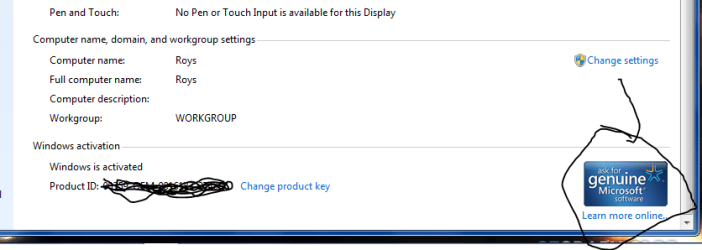
Then go control panel >> system, give it about 15 secs, it should show the Genuine MS symbol block in the windows activation section.
if not hit the change my product code blue line, and on the next screen input your COA sticker code.
if its a tower will be on the side, Laptop on the bottom/ or in the battery compartment
DO NOT post it

Roy
 

My Computer

Computer type
PC/Desktop
Computer Manufacturer/Model Number
medionl/Aspire 6930G/acer x55a
OS
W7 home premium 32bit/W7HP 64bit/w10 tp insider ring
CPU
E5300 dual core
Motherboard
medion MS7366
Memory
3gb
Graphics Card(s)
Nvidia Geforce 7100 Nforce 630i
Monitor(s) Displays
avixc
Internet Speed
n (isp resticted to 72)
Antivirus
mse/pands
Browser
palemoon
Other Info
Belkin Fd7050 n USB using Railink RT2870 drivers, more upto date
Hi Torchwood,
I haven't received the "not-genuine " message since installing the Intel drivers. I attempted to install the KB file, but as you said it might, it told me it was already installed. I rebooted and went to control panel/system and to be honest I don't know if the MS symbol is any different(or added) since the last time I looked at it. I'll send you a screen shot if you think it important. In any event, I believe the issue is resolved, thanks to your patience and working with me.
Thanks again....you're my hero:D
Gary
 

My Computer

Computer type
Laptop
Computer Manufacturer/Model Number
asus k60IJ
OS
windows 7 home premium 64 bit
CPU
dual core cpu 2.1 ghz
Motherboard
4 gb
Hard Drives
1 TB seagate
Antivirus
windows defender
Browser
ie 8 and chrome
Hi Gary,
it should look like this.

See you on Pokerstars im Garykiller56:devil:
 

Attachments

  • gen.PNG
    gen.PNG
    15 KB · Views: 0

My Computer

Computer type
PC/Desktop
Computer Manufacturer/Model Number
medionl/Aspire 6930G/acer x55a
OS
W7 home premium 32bit/W7HP 64bit/w10 tp insider ring
CPU
E5300 dual core
Motherboard
medion MS7366
Memory
3gb
Graphics Card(s)
Nvidia Geforce 7100 Nforce 630i
Monitor(s) Displays
avixc
Internet Speed
n (isp resticted to 72)
Antivirus
mse/pands
Browser
palemoon
Other Info
Belkin Fd7050 n USB using Railink RT2870 drivers, more upto date
yep that's the icon I'm seeing. thanks again...still no "not genuine" messages.

having some dvd drive issues now..not sure if it could be related to the new intel drivers, or just my old machine acting up
 

My Computer

Computer type
Laptop
Computer Manufacturer/Model Number
asus k60IJ
OS
windows 7 home premium 64 bit
CPU
dual core cpu 2.1 ghz
Motherboard
4 gb
Hard Drives
1 TB seagate
Antivirus
windows defender
Browser
ie 8 and chrome
check the drivers via device manager look for ! or down arrows.

Roy
 

My Computer

Computer type
PC/Desktop
Computer Manufacturer/Model Number
medionl/Aspire 6930G/acer x55a
OS
W7 home premium 32bit/W7HP 64bit/w10 tp insider ring
CPU
E5300 dual core
Motherboard
medion MS7366
Memory
3gb
Graphics Card(s)
Nvidia Geforce 7100 Nforce 630i
Monitor(s) Displays
avixc
Internet Speed
n (isp resticted to 72)
Antivirus
mse/pands
Browser
palemoon
Other Info
Belkin Fd7050 n USB using Railink RT2870 drivers, more upto date
Hi,
I see no errors in device manager.
CDs seem to be working OK, but I can't format a DVD, nor write nor read one.
 

My Computer

Computer type
Laptop
Computer Manufacturer/Model Number
asus k60IJ
OS
windows 7 home premium 64 bit
CPU
dual core cpu 2.1 ghz
Motherboard
4 gb
Hard Drives
1 TB seagate
Antivirus
windows defender
Browser
ie 8 and chrome
Back
Top