Solved Not Genuine

Since the drive letter did slip it should boot once corrected. The only reason I can think of why it doesn't is that there is deeper corruption.

I think you'll save more wasted time now by copying your files into the 64 bit OS, booting the installer and clean reinstalling 32 bit. Clean Install Windows 7
 
Okay I'll just perform clean install.
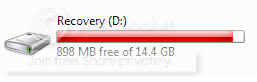
I think I have some problems with my recovery partition too

2.png


it says it's full but it has free space.
 

My Computer My Computer

At a glance

Windows 7 64 bit
OS
Windows 7 64 bit
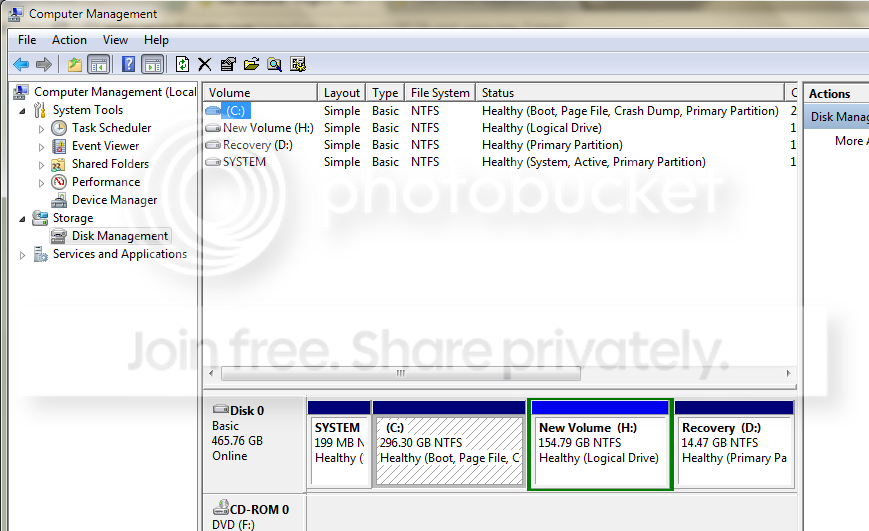
I wonder if there is something about the repartitioning that caused the problem which we could see from a screenshot of the maximized Disk Management drive map with listings. Use the Snipping Tool in Start Menu. Screen Shots

You can delete the Recovery partition if you need its space, but I would make your Recovery disks first. It may not run now anyway, though you can always cue it up to see.
 
I think I'll format and delete the recovery partition too?
I have both 64 bit and 32bit installers though to perform the recovery
 

My Computer My Computer

At a glance

Windows 7 64 bit
OS
Windows 7 64 bit
How about the Disk Mgmt screenshot?

I should have asked for it by now but was absorbed with the known cause of the Blue Screen lockout.

There are reasons to have the Recovery Disks e.g. if you would want to sell the rig later and buyer wanted some OEM software which is shoveled into the factory image. But if you know you'd never need all that crap for anything then you can rely on the installersl or instead of reinstalls be modern and use built-in Backup Imaging to reimage the HD in 20 minutes.
 
Here's the Disk Management screenshot
3.png


So I still need the recovery you know where I can get another one if I'll format it?
 

My Computer My Computer

At a glance

Windows 7 64 bit
OS
Windows 7 64 bit
You should make the Recovery Disks first which is the backup. You can also order them from Tech Support if ever needed. We have some experts here who can help retrieve the .wim file from Recovery and mount it to run Recovery if it won't run from Win7 or it's hotkey at boot.

DM looks OK. I'd delete the install partition and recreate it using Win7 installer in Step 8 here: Clean Install Windows 7 since it might prefer a Primary instead of Logical partition and you are allowed to have four Primaries.
 
Last edited:
It's all good now I did a clean install. I burned a recovery in CD too. so I deleted the recovery partition.

Thank you the help
 

My Computer My Computer

At a glance

Windows 7 64 bit
OS
Windows 7 64 bit
Back
Top