
Hi all,
I have a Western Digital Elements which has been working properly. This morning when I connected it to my laptop, i heard few weird 'tik tik tik' sounds when it was connected to laptop. Then the laptop could not detect my hardisk.
I tried connecting it to other laptops but the problem still persists; hardisk not detected and the tik sound.
I went to Google the solution but could not find suitable one. In the disk management, my hardisk is shown as not initialized and unknown, but there was no unallocated space at the right hand side as indicated by some other users.
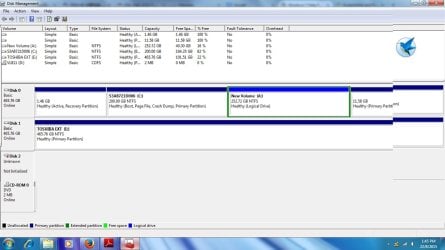
Attach is the screen shot of my disk management, anyone please kindly help!
I am ready to give up my hardisk, but I just wanna get back my data inside, thanks!
I have a Western Digital Elements which has been working properly. This morning when I connected it to my laptop, i heard few weird 'tik tik tik' sounds when it was connected to laptop. Then the laptop could not detect my hardisk.
I tried connecting it to other laptops but the problem still persists; hardisk not detected and the tik sound.
I went to Google the solution but could not find suitable one. In the disk management, my hardisk is shown as not initialized and unknown, but there was no unallocated space at the right hand side as indicated by some other users.
Attach is the screen shot of my disk management, anyone please kindly help!
I am ready to give up my hardisk, but I just wanna get back my data inside, thanks!
My Computer
- Computer type
- Laptop
- OS
- Windows 7 Home Premium 32 bit


