Not showing CPU FSB speed

mihir

New member
Local time
11:53 PM
Messages
5
I have ASUS P5B-MX Motherboard, Intel 946GZ Chipset. Intel Core 2 Duo E7200, 1066 MHz FSB bus. DDR2 SD RAM compatible (2 Banks/slots).

Recently i changed my RAM from 1 GB DDR2 RAM to 2 GB DDR2 RAM in a single slot.
Previously in Windows 7 it used to show
Processor : Intel Core 2 Duo CPU E7200 @2.53 MHz 3.6 Mhz.
but now it is showing it as
Processor : Intel Core 2 Duo CPU E7200 @2.53 Mhz 2.53 Mhz.

I suppose it is not showing the additional FSB 1066 Mhz speed.

Please help!!!
 

My Computer

OS
Win 7 32 bit
Download CPU-Z and see what it tells you. When you launch it, click on "Clocks (Core #0)" to change which core it shows.
 

My Computer

OS
Microsoft Windows 7 Ultimate x64 (Build 7601 SP1)
CPU
AMD Phenom II X2 555 @ X4 B55 (3.2Ghz, 2MB L2/6MB L3 Cache)
Motherboard
ASUS M4A785TD-V Evo
Memory
4GB (2x2GB) Corsair DDR3, 1333Mhz
Graphics Card(s)
ASUS ENGTX560, DirectCU, 1GD5
Sound Card
8-Channel HD Audio
Monitor(s) Displays
Philips 226CL2SB
Screen Resolution
1920x1080p
Hard Drives
500GB Seagate, SATA2, 7200rpm, 16MB/s
PSU
Corsair TX650 v2
Internet Speed
90mbps Fiber Optics
Not Showing CPU FSB Speed

Thanks for your help. I will download it and check the exact specifications.

Meanwhile, i have also checked the settings in my BIOS. it shows same.
Intel Core 2 Duo E7200 2.53 Mhz 2.53 Mhz.

I think it should show 3.66 Mhz. So it is not only a Windows 7 problem.

What may be the issue? :(
 

My Computer

OS
Win 7 32 bit
CPU-Z report of my computer system

Intel Core 2 Duo E7200
CPU Arch : 1 CPU - 2 Cores - 2 Threads
CPU PSN : Intel Core2 Duo CPU E7200 @ 2.53GHz
CPU EXT : MMX, SSE (1, 2, 3, 3S, 4.1), EM64T
CPUID : 6.7.6 / Extended : 6.17
CPU Cache : L1 : 2 x 32 / 2 x 32 KB - L2 : 3072 KB
Core : Wolfdale (45 nm) / Stepping : M0

Freq : 1600.1 MHz (266.68 * 6)


MB Brand : Asus
MB Model : P5N-MX
NB : NVIDIA GeForce 7050 rev A2
SB : NVIDIA nForce 610i rev A2

GPU Type : NVIDIA GeForce 7050 / NVIDIA nForce 610i (Microsoft Corporation - WDDM)
DirectX Version : 11.0


RAM : 2048 MB DDR2 Single Channel
RAM Speed : 400 MHz (2:3) @ 5-4-4-17
Slot 1 : 2048MB (6400)
Slot 1 Manufacturer : Noname
 

My Computer

OS
Win 7 32 bit
Sounds as if your board is reporting your CPU's rated speed. 3.66 Would be overclocked and it would only show that if the settings were not set at default. CPU-Z will also only report the 2.53 in most cases unless the CPU is under full load unless you have the Thermal throttling turned off in the bios.

CPU-z is reporting your ram at 800Mhz speed you will have to change the timings and possibly the voltage to get it to run at 1066 if the board supports that speed ram.
Fabe
 

My Computer

Computer Manufacturer/Model Number
Self Built
OS
Windows 7 ultimate 64 bit / XP Home sp3
CPU
intel Core 2 Duo E8400 3.0ghz
Motherboard
Asus P5ND bios 1401
Memory
8 gigs 1066 OCZ Fata1ty
Graphics Card(s)
EVGA GTX 580 Call of Duty Black Ops Edition
Sound Card
Creative Soundblaster Audigy 2zs
Monitor(s) Displays
Asus 24in LCD's 2MS X2
Screen Resolution
1920x1080p @60Hz
Hard Drives
WD Caviar 500 Black/ WD Caviar 200 Blue
PSU
OCZ 700W GameXtreme
Case
NZXT Apollo
Cooling
Corsair H50 CPU/120mm x3 /60mm x2 /Corsair Dominator Ram
Keyboard
Logitech Bluetooth Wireless MX5000
Mouse
Logitech Bluetooth Wireless MX1000
Internet Speed
Download 19.83 Upload 0.97
Other Info
Logitech Z2300 Speakers/ Bose Noise Cancelling Headphones/Avermedia PCI-e Hybrid TV Bravo/Epson NX415 all in one/ 4 Port Powered USB Hub/ LG 10x Bluray Burner /TSST Corp DVDRW External
Not Showing CPU FSB Speed

Where am i supposed to load the default settings? In the BIOS ?

or should i update using ASUS EZ Flash 2 software....will it work?
 

My Computer

OS
Win 7 32 bit
What should be the exact timing and voltage settings to run it at 1066 Mhz ?
 

My Computer

OS
Win 7 32 bit
What should be the exact timing and voltage settings to run it at 1066 Mhz ?
For that I suggest you check with the manufaturers web site or site's specifically for overlcoking boards to get the proper timings as they all differ.
Providing your board says it can run your Ram at 1066 speeds.
Go to your boards site a nd download the manual and look at what is the QVL list (Qualified Vendors List) for what Ram to use.
Fabe
 

My Computer

Computer Manufacturer/Model Number
Self Built
OS
Windows 7 ultimate 64 bit / XP Home sp3
CPU
intel Core 2 Duo E8400 3.0ghz
Motherboard
Asus P5ND bios 1401
Memory
8 gigs 1066 OCZ Fata1ty
Graphics Card(s)
EVGA GTX 580 Call of Duty Black Ops Edition
Sound Card
Creative Soundblaster Audigy 2zs
Monitor(s) Displays
Asus 24in LCD's 2MS X2
Screen Resolution
1920x1080p @60Hz
Hard Drives
WD Caviar 500 Black/ WD Caviar 200 Blue
PSU
OCZ 700W GameXtreme
Case
NZXT Apollo
Cooling
Corsair H50 CPU/120mm x3 /60mm x2 /Corsair Dominator Ram
Keyboard
Logitech Bluetooth Wireless MX5000
Mouse
Logitech Bluetooth Wireless MX1000
Internet Speed
Download 19.83 Upload 0.97
Other Info
Logitech Z2300 Speakers/ Bose Noise Cancelling Headphones/Avermedia PCI-e Hybrid TV Bravo/Epson NX415 all in one/ 4 Port Powered USB Hub/ LG 10x Bluray Burner /TSST Corp DVDRW External
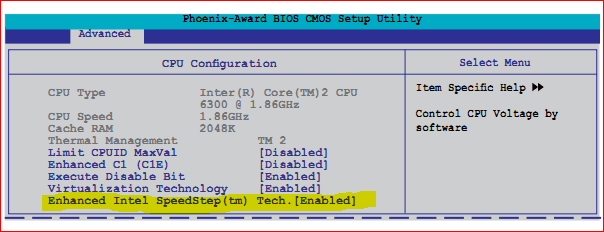
One word, Speedstep,

speedstep.PNG

SpeedStep - Wikipedia, the free encyclopedia

which is enabled by default in the bios on your motherboard according to the manual.

Providing your board says it can run your Ram at 1066 speeds.

It doesn't,

ASUSTeK Computer Inc. - Motherboards - ASUS P5N-MX

2 x DIMM, Max. 4 GB, DDR2 800/667/533 Non-ECC,Un-buffered Memory
*800 is overclocking speed

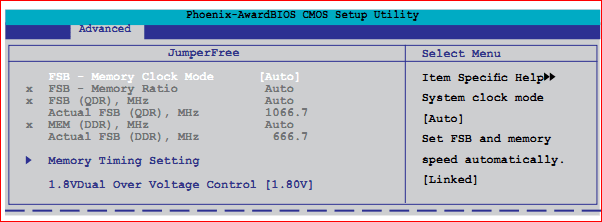
It only supports up to 667 MHz ram, and has to be "overclocked" to run at 800 MHz. If you don't have the manual download it from the Asus link above and go to page 2-21 and it explains the settings and what needs to be changes to get the ram to run at a higher frequency,

memspeed1.PNG
 

My Computer

Computer type
PC/Desktop
Computer Manufacturer/Model Number
Me
OS
Win 7 Ultimate x64
CPU
FX-8350 @ 4.6 GHz so far
Motherboard
Asus M5A97 EVO
Memory
ADATA XPG V1 Series Black 8GB DDR3 1600
Graphics Card(s)
Sapphire R9 270x Dual-X
Sound Card
Xonar DGX w/ Corsair Vengence 1300
Monitor(s) Displays
Acer S232HL Abid
Screen Resolution
1920x1080
Hard Drives
120 GB OCZ Vertex 3
500 GB Seagate 7200.12
PSU
Antec Earthwatts 650W Green
Case
Antec Three Hundred
Cooling
Cooler Master 212 EVO
Keyboard
Logitech G510
Mouse
Logitech G500s
Internet Speed
35000/3000
I have a question, if he's only running one 2ghz stick of ram that means it's running in single channel, which means it probably won't run at 1066 am i thinking wrong:confused:
 

My Computer

Computer Manufacturer/Model Number
Dell XPS 730
OS
Windows 7 Home Premium 64 bit
CPU
Intel Core 2 quad Extreme Q9770 @ 3.2 GHz
Memory
4x2 GB Muskin 1600 MHz ram
Graphics Card(s)
NVidia GTX 250
Sound Card
Soundblaster X-Fi Fatality Champion
Monitor(s) Displays
2 Dell 2007WFP Ultrascans
Screen Resolution
3360 x 1050
Hard Drives
WD Black 1TB sata, 2-WD Black 500 sata, 2-Seagate 500 Go external
PSU
1000 Watt
Cooling
air
Keyboard
MS Natrual Keyboard Pro
Mouse
Logitech Wireless Trackball
Internet Speed
DSL Elite
Doesn't matter as the motherboard doesn't support dual channel.
 

My Computer

Computer type
PC/Desktop
Computer Manufacturer/Model Number
Me
OS
Win 7 Ultimate x64
CPU
FX-8350 @ 4.6 GHz so far
Motherboard
Asus M5A97 EVO
Memory
ADATA XPG V1 Series Black 8GB DDR3 1600
Graphics Card(s)
Sapphire R9 270x Dual-X
Sound Card
Xonar DGX w/ Corsair Vengence 1300
Monitor(s) Displays
Acer S232HL Abid
Screen Resolution
1920x1080
Hard Drives
120 GB OCZ Vertex 3
500 GB Seagate 7200.12
PSU
Antec Earthwatts 650W Green
Case
Antec Three Hundred
Cooling
Cooler Master 212 EVO
Keyboard
Logitech G510
Mouse
Logitech G500s
Internet Speed
35000/3000
Back
Top