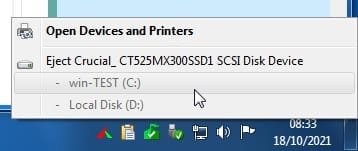
2 days ago my Desktop PC with Win 7 Ultimate booted but nothing showed on my screen. I thought that it had to be either a problem with the screen or the video card.
I plugged my screen into my wife's PC - All good!, plugged my wife's screen into my PC - Nothing!
I then removed all the cables from the rear and took it outside and blew away the dust bunnies.
Removed the RAM and cleaned the contacts with a plastic eraser. Re-assembled the PC and booted it, Nothing! I then removed the sticks of RAM one by one and booted, Bingo! the first stick was not working.
However, my C: drive is now showing up as "Safely Remove Hardware" on the taskbar.
My son-in-law setup my BIOS for me, but was unable to fix the C: drive showing up as "Safely Remove Hardware".
How do I make my SSD C: Drive show as an SSD drive and not an SCSI drive on the Taskbar?
My system:
Operating System: Windows 7 Ultimate 64-bit SP1
CPU: Intel Core i7 920 @ 2.67GHz 58 °C Bloomfield 45nm Technology
RAM: 4.00GB Dual-Channel DDR3 @ 532MHz (8-8-8-20)
Motherboard: Gigabyte Technology Co. Ltd. EX58-UD3R (Socket 1366) 34 °C
Graphics: BenQ GW2760HL (1920x1080@60Hz)
4096MB ATI Radeon RX 570 Series (ASUStek Computer Inc) 29 °C
Storage:
465GB Samsung SSD 860 EVO 500G SCSI Disk Device (SATA (SSD)) 34 °C
232GB Western Digital WDC WD2500JB-22REA0 SCSI Disk Device (RAID )(Software RAID) 41 °C
596GB Western Digital WDC WD6400AAKS-65A7B0 ATA Device (SATA ) 38 °C
Optical Drives:
16X52X32X52COMBO SCSI CdRom Device
HL-DT-ST DVDRAM GH20NS15 SCSI CdRom Device
Audio:
Realtek High Definition Audio
I plugged my screen into my wife's PC - All good!, plugged my wife's screen into my PC - Nothing!
I then removed all the cables from the rear and took it outside and blew away the dust bunnies.
Removed the RAM and cleaned the contacts with a plastic eraser. Re-assembled the PC and booted it, Nothing! I then removed the sticks of RAM one by one and booted, Bingo! the first stick was not working.
However, my C: drive is now showing up as "Safely Remove Hardware" on the taskbar.
My son-in-law setup my BIOS for me, but was unable to fix the C: drive showing up as "Safely Remove Hardware".
How do I make my SSD C: Drive show as an SSD drive and not an SCSI drive on the Taskbar?
My system:
Operating System: Windows 7 Ultimate 64-bit SP1
CPU: Intel Core i7 920 @ 2.67GHz 58 °C Bloomfield 45nm Technology
RAM: 4.00GB Dual-Channel DDR3 @ 532MHz (8-8-8-20)
Motherboard: Gigabyte Technology Co. Ltd. EX58-UD3R (Socket 1366) 34 °C
Graphics: BenQ GW2760HL (1920x1080@60Hz)
4096MB ATI Radeon RX 570 Series (ASUStek Computer Inc) 29 °C
Storage:
465GB Samsung SSD 860 EVO 500G SCSI Disk Device (SATA (SSD)) 34 °C
232GB Western Digital WDC WD2500JB-22REA0 SCSI Disk Device (RAID )(Software RAID) 41 °C
596GB Western Digital WDC WD6400AAKS-65A7B0 ATA Device (SATA ) 38 °C
Optical Drives:
16X52X32X52COMBO SCSI CdRom Device
HL-DT-ST DVDRAM GH20NS15 SCSI CdRom Device
Audio:
Realtek High Definition Audio
Last edited:
My Computer
At a glance
Windows 7 Ultimate 64 bit SP1DualCore Intel Pentium D 820, 2800 MHz (14 x ...Kingston DDR3 (PC3-10700H) 6.0GBAMD Radeon HD 6450
- Computer type
- PC/Desktop
- Computer Manufacturer/Model Number
- Homebuild
- OS
- Windows 7 Ultimate 64 bit SP1
- CPU
- DualCore Intel Pentium D 820, 2800 MHz (14 x 200)
- Motherboard
- Gigabyte EX58-UD3R
- Memory
- Kingston DDR3 (PC3-10700H) 6.0GB
- Graphics Card(s)
- AMD Radeon HD 6450
- Sound Card
- Realtek ALC882/D/M
- Monitor(s) Displays
- Samsung SyncMaster 2233SW
- Screen Resolution
- 1920 x 1080
- Hard Drives
- Drive #1 - WDC WD2500JB-22REA0 (232 GB)
Drive #2 - WDC WD6400AAKS-65A7B0 (596 GB)
- PSU
- EVGA Supernova 750w G2 Gold
- Cooling
- 5 x 80mm Generic Fans
- Keyboard
- Microsoft Comfort Curve 2000
- Mouse
- SteelSeries IKARI 62001-1 Laser or Microsoft Laser 6000
- Internet Speed
- 1500/256
- Antivirus
- NOD32 v10.1.235.0
- Browser
- FireFox 59.0.2 X64bit
- Other Info
- Telstra Technicolor TG799vac Modem
LG HL-DT-ST DVDRAM GH20NS15 ATA Device
16X52X32X52 COMBO SCSI CDRom Device
Logitech Wave Keyboard
Microsoft 6000 Laser Mouse