Solved Notebook wifi works at home but not at hotspots

indexwheel

New member
Local time
5:21 PM
Messages
7
Hi all,

I'm a long time lurker here, but this is my first post. I have an Acer notebook (4720G, T9300, 9600MGT, 3Gb, Intel 3945BG wifi card). I am running Windows 7 Pro 64bit, fully up to date and all my hardware has the latest available drivers. I have my AVG antivirus disabled and only running Windows 7 inbuilt firewall.

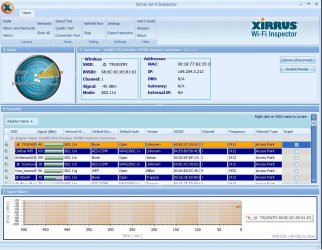
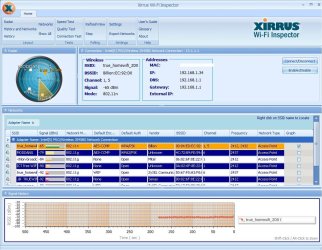
Anyway, my home wif modem router works fine, both of my laptops always connect automatically without any problems. But, if I take my notebook to a wifi hotspot (at least any I have tried so far), I can't get access to the net. I can connect ok, and the wifi status says connected, but also says "no internet access". If I boot from my old XP SP3 hard drive, it works perfectly anywhere, so I know for sure my hardware is good. Attached is a screencap of the Xirrus wifi inspector.

I basically know very little about networks, and hoping someone could assist with this. I already read many posts about wifi problems and searched google etc, but couldn't find anyone with a problem like this.

Thanks,
Regards, Rob
 

Attachments
  • wifi.jpg
    wifi.jpg
    140.3 KB · Views: 7

My Computer My Computer

At a glance

Windows 7 Professional 64 bitT93003Gbnvidia 9600MGT
Computer type
Laptop
Computer Manufacturer/Model Number
acer 4720G
OS
Windows 7 Professional 64 bit
CPU
T9300
Motherboard
MBKxxx003
Memory
3Gb
Graphics Card(s)
nvidia 9600MGT
Hard Drives
Samsung 840 500Gb SSD
Antivirus
AVG
Browser
IE9
I'm not a wireless expert either. See if the notebook's adapter has settings to allow it to recognize 802.11a/b/g/n. Your snip shows it in 802.11n mode and the hot spots may use a different one. Also check what band you can use, 2.5GHz or 5GHz.
 

My Computer My Computer

At a glance

Windows 7 Ultimate X64 SP1Intel i5-2550K, Differing ~4.4-4.8GHz No buil...16GB G.Skill Sniper 1866MHz @ 2133MHz 2x8GBASUS GTX650TIB-DC2OC-2GD5, (650TI Boost)
Computer type
PC/Desktop
Computer Manufacturer/Model Number
Home Built Desktop By DataTech
OS
Windows 7 Ultimate X64 SP1
CPU
Intel i5-2550K, Differing ~4.4-4.8GHz No built in GPU
Motherboard
ASUS P8Z68-V PRO/GEN3
Memory
16GB G.Skill Sniper 1866MHz @ 2133MHz 2x8GB
Graphics Card(s)
ASUS GTX650TIB-DC2OC-2GD5, (650TI Boost)
Sound Card
Onboard Realtek 5-1
Monitor(s) Displays
Samsung P2570HD
Screen Resolution
1920x1080
Hard Drives
Samsung 840 Pro 256GB SSD for OS, 500GB Seagate Constellation (Enterprise drive) for Data
PSU
Corsair HX650W
Case
Inwin Dragon Rider
Cooling
Hyper 212 EVO w/two Noctua fans, push-pull, @1300 RPM
Keyboard
E-Z Eyes, bright yellow keys with large characters
Mouse
steelseries SENSEI Laser Pro Gaming
Internet Speed
48-51Mbs Mbs down, 11 Mbs up Xfinity Cable
Antivirus
Norton Internet Security 2013
Browser
IE 10, Opera, Pale Moon if needed
Other Info
4 case fans, LG BluRay-RE, ASUS DVD-RW, Mr. Fusion power supply, 1.21 gigawatts.
~~~
I can connect ok, and the wifi status says connected, but also says "no internet access".
~~~
Can you ping once you are connected to these Hotspot Wireless Access Points? See this post.

Please upload the results of an IPCONFIG/ALL while connected to a Hotspot. See this post.
 

My Computer My Computer

At a glance

W7 Pro SP1 64biti78GBIntel HD Graphics
Computer type
Laptop
Computer Manufacturer/Model Number
Employer provided Dell Latitude
OS
W7 Pro SP1 64bit
CPU
i7
Memory
8GB
Graphics Card(s)
Intel HD Graphics
Hard Drives
crappy SSD
Antivirus
Employer mandated Symantec Endpoint Protection
Browser
Pale Moon 64bit, IE11 64bit & Chrome 64bit
Thanks very much, it may take me a few days before I can get out to a hotspot and do the ipconfig test as I am not very mobile.

Regards, Rob
 

My Computer My Computer

At a glance

Windows 7 Professional 64 bitT93003Gbnvidia 9600MGT
Computer type
Laptop
Computer Manufacturer/Model Number
acer 4720G
OS
Windows 7 Professional 64 bit
CPU
T9300
Motherboard
MBKxxx003
Memory
3Gb
Graphics Card(s)
nvidia 9600MGT
Hard Drives
Samsung 840 500Gb SSD
Antivirus
AVG
Browser
IE9
Ok, I have come to the hotspot I would like to use, and connected to the wifi here. I ran the Xirrus inspector, and also did the ipconfig/all thing and the results are attached below, a screencap and attached txt file. (I did these tests in Win7 x64, and now am running from my old XP drive to get access so I can post here. All hardware is working fine in XP).

Thanks in advance for any help with this problem.
 

Attachments

  • wifi-cp.jpg
    wifi-cp.jpg
    136.9 KB · Views: 5
  • ip.txt
    ip.txt
    2.7 KB · Views: 4

My Computer My Computer

At a glance

Windows 7 Professional 64 bitT93003Gbnvidia 9600MGT
Computer type
Laptop
Computer Manufacturer/Model Number
acer 4720G
OS
Windows 7 Professional 64 bit
CPU
T9300
Motherboard
MBKxxx003
Memory
3Gb
Graphics Card(s)
nvidia 9600MGT
Hard Drives
Samsung 840 500Gb SSD
Antivirus
AVG
Browser
IE9
Thanks for the IPCONFIG txt file.

You are not getting an IP address that you can use.

Please copy this text to a text file:
Code:
ipconfig /release
ipconfig /renew
netsh winsock reset all
netsh int ip reset all
shutdown -r -t 1
Save the text file and then rename that file something like test.bat
Right click on that test.bat file and select run as administrator.
Your computer will reboot.

Reconnect to the HotSpot and see if you get an IP that does not start with 169.
 

My Computer My Computer

At a glance

W7 Pro SP1 64biti78GBIntel HD Graphics
Computer type
Laptop
Computer Manufacturer/Model Number
Employer provided Dell Latitude
OS
W7 Pro SP1 64bit
CPU
i7
Memory
8GB
Graphics Card(s)
Intel HD Graphics
Hard Drives
crappy SSD
Antivirus
Employer mandated Symantec Endpoint Protection
Browser
Pale Moon 64bit, IE11 64bit & Chrome 64bit
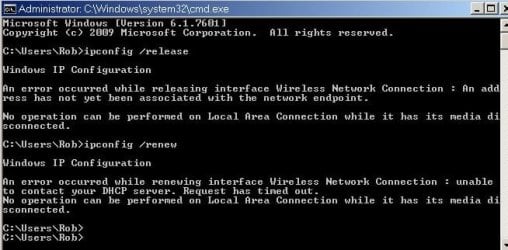
Thanks UsernameIssues. I tried that without any success. After running the batch file and rebooting, I still get the "not connected to internet" message and running ipconfig still shows no IP address. So I edited the batch file and removed the shutdown line to see what happens and got the following error message: "An error occured while releasing interface Wireless Network Connection: An address has not yet been associated with the network endpoint." and also "No operation can be performed on Local Area Connection while it has its media disconnected."

So, not sure what to do now. I won't be able to return to a hotspot for a couple of days now (mobility issues), but if you have any other ideas I can try, I would be very happy.

Thanks again,
Regards, Rob
 

My Computer My Computer

At a glance

Windows 7 Professional 64 bitT93003Gbnvidia 9600MGT
Computer type
Laptop
Computer Manufacturer/Model Number
acer 4720G
OS
Windows 7 Professional 64 bit
CPU
T9300
Motherboard
MBKxxx003
Memory
3Gb
Graphics Card(s)
nvidia 9600MGT
Hard Drives
Samsung 840 500Gb SSD
Antivirus
AVG
Browser
IE9
Thanks for trying those steps and for the feedback.

In your screenshot in post #5, there appears to be two other open networks. Does this issue happen with them? I know that you said that you had tried more than one hotspot in the past, I'm just wondering about those two since they seem to be two different brands of wireless access points.

You mentioned that "ipconfig still shows no IP address". Did it show a 169 autoconfiguration IP address?
 

My Computer My Computer

At a glance

W7 Pro SP1 64biti78GBIntel HD Graphics
Computer type
Laptop
Computer Manufacturer/Model Number
Employer provided Dell Latitude
OS
W7 Pro SP1 64bit
CPU
i7
Memory
8GB
Graphics Card(s)
Intel HD Graphics
Hard Drives
crappy SSD
Antivirus
Employer mandated Symantec Endpoint Protection
Browser
Pale Moon 64bit, IE11 64bit & Chrome 64bit
Even though you're "connected" to the Internet through your wireless connection out at Starbucks, you still need to perform the Network setup wizard, to define that just-connected network as home, work, or public.

Control Panel -> Network and Internet -> Network and Sharing Center

Then click on the "connect to a network" and follow the wizard. Presumably your Starbucks network is "public" in order to keep security high.

You should now be able to get to the Internet out in the world at WiFi hotspots.
 

My Computer My Computer

At a glance

Windows 7 Pro x64 (1), Win7 Pro X64 (2)i5-3350p 3.1Ghz/6MB-cache (1); E8400 3.0Ghz/6...8GB PC3-12800 DDR3 (1); 4GB PC3-10600 DDR3 (2)ATI HD7750 (1), (see TV cards); ATI R7 250 (2)
Computer type
PC/Desktop
Computer Manufacturer/Model Number
Home-built, two systems (1) and (2)
OS
Windows 7 Pro x64 (1), Win7 Pro X64 (2)
CPU
i5-3350p 3.1Ghz/6MB-cache (1); E8400 3.0Ghz/6MB-cache (2)
Motherboard
ASUS P8Z77-V Pro (1); ASUS P5Q3 (2)
Memory
8GB PC3-12800 DDR3 (1); 4GB PC3-10600 DDR3 (2)
Graphics Card(s)
ATI HD7750 (1), (see TV cards); ATI R7 250 (2)
Sound Card
Realtek ALC892 HD Audio (1); Realtek ALC1200 HD Audio (2)
Monitor(s) Displays
Eizo HD2441W LCD, Eizo S2433W (1); Eizo 24" S2433W (2)
Screen Resolution
1920x1200, 1920x1200 (1); 1920x1200 (2)
Hard Drives
(1) 1TB SATA-II (7200RPM), 2x2TB SATA-III (7200RPM), 250GB SATA-III (10000RPM) for OS; 2x2TB external USB 3.0

(2) 320GB SATA-II (7200RPM), 750GB SATA-II (7200RPM), 150GB SATA-II (10000RPM) for OS; 2TB external USB 3.0
PSU
Nesteq ECS-6001 600W (1); Nesteq ECS-5001 500W (2)
Case
Acousti-Case 360 (1) and (2)
Cooling
Noctua NH-U12P SE2 for CPU, 2x120mm case fans (1) and (2)
Keyboard
IBM PS/2 (1) and (2)
Mouse
Logitech MX Revolution wireless (1); Microsoft wired (2)
Internet Speed
100mbps down / 10mbps up
Antivirus
Microsoft Security Essentials; Malwarebyte Anti-Malware Pro
Browser
Firefox
Other Info
Ceton InfiniTV 4-tuner cablecard-enabled TV card as well as Hauppauge HVR-2250 OTA/ATSC 2-tuner TV card in (1), running under Win7 WMC
Frustration continues to mount! Usernameissues: I get no ip address at all, not even a 169 type. Dsperber: I tried to connect by the method you've suggested but no luck either. When I click connect to a new access point, a window opens up and says it may take 90 sec to populate the list. But nothing ever shows up even after 5 minutes. All the while, the network shows connected to the hotspot and no internet access available. I tried some other options available on the netwok setup, none of them worked either. I can't try any of the other available hotspot signals, as I don't have a username or password for them. So mass confusion reigns supreme here!

Regards, Rob
 

My Computer My Computer

At a glance

Windows 7 Professional 64 bitT93003Gbnvidia 9600MGT
Computer type
Laptop
Computer Manufacturer/Model Number
acer 4720G
OS
Windows 7 Professional 64 bit
CPU
T9300
Motherboard
MBKxxx003
Memory
3Gb
Graphics Card(s)
nvidia 9600MGT
Hard Drives
Samsung 840 500Gb SSD
Antivirus
AVG
Browser
IE9
In post #5, you provided a nice screenshot of the Xirrus app.
That app shows that you have a "169...." IP address.

In post #10, you state: "I get no ip address at all, not even a 169 type."

Did post #5 and post #10 happen while visiting the same hotspot area?


In the screenshot in post #5, you show to be connected to a Wireless Access Point (WAP) made by an unknown vendor. That row of information shows:
Default Encryption = None
Default Authentication = Open.

Now look at the row for the WAP vendor named Senao.
The information for that WAP is about the same:
Default Encryption = None
Default Authentication = Open.

You should be able to connect to the Senao WAP. You might not be able to surf the web without a username and password, but you should be able to connect to that WAP and get a good IP address. The same is true for the WAP made by the vendor named Trapeze.

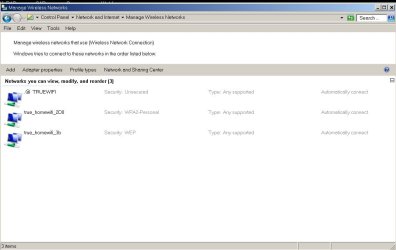
However, looking at the screenshot in post #1, there are three Wireless Access Points listed with:
Default Encryption = None
Default Authentication = Open.
You should be able to connect to one of them without a username and password. Just as a test. Just to see if you get a good IP address. (You might need to move the laptop a bit closer to one wall or window to get a better signal strength.) To prevent your computer from connecting to the WAP that you normally connect to at home, you might want to turn off the power to that WAP. That way, you have not changed anything on your laptop that lets your W7 OS connect to Wi-Fi while at home.


You might also want to remove any old connection info that you have for Wireless Access Points other than your home one. This can be done via:
Control Panel >
Network and Internet >
Network and Sharing Center >
Manage wireless networks.
Right click on each old entry and select Remove network from the context menu.


When I follow the steps mentioned by dsperber, the window that pops up for me shows a lists of WAPs that are in range. It is the same window that I get if I click on the network icon in the notification area by the clock. Here is a image of that window published by a university. Is that the window that you see? Is that the window that never populates with a list of WAPs that are in range? Is that the window that shows that you are connected to the hotspot and also tells you that you have "No Internet access"? Or are you using a 3rd party app to control these connections?
 

My Computer My Computer

At a glance

W7 Pro SP1 64biti78GBIntel HD Graphics
Computer type
Laptop
Computer Manufacturer/Model Number
Employer provided Dell Latitude
OS
W7 Pro SP1 64bit
CPU
i7
Memory
8GB
Graphics Card(s)
Intel HD Graphics
Hard Drives
crappy SSD
Antivirus
Employer mandated Symantec Endpoint Protection
Browser
Pale Moon 64bit, IE11 64bit & Chrome 64bit
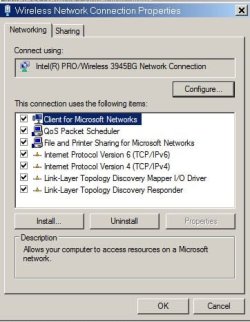
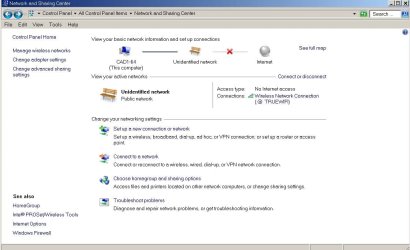
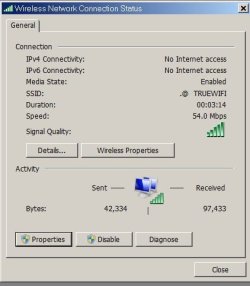
Been back to my local hotspot and once again, no luck. I can connect to other networks that are available, but as I don't have passwords for them I can't check if there is any access. (even the wap's that are "unsecured" still ask for a password. My home network is still working fine. I have 2 wifi modems at home, both connect and have no problem accessing the internet. After having tried every combination of everything I could think of, I am out of ideas now, so I have done some more screencaps of the various setup windows in the hope someone can see a problem.

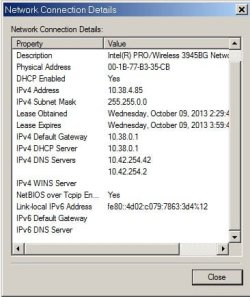
Also, I did a new ipconfig /all for the windows 7 system that doesn't work, and also another one from my XP boot drive that does work. And I did a screencap of a manual ipconfig /release and ipconfig /renew so you can see the error messages. The network I am trying to connect to at the hotspot is called @ TRUEWIFI, a very large wifi provider here in Thailand. The other 2 you can see on the manage wireless netwoks screen are my 2 home wifi's.

Do you think there maybe some component service that should be running that isn't? I went into admin tools/component services and enabled everything I thought might be ntework related, and that didn't help either, so I am at a loss to understand.

BTW, I am not running any 3rd party software to manage the firewall or anything, but....wait on a minute... I just realized I am running Peerblock, I wonder if that could be confusing things. I'll try to get back to the hotspot tomorrow and try that.

Regards, Rob
 

Attachments

  • wifi status2.jpg
    wifi status2.jpg
    27.8 KB · Views: 14
  • wifi adapter settings1.jpg
    wifi adapter settings1.jpg
    30.9 KB · Views: 14
  • wifi connected.jpg
    wifi connected.jpg
    19.3 KB · Views: 14
  • wifi unidentifed nw.jpg
    wifi unidentifed nw.jpg
    65 KB · Views: 0
  • wifi networks.jpg
    wifi networks.jpg
    47 KB · Views: 0
  • wifi status.jpg
    wifi status.jpg
    22.3 KB · Views: 14
  • ipconfig.jpg
    ipconfig.jpg
    35.2 KB · Views: 14
  • ipcfg-win7.txt
    ipcfg-win7.txt
    2.3 KB · Views: 1
  • ipcfg-xp.txt
    ipcfg-xp.txt
    1.4 KB · Views: 1
Last edited:

My Computer My Computer

At a glance

Windows 7 Professional 64 bitT93003Gbnvidia 9600MGT
Computer type
Laptop
Computer Manufacturer/Model Number
acer 4720G
OS
Windows 7 Professional 64 bit
CPU
T9300
Motherboard
MBKxxx003
Memory
3Gb
Graphics Card(s)
nvidia 9600MGT
Hard Drives
Samsung 840 500Gb SSD
Antivirus
AVG
Browser
IE9
Been back to my local hotspot and once again, no luck. I can connect to other networks that are available, but as I don't have passwords for them I can't check if there is any access. (even the wap's that are "unsecured" still ask for a password.)............

Once you connect to one of those other networks, you should have an IP address.

Can you get an IP address from any of these other hotspots?

I'm not sure what the problem is or if something is not running... but it really would help us to know if you can get an IP at a hotspot. It does not matter if you need a password to surf the internet. We only care about getting an IP address from any hotspot.
 

My Computer My Computer

At a glance

W7 Pro SP1 64biti78GBIntel HD Graphics
Computer type
Laptop
Computer Manufacturer/Model Number
Employer provided Dell Latitude
OS
W7 Pro SP1 64bit
CPU
i7
Memory
8GB
Graphics Card(s)
Intel HD Graphics
Hard Drives
crappy SSD
Antivirus
Employer mandated Symantec Endpoint Protection
Browser
Pale Moon 64bit, IE11 64bit & Chrome 64bit
Problem Solved!! ....and I feel like a bit of an idiot for not realizing what was wrong before. It was Peerblock that was stopping Win 7 from getting an IP address all along. I have peeblock set to run on startup, and its icon was in the hidden part of the systry so I didn't see it blinking. So I set the exceptions it needed to run on this hotspot and everything works perfectly now. As to why I didn't have to do this at home, I have no idea...I certainly can't recall having had to do that before.

Anyways, thanks to all for your help, I certainly have learnt a lot more about setting up wifi access now so all wasn't wasted.

Best Regards,
Rob
 

My Computer My Computer

At a glance

Windows 7 Professional 64 bitT93003Gbnvidia 9600MGT
Computer type
Laptop
Computer Manufacturer/Model Number
acer 4720G
OS
Windows 7 Professional 64 bit
CPU
T9300
Motherboard
MBKxxx003
Memory
3Gb
Graphics Card(s)
nvidia 9600MGT
Hard Drives
Samsung 840 500Gb SSD
Antivirus
AVG
Browser
IE9
Glad you got it fixed, we all learned from it. Sometimes the simplest things cause the biggest problems.:)
 

My Computer My Computer

At a glance

Windows 7 Ultimate X64 SP1Intel i5-2550K, Differing ~4.4-4.8GHz No buil...16GB G.Skill Sniper 1866MHz @ 2133MHz 2x8GBASUS GTX650TIB-DC2OC-2GD5, (650TI Boost)
Computer type
PC/Desktop
Computer Manufacturer/Model Number
Home Built Desktop By DataTech
OS
Windows 7 Ultimate X64 SP1
CPU
Intel i5-2550K, Differing ~4.4-4.8GHz No built in GPU
Motherboard
ASUS P8Z68-V PRO/GEN3
Memory
16GB G.Skill Sniper 1866MHz @ 2133MHz 2x8GB
Graphics Card(s)
ASUS GTX650TIB-DC2OC-2GD5, (650TI Boost)
Sound Card
Onboard Realtek 5-1
Monitor(s) Displays
Samsung P2570HD
Screen Resolution
1920x1080
Hard Drives
Samsung 840 Pro 256GB SSD for OS, 500GB Seagate Constellation (Enterprise drive) for Data
PSU
Corsair HX650W
Case
Inwin Dragon Rider
Cooling
Hyper 212 EVO w/two Noctua fans, push-pull, @1300 RPM
Keyboard
E-Z Eyes, bright yellow keys with large characters
Mouse
steelseries SENSEI Laser Pro Gaming
Internet Speed
48-51Mbs Mbs down, 11 Mbs up Xfinity Cable
Antivirus
Norton Internet Security 2013
Browser
IE 10, Opera, Pale Moon if needed
Other Info
4 case fans, LG BluRay-RE, ASUS DVD-RW, Mr. Fusion power supply, 1.21 gigawatts.

My Computer My Computer

At a glance

W7 Pro SP1 64biti78GBIntel HD Graphics
Computer type
Laptop
Computer Manufacturer/Model Number
Employer provided Dell Latitude
OS
W7 Pro SP1 64bit
CPU
i7
Memory
8GB
Graphics Card(s)
Intel HD Graphics
Hard Drives
crappy SSD
Antivirus
Employer mandated Symantec Endpoint Protection
Browser
Pale Moon 64bit, IE11 64bit & Chrome 64bit
Back
Top