
Hello.
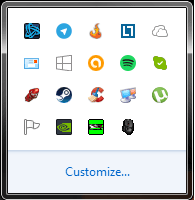
I am at random getting my Show Hidden Icons stuck in the foreground, and not dissapearing when I click anywhere else. Only way to fix it is to click the Show Hidden Icons button again.. it's a minor thing, but it's greatly irritating. Usually happens when I have clicked on a hidden icon in there, but that's not confirmed as again.. that happens at random, and sometimes when I didn't click anything. I posted an image just to show what I have in the hidden icons, I got a lot because I don't like it cluttering my notification area.
I am at random getting my Show Hidden Icons stuck in the foreground, and not dissapearing when I click anywhere else. Only way to fix it is to click the Show Hidden Icons button again.. it's a minor thing, but it's greatly irritating. Usually happens when I have clicked on a hidden icon in there, but that's not confirmed as again.. that happens at random, and sometimes when I didn't click anything. I posted an image just to show what I have in the hidden icons, I got a lot because I don't like it cluttering my notification area.
Attachments
My Computer
At a glance
Windows 7 Ultimate x64Intel Core i5 4440Corsair Vengeance LP 8x2 1600MHzASUS GeForce GTX 750
- Computer type
- PC/Desktop
- Computer Manufacturer/Model Number
- Custom build
- OS
- Windows 7 Ultimate x64
- CPU
- Intel Core i5 4440
- Motherboard
- ASUSTeK B85M-G
- Memory
- Corsair Vengeance LP 8x2 1600MHz
- Graphics Card(s)
- ASUS GeForce GTX 750
- Sound Card
- Motherboard Realtek
- Monitor(s) Displays
- BenQ GL2450 (DVI-D), HP Compaq LA2205WG (VGA)
- Screen Resolution
- 1920x1080, 1680x1050
- Hard Drives
- A-DATA SP900 128GB SSD
Seagate Barracuda 500GB 7200RPM HDD
- PSU
- Antec VP550 550W
- Case
- Fractal Design Core 1000
- Cooling
- Default Intel Fan, Front Chassi Fan, GPU Fan
- Keyboard
- Mad Cats v5
- Mouse
- Mad Catz R.A.T. 3
- Internet Speed
- 30Mbps
- Antivirus
- Avast! Antivirus
- Browser
- Google Chrome


