Notification/Tray area activation

Logman

New member
Local time
3:39 PM
Messages
25
Hi,

I've got two desktops with Windows 7 and am having the same problem on both - when I press the arrow on the task bar to open the area with the icons, as soon as I move the mouse towards it the window with the icons in it disappears i.e. it loses activation and closes. It can take up to ten goes to get in there to access an icon. As a workaround I've temporarily put them on the task bar but there is too many and it takes up an undesirable amount of my bar.

Is there a way to give this small window 'always on top' or 'keep activated' status?

Thanks.
 

My Computer My Computer

At a glance

Windows 7 HPIntel Quad 6600 2.4 GHz4.00 GB Hyper X8600 gt and 8400gt (4 monitors)
OS
Windows 7 HP
CPU
Intel Quad 6600 2.4 GHz
Motherboard
Gigabyte
Memory
4.00 GB Hyper X
Graphics Card(s)
8600 gt and 8400gt (4 monitors)
Monitor(s) Displays
Acer 24 and 22 inch - LG 57 inch and LG 22 inch TV's
Hard Drives
2 x 250 g and WD 1 TB external
PSU
Antec
Case
Lian Li PC-A70F
Cooling
Noctua Dual
Mouse
Logitech MX Rev
Internet Speed
ADSL2+
Is this a new problem?

Did you add or change anything when the problem started?

When did it start?
 

My Computer My Computer

At a glance

Windows 10, Home Clean InstallIntel Core2 processsor Q8200(2.33Ghz 1333FSB)...6 gbATI Radeon 256MB HD3650
Computer type
PC/Desktop
Computer Manufacturer/Model Number
Dell XPS 420
OS
Windows 10, Home Clean Install
CPU
Intel Core2 processsor Q8200(2.33Ghz 1333FSB) Quad Core Tech
Motherboard
Dell
Memory
6 gb
Graphics Card(s)
ATI Radeon 256MB HD3650
Sound Card
Intergrated 7.1 Channel Audio
Monitor(s) Displays
Dell SP2009W 20"
Hard Drives
640 GB Serial ATA Hard drive
Cooling
Fan
Keyboard
Dell USB Keyboard
Mouse
Dell Premium Optical USB
Internet Speed
DSL 2.85
I've only just bought windows 7 - the other PC has had it for a month or so. It's been like that the whole time. I've tried turning off everything that might steal the activation but no luck - as soon as I move my cursor toward that window it just closes....
 

My Computer My Computer

At a glance

Windows 7 HPIntel Quad 6600 2.4 GHz4.00 GB Hyper X8600 gt and 8400gt (4 monitors)
OS
Windows 7 HP
CPU
Intel Quad 6600 2.4 GHz
Motherboard
Gigabyte
Memory
4.00 GB Hyper X
Graphics Card(s)
8600 gt and 8400gt (4 monitors)
Monitor(s) Displays
Acer 24 and 22 inch - LG 57 inch and LG 22 inch TV's
Hard Drives
2 x 250 g and WD 1 TB external
PSU
Antec
Case
Lian Li PC-A70F
Cooling
Noctua Dual
Mouse
Logitech MX Rev
Internet Speed
ADSL2+
What do the computers have in common?
Same ISP etc?

Router?

Think the cause is something in common.

Did you use the same DVD to load the OS?
 

My Computer My Computer

At a glance

Windows 10, Home Clean InstallIntel Core2 processsor Q8200(2.33Ghz 1333FSB)...6 gbATI Radeon 256MB HD3650
Computer type
PC/Desktop
Computer Manufacturer/Model Number
Dell XPS 420
OS
Windows 10, Home Clean Install
CPU
Intel Core2 processsor Q8200(2.33Ghz 1333FSB) Quad Core Tech
Motherboard
Dell
Memory
6 gb
Graphics Card(s)
ATI Radeon 256MB HD3650
Sound Card
Intergrated 7.1 Channel Audio
Monitor(s) Displays
Dell SP2009W 20"
Hard Drives
640 GB Serial ATA Hard drive
Cooling
Fan
Keyboard
Dell USB Keyboard
Mouse
Dell Premium Optical USB
Internet Speed
DSL 2.85
They are on the same home network through a router. We have two Windows 7 setup disks (not upgrade) and did a Custom install from XP on both.

As I said before, I'm using the 'Always show all icons' option which would be fine if there wasn't so many - can I remove some of those like the network etc, if yes, how do I do that?

Thanks.
 

My Computer My Computer

At a glance

Windows 7 HPIntel Quad 6600 2.4 GHz4.00 GB Hyper X8600 gt and 8400gt (4 monitors)
OS
Windows 7 HP
CPU
Intel Quad 6600 2.4 GHz
Motherboard
Gigabyte
Memory
4.00 GB Hyper X
Graphics Card(s)
8600 gt and 8400gt (4 monitors)
Monitor(s) Displays
Acer 24 and 22 inch - LG 57 inch and LG 22 inch TV's
Hard Drives
2 x 250 g and WD 1 TB external
PSU
Antec
Case
Lian Li PC-A70F
Cooling
Noctua Dual
Mouse
Logitech MX Rev
Internet Speed
ADSL2+
which icons disappear? notification area?

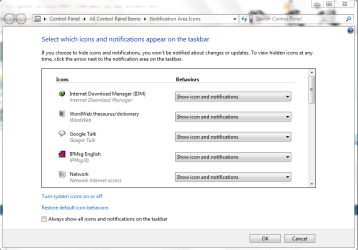
Rightclick taskbar>Properties>Customize Notification area
 
Click on Up arrow near your taskbar clock. Click customize. You will be shown a window in which you have all options. Like, show/hide icon and notification and only notification. This way, you can show or hide the icons displayed in the taskbar. For ur better understanding attached is a snip.
 

Attachments

  • notification.PNG
    notification.PNG
    33.2 KB · Views: 6

My Computer My Computer

At a glance

Lioni54GBIntel
Computer Manufacturer/Model Number
MacBook Pro
OS
Lion
CPU
i5
Memory
4GB
Graphics Card(s)
Intel
Screen Resolution
1200x800
Hard Drives
Seagate FreeAgent GO 250GB Ext. HDD
oops, off track guys - the whole window vanishes ie, the 2 inch x 2 inch window that appears when you press the up arrow - as soon as I move my cursor after pressing the arrow it's gone.
 

My Computer My Computer

At a glance

Windows 7 HPIntel Quad 6600 2.4 GHz4.00 GB Hyper X8600 gt and 8400gt (4 monitors)
OS
Windows 7 HP
CPU
Intel Quad 6600 2.4 GHz
Motherboard
Gigabyte
Memory
4.00 GB Hyper X
Graphics Card(s)
8600 gt and 8400gt (4 monitors)
Monitor(s) Displays
Acer 24 and 22 inch - LG 57 inch and LG 22 inch TV's
Hard Drives
2 x 250 g and WD 1 TB external
PSU
Antec
Case
Lian Li PC-A70F
Cooling
Noctua Dual
Mouse
Logitech MX Rev
Internet Speed
ADSL2+
Do you move the cursor on the notification window or elsewhere?
 

My Computer My Computer

At a glance

Lioni54GBIntel
Computer Manufacturer/Model Number
MacBook Pro
OS
Lion
CPU
i5
Memory
4GB
Graphics Card(s)
Intel
Screen Resolution
1200x800
Hard Drives
Seagate FreeAgent GO 250GB Ext. HDD
I go straight for the small window and it loses activation and it's gone. I just remembered that the same thing happens with auto complete on my browser - I go to click the suggestion and the auto complete closes - takes about ten attempts before that will stay there too.
 

My Computer My Computer

At a glance

Windows 7 HPIntel Quad 6600 2.4 GHz4.00 GB Hyper X8600 gt and 8400gt (4 monitors)
OS
Windows 7 HP
CPU
Intel Quad 6600 2.4 GHz
Motherboard
Gigabyte
Memory
4.00 GB Hyper X
Graphics Card(s)
8600 gt and 8400gt (4 monitors)
Monitor(s) Displays
Acer 24 and 22 inch - LG 57 inch and LG 22 inch TV's
Hard Drives
2 x 250 g and WD 1 TB external
PSU
Antec
Case
Lian Li PC-A70F
Cooling
Noctua Dual
Mouse
Logitech MX Rev
Internet Speed
ADSL2+
This should be a problem with the add-ons installed in your browser and applications that run your notification area.
In your browser, disable all third party addon and check the issue.
For your notification, you can clean boot your computer and check.
Clean boot - start - run - msconfig - startup - disable all - restart.
 

My Computer My Computer

At a glance

Lioni54GBIntel
Computer Manufacturer/Model Number
MacBook Pro
OS
Lion
CPU
i5
Memory
4GB
Graphics Card(s)
Intel
Screen Resolution
1200x800
Hard Drives
Seagate FreeAgent GO 250GB Ext. HDD
Thanks, it looks like it's one of my apps, worked straight away - I then did what you said only excluding a few of my smaller apps and it was still fine, started them and it happened again so I've got it down to a few.

Thanks for that tip, very useful. :D
 

My Computer My Computer

At a glance

Windows 7 HPIntel Quad 6600 2.4 GHz4.00 GB Hyper X8600 gt and 8400gt (4 monitors)
OS
Windows 7 HP
CPU
Intel Quad 6600 2.4 GHz
Motherboard
Gigabyte
Memory
4.00 GB Hyper X
Graphics Card(s)
8600 gt and 8400gt (4 monitors)
Monitor(s) Displays
Acer 24 and 22 inch - LG 57 inch and LG 22 inch TV's
Hard Drives
2 x 250 g and WD 1 TB external
PSU
Antec
Case
Lian Li PC-A70F
Cooling
Noctua Dual
Mouse
Logitech MX Rev
Internet Speed
ADSL2+
Glad it solved your problem and kudos to post back your results. :)

Happy 7ing ;)
 

My Computer My Computer

At a glance

Lioni54GBIntel
Computer Manufacturer/Model Number
MacBook Pro
OS
Lion
CPU
i5
Memory
4GB
Graphics Card(s)
Intel
Screen Resolution
1200x800
Hard Drives
Seagate FreeAgent GO 250GB Ext. HDD
Back
Top