Hi,
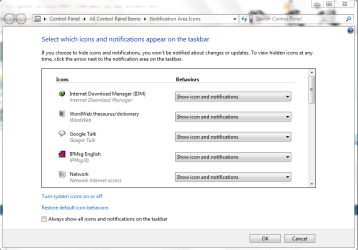
I've got two desktops with Windows 7 and am having the same problem on both - when I press the arrow on the task bar to open the area with the icons, as soon as I move the mouse towards it the window with the icons in it disappears i.e. it loses activation and closes. It can take up to ten goes to get in there to access an icon. As a workaround I've temporarily put them on the task bar but there is too many and it takes up an undesirable amount of my bar.
Is there a way to give this small window 'always on top' or 'keep activated' status?
Thanks.
I've got two desktops with Windows 7 and am having the same problem on both - when I press the arrow on the task bar to open the area with the icons, as soon as I move the mouse towards it the window with the icons in it disappears i.e. it loses activation and closes. It can take up to ten goes to get in there to access an icon. As a workaround I've temporarily put them on the task bar but there is too many and it takes up an undesirable amount of my bar.
Is there a way to give this small window 'always on top' or 'keep activated' status?
Thanks.
My Computer
At a glance
Windows 7 HPIntel Quad 6600 2.4 GHz4.00 GB Hyper X8600 gt and 8400gt (4 monitors)
- OS
- Windows 7 HP
- CPU
- Intel Quad 6600 2.4 GHz
- Motherboard
- Gigabyte
- Memory
- 4.00 GB Hyper X
- Graphics Card(s)
- 8600 gt and 8400gt (4 monitors)
- Monitor(s) Displays
- Acer 24 and 22 inch - LG 57 inch and LG 22 inch TV's
- Hard Drives
- 2 x 250 g and WD 1 TB external
- PSU
- Antec
- Case
- Lian Li PC-A70F
- Cooling
- Noctua Dual
- Mouse
- Logitech MX Rev
- Internet Speed
- ADSL2+