Nslookup and ping resolves to different ip

plumpf

New member
Member
VIP
Local time
5:22 AM
Messages
108
Hi

I pinged and nslookup an ip and both shows different ip?
Why?

How is it possible?

I did it on a my laptop. Both commands were entered in same command prompt Window with a gap of few seconds in between.. How is it possible?

my ip settings are correct.
 

My Computer

Computer type
PC/Desktop
Computer Manufacturer/Model Number
Dell 755
OS
Windows 7 Ultimate x64
CPU
E6550
Motherboard
Stock Q35 Chipset Based
Memory
8GB DDR2
Hard Drives
1TB
Keyboard
Microsoft Comfort 2000
Mouse
Microsoft
Antivirus
None
Browser
FireFox

My Computer

Computer type
Laptop
Computer Manufacturer/Model Number
Employer provided Dell Latitude
OS
W7 Pro SP1 64bit
CPU
i7
Memory
8GB
Graphics Card(s)
Intel HD Graphics
Hard Drives
crappy SSD
Antivirus
Employer mandated Symantec Endpoint Protection
Browser
Pale Moon 64bit, IE11 64bit & Chrome 64bit
This can happen and doesn't mean anything is wrong.
Some large websites have several servers, each with a different IP address. The DNS server that is authoritative for the site will pick one in round robin fashion to spread the load among the servers. Any other DNS server involved could have any one of the IP addresses depending on when the authoritative DNS server was accessed. The address shown in ping probably came from the local DNS cache which could be any IP address in the series.
 

My Computer

Computer type
PC/Desktop
Computer Manufacturer/Model Number
HP
OS
Windows 7 Pro 64 bit
CPU
Xeon W3520
Memory
8 GB
Graphics Card(s)
Nvidia Geforce 210
Hi

I pinged and nslookup an ip and both shows different ip?
Why?

How is it possible?

I did it on a my laptop. Both commands were entered in same command prompt Window with a gap of few seconds in between.. How is it possible?

my ip settings are correct.


...The address shown in ping probably came from the local DNS cache which could be any IP address in the series.
DNS cache should not be involved when one pings an IP since there is no domain name to be resolved.

It is fine to get a list of IP addresses if one does an NSlookup on a domain name. But doing an NSlookup on an IP address should yield the source and one IP address.

Perhaps I did not understand what the OP was doing - hence my request for a screenshot.
 

My Computer

Computer type
Laptop
Computer Manufacturer/Model Number
Employer provided Dell Latitude
OS
W7 Pro SP1 64bit
CPU
i7
Memory
8GB
Graphics Card(s)
Intel HD Graphics
Hard Drives
crappy SSD
Antivirus
Employer mandated Symantec Endpoint Protection
Browser
Pale Moon 64bit, IE11 64bit & Chrome 64bit
I assumed that the ping was by domain name in which case the DNS cache is very much involved. If the ping was by specific IP address there is no reason why it should match anything.

But without knowing exactly what the commands entered were this is all just guesswork.
 

My Computer

Computer type
PC/Desktop
Computer Manufacturer/Model Number
HP
OS
Windows 7 Pro 64 bit
CPU
Xeon W3520
Memory
8 GB
Graphics Card(s)
Nvidia Geforce 210
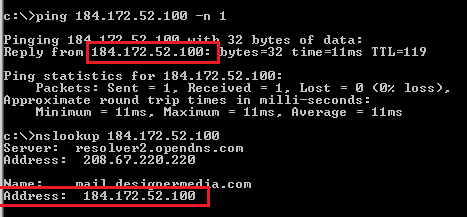
I could be misinterpreting the OP...
(I pinged and nslookup an ip...)
...maybe he asked ping to resolve IP to host name*
...which I did not do here:
ns-ping.PNG
That is what I figured should always match.

*which may involve the DNS cache. I keep that service disabled per the advice of those providing me an anti-malware HOST file. When the DNS service is disabled, the ping app makes a fresh DNS query.

Let's see what the OP can show us :-)
 

My Computer

Computer type
Laptop
Computer Manufacturer/Model Number
Employer provided Dell Latitude
OS
W7 Pro SP1 64bit
CPU
i7
Memory
8GB
Graphics Card(s)
Intel HD Graphics
Hard Drives
crappy SSD
Antivirus
Employer mandated Symantec Endpoint Protection
Browser
Pale Moon 64bit, IE11 64bit & Chrome 64bit
Back
Top