ntoskrnl.exe BSOD

What kind of airflow do you have? I have a 670 OC, and I've overclocked it and benchmarked it a lot and it's never seen 65C. They shouldn't run that hot. Also, which card do you have?
 

My Computers My Computers

System One System Two

  • Computer type
    PC/Desktop
    Computer Manufacturer/Model Number
    ALWAYS UNDER CONSTRUCTION
    OS
    Windows 11 Pro
    CPU
    Ryzen 9 5900X
    Motherboard
    Asus X570 Crosshair Viii Hero
    Memory
    32GB G Skill DDR4-3600
    Graphics Card(s)
    EVGA RTX 3080 FTW 3 Ultra
    Sound Card
    On Board/Sennheiser PC37X Headset
    Monitor(s) Displays
    3 X Asus 27"
    Screen Resolution
    2560x1440
    Hard Drives
    2 X 1 TB NVME drives
    PSU
    EVGA 850
    Case
    Phanteks Eclipse P400A
    Cooling
    EVGA 280 AIO
    Keyboard
    Logitech G510s/ Logitech G13
    Mouse
    Logitech G502
    Internet Speed
    24/1
    Antivirus
    ESET/MBAM Pro/SAS Pro
    Browser
    Chrome/ Firefox/ Edge
  • Computer type
    Laptop
    System Manufacturer/Model Number
    Dell 16 Plus
    OS
    Windows 11 Pro
    CPU
    Intel Ultra 9 288V
    Memory
    32 GB LPDDR5X 8533
    Monitor(s) Displays
    16" Mini-LED HDR600 Touch 90 Hz
    Screen Resolution
    2560X1600
    Hard Drives
    1 TB NVME
Just a regular computer case. Basic cord management. Aftermarket fan on cpu and 1 case fan.
 

My Computer My Computer

Computer type
PC/Desktop
Computer Manufacturer/Model Number
Asus
OS
Windows 7 Home Premium 64 bit
CPU
AMD Phenom II X4 965
Motherboard
CM1630 AsusTek
Memory
8gb Adata DDR3 1600 Dual Channel
Graphics Card(s)
Nvidia GTX 660
Monitor(s) Displays
1
Screen Resolution
1366x768
Hard Drives
ST31000528AS ATA Device
PSU
RX-600AF 600W 80BRONZE
Case
ASUS CM1630 Stock Case
Internet Speed
10mb dl/1mb up
Antivirus
MSE
Browser
Google Chrome
If you can, add some more intake fans. Just to test it, take the side off and blow a house fan into the case. See if that helps.
 

My Computers My Computers

System One System Two

  • Computer type
    PC/Desktop
    Computer Manufacturer/Model Number
    ALWAYS UNDER CONSTRUCTION
    OS
    Windows 11 Pro
    CPU
    Ryzen 9 5900X
    Motherboard
    Asus X570 Crosshair Viii Hero
    Memory
    32GB G Skill DDR4-3600
    Graphics Card(s)
    EVGA RTX 3080 FTW 3 Ultra
    Sound Card
    On Board/Sennheiser PC37X Headset
    Monitor(s) Displays
    3 X Asus 27"
    Screen Resolution
    2560x1440
    Hard Drives
    2 X 1 TB NVME drives
    PSU
    EVGA 850
    Case
    Phanteks Eclipse P400A
    Cooling
    EVGA 280 AIO
    Keyboard
    Logitech G510s/ Logitech G13
    Mouse
    Logitech G502
    Internet Speed
    24/1
    Antivirus
    ESET/MBAM Pro/SAS Pro
    Browser
    Chrome/ Firefox/ Edge
  • Computer type
    Laptop
    System Manufacturer/Model Number
    Dell 16 Plus
    OS
    Windows 11 Pro
    CPU
    Intel Ultra 9 288V
    Memory
    32 GB LPDDR5X 8533
    Monitor(s) Displays
    16" Mini-LED HDR600 Touch 90 Hz
    Screen Resolution
    2560X1600
    Hard Drives
    1 TB NVME
I can try the house fan tomorrow. I have to do course work tonight.
 

My Computer My Computer

Computer type
PC/Desktop
Computer Manufacturer/Model Number
Asus
OS
Windows 7 Home Premium 64 bit
CPU
AMD Phenom II X4 965
Motherboard
CM1630 AsusTek
Memory
8gb Adata DDR3 1600 Dual Channel
Graphics Card(s)
Nvidia GTX 660
Monitor(s) Displays
1
Screen Resolution
1366x768
Hard Drives
ST31000528AS ATA Device
PSU
RX-600AF 600W 80BRONZE
Case
ASUS CM1630 Stock Case
Internet Speed
10mb dl/1mb up
Antivirus
MSE
Browser
Google Chrome
Ok, no problem. Just let us know.
 

My Computers My Computers

System One System Two

  • Computer type
    PC/Desktop
    Computer Manufacturer/Model Number
    ALWAYS UNDER CONSTRUCTION
    OS
    Windows 11 Pro
    CPU
    Ryzen 9 5900X
    Motherboard
    Asus X570 Crosshair Viii Hero
    Memory
    32GB G Skill DDR4-3600
    Graphics Card(s)
    EVGA RTX 3080 FTW 3 Ultra
    Sound Card
    On Board/Sennheiser PC37X Headset
    Monitor(s) Displays
    3 X Asus 27"
    Screen Resolution
    2560x1440
    Hard Drives
    2 X 1 TB NVME drives
    PSU
    EVGA 850
    Case
    Phanteks Eclipse P400A
    Cooling
    EVGA 280 AIO
    Keyboard
    Logitech G510s/ Logitech G13
    Mouse
    Logitech G502
    Internet Speed
    24/1
    Antivirus
    ESET/MBAM Pro/SAS Pro
    Browser
    Chrome/ Firefox/ Edge
  • Computer type
    Laptop
    System Manufacturer/Model Number
    Dell 16 Plus
    OS
    Windows 11 Pro
    CPU
    Intel Ultra 9 288V
    Memory
    32 GB LPDDR5X 8533
    Monitor(s) Displays
    16" Mini-LED HDR600 Touch 90 Hz
    Screen Resolution
    2560X1600
    Hard Drives
    1 TB NVME
What would be good setups for my fan speed in MSI afterburner?
 

My Computer My Computer

Computer type
PC/Desktop
Computer Manufacturer/Model Number
Asus
OS
Windows 7 Home Premium 64 bit
CPU
AMD Phenom II X4 965
Motherboard
CM1630 AsusTek
Memory
8gb Adata DDR3 1600 Dual Channel
Graphics Card(s)
Nvidia GTX 660
Monitor(s) Displays
1
Screen Resolution
1366x768
Hard Drives
ST31000528AS ATA Device
PSU
RX-600AF 600W 80BRONZE
Case
ASUS CM1630 Stock Case
Internet Speed
10mb dl/1mb up
Antivirus
MSE
Browser
Google Chrome

My Computers My Computers

System One System Two

  • Computer type
    PC/Desktop
    Computer Manufacturer/Model Number
    ALWAYS UNDER CONSTRUCTION
    OS
    Windows 11 Pro
    CPU
    Ryzen 9 5900X
    Motherboard
    Asus X570 Crosshair Viii Hero
    Memory
    32GB G Skill DDR4-3600
    Graphics Card(s)
    EVGA RTX 3080 FTW 3 Ultra
    Sound Card
    On Board/Sennheiser PC37X Headset
    Monitor(s) Displays
    3 X Asus 27"
    Screen Resolution
    2560x1440
    Hard Drives
    2 X 1 TB NVME drives
    PSU
    EVGA 850
    Case
    Phanteks Eclipse P400A
    Cooling
    EVGA 280 AIO
    Keyboard
    Logitech G510s/ Logitech G13
    Mouse
    Logitech G502
    Internet Speed
    24/1
    Antivirus
    ESET/MBAM Pro/SAS Pro
    Browser
    Chrome/ Firefox/ Edge
  • Computer type
    Laptop
    System Manufacturer/Model Number
    Dell 16 Plus
    OS
    Windows 11 Pro
    CPU
    Intel Ultra 9 288V
    Memory
    32 GB LPDDR5X 8533
    Monitor(s) Displays
    16" Mini-LED HDR600 Touch 90 Hz
    Screen Resolution
    2560X1600
    Hard Drives
    1 TB NVME
Alright I set it up. I've noticed crashes in games and fps drops but my temperatures have been fine. I don't know what to do at the moment.
 

My Computer My Computer

Computer type
PC/Desktop
Computer Manufacturer/Model Number
Asus
OS
Windows 7 Home Premium 64 bit
CPU
AMD Phenom II X4 965
Motherboard
CM1630 AsusTek
Memory
8gb Adata DDR3 1600 Dual Channel
Graphics Card(s)
Nvidia GTX 660
Monitor(s) Displays
1
Screen Resolution
1366x768
Hard Drives
ST31000528AS ATA Device
PSU
RX-600AF 600W 80BRONZE
Case
ASUS CM1630 Stock Case
Internet Speed
10mb dl/1mb up
Antivirus
MSE
Browser
Google Chrome
With Graphics cards, if it isn't temps or drivers, it comes down to the card itself, your motherboard or the power supply. That is pretty much all that is involved. I would suggest to see if you have a friend with a similar card who will swap cards with you for a few days to see. If his card does the same in your computer but your card runs fine in his, you know it is not the card. You can borrow a good working PSU and try that.

At this point it is the process of elimination. According to Anandtech (AnandTech | The NVIDIA GeForce GTX 660 Review: GK106 Fills Out The Kepler Family ) your card can pull as much as 287 Watts. Your PSU is of questionable quality and depending on which model you have can put out around a max of 450 Watts on the +12V rail(s), that leaves little for the rest of your components and very few PSU's can sustain max output. Failing either one of those, it is the motherboard.

I would start by turning down my in game settings to see if that helps. Then proceed to the other things mentioned above. Just let me know how you progress. I wouldn't go buy anything unless I found out what was causing your problems.
 

My Computers My Computers

System One System Two

  • Computer type
    PC/Desktop
    Computer Manufacturer/Model Number
    ALWAYS UNDER CONSTRUCTION
    OS
    Windows 11 Pro
    CPU
    Ryzen 9 5900X
    Motherboard
    Asus X570 Crosshair Viii Hero
    Memory
    32GB G Skill DDR4-3600
    Graphics Card(s)
    EVGA RTX 3080 FTW 3 Ultra
    Sound Card
    On Board/Sennheiser PC37X Headset
    Monitor(s) Displays
    3 X Asus 27"
    Screen Resolution
    2560x1440
    Hard Drives
    2 X 1 TB NVME drives
    PSU
    EVGA 850
    Case
    Phanteks Eclipse P400A
    Cooling
    EVGA 280 AIO
    Keyboard
    Logitech G510s/ Logitech G13
    Mouse
    Logitech G502
    Internet Speed
    24/1
    Antivirus
    ESET/MBAM Pro/SAS Pro
    Browser
    Chrome/ Firefox/ Edge
  • Computer type
    Laptop
    System Manufacturer/Model Number
    Dell 16 Plus
    OS
    Windows 11 Pro
    CPU
    Intel Ultra 9 288V
    Memory
    32 GB LPDDR5X 8533
    Monitor(s) Displays
    16" Mini-LED HDR600 Touch 90 Hz
    Screen Resolution
    2560X1600
    Hard Drives
    1 TB NVME
Got another BSOD, this time it wasn't a ntoskrnl.exe though, so maybe it will help? Also I've been playing games without crashes and stuff lately, this BSOD was random.
 

My Computer My Computer

Computer type
PC/Desktop
Computer Manufacturer/Model Number
Asus
OS
Windows 7 Home Premium 64 bit
CPU
AMD Phenom II X4 965
Motherboard
CM1630 AsusTek
Memory
8gb Adata DDR3 1600 Dual Channel
Graphics Card(s)
Nvidia GTX 660
Monitor(s) Displays
1
Screen Resolution
1366x768
Hard Drives
ST31000528AS ATA Device
PSU
RX-600AF 600W 80BRONZE
Case
ASUS CM1630 Stock Case
Internet Speed
10mb dl/1mb up
Antivirus
MSE
Browser
Google Chrome
It really doesn't tell me much

Code:
PAGE_FAULT_IN_NONPAGED_AREA (50)
Invalid system memory was referenced.  This cannot be protected by try-except,
it must be protected by a Probe.  Typically the address is just plain bad or it
is pointing at freed memory.
Arguments:
Arg1: fffff90080bea3d0, memory referenced.
Arg2: 0000000000000001, value 0 = read operation, 1 = write operation.
Arg3: fffff960000b66cf, If non-zero, the instruction address which referenced the bad memory
 address.
Arg4: 0000000000000002, (reserved)
 

My Computers My Computers

System One System Two

  • Computer type
    PC/Desktop
    Computer Manufacturer/Model Number
    ALWAYS UNDER CONSTRUCTION
    OS
    Windows 11 Pro
    CPU
    Ryzen 9 5900X
    Motherboard
    Asus X570 Crosshair Viii Hero
    Memory
    32GB G Skill DDR4-3600
    Graphics Card(s)
    EVGA RTX 3080 FTW 3 Ultra
    Sound Card
    On Board/Sennheiser PC37X Headset
    Monitor(s) Displays
    3 X Asus 27"
    Screen Resolution
    2560x1440
    Hard Drives
    2 X 1 TB NVME drives
    PSU
    EVGA 850
    Case
    Phanteks Eclipse P400A
    Cooling
    EVGA 280 AIO
    Keyboard
    Logitech G510s/ Logitech G13
    Mouse
    Logitech G502
    Internet Speed
    24/1
    Antivirus
    ESET/MBAM Pro/SAS Pro
    Browser
    Chrome/ Firefox/ Edge
  • Computer type
    Laptop
    System Manufacturer/Model Number
    Dell 16 Plus
    OS
    Windows 11 Pro
    CPU
    Intel Ultra 9 288V
    Memory
    32 GB LPDDR5X 8533
    Monitor(s) Displays
    16" Mini-LED HDR600 Touch 90 Hz
    Screen Resolution
    2560X1600
    Hard Drives
    1 TB NVME
Damn
 

My Computer My Computer

Computer type
PC/Desktop
Computer Manufacturer/Model Number
Asus
OS
Windows 7 Home Premium 64 bit
CPU
AMD Phenom II X4 965
Motherboard
CM1630 AsusTek
Memory
8gb Adata DDR3 1600 Dual Channel
Graphics Card(s)
Nvidia GTX 660
Monitor(s) Displays
1
Screen Resolution
1366x768
Hard Drives
ST31000528AS ATA Device
PSU
RX-600AF 600W 80BRONZE
Case
ASUS CM1630 Stock Case
Internet Speed
10mb dl/1mb up
Antivirus
MSE
Browser
Google Chrome
So I opened my case and stuck a portable fan by it and I'm getting pretty good temps. I also set up MSI afterburner to run just like your's is. I ran FurMark for 16 minutes and only got up to 77C, compared to the 98C I was getting before after running for 7 minutes. Also I got another BSOD (this was before I opened up my case). This time it was dxgkrnl.sys. I'm attaching the dm log collector zip, just in case it has anything useful for you.
 

My Computer My Computer

Computer type
PC/Desktop
Computer Manufacturer/Model Number
Asus
OS
Windows 7 Home Premium 64 bit
CPU
AMD Phenom II X4 965
Motherboard
CM1630 AsusTek
Memory
8gb Adata DDR3 1600 Dual Channel
Graphics Card(s)
Nvidia GTX 660
Monitor(s) Displays
1
Screen Resolution
1366x768
Hard Drives
ST31000528AS ATA Device
PSU
RX-600AF 600W 80BRONZE
Case
ASUS CM1630 Stock Case
Internet Speed
10mb dl/1mb up
Antivirus
MSE
Browser
Google Chrome
Code:
nvlddmkm
start             end                 module name
fffff880`1303f000 fffff880`13d1f000   nvlddmkm T (no symbols)           
    Loaded symbol image file: nvlddmkm.sys
    Image path: \SystemRoot\system32\DRIVERS\nvlddmkm.sys
    Image name: nvlddmkm.sys
    Timestamp:        Wed Nov 12 14:51:31 2014 (5463C853)
    CheckSum:         00CA4D59
    ImageSize:        00CE0000
    Translations:     0000.04b0 0000.04e4 0409.04b0 0409.04e4
 

My Computers My Computers

System One System Two

  • Computer type
    PC/Desktop
    Computer Manufacturer/Model Number
    ALWAYS UNDER CONSTRUCTION
    OS
    Windows 11 Pro
    CPU
    Ryzen 9 5900X
    Motherboard
    Asus X570 Crosshair Viii Hero
    Memory
    32GB G Skill DDR4-3600
    Graphics Card(s)
    EVGA RTX 3080 FTW 3 Ultra
    Sound Card
    On Board/Sennheiser PC37X Headset
    Monitor(s) Displays
    3 X Asus 27"
    Screen Resolution
    2560x1440
    Hard Drives
    2 X 1 TB NVME drives
    PSU
    EVGA 850
    Case
    Phanteks Eclipse P400A
    Cooling
    EVGA 280 AIO
    Keyboard
    Logitech G510s/ Logitech G13
    Mouse
    Logitech G502
    Internet Speed
    24/1
    Antivirus
    ESET/MBAM Pro/SAS Pro
    Browser
    Chrome/ Firefox/ Edge
  • Computer type
    Laptop
    System Manufacturer/Model Number
    Dell 16 Plus
    OS
    Windows 11 Pro
    CPU
    Intel Ultra 9 288V
    Memory
    32 GB LPDDR5X 8533
    Monitor(s) Displays
    16" Mini-LED HDR600 Touch 90 Hz
    Screen Resolution
    2560X1600
    Hard Drives
    1 TB NVME
Nvidia drivers?
 

My Computer My Computer

Computer type
PC/Desktop
Computer Manufacturer/Model Number
Asus
OS
Windows 7 Home Premium 64 bit
CPU
AMD Phenom II X4 965
Motherboard
CM1630 AsusTek
Memory
8gb Adata DDR3 1600 Dual Channel
Graphics Card(s)
Nvidia GTX 660
Monitor(s) Displays
1
Screen Resolution
1366x768
Hard Drives
ST31000528AS ATA Device
PSU
RX-600AF 600W 80BRONZE
Case
ASUS CM1630 Stock Case
Internet Speed
10mb dl/1mb up
Antivirus
MSE
Browser
Google Chrome
Yes,
http://www.sevenforums.com/tutorials/327414-nvidia-drivers-avoid-problems.html

Then

   Warning
Be sure to create a System Restore point before proceeding further http://www.sevenforums.com/tutorials/697-system-restore-point-create.html


Driver Verifier - Enable and Disable
Run Driver Verifier for 24 hours or the occurrence of the next crash, whichever is earlier.
   Information

What is Driver Verifier:
It puts stress on the drivers, and tries to make the faulty driver crash the computer. It is designed this way, to attempt to trap the offending driver.


What you will notice:
It will tend to make the computer rather slow and sluggish because the drivers are being stressed.
   Warning

Before enabling DV, make sure you have created a system restore point before enabling Driver Verifier. make a System Restore Point manually before enabling DV.


   Tip


Let us know the results, with the subsequent crash dumps, if any.
 

My Computers My Computers

System One System Two

  • Computer type
    PC/Desktop
    Computer Manufacturer/Model Number
    ALWAYS UNDER CONSTRUCTION
    OS
    Windows 11 Pro
    CPU
    Ryzen 9 5900X
    Motherboard
    Asus X570 Crosshair Viii Hero
    Memory
    32GB G Skill DDR4-3600
    Graphics Card(s)
    EVGA RTX 3080 FTW 3 Ultra
    Sound Card
    On Board/Sennheiser PC37X Headset
    Monitor(s) Displays
    3 X Asus 27"
    Screen Resolution
    2560x1440
    Hard Drives
    2 X 1 TB NVME drives
    PSU
    EVGA 850
    Case
    Phanteks Eclipse P400A
    Cooling
    EVGA 280 AIO
    Keyboard
    Logitech G510s/ Logitech G13
    Mouse
    Logitech G502
    Internet Speed
    24/1
    Antivirus
    ESET/MBAM Pro/SAS Pro
    Browser
    Chrome/ Firefox/ Edge
  • Computer type
    Laptop
    System Manufacturer/Model Number
    Dell 16 Plus
    OS
    Windows 11 Pro
    CPU
    Intel Ultra 9 288V
    Memory
    32 GB LPDDR5X 8533
    Monitor(s) Displays
    16" Mini-LED HDR600 Touch 90 Hz
    Screen Resolution
    2560X1600
    Hard Drives
    1 TB NVME
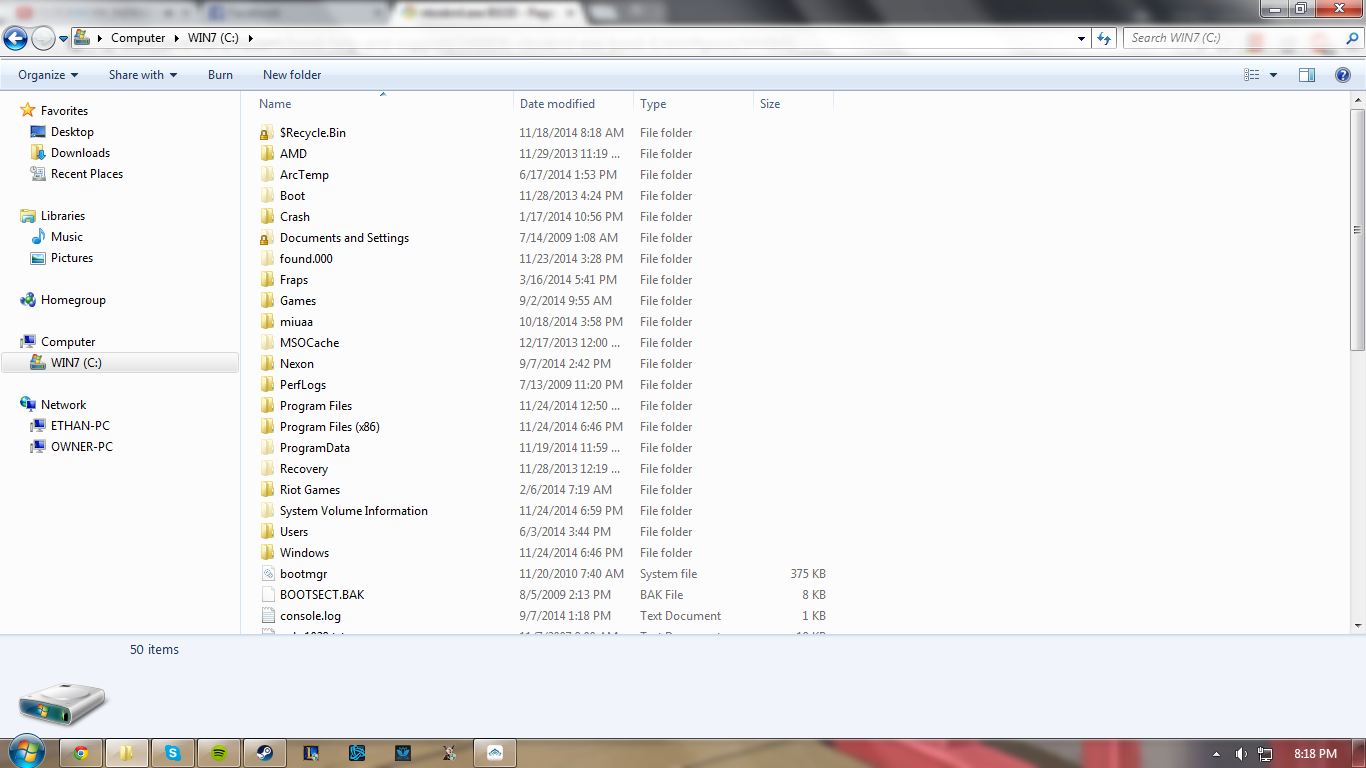
I've noticed that the NVIDIA folder in my C: drive disappears. The first time you linked that a while ago I had no folder there, and then after reinstalling it was there. Now I'm trying to delete the NVIDIA drivers again and it's not there anymore.
 

My Computer My Computer

Computer type
PC/Desktop
Computer Manufacturer/Model Number
Asus
OS
Windows 7 Home Premium 64 bit
CPU
AMD Phenom II X4 965
Motherboard
CM1630 AsusTek
Memory
8gb Adata DDR3 1600 Dual Channel
Graphics Card(s)
Nvidia GTX 660
Monitor(s) Displays
1
Screen Resolution
1366x768
Hard Drives
ST31000528AS ATA Device
PSU
RX-600AF 600W 80BRONZE
Case
ASUS CM1630 Stock Case
Internet Speed
10mb dl/1mb up
Antivirus
MSE
Browser
Google Chrome
It should not disappear, unless you deleted the whole folder. It is the folder that holds your graphics drivers. It can't disappear.
 

My Computers My Computers

System One System Two

  • Computer type
    PC/Desktop
    Computer Manufacturer/Model Number
    ALWAYS UNDER CONSTRUCTION
    OS
    Windows 11 Pro
    CPU
    Ryzen 9 5900X
    Motherboard
    Asus X570 Crosshair Viii Hero
    Memory
    32GB G Skill DDR4-3600
    Graphics Card(s)
    EVGA RTX 3080 FTW 3 Ultra
    Sound Card
    On Board/Sennheiser PC37X Headset
    Monitor(s) Displays
    3 X Asus 27"
    Screen Resolution
    2560x1440
    Hard Drives
    2 X 1 TB NVME drives
    PSU
    EVGA 850
    Case
    Phanteks Eclipse P400A
    Cooling
    EVGA 280 AIO
    Keyboard
    Logitech G510s/ Logitech G13
    Mouse
    Logitech G502
    Internet Speed
    24/1
    Antivirus
    ESET/MBAM Pro/SAS Pro
    Browser
    Chrome/ Firefox/ Edge
  • Computer type
    Laptop
    System Manufacturer/Model Number
    Dell 16 Plus
    OS
    Windows 11 Pro
    CPU
    Intel Ultra 9 288V
    Memory
    32 GB LPDDR5X 8533
    Monitor(s) Displays
    16" Mini-LED HDR600 Touch 90 Hz
    Screen Resolution
    2560X1600
    Hard Drives
    1 TB NVME
I still have the driver installed, but look, no folder.

62e9fee9d5ca0e129934dda32745dfc8.png


There was a NVIDIA folder here yesterday.
 

My Computer My Computer

Computer type
PC/Desktop
Computer Manufacturer/Model Number
Asus
OS
Windows 7 Home Premium 64 bit
CPU
AMD Phenom II X4 965
Motherboard
CM1630 AsusTek
Memory
8gb Adata DDR3 1600 Dual Channel
Graphics Card(s)
Nvidia GTX 660
Monitor(s) Displays
1
Screen Resolution
1366x768
Hard Drives
ST31000528AS ATA Device
PSU
RX-600AF 600W 80BRONZE
Case
ASUS CM1630 Stock Case
Internet Speed
10mb dl/1mb up
Antivirus
MSE
Browser
Google Chrome
Look in program files.
 

My Computer My Computer

Computer type
PC/Desktop
Computer Manufacturer/Model Number
Home made Desktop
OS
Windows 10 Pro. 64/ version 1709 Windows 7 Pro/64
CPU
Intel i7-6800K @ 4.3
Motherboard
ASUS X-99 Deluxe II
Memory
Corsair Platinum 16 gig @2400
Graphics Card(s)
EVGA GTX 1070 OC
Monitor(s) Displays
Asus 27" LED LCD/VE278Q
Screen Resolution
1920-1080 or 1280-720 HDMI
Hard Drives
INTEL SSD 730-240 Gb Sata 3.0/
PSU
EVGA Platium 1200W
Case
Phanteks Luxe Tempered Glass 8 fans/ one radiator
Cooling
XSPC/ Water Cooled CPU
Keyboard
Das 4 Professional
Mouse
Logitech M705/MX Anywhere 2-S
Internet Speed
100 mbits
Antivirus
Microsoft Security Essentials/ Malwarebytes Premium 3.0/ SAS
Browser
I.E. 11 default/Firefox/ ISP Time Warner Cable/Spectrum
Other Info
LG BluRay Burner/
Sound system-KLipsch-THX/
Icy Dock ssd Hot Swap bays.
Back
Top