Numerous (self-imposed) problems with Win7 install

ekvsyhdrn

New member
Local time
4:04 AM
Messages
7
Hello,

I just registered to get some help with installing Windows 7Pro 64-bit. I've tried several things and I think I severely messed up my computer. I'll try to remember as much as I can but feel free to ask for clarifications.

The situation:
I have a relatively new ( < 2months) Lenovo t400 laptop that had vista home basic on it. the laptop came with 3 partitions: the C: drive, a partition with lenovo software on it and a third one with Visa and some other software on it.

I bought the student download from digital river 2 days ago converted the file to an .iso using these instructions http://www.sevenforums.com/tutorials/30470-make-bootable-iso-student-d-l.html

Prior to installing Win7, I created a backup of the vista drive as they suggested and also created rescue and recovery disks. At this time I should have "recovered the drive space" of the vista drive but didn't.

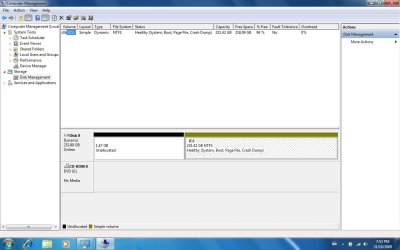
I now put the .iso bootable disk in, and started a custom install. When I got the the bit about the partitions, I decided to delete the vista partition thinking it would merge with the C: drive This didn't happen and I ended up with some unallocated space. I completed the Win7 installation and went looking on the net for ways to merge the unallocated space into the C: drive. I came across disk management and like an idiot converted the C: drive and the lenovo partition to dynamic disks. Trying to convert them back, I followed the instructions here about deleting the volumes and so I wiped the lenovo partition clean too but because the C: drive is a bootable drive, I can't change it back from dynamic. I've now merged the C: drive with what used to be the lenovo partition and am now stuck with one unallocated partition and the C: drive which is still dynamic. I'd now like to merge the unallocated partition (which is on the left) with the C: drive and then convert the single partition back to a basic disk? Is that possible or am I stuck with the dynamic disks? Any help would be appreciated.

p.s. - When I try to try to merge the unallocated space and C: drive together using the elevated command prompt in these: http://www.sevenforums.com/tutorials/2670-partition-volume-extend.html
instructions, I get an error after the "extend" command saying: Virtual Disk Service error: The volume requires contiguous disk extents"

p.p.s - I have absolutely no data on the computer that I value. Because the laptop, is so new whenever I worked on it with Vista, I always saved my work to USB, and the only programs I had installed were freeware (Avast! Anti-virus, Firefox, Chrome, VLC etc.) So re-doing the whole install won't cost me anything is terms of backing-up

p.p.p.s - I've re-done the Win7 install several times now (which is why I think I've really screwed up) because I thought you could format the partitions there but I wasn't able to. The last time I tried to install, it wouldn't accept the product key, so I finally left it blank.

Sorry about the length but I wanted to get everything as clear as possible.

Thanks once again

Patrick
 

My Computer

OS
Windows 7[?]
Hi and Welcome to SevenForums,

You can use Partition Wizard Free Download Partition Wizard

Can you post a screen shot of your disk manager so we can have a look?
 

My Computer

Computer Manufacturer/Model Number
Blue Shards 1.0
OS
Windows 7 Ultimate 64bit
CPU
AMD Phenom II 555 Black Edition Quad Core OC'd to 4.0GHz
Motherboard
ASUS M4A88T-M
Memory
G Skill RipJaw 1333MHz 4GB
Graphics Card(s)
ATI raideon 4250 HD/XFX ATI Radeon 1GB HD4650
Sound Card
Realteck HD Audio
Monitor(s) Displays
2x 22" Widescreen HD Monitors
Hard Drives
500GB Sata 7500RPM
80GB IDE
PSU
850W OCUK Modular
Case
Antec Dark Fleet DF-30
Cooling
Titan Fenrir Pro (CPU)
Keyboard
Logitech Wireless
Mouse
Logitech Wireless
Internet Speed
24Meg
Other Info
Getting soon-
2TB 7200RPM HDD
+8GB RAM
30GB SSD
HD6950/70
As you found out, you can only extend a partition from left to right when viewed in Disk Management--your unallocated space has to be immediately to the right of whatever partition you are trying to expand.

There are ways to get around this, but they involve third party applications, moving partitions, etc.

What's wrong with starting from scratch and deleting all partitions, which would ensure that C would end up at the beginning of the drive, to the far left when viewed in Disk Management??

If you did this, you would have to choose "custom install" early in the process and then "drive options, advanced" shortly thereafter. Then delete partitions.
 

My Computer

Computer type
PC/Desktop
Computer Manufacturer/Model Number
Ignatz Special; 4 speed manual gearbox; factory air conditioning; one of one
OS
Windows 7 Home Premium SP1, 64-bit
CPU
Intel Skylake i5-6600K, not overclocked
Motherboard
AsRock Z170M Extreme 4, micro ATX
Memory
8 GB HyperX DDR4-2666 (2 x 4 GB)
Graphics Card(s)
none; graphics are integrated on CPU
Sound Card
onboard: Realtek ALC1150; external: USB Behringer UF0-202
Monitor(s) Displays
Dell S2340M 23 inch IPS
Screen Resolution
1600 x 900
Hard Drives
System: Crucial MX100 series SSD, 128 GB;
Data: Samsung Spinpoint 103SJ, 1 TB;
Backup: WD Caviar Green WD30EZRX-00D8PB0, 3 TB
PSU
Rosewill SilentNight 500 watt fanless, semi-modular
Case
Antec Solo II
Cooling
Noctua NH-U12S; Noctua F12 intake, Noctua S12A exhaust
Keyboard
Microsoft 200 6JH-00001 USB
Mouse
Dell or Microsoft optical wired; USB
Antivirus
Microsoft Security Essentials and Malwarebytes Premium
Browser
Pale Moon
Other Info
All fans PWM; speeds at idle: CPU circa 500 rpm; intake circa 600 rpm; exhaust circa 600 rpm; CPU temps 27 idle and 47 C load in a warm room (27 C/81 F) when running Intel Extreme Tuning Utility stress test.
Sorry, I should have said that I'd tried the partition wizard.

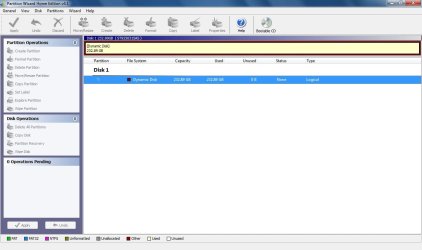
The first attachment is the disk manager, the second is a screen shot of Partition Wizard. I can't seem to select anything to do in partition wizard.

I'd love to be able to start from scratch. Everytime I have though, I haven't been able to delete/format the partitions. At what stage am I supposed to do this? I thought it would be where they ask you to choose the partition to install Win7 to, but I'm not able to delete the partitions and if I click format when selecting the C: drive, the wheel/hourglass goes round for a bit and then nothing happens. What am I doing wrong
 

Attachments

  • Disk Manager.jpg
    Disk Manager.jpg
    72.8 KB · Views: 176
  • Part Manager.jpg
    Part Manager.jpg
    60.6 KB · Views: 140

My Computer

OS
Windows 7[?]
When you "start from scratch", choose custom install, and then come to what appears to be a display of your drives, do you see an option on the lower part of the window that says something like "drive options/advanced"??

If you do, poke it. The next screen should allow you to delete partitions.

You won't be asked to format anything. Formatting takes place automatically. You should be able to delete C and proceed, in which case you would end up with Windows 7 on a new C, this time located at the far left in Disk Management.

If not, then the dynamic disks thing may be part of the problem?
 

My Computer

Computer type
PC/Desktop
Computer Manufacturer/Model Number
Ignatz Special; 4 speed manual gearbox; factory air conditioning; one of one
OS
Windows 7 Home Premium SP1, 64-bit
CPU
Intel Skylake i5-6600K, not overclocked
Motherboard
AsRock Z170M Extreme 4, micro ATX
Memory
8 GB HyperX DDR4-2666 (2 x 4 GB)
Graphics Card(s)
none; graphics are integrated on CPU
Sound Card
onboard: Realtek ALC1150; external: USB Behringer UF0-202
Monitor(s) Displays
Dell S2340M 23 inch IPS
Screen Resolution
1600 x 900
Hard Drives
System: Crucial MX100 series SSD, 128 GB;
Data: Samsung Spinpoint 103SJ, 1 TB;
Backup: WD Caviar Green WD30EZRX-00D8PB0, 3 TB
PSU
Rosewill SilentNight 500 watt fanless, semi-modular
Case
Antec Solo II
Cooling
Noctua NH-U12S; Noctua F12 intake, Noctua S12A exhaust
Keyboard
Microsoft 200 6JH-00001 USB
Mouse
Dell or Microsoft optical wired; USB
Antivirus
Microsoft Security Essentials and Malwarebytes Premium
Browser
Pale Moon
Other Info
All fans PWM; speeds at idle: CPU circa 500 rpm; intake circa 600 rpm; exhaust circa 600 rpm; CPU temps 27 idle and 47 C load in a warm room (27 C/81 F) when running Intel Extreme Tuning Utility stress test.
Sorry, I should have said that I'd tried the partition wizard.

The first attachment is the disk manager, the second is a screen shot of Partition Wizard. I can't seem to select anything to do in partition wizard.

I'd love to be able to start from scratch. Everytime I have though, I haven't been able to delete/format the partitions. At what stage am I supposed to do this? I thought it would be where they ask you to choose the partition to install Win7 to, but I'm not able to delete the partitions and if I click format when selecting the C: drive, the wheel/hourglass goes round for a bit and then nothing happens. What am I doing wrong
Did you burn the boot disc (bottom of the page in the link i gave you) and mount it to a CD with the like of PowerIso ?
If you did then do this..
Put the PW Boot Disc into the cd drive > Reboot Pc > When it promts to boot from CD hit a key on the keyboard> Boot with PW.

Pick the first resouloution,disregard the warning.

Pick the partition>delete>Click again and Format as NTFS and make primary>set as active. Note: After EACH step click apply located at the bottom left of the screen.

Exit and reboot with the windows 7 install disc and do a full clean install.

Dan
 

My Computer

Computer Manufacturer/Model Number
Blue Shards 1.0
OS
Windows 7 Ultimate 64bit
CPU
AMD Phenom II 555 Black Edition Quad Core OC'd to 4.0GHz
Motherboard
ASUS M4A88T-M
Memory
G Skill RipJaw 1333MHz 4GB
Graphics Card(s)
ATI raideon 4250 HD/XFX ATI Radeon 1GB HD4650
Sound Card
Realteck HD Audio
Monitor(s) Displays
2x 22" Widescreen HD Monitors
Hard Drives
500GB Sata 7500RPM
80GB IDE
PSU
850W OCUK Modular
Case
Antec Dark Fleet DF-30
Cooling
Titan Fenrir Pro (CPU)
Keyboard
Logitech Wireless
Mouse
Logitech Wireless
Internet Speed
24Meg
Other Info
Getting soon-
2TB 7200RPM HDD
+8GB RAM
30GB SSD
HD6950/70
Just started for scratch again so I'm waiting for it to re-install (I'm typing this on the family computer which has WinXP).

I tried the custom install, and clicked on drive options but it didn't let me delete either of the partitions (the delete button was greyed out). It allowed me to click on the format button for the C: drive which I tried. I then got a warning saying I'd lose any data and I clicked ok but nothing happened to allow me to delete any partitions.

When I downloaded Partition Wizard all I did was use the free download from download.com and then install it. Once Win7 finishes installing I'll try the "Free Download Bootable CD Now!" which is what I suppose you're referring to Dan.

Concerning the burning bit, I've just downloaded the file to this computer: "pwe41.iso". I'm going to move it to the laptop where I'll download PowerISO so that I can burn it. Could you please give me some quick instructions on how to create a bootable disk? I haven't looked at the program PowerISO yet so I don't know anything about it.

I'll update on how the mounted restart turns out in a bit

Thanks a lot for the quick responses

Patrick
 

My Computer

OS
Windows 7[?]
Just started for scratch again so I'm waiting for it to re-install (I'm typing this on the family computer which has WinXP).

I tried the custom install, and clicked on drive options but it didn't let me delete either of the partitions (the delete button was greyed out). It allowed me to click on the format button for the C: drive which I tried. I then got a warning saying I'd lose any data and I clicked ok but nothing happened to allow me to delete any partitions.

When I downloaded Partition Wizard all I did was use the free download from download.com and then install it. Once Win7 finishes installing I'll try the "Free Download Bootable CD Now!" which is what I suppose you're referring to Dan.

Concerning the burning bit, I've just downloaded the file to this computer: "pwe41.iso". I'm going to move it to the laptop where I'll download PowerISO so that I can burn it. Could you please give me some quick instructions on how to create a bootable disk? I haven't looked at the program PowerISO yet so I don't know anything about it.

I'll update on how the mounted restart turns out in a bit

Thanks a lot for the quick responses

Patrick
I do the same with the family pc at times lol

Thats what i thought would happen.

Yep,thats the one,it basically allows you to modify your partitions outside of the OS (whic was probably the reason it wouldnt delete for you).

I purchased poweriso on,its not free,at the time i was aftraid of using freeware lol:o

IMGBurn should do the same job and it is free
Download ImgBurn 2.5.0.0 - Can write most types of CD / DVD images and it supports all the latest writers - Softpedia

You simply grab the file and "Mount file to Cd" then burn,tada,bootable disc :) ...or similar as ive never used imgburn


Dan
 

My Computer

Computer Manufacturer/Model Number
Blue Shards 1.0
OS
Windows 7 Ultimate 64bit
CPU
AMD Phenom II 555 Black Edition Quad Core OC'd to 4.0GHz
Motherboard
ASUS M4A88T-M
Memory
G Skill RipJaw 1333MHz 4GB
Graphics Card(s)
ATI raideon 4250 HD/XFX ATI Radeon 1GB HD4650
Sound Card
Realteck HD Audio
Monitor(s) Displays
2x 22" Widescreen HD Monitors
Hard Drives
500GB Sata 7500RPM
80GB IDE
PSU
850W OCUK Modular
Case
Antec Dark Fleet DF-30
Cooling
Titan Fenrir Pro (CPU)
Keyboard
Logitech Wireless
Mouse
Logitech Wireless
Internet Speed
24Meg
Other Info
Getting soon-
2TB 7200RPM HDD
+8GB RAM
30GB SSD
HD6950/70
Ok, I'm just in the process of booting with PW. I selected the first resolution and hit enter and I got this warning message:

DO NOT take the following operations for these operations will cause your system to be unbootable.
1. Moving/resizing system partition of Windows Vista/Windows 2008/Windows 7
2. Creating/Deleting any partitions before the system partition of Windows 2000/WinXP/Win2003

I'm planning on trying to merge the unallocated partition with the C: drive and then change them to basic disks from dynamic disks. Is it safe to do this and do these warnings matter for me since I'm re-installing Win7 afterwards anyway?
 

My Computer

OS
Windows 7[?]
Ok, I'm just in the process of booting with PW. I selected the first resolution and hit enter and I got this warning message:

DO NOT take the following operations for these operations will cause your system to be unbootable.
1. Moving/resizing system partition of Windows Vista/Windows 2008/Windows 7
2. Creating/Deleting any partitions before the system partition of Windows 2000/WinXP/Win2003

I'm planning on trying to merge the unallocated partition with the C: drive and then change them to basic disks from dynamic disks. Is it safe to do this and do these warnings matter for me since I'm re-installing Win7 afterwards anyway?
Ignore the warning.

When your in,delete vista partition>click apply>delete Win7>click apply>Format unallocated space as NTFS>click apply>Make Primary>Click apply>Marks as active>click apply

Re-run Win7

Edit: When your in PW,delete C partition>click apply>Format unallocated space as NTFS>click apply>Make Primary>Click apply>Marks as active>click apply

**Always click apply after EACH step.
 

My Computer

Computer Manufacturer/Model Number
Blue Shards 1.0
OS
Windows 7 Ultimate 64bit
CPU
AMD Phenom II 555 Black Edition Quad Core OC'd to 4.0GHz
Motherboard
ASUS M4A88T-M
Memory
G Skill RipJaw 1333MHz 4GB
Graphics Card(s)
ATI raideon 4250 HD/XFX ATI Radeon 1GB HD4650
Sound Card
Realteck HD Audio
Monitor(s) Displays
2x 22" Widescreen HD Monitors
Hard Drives
500GB Sata 7500RPM
80GB IDE
PSU
850W OCUK Modular
Case
Antec Dark Fleet DF-30
Cooling
Titan Fenrir Pro (CPU)
Keyboard
Logitech Wireless
Mouse
Logitech Wireless
Internet Speed
24Meg
Other Info
Getting soon-
2TB 7200RPM HDD
+8GB RAM
30GB SSD
HD6950/70
It didn't work, I'm getting exactly the same result. Partition Wizard won't allow me to modify the disk at all as all the options are greyed out. Do you know if Partition Wizard can handle dynamic partitions?
 

My Computer

OS
Windows 7[?]

My Computer

Computer Manufacturer/Model Number
Blue Shards 1.0
OS
Windows 7 Ultimate 64bit
CPU
AMD Phenom II 555 Black Edition Quad Core OC'd to 4.0GHz
Motherboard
ASUS M4A88T-M
Memory
G Skill RipJaw 1333MHz 4GB
Graphics Card(s)
ATI raideon 4250 HD/XFX ATI Radeon 1GB HD4650
Sound Card
Realteck HD Audio
Monitor(s) Displays
2x 22" Widescreen HD Monitors
Hard Drives
500GB Sata 7500RPM
80GB IDE
PSU
850W OCUK Modular
Case
Antec Dark Fleet DF-30
Cooling
Titan Fenrir Pro (CPU)
Keyboard
Logitech Wireless
Mouse
Logitech Wireless
Internet Speed
24Meg
Other Info
Getting soon-
2TB 7200RPM HDD
+8GB RAM
30GB SSD
HD6950/70
Unbelievably I've managed to figure out a way to change the dynamic disk back to basic. From these directions http://www.sevenforums.com/tutorials/26829-convert-dynamic-disk-basic-disk.html, rather than starting the command prompt at boot, I selected the repair windows option and then selected command prompt from the list of 5 options. Followed the rest of the steps and got it. I think the unallocated space got merged at the same time as well.

I'm feeling so ecstatic, I'm slowly trying to learn more abour computers but this my first upgrade and it was a steep learning curve.

Thanks a ton Dan and ignatzatsonic for the help

Patrick
 

My Computer

OS
Windows 7[?]
was typing my reply, when you replied, that's what I did and it worked. Thanks once again, I'm off to bed in a very pleased mood :)
 

My Computer

OS
Windows 7[?]
Well done:)


p.s Look above your post:huh: lol


No problem,glad to help,come back if you have anymore issues

Dan
 

My Computer

Computer Manufacturer/Model Number
Blue Shards 1.0
OS
Windows 7 Ultimate 64bit
CPU
AMD Phenom II 555 Black Edition Quad Core OC'd to 4.0GHz
Motherboard
ASUS M4A88T-M
Memory
G Skill RipJaw 1333MHz 4GB
Graphics Card(s)
ATI raideon 4250 HD/XFX ATI Radeon 1GB HD4650
Sound Card
Realteck HD Audio
Monitor(s) Displays
2x 22" Widescreen HD Monitors
Hard Drives
500GB Sata 7500RPM
80GB IDE
PSU
850W OCUK Modular
Case
Antec Dark Fleet DF-30
Cooling
Titan Fenrir Pro (CPU)
Keyboard
Logitech Wireless
Mouse
Logitech Wireless
Internet Speed
24Meg
Other Info
Getting soon-
2TB 7200RPM HDD
+8GB RAM
30GB SSD
HD6950/70
Back
Top