Nvidia Card OCing

markvis14

New member
Member
Local time
6:43 PM
Messages
82
Hello guys,

I got a fairly old Nvidia 9600GT 2GB RAM

I want to try and OC it to it's max but I am wondering whats the best program to use?

Thanks in advance!

Regards,
Mark
 

My Computer

Computer Manufacturer/Model Number
MSI
OS
Windows 7 64 Bit
CPU
Intel(R) Core(TM) i5 2500k @ 3.30GHz OC@ 4.4GHz
Motherboard
GA-Z68X-UD3H-B3
Memory
Corsair 8GB DDR3 RAM LP @ 1600Mhz
Graphics Card(s)
Nvidia GTS450 1GB
Monitor(s) Displays
22" 16:10
Screen Resolution
1680x1050
PSU
Corsair 750Watt
Keyboard
Steelseries G7
Mouse
Steelseries Xai
Internet Speed
10Mbit

My Computer

Computer Manufacturer/Model Number
Hera
OS
Windows 7 Ultimate x64, Mint 9
CPU
Intel i5-2500k
Motherboard
ASUS P8P67 Pro
Memory
2x 4Gb Corsair VENGEANCE DDR3-1600
Graphics Card(s)
NVidia GeForce N260GTX Twin Frozr
Sound Card
Realtek HD OnBoard Audio
Monitor(s) Displays
ASUS 24" Monitor
Screen Resolution
1920x1080
Hard Drives
G.SKILL Phoenix Series 60GB SATA II MLC Internal Solid State Drive (SSD)
SAMSUNG Spinpoint F3R 1TB 7200 RPM 32MB Cache SATA II
PSU
Cooler Master Real Power Pro 750W
Case
Cooler Master Haf 932
Cooling
Fans
Keyboard
Razer Tarantula
Mouse
Razer Lachesis
Internet Speed
not fast enough
Awesome thanks :D

Are there any known safe zones for a 9600GT ? (I just tried putting the core fairly high and then I got a blue screen lol)
 

My Computer

Computer Manufacturer/Model Number
MSI
OS
Windows 7 64 Bit
CPU
Intel(R) Core(TM) i5 2500k @ 3.30GHz OC@ 4.4GHz
Motherboard
GA-Z68X-UD3H-B3
Memory
Corsair 8GB DDR3 RAM LP @ 1600Mhz
Graphics Card(s)
Nvidia GTS450 1GB
Monitor(s) Displays
22" 16:10
Screen Resolution
1680x1050
PSU
Corsair 750Watt
Keyboard
Steelseries G7
Mouse
Steelseries Xai
Internet Speed
10Mbit
Awesome thanks :D

Are there any known safe zones for a 9600GT ? (I just tried putting the core fairly high and then I got a blue screen lol)
Depends more on the card, but you should google it and look around. Generally for a GPU, over about 90C is BAD.

~Lordbob
 

My Computer

Computer Manufacturer/Model Number
Hera
OS
Windows 7 Ultimate x64, Mint 9
CPU
Intel i5-2500k
Motherboard
ASUS P8P67 Pro
Memory
2x 4Gb Corsair VENGEANCE DDR3-1600
Graphics Card(s)
NVidia GeForce N260GTX Twin Frozr
Sound Card
Realtek HD OnBoard Audio
Monitor(s) Displays
ASUS 24" Monitor
Screen Resolution
1920x1080
Hard Drives
G.SKILL Phoenix Series 60GB SATA II MLC Internal Solid State Drive (SSD)
SAMSUNG Spinpoint F3R 1TB 7200 RPM 32MB Cache SATA II
PSU
Cooler Master Real Power Pro 750W
Case
Cooler Master Haf 932
Cooling
Fans
Keyboard
Razer Tarantula
Mouse
Razer Lachesis
Internet Speed
not fast enough
i dont mean to hijack this thread, but can you OC a factory OC'ed card?
 

My Computer

Computer Manufacturer/Model Number
The Vampire
OS
Windows 7 Ultimate
CPU
Intel i5 2500k @ 3.30
Motherboard
P8Z68 V-Pro
Memory
G.Skill Ripjaws 1600 2x4 Gb
Graphics Card(s)
BFG GTX 260 MAXCORE 55 OC 896MB GDDR3
Sound Card
Onboard
Monitor(s) Displays
50'' Sony Display Panel
Screen Resolution
1360 x 768
Hard Drives
Seagate 750 GB
WD 160 GB
PSU
OCZ 750 Watts ZT Series Fully Modular PSU 80 Plus Bronze
Case
NZXT Red Phantom
Cooling
120mm x2 Intake, 120mm x 1 and 200mm x2 Exhaust
Keyboard
LX710 Logitech Wireless Keyboard
Mouse
Logitech Wireless Mouse

My Computer

Computer Manufacturer/Model Number
Hera
OS
Windows 7 Ultimate x64, Mint 9
CPU
Intel i5-2500k
Motherboard
ASUS P8P67 Pro
Memory
2x 4Gb Corsair VENGEANCE DDR3-1600
Graphics Card(s)
NVidia GeForce N260GTX Twin Frozr
Sound Card
Realtek HD OnBoard Audio
Monitor(s) Displays
ASUS 24" Monitor
Screen Resolution
1920x1080
Hard Drives
G.SKILL Phoenix Series 60GB SATA II MLC Internal Solid State Drive (SSD)
SAMSUNG Spinpoint F3R 1TB 7200 RPM 32MB Cache SATA II
PSU
Cooler Master Real Power Pro 750W
Case
Cooler Master Haf 932
Cooling
Fans
Keyboard
Razer Tarantula
Mouse
Razer Lachesis
Internet Speed
not fast enough
oh goodie!! i hope i dont fry it. :shock:
 

My Computer

Computer Manufacturer/Model Number
The Vampire
OS
Windows 7 Ultimate
CPU
Intel i5 2500k @ 3.30
Motherboard
P8Z68 V-Pro
Memory
G.Skill Ripjaws 1600 2x4 Gb
Graphics Card(s)
BFG GTX 260 MAXCORE 55 OC 896MB GDDR3
Sound Card
Onboard
Monitor(s) Displays
50'' Sony Display Panel
Screen Resolution
1360 x 768
Hard Drives
Seagate 750 GB
WD 160 GB
PSU
OCZ 750 Watts ZT Series Fully Modular PSU 80 Plus Bronze
Case
NZXT Red Phantom
Cooling
120mm x2 Intake, 120mm x 1 and 200mm x2 Exhaust
Keyboard
LX710 Logitech Wireless Keyboard
Mouse
Logitech Wireless Mouse
I'll thorugh in Evga precision again as another program to overclock your Nvidia card |MG| EVGA Precision 1.9.5 Download You can get it off Evga's site as well only you have to join the site that is why I send you to majorgeeks. Fabe
 

My Computer

Computer Manufacturer/Model Number
Self Built
OS
Windows 7 ultimate 64 bit / XP Home sp3
CPU
intel Core 2 Duo E8400 3.0ghz
Motherboard
Asus P5ND bios 1401
Memory
8 gigs 1066 OCZ Fata1ty
Graphics Card(s)
EVGA GTX 580 Call of Duty Black Ops Edition
Sound Card
Creative Soundblaster Audigy 2zs
Monitor(s) Displays
Asus 24in LCD's 2MS X2
Screen Resolution
1920x1080p @60Hz
Hard Drives
WD Caviar 500 Black/ WD Caviar 200 Blue
PSU
OCZ 700W GameXtreme
Case
NZXT Apollo
Cooling
Corsair H50 CPU/120mm x3 /60mm x2 /Corsair Dominator Ram
Keyboard
Logitech Bluetooth Wireless MX5000
Mouse
Logitech Bluetooth Wireless MX1000
Internet Speed
Download 19.83 Upload 0.97
Other Info
Logitech Z2300 Speakers/ Bose Noise Cancelling Headphones/Avermedia PCI-e Hybrid TV Bravo/Epson NX415 all in one/ 4 Port Powered USB Hub/ LG 10x Bluray Burner /TSST Corp DVDRW External
Thanks!! :D
 

My Computer

Computer Manufacturer/Model Number
The Vampire
OS
Windows 7 Ultimate
CPU
Intel i5 2500k @ 3.30
Motherboard
P8Z68 V-Pro
Memory
G.Skill Ripjaws 1600 2x4 Gb
Graphics Card(s)
BFG GTX 260 MAXCORE 55 OC 896MB GDDR3
Sound Card
Onboard
Monitor(s) Displays
50'' Sony Display Panel
Screen Resolution
1360 x 768
Hard Drives
Seagate 750 GB
WD 160 GB
PSU
OCZ 750 Watts ZT Series Fully Modular PSU 80 Plus Bronze
Case
NZXT Red Phantom
Cooling
120mm x2 Intake, 120mm x 1 and 200mm x2 Exhaust
Keyboard
LX710 Logitech Wireless Keyboard
Mouse
Logitech Wireless Mouse
Your very welcome. Fabe
 

My Computer

Computer Manufacturer/Model Number
Self Built
OS
Windows 7 ultimate 64 bit / XP Home sp3
CPU
intel Core 2 Duo E8400 3.0ghz
Motherboard
Asus P5ND bios 1401
Memory
8 gigs 1066 OCZ Fata1ty
Graphics Card(s)
EVGA GTX 580 Call of Duty Black Ops Edition
Sound Card
Creative Soundblaster Audigy 2zs
Monitor(s) Displays
Asus 24in LCD's 2MS X2
Screen Resolution
1920x1080p @60Hz
Hard Drives
WD Caviar 500 Black/ WD Caviar 200 Blue
PSU
OCZ 700W GameXtreme
Case
NZXT Apollo
Cooling
Corsair H50 CPU/120mm x3 /60mm x2 /Corsair Dominator Ram
Keyboard
Logitech Bluetooth Wireless MX5000
Mouse
Logitech Bluetooth Wireless MX1000
Internet Speed
Download 19.83 Upload 0.97
Other Info
Logitech Z2300 Speakers/ Bose Noise Cancelling Headphones/Avermedia PCI-e Hybrid TV Bravo/Epson NX415 all in one/ 4 Port Powered USB Hub/ LG 10x Bluray Burner /TSST Corp DVDRW External
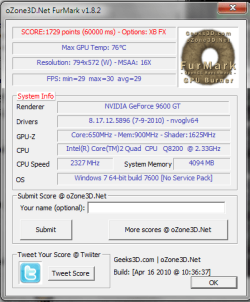
Hello guys,

Today I decided to start OCing ..

After doing so I found the results to be very weird.
Please view the scores.

before and after

According to the screenshots OCing has decreased performance instead of optimizing it?

Regards,
Mark
 

Attachments

  • GPU_OC_After.png
    GPU_OC_After.png
    22.9 KB · Views: 7
  • GPU_OC_Before.png
    GPU_OC_Before.png
    21.7 KB · Views: 6

My Computer

Computer Manufacturer/Model Number
MSI
OS
Windows 7 64 Bit
CPU
Intel(R) Core(TM) i5 2500k @ 3.30GHz OC@ 4.4GHz
Motherboard
GA-Z68X-UD3H-B3
Memory
Corsair 8GB DDR3 RAM LP @ 1600Mhz
Graphics Card(s)
Nvidia GTS450 1GB
Monitor(s) Displays
22" 16:10
Screen Resolution
1680x1050
PSU
Corsair 750Watt
Keyboard
Steelseries G7
Mouse
Steelseries Xai
Internet Speed
10Mbit
@ markvis14

I thought maybe your temps were too high and the card was throttling at first glance. But looks like your temps have gone down along with your score on this overclock attempt.

Not sure but looks to me like something is throttling or maybe your power supply rail cannot handle the extra power needed for this overclock.

What is the power supply rated on your system?

Have you noticed a increase in CPU/Chipset temperatures with this overclock attempt?

:p
 

My Computer

OS
Windows 7 Professional
CPU
Intel Core i7-2670QM
Memory
Samsung 8GB
Graphics Card(s)
NVIDIA GT 555M
Hard Drives
Intel 525 120GB | HGST Travelstar 1TB
Mouse
CM Storm Xornet | Microsoft Sculpt Comfort
Internet Speed
25 Mbps | 600 Kbps
Other Info
Centrino 6205 | Seagate Backup Plus 1TB
My power supply is a 400W.
And how do you mean rated?

And no I haven't noticed any temp increases in my CPU/chipset
 

My Computer

Computer Manufacturer/Model Number
MSI
OS
Windows 7 64 Bit
CPU
Intel(R) Core(TM) i5 2500k @ 3.30GHz OC@ 4.4GHz
Motherboard
GA-Z68X-UD3H-B3
Memory
Corsair 8GB DDR3 RAM LP @ 1600Mhz
Graphics Card(s)
Nvidia GTS450 1GB
Monitor(s) Displays
22" 16:10
Screen Resolution
1680x1050
PSU
Corsair 750Watt
Keyboard
Steelseries G7
Mouse
Steelseries Xai
Internet Speed
10Mbit
Sorry I should be more specific. Some power supply can only output a certain maximum amount of power even if the are say 400W, this is usually the case with less known brands. I'm no expert when it comes to a power supply thus I usually play if safe and get a ton of power that I will never use on my system. I'm not sure what are the required amps on the 12V rail needed for a 7600GT but when you overclock anything in the system it will usually stress out and draw more power from your power supply, not to mention add heat and stress to the component you are overclocking and the rest of your system if it's not properly ventilated. Your GPU and CPU has a safe guard against heat, if any one of those components reach a certain temperature due to overclocking or bad ventilation it will decrease in speed to cool itself down, this is referred to as throttling. Thus, if your videocard or CPU is throttling due to heat then there will be no visible performance increase and maybe even a performance decrease depending on the component that is throttling with this overclock. Really, I cannot tell but it's just my opinion on your case scenario. :p
 

My Computer

OS
Windows 7 Professional
CPU
Intel Core i7-2670QM
Memory
Samsung 8GB
Graphics Card(s)
NVIDIA GT 555M
Hard Drives
Intel 525 120GB | HGST Travelstar 1TB
Mouse
CM Storm Xornet | Microsoft Sculpt Comfort
Internet Speed
25 Mbps | 600 Kbps
Other Info
Centrino 6205 | Seagate Backup Plus 1TB
you can oc any factory oc'ed card simply cause they don't oc it by much probally about 50ghz for each the core clock memory clock ect

i currently run a hd5770 i looked at the factory oc mine was oc'ed farther then the factory oc and the oc wasn't much from the normal values

i used a oc program with my nvidia 7300gt called riva tuner it tuned my agp card a little higher

and when you oc with a program it should show the limits of both clocks pretty much you want to keep under atleast 40 to 30 mghz from max for stability but it also depends on your set up the combination of board components makes for a good oc
 

My Computer

Computer type
PC/Desktop
Computer Manufacturer/Model Number
CoreI7-6700K MrFingerIII Special Builds
OS
Windows 10 Home Premium 64bit sp1
CPU
Intel I7-6700K @ 4.6 Ghz 1.344 volts everyday OC
Motherboard
Asrock Fatality K6 Z170 Socket 1151
Memory
32GB G-Skill TridentZ 3200mhz 16-18-18-38 DDR4
Graphics Card(s)
Sli Gigabyte Windforce GTX 980 G1
Sound Card
AC97 Creative Rage Tactic 3D Headphones Bluetooth
Monitor(s) Displays
27" Asus ROG Swift PG278Q G-Sync 48" Vizio Smart HD TV
Screen Resolution
2560x1440p 27"- 48" Currently Gaming at 2560x1440p Res 2K
Hard Drives
250GB Samsung Evo840SSD Seagate baracuda 500 GB WD Mybook 500Gb 1TB Seagate Barracuda
PSU
HX1050w Corsair Silver 80plus certified crosfire/sli
Case
Enthod Pro Full Tower
Cooling
Corsair H110i GT 280 mm High Performance WaterBlock
Keyboard
Logitech wireless keyboard
Mouse
Logitech wireless mouse
Internet Speed
Cox Cable 100+ mb
Antivirus
WebRoot Spysweeper with Antivirus
Browser
IE-10, Chrome, Opera
Other Info
My Other Rig is a AMD FX8320E @4.6Ghz 16GB Ballistic Sport Ram
Mobo Asrock Fatality 990FX 120GB OCZ SSD 1TB Seagate Barracuda Corsair H75 Cooling PSU Corsair CX750
GPU GTX Gigabyte 970G1
Looks more like you have reached the limit of your card.

The heat generated is degrading performance and/or your card is throttling (as said above). There is no way to fix this except to either try with increased cooling or get a new card.

~Lordbob
 

My Computer

Computer Manufacturer/Model Number
Hera
OS
Windows 7 Ultimate x64, Mint 9
CPU
Intel i5-2500k
Motherboard
ASUS P8P67 Pro
Memory
2x 4Gb Corsair VENGEANCE DDR3-1600
Graphics Card(s)
NVidia GeForce N260GTX Twin Frozr
Sound Card
Realtek HD OnBoard Audio
Monitor(s) Displays
ASUS 24" Monitor
Screen Resolution
1920x1080
Hard Drives
G.SKILL Phoenix Series 60GB SATA II MLC Internal Solid State Drive (SSD)
SAMSUNG Spinpoint F3R 1TB 7200 RPM 32MB Cache SATA II
PSU
Cooler Master Real Power Pro 750W
Case
Cooler Master Haf 932
Cooling
Fans
Keyboard
Razer Tarantula
Mouse
Razer Lachesis
Internet Speed
not fast enough
a new card would be the better thing to do you can get any dependable card for decent gameplay for about 120.00 and then you can oc that for better performance cause 9600gt is limited compared to all the new stuff going on
 

My Computer

Computer type
PC/Desktop
Computer Manufacturer/Model Number
CoreI7-6700K MrFingerIII Special Builds
OS
Windows 10 Home Premium 64bit sp1
CPU
Intel I7-6700K @ 4.6 Ghz 1.344 volts everyday OC
Motherboard
Asrock Fatality K6 Z170 Socket 1151
Memory
32GB G-Skill TridentZ 3200mhz 16-18-18-38 DDR4
Graphics Card(s)
Sli Gigabyte Windforce GTX 980 G1
Sound Card
AC97 Creative Rage Tactic 3D Headphones Bluetooth
Monitor(s) Displays
27" Asus ROG Swift PG278Q G-Sync 48" Vizio Smart HD TV
Screen Resolution
2560x1440p 27"- 48" Currently Gaming at 2560x1440p Res 2K
Hard Drives
250GB Samsung Evo840SSD Seagate baracuda 500 GB WD Mybook 500Gb 1TB Seagate Barracuda
PSU
HX1050w Corsair Silver 80plus certified crosfire/sli
Case
Enthod Pro Full Tower
Cooling
Corsair H110i GT 280 mm High Performance WaterBlock
Keyboard
Logitech wireless keyboard
Mouse
Logitech wireless mouse
Internet Speed
Cox Cable 100+ mb
Antivirus
WebRoot Spysweeper with Antivirus
Browser
IE-10, Chrome, Opera
Other Info
My Other Rig is a AMD FX8320E @4.6Ghz 16GB Ballistic Sport Ram
Mobo Asrock Fatality 990FX 120GB OCZ SSD 1TB Seagate Barracuda Corsair H75 Cooling PSU Corsair CX750
GPU GTX Gigabyte 970G1
Throttling at 75c?
I'm gtx 480 user and what's this? :p

Can't you increase the threshold in bios, well atleast you can look around, get gpu-z and get your bios from you card, then get nibitor and open it, you can probably edit some voltage (possibly) and the fan settings, also you can set clocks to something higher on default.
nvflash does the flashing, can't go wrong unless you randomly change values, but those things are pretty straight forward.

I don't think even if your card goes above 80c it'd be any danger to it, you can always get new cooler, if you think it's worth it.

Also voltage is mostly restricting overclocking on older card because you can't change that, unlike in 400 series, without physical voltage mods that is.
 

My Computer

OS
Windows 7 Professional x64
CPU
E6420 (temporary)
Motherboard
G43 Twins-FullHD (temporary)
Memory
DDR2 2x1gb (temporary)
Graphics Card(s)
Evga GTX 480 Superclocked+
Sound Card
Creative X-FI Extreme Audio Pci-E
Monitor(s) Displays
2x24" Samsung SyncMaster 2494HS
Screen Resolution
1920x1080
Hard Drives
2xSamsung 500GB
Samsung F3 1 TB
PSU
OCZ GameXstream 850w
Case
Cooler Master HAF X
Keyboard
Logitech Illuminated
Mouse
Logitech MX518
Internet Speed
40/2
@ Nikkeli

Look at the before and after overclocking screen shots, how could any card run cooler than stock once overclocked without replacing the stock cooler? :sarc:

Therefore, a good guess is the card may have hit the maximum temperature threshold in which it started to throttle in order to cool itself down.

And thus the lower temperatures, remember this is only my opinion but it could be anybody guess unless I could see the action in person.

:p
 

My Computer

OS
Windows 7 Professional
CPU
Intel Core i7-2670QM
Memory
Samsung 8GB
Graphics Card(s)
NVIDIA GT 555M
Hard Drives
Intel 525 120GB | HGST Travelstar 1TB
Mouse
CM Storm Xornet | Microsoft Sculpt Comfort
Internet Speed
25 Mbps | 600 Kbps
Other Info
Centrino 6205 | Seagate Backup Plus 1TB
Back
Top