Hello guys,
I am having some real annoying problems with the nVidia Control Panel + Drivers (Geforce GT220), for about a year or two now lol.
So I currently have the 275.33 installed, and every time there's an update I have tried to update the drivers but with no luck.
Okey this is what happens every time:
I download the right driver, in this case, the very latest (295.73-desktop-win7-winvista-64bit-international-whql.exe) and extract the files.
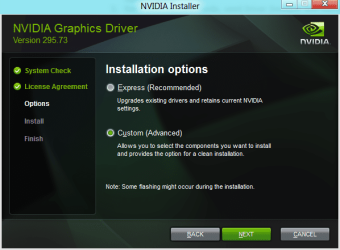
I run as administrator the installer, accept terms and accept & install.
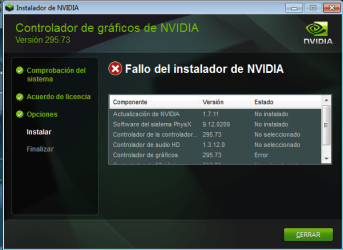
It starts well, after about 20% of the progressbar, the installation stops at nVidia Control Panel and it says "Error". And nothing else can be done. I've been stuck with the 275.33 drivers for months!
I've tried the following:
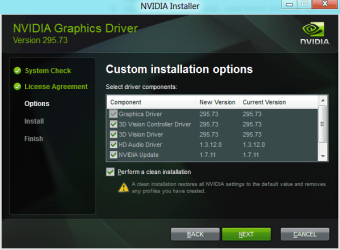
1. Perform a "Clean Install". Deleted my drivers, and then fails at the Control Panel installation.
2. Uninstall drivers in normal mode. Reboot into safe mode, use Driver Sweeper to clean leftover files, clean registry with CCleaner. Boot back into normal mode, run installer, it fails. Have to system restore to get drivers back installed (not even the 275.33 installation works!)
3. I've even tried following a suggestion I found online, I totally uninstalled the drivers, and then used Windows Update to find the drivers. (I hate using Windows Update to update anything but the OS). The updates failed.
Computer Specs:
I have no idea what to do now. My whole pc is up-to-date, bios and all, except nVidia.
Suggestions are gladly welcome, if you need any info just ask.
Thanks in advance!
I am having some real annoying problems with the nVidia Control Panel + Drivers (Geforce GT220), for about a year or two now lol.
So I currently have the 275.33 installed, and every time there's an update I have tried to update the drivers but with no luck.
Okey this is what happens every time:
I download the right driver, in this case, the very latest (295.73-desktop-win7-winvista-64bit-international-whql.exe) and extract the files.
I run as administrator the installer, accept terms and accept & install.
It starts well, after about 20% of the progressbar, the installation stops at nVidia Control Panel and it says "Error". And nothing else can be done. I've been stuck with the 275.33 drivers for months!
I've tried the following:
1. Perform a "Clean Install". Deleted my drivers, and then fails at the Control Panel installation.
2. Uninstall drivers in normal mode. Reboot into safe mode, use Driver Sweeper to clean leftover files, clean registry with CCleaner. Boot back into normal mode, run installer, it fails. Have to system restore to get drivers back installed (not even the 275.33 installation works!)
3. I've even tried following a suggestion I found online, I totally uninstalled the drivers, and then used Windows Update to find the drivers. (I hate using Windows Update to update anything but the OS). The updates failed.
Computer Specs:
Code:
Operating System
    MS Windows 7 Home Premium 64-bit SP1
CPU
    Intel Core i3 530  @ 2.93GHz
    Clarkdale 32nm Technology
RAM
    4,00 GB Dual-Channel DDR3 @ 666MHz (9-9-9-24)
Motherboard
    Gigabyte Technology Co., Ltd. H55M-S2H (Socket 1156)
Graphics
    TLU-01911C (1440x900@60Hz)
    1024MB GeForce GT 220 (Gigabyte)
Hard Drives
    488GB Seagate ST3500418AS ATA Device (SATA)
Optical Drives
    MagicISO Virtual DVD-ROM0000
    HL-DT-ST DVDRAM GH22NS50 ATA Device
Audio
Realtek High Definition AudioSuggestions are gladly welcome, if you need any info just ask.
Thanks in advance!
My Computer
At a glance
Windows 7 Ultimate 64-bit SP1Intel Core i5 4670K @ 3.40GHz16.0GB Dual-Channel DDR3 @ 666MHz (9-9-9-24)2047MB NVIDIA GeForce GTX 760 (MSI)
- Computer type
- PC/Desktop
- OS
- Windows 7 Ultimate 64-bit SP1
- CPU
- Intel Core i5 4670K @ 3.40GHz
- Motherboard
- MSI Z87-G45 GAMING (MS-7821)
- Memory
- 16.0GB Dual-Channel DDR3 @ 666MHz (9-9-9-24)
- Graphics Card(s)
- 2047MB NVIDIA GeForce GTX 760 (MSI)
- Monitor(s) Displays
- Acer H236HL
- Screen Resolution
- 1920x1080@60Hz
- Hard Drives
- 111GB KINGSTON SV300S37A120G ATA Device (SSD)
2794GB Seagate ST3000DM001-9YN166 ATA Device (SATA)
465GB Seagate ST3500320NS ATA Device (SATA)
931GB Seagate ST1000DM003-1CH162 ATA Device (SATA)
3726GB Hitachi HGST HDS 5C4040ALE630 USB Device (USB
- PSU
- LEPA G 650W 80 PLUS Gold
- Case
- Fractal Design Define R4 (Arctic White)
- Cooling
- Corsair H60 74.4 CFM Liquid CPU Cooler
- Antivirus
- Common sense
- Browser
- Firefox


 )
)