Solved nVidia Control Panel & Drivers Problems

joshdw

New member
Member
Local time
6:44 PM
Messages
35
Location
Spain
Hello guys,

I am having some real annoying problems with the nVidia Control Panel + Drivers (Geforce GT220), for about a year or two now lol.
So I currently have the 275.33 installed, and every time there's an update I have tried to update the drivers but with no luck.

Okey this is what happens every time:
I download the right driver, in this case, the very latest (295.73-desktop-win7-winvista-64bit-international-whql.exe) and extract the files.
I run as administrator the installer, accept terms and accept & install.
It starts well, after about 20% of the progressbar, the installation stops at nVidia Control Panel and it says "Error". And nothing else can be done. I've been stuck with the 275.33 drivers for months!

I've tried the following:
1. Perform a "Clean Install". Deleted my drivers, and then fails at the Control Panel installation.
2. Uninstall drivers in normal mode. Reboot into safe mode, use Driver Sweeper to clean leftover files, clean registry with CCleaner. Boot back into normal mode, run installer, it fails. Have to system restore to get drivers back installed (not even the 275.33 installation works!)
3. I've even tried following a suggestion I found online, I totally uninstalled the drivers, and then used Windows Update to find the drivers. (I hate using Windows Update to update anything but the OS). The updates failed.

Computer Specs:
Code:
Operating System
    MS Windows 7 Home Premium 64-bit SP1
CPU
    Intel Core i3 530  @ 2.93GHz
    Clarkdale 32nm Technology
RAM
    4,00 GB Dual-Channel DDR3 @ 666MHz (9-9-9-24)
Motherboard
    Gigabyte Technology Co., Ltd. H55M-S2H (Socket 1156) 
Graphics
    TLU-01911C (1440x900@60Hz)
    1024MB GeForce GT 220 (Gigabyte)
Hard Drives
    488GB Seagate ST3500418AS ATA Device (SATA)
Optical Drives
    MagicISO Virtual DVD-ROM0000
    HL-DT-ST DVDRAM GH22NS50 ATA Device
Audio
    Realtek High Definition Audio
I have no idea what to do now. My whole pc is up-to-date, bios and all, except nVidia.
Suggestions are gladly welcome, if you need any info just ask.
Thanks in advance!
 

My Computer

Computer type
PC/Desktop
OS
Windows 7 Ultimate 64-bit SP1
CPU
Intel Core i5 4670K @ 3.40GHz
Motherboard
MSI Z87-G45 GAMING (MS-7821)
Memory
16.0GB Dual-Channel DDR3 @ 666MHz (9-9-9-24)
Graphics Card(s)
2047MB NVIDIA GeForce GTX 760 (MSI)
Monitor(s) Displays
Acer H236HL
Screen Resolution
1920x1080@60Hz
Hard Drives
111GB KINGSTON SV300S37A120G ATA Device (SSD)
2794GB Seagate ST3000DM001-9YN166 ATA Device (SATA)
465GB Seagate ST3500320NS ATA Device (SATA)
931GB Seagate ST1000DM003-1CH162 ATA Device (SATA)
3726GB Hitachi HGST HDS 5C4040ALE630 USB Device (USB
PSU
LEPA G 650W 80 PLUS Gold
Case
Fractal Design Define R4 (Arctic White)
Cooling
Corsair H60 74.4 CFM Liquid CPU Cooler
Antivirus
Common sense
Browser
Firefox
A few suggestions.
Install the executable, without using "Run as administrator".
or
Use 7-Zip, WinZip, etc., extract the files and use setup.exe to install.
or
Try installing the Display Driver using nvcplsetupeng.exe, inside the folder.

nvidia.JPG
 

My Computer

Computer type
PC/Desktop
Computer Manufacturer/Model Number
Custom Build
OS
Windows 7 Home Premium 64 bit
CPU
Intel Core i7-4790
Motherboard
GA-Z87X-D3H
Memory
G.SKILL 8GB (2 x 4GB) DDR3 F3-10666CL9D-8GBNT
Graphics Card(s)
AMD Radeon R7 250
Sound Card
Realtek ALC892
Monitor(s) Displays
Samsung UN32EH5000, Dell 1703FPT
Screen Resolution
1920 x 1080, 1280 x 1024
Hard Drives
WD5003AZEX
WD10EZEX
Samsung HD103SJ
Samsung 128 GB 840 PRO
PSU
SeaSonic M12II SS-500GM
Case
Fractal Design Define R4
Cooling
Zalman CNPS9900ALED
Keyboard
Logitech K800
Mouse
Logitech M705
Internet Speed
16 Mbps
Antivirus
Avast
Browser
Firefox
Other Info
Bose Companion 2 Multimedia Speakers
A few suggestions.
1. Install the executable, without using "Run as administrator".
2. Use 7-Zip, WinZip, etc., extract the files and use setup.exe to install.
3. Try installing the Display Driver using nvcplsetupeng.exe, inside the folder.

View attachment 199772
Thanks for the fast reply, tried without admin, didn't work, error came up at the Control Panel part of the installation again.
There is no nvcplsetupeng.exe or any nvcplsetup.exe file in any folder. :S Inside the physX folder is only PhysX_9.12.0209_SystemSoftware.msi

Edit: my bad, it's called NVCPLSetupInt.exe for me. gonna try it now
 

My Computer

Computer type
PC/Desktop
OS
Windows 7 Ultimate 64-bit SP1
CPU
Intel Core i5 4670K @ 3.40GHz
Motherboard
MSI Z87-G45 GAMING (MS-7821)
Memory
16.0GB Dual-Channel DDR3 @ 666MHz (9-9-9-24)
Graphics Card(s)
2047MB NVIDIA GeForce GTX 760 (MSI)
Monitor(s) Displays
Acer H236HL
Screen Resolution
1920x1080@60Hz
Hard Drives
111GB KINGSTON SV300S37A120G ATA Device (SSD)
2794GB Seagate ST3000DM001-9YN166 ATA Device (SATA)
465GB Seagate ST3500320NS ATA Device (SATA)
931GB Seagate ST1000DM003-1CH162 ATA Device (SATA)
3726GB Hitachi HGST HDS 5C4040ALE630 USB Device (USB
PSU
LEPA G 650W 80 PLUS Gold
Case
Fractal Design Define R4 (Arctic White)
Cooling
Corsair H60 74.4 CFM Liquid CPU Cooler
Antivirus
Common sense
Browser
Firefox
A few suggestions.
1. Install the executable, without using "Run as administrator".
2. Use 7-Zip, WinZip, etc., extract the files and use setup.exe to install.
3. Try installing the Display Driver using nvcplsetupeng.exe, inside the folder.

View attachment 199772
Thanks for the fast reply, tried without admin, didn't work, error came up at the Control Panel part of the installation again.
There is no nvcplsetupeng.exe or any nvcplsetup.exe file in any folder. :S Inside the physX folder is only PhysX_9.12.0209_SystemSoftware.msi

Did you extract the 295.73 file?
 

My Computer

Computer type
PC/Desktop
Computer Manufacturer/Model Number
Custom Build
OS
Windows 7 Home Premium 64 bit
CPU
Intel Core i7-4790
Motherboard
GA-Z87X-D3H
Memory
G.SKILL 8GB (2 x 4GB) DDR3 F3-10666CL9D-8GBNT
Graphics Card(s)
AMD Radeon R7 250
Sound Card
Realtek ALC892
Monitor(s) Displays
Samsung UN32EH5000, Dell 1703FPT
Screen Resolution
1920 x 1080, 1280 x 1024
Hard Drives
WD5003AZEX
WD10EZEX
Samsung HD103SJ
Samsung 128 GB 840 PRO
PSU
SeaSonic M12II SS-500GM
Case
Fractal Design Define R4
Cooling
Zalman CNPS9900ALED
Keyboard
Logitech K800
Mouse
Logitech M705
Internet Speed
16 Mbps
Antivirus
Avast
Browser
Firefox
Other Info
Bose Companion 2 Multimedia Speakers
A few suggestions.
1. Install the executable, without using "Run as administrator".
2. Use 7-Zip, WinZip, etc., extract the files and use setup.exe to install.
3. Try installing the Display Driver using nvcplsetupeng.exe, inside the folder.

View attachment 199772
Thanks for the fast reply, tried without admin, didn't work, error came up at the Control Panel part of the installation again.
There is no nvcplsetupeng.exe or any nvcplsetup.exe file in any folder. :S Inside the physX folder is only PhysX_9.12.0209_SystemSoftware.msi

Did you extract the 295.73 file?
Check the Edit:
:P
So I ran NVCPLSetupInt.exe and nothing seemed to happen. Asked me to allow the program to allow changes to the computer. But no window showed up.
 

My Computer

Computer type
PC/Desktop
OS
Windows 7 Ultimate 64-bit SP1
CPU
Intel Core i5 4670K @ 3.40GHz
Motherboard
MSI Z87-G45 GAMING (MS-7821)
Memory
16.0GB Dual-Channel DDR3 @ 666MHz (9-9-9-24)
Graphics Card(s)
2047MB NVIDIA GeForce GTX 760 (MSI)
Monitor(s) Displays
Acer H236HL
Screen Resolution
1920x1080@60Hz
Hard Drives
111GB KINGSTON SV300S37A120G ATA Device (SSD)
2794GB Seagate ST3000DM001-9YN166 ATA Device (SATA)
465GB Seagate ST3500320NS ATA Device (SATA)
931GB Seagate ST1000DM003-1CH162 ATA Device (SATA)
3726GB Hitachi HGST HDS 5C4040ALE630 USB Device (USB
PSU
LEPA G 650W 80 PLUS Gold
Case
Fractal Design Define R4 (Arctic White)
Cooling
Corsair H60 74.4 CFM Liquid CPU Cooler
Antivirus
Common sense
Browser
Firefox
OK,
Did you try setup.exe?
 

My Computer

Computer type
PC/Desktop
Computer Manufacturer/Model Number
Custom Build
OS
Windows 7 Home Premium 64 bit
CPU
Intel Core i7-4790
Motherboard
GA-Z87X-D3H
Memory
G.SKILL 8GB (2 x 4GB) DDR3 F3-10666CL9D-8GBNT
Graphics Card(s)
AMD Radeon R7 250
Sound Card
Realtek ALC892
Monitor(s) Displays
Samsung UN32EH5000, Dell 1703FPT
Screen Resolution
1920 x 1080, 1280 x 1024
Hard Drives
WD5003AZEX
WD10EZEX
Samsung HD103SJ
Samsung 128 GB 840 PRO
PSU
SeaSonic M12II SS-500GM
Case
Fractal Design Define R4
Cooling
Zalman CNPS9900ALED
Keyboard
Logitech K800
Mouse
Logitech M705
Internet Speed
16 Mbps
Antivirus
Avast
Browser
Firefox
Other Info
Bose Companion 2 Multimedia Speakers
Yes I did, both in normal and safe mode.
Thanks once again.
 

My Computer

Computer type
PC/Desktop
OS
Windows 7 Ultimate 64-bit SP1
CPU
Intel Core i5 4670K @ 3.40GHz
Motherboard
MSI Z87-G45 GAMING (MS-7821)
Memory
16.0GB Dual-Channel DDR3 @ 666MHz (9-9-9-24)
Graphics Card(s)
2047MB NVIDIA GeForce GTX 760 (MSI)
Monitor(s) Displays
Acer H236HL
Screen Resolution
1920x1080@60Hz
Hard Drives
111GB KINGSTON SV300S37A120G ATA Device (SSD)
2794GB Seagate ST3000DM001-9YN166 ATA Device (SATA)
465GB Seagate ST3500320NS ATA Device (SATA)
931GB Seagate ST1000DM003-1CH162 ATA Device (SATA)
3726GB Hitachi HGST HDS 5C4040ALE630 USB Device (USB
PSU
LEPA G 650W 80 PLUS Gold
Case
Fractal Design Define R4 (Arctic White)
Cooling
Corsair H60 74.4 CFM Liquid CPU Cooler
Antivirus
Common sense
Browser
Firefox
After reading the replies on this thread, I have a question, do i run the nasty file remover after I uninstall the drivers or before?
 

My Computer

Computer type
PC/Desktop
OS
Windows 7 Ultimate 64-bit SP1
CPU
Intel Core i5 4670K @ 3.40GHz
Motherboard
MSI Z87-G45 GAMING (MS-7821)
Memory
16.0GB Dual-Channel DDR3 @ 666MHz (9-9-9-24)
Graphics Card(s)
2047MB NVIDIA GeForce GTX 760 (MSI)
Monitor(s) Displays
Acer H236HL
Screen Resolution
1920x1080@60Hz
Hard Drives
111GB KINGSTON SV300S37A120G ATA Device (SSD)
2794GB Seagate ST3000DM001-9YN166 ATA Device (SATA)
465GB Seagate ST3500320NS ATA Device (SATA)
931GB Seagate ST1000DM003-1CH162 ATA Device (SATA)
3726GB Hitachi HGST HDS 5C4040ALE630 USB Device (USB
PSU
LEPA G 650W 80 PLUS Gold
Case
Fractal Design Define R4 (Arctic White)
Cooling
Corsair H60 74.4 CFM Liquid CPU Cooler
Antivirus
Common sense
Browser
Firefox
Nvidia just can't make 64 bit drivers. I have updated twice and two times the driver "stopped responding" and the BSOD appeared. Now my Win 7 64 bit Pc only use drivers from Windows Update.
 

My Computer

OS
Windows 7 Prof 64 bit
I know, I feel that they don't even try to support 64 bit!
 

My Computer

Computer type
PC/Desktop
OS
Windows 7 Ultimate 64-bit SP1
CPU
Intel Core i5 4670K @ 3.40GHz
Motherboard
MSI Z87-G45 GAMING (MS-7821)
Memory
16.0GB Dual-Channel DDR3 @ 666MHz (9-9-9-24)
Graphics Card(s)
2047MB NVIDIA GeForce GTX 760 (MSI)
Monitor(s) Displays
Acer H236HL
Screen Resolution
1920x1080@60Hz
Hard Drives
111GB KINGSTON SV300S37A120G ATA Device (SSD)
2794GB Seagate ST3000DM001-9YN166 ATA Device (SATA)
465GB Seagate ST3500320NS ATA Device (SATA)
931GB Seagate ST1000DM003-1CH162 ATA Device (SATA)
3726GB Hitachi HGST HDS 5C4040ALE630 USB Device (USB
PSU
LEPA G 650W 80 PLUS Gold
Case
Fractal Design Define R4 (Arctic White)
Cooling
Corsair H60 74.4 CFM Liquid CPU Cooler
Antivirus
Common sense
Browser
Firefox
Try this.
1st, make a system backup. Just in case.

Next, delete the installer folders @
C:/ Nvidia / Display Driver / xxxxxxx

Download the latest driver directly from Nvidia, and keep somewhere easy to get to.

Then, in the Control Panel, uninstall all the Nvidia software, but un-install the driver last.
Phys-X, Update, 3d Vision, Driver etc

Reboot you computer.
Wait for Windows to install the generic VGA adapter driver, should only take a second.

Then, install the Nvidia driver as you normally would. I would still choose a clean installation though. There should be no need for any compatability or run as admin.
It should automatically prompt for Admin rights.


There really shouldnt be any issues with 64bit. What you are describing sounds like something is corrupt somewhere.
 

My Computer

Computer Manufacturer/Model Number
Custom (Self Build)
OS
Windows 7 Home Premium 64bit
CPU
Intel Core i7 2700k
Motherboard
eVGA P67 SLI
Memory
8GB Mushkin Redline Ridgebacks @1866
Graphics Card(s)
EVGA GTX570 SC
Sound Card
XiFi Titanium HD
Monitor(s) Displays
LG W2453V
Screen Resolution
1920x1080
Hard Drives
Intel 320 80GB -- Intel X25-V 40GB --WD Black 1TB x2 -- WD Blue 640GB
PSU
Seasonic x750
Case
Corsair 600T SE White
Cooling
eVGA Superclocked CPU Cooler
Keyboard
Saitek Cyborg
Antivirus
Kaspersky
Browser
IE
Other Info
LG BD/DVD
Try this.
1st, make a system backup. Just in case.

Next, delete the installer folders @
C:/ Nvidia / Display Driver / xxxxxxx

Download the latest driver directly from Nvidia, and keep somewhere easy to get to.

Then, in the Control Panel, uninstall all the Nvidia software, but un-install the driver last.
Phys-X, Update, 3d Vision, Driver etc

Reboot you computer.
Wait for Windows to install the generic VGA adapter driver, should only take a second.

Then, install the Nvidia driver as you normally would. I would still choose a clean installation though. There should be no need for any compatability or run as admin.
It should automatically prompt for Admin rights.


There really shouldnt be any issues with 64bit. What you are describing sounds like something is corrupt somewhere.

I'm at the point of sanity at the moment, you have no clue how enraged I am.
After countless hours, well not really, about 5 hours. I am worse then where I started off at.
I spent at least 30 minutes reading throughly this through: Ultimate Nvidia Driver Guide for Uninstalling and Installing driversets
I then spent the next 3 hours doing all steps, (in fact, repeating the process 3 times too!)

  1. Uninstalled Physx, then contol panel.
  2. Control Panel wouldn't uninstal. Uninstaller never launches, files never got deleted, I manually tried to run Uninstaller and nothing but a popup opened showing examples of commands to use with Uninstaller.
  3. Continuing 2, I tried using CMD and navigating to the uninstaller and using nvuninst.exe -Uninstall. Didn't work.
  4. So I rebooted, after reboot into normal mode, I tried a Clean Install with the latest Installer. It managed to "remove" the driver, installation of new version failed.
  5. Rebooted into safe mode, used Driver Sweeper and Nasty File Remover to delete all the files.
  6. Rebooted into normal mode, ran Installer, performing a clean install, didn't work.
  7. Rebooted into safe mode again, for some magical reason, all the NVIDIA files where there again. Deleted them. This time I manualy deleted every single nvidia file on my system using Unlocker. I mean every single one.
  8. Rebooted into normal mode, some magical reason again, C:/Program Files/NVIDIA Corporation/ was there and some files aswell ....
  9. Tried Installer again. Didn't work.
  10. Repeated entire process 2 more times. Didn't work.
So how do you think I feel right now... Viewing this page with 640x480 px VGA display driver because I can't restore system because it fails to restore.
Thanks a lot NVIDIA.


If anybody can help, please! I will even show you via Teamviewer.
Edit: Windows Update managed to install 275.33 Control Panel for me :/
 

My Computer

Computer type
PC/Desktop
OS
Windows 7 Ultimate 64-bit SP1
CPU
Intel Core i5 4670K @ 3.40GHz
Motherboard
MSI Z87-G45 GAMING (MS-7821)
Memory
16.0GB Dual-Channel DDR3 @ 666MHz (9-9-9-24)
Graphics Card(s)
2047MB NVIDIA GeForce GTX 760 (MSI)
Monitor(s) Displays
Acer H236HL
Screen Resolution
1920x1080@60Hz
Hard Drives
111GB KINGSTON SV300S37A120G ATA Device (SSD)
2794GB Seagate ST3000DM001-9YN166 ATA Device (SATA)
465GB Seagate ST3500320NS ATA Device (SATA)
931GB Seagate ST1000DM003-1CH162 ATA Device (SATA)
3726GB Hitachi HGST HDS 5C4040ALE630 USB Device (USB
PSU
LEPA G 650W 80 PLUS Gold
Case
Fractal Design Define R4 (Arctic White)
Cooling
Corsair H60 74.4 CFM Liquid CPU Cooler
Antivirus
Common sense
Browser
Firefox
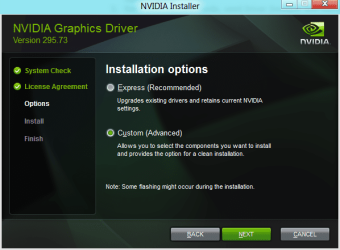
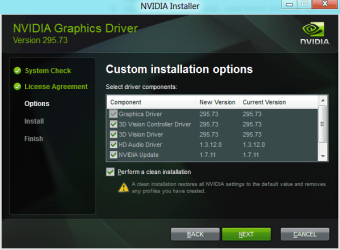
The NVidia driver is self-extracting; there is no need to extract it first. Did you select these options when trying to install?

Capture.PNG Capture1.PNG

Just in case your copy of the driver is corrupt, download a fresh one first.
 

My Computer

Computer type
PC/Desktop
Computer Manufacturer/Model Number
Dwarf Dwf/11/2012 r09/2013
OS
Windows 8.1 Pro RTM x64
CPU
Intel Core-i5-3570K 4-core @ 3.4GHz (Ivy Bridge) (OC 4.4GHz)
Motherboard
ASRock Z77 Extreme4-M
Memory
4 x 4GB DDR3-1600 Corsair Vengeance CMZ8GX3M2A1600C9B (16GB)
Graphics Card(s)
MSI GeForce GTX770 Gaming OC 2GB
Sound Card
Realtek High Definition on board solution (ALC 898)
Monitor(s) Displays
ViewSonic VA1912w Widescreen (VGA)
Screen Resolution
1440x900
Hard Drives
OCZ Agility 3 SSD 120GB SATA III x2 (RAID 0)
Samsung HD501LJ 500GB SATA II x2
Hitachi HDS721010CLA332 1TB SATA II
Iomega 1.5TB Ext USB 2.0
WD 2.0TB Ext USB 3.0
PSU
XFX Pro Series 850W Semi-Modular
Case
Gigabyte IF233
Cooling
1 x 120mm Front Inlet 1 x 120mm Rear Exhaust
Keyboard
Microsoft Comfort Curve Keyboard 3000 (USB)
Mouse
Microsoft Comfort Mouse 3000 for Business (USB)
Internet Speed
NetGear DG834Gv3 ADSL Modem/Router (Ethernet) ~4.0 Mb/s (O2)
Antivirus
Avast! 8.0.1497
Browser
IE 11
Other Info
Optical Drive: HL-DT-ST BD-RE BH10LS30 SATA Bluray
Lexmark S305 Printer/Scanner/Copier (USB)
WEI Score: 8.1/8.1/8.5/8.5/8.25
Asus Eee PC 1011PX Netbook (Windows 7 x86 Starter)
The NVidia driver is self-extracting; there is no need to extract it first. Did you select these options when trying to install?

View attachment 200397 View attachment 200398

Just in case your copy of the driver is corrupt, download a fresh one first.
Yes it's self extracting, sorry for not posting it clearly. I even downloaded a fresh installation. Didn't help.
Thanks!
 

My Computer

Computer type
PC/Desktop
OS
Windows 7 Ultimate 64-bit SP1
CPU
Intel Core i5 4670K @ 3.40GHz
Motherboard
MSI Z87-G45 GAMING (MS-7821)
Memory
16.0GB Dual-Channel DDR3 @ 666MHz (9-9-9-24)
Graphics Card(s)
2047MB NVIDIA GeForce GTX 760 (MSI)
Monitor(s) Displays
Acer H236HL
Screen Resolution
1920x1080@60Hz
Hard Drives
111GB KINGSTON SV300S37A120G ATA Device (SSD)
2794GB Seagate ST3000DM001-9YN166 ATA Device (SATA)
465GB Seagate ST3500320NS ATA Device (SATA)
931GB Seagate ST1000DM003-1CH162 ATA Device (SATA)
3726GB Hitachi HGST HDS 5C4040ALE630 USB Device (USB
PSU
LEPA G 650W 80 PLUS Gold
Case
Fractal Design Define R4 (Arctic White)
Cooling
Corsair H60 74.4 CFM Liquid CPU Cooler
Antivirus
Common sense
Browser
Firefox
Do you happen to image your system?
Sometimes, its better just to roll back a few weeks or month and try again.


Honestly, Im a bit stumped. Never had such a issue, and the few minor issues I have had were resolved by removing all and doing a clean install with a fresh copy of the driver package.

I can't help but think there is something interfering with the Un-Install/install process.


Just to cover all basis, have you tried disabling your AV/Spyware scanners during the process? This shouldn't cause a issue, but it is possible.
 

My Computer

Computer Manufacturer/Model Number
Custom (Self Build)
OS
Windows 7 Home Premium 64bit
CPU
Intel Core i7 2700k
Motherboard
eVGA P67 SLI
Memory
8GB Mushkin Redline Ridgebacks @1866
Graphics Card(s)
EVGA GTX570 SC
Sound Card
XiFi Titanium HD
Monitor(s) Displays
LG W2453V
Screen Resolution
1920x1080
Hard Drives
Intel 320 80GB -- Intel X25-V 40GB --WD Black 1TB x2 -- WD Blue 640GB
PSU
Seasonic x750
Case
Corsair 600T SE White
Cooling
eVGA Superclocked CPU Cooler
Keyboard
Saitek Cyborg
Antivirus
Kaspersky
Browser
IE
Other Info
LG BD/DVD
So, can you run the 32 bit driver download and will it work?
 

My Computer

Computer Manufacturer/Model Number
Biostar ACPI x64 based PC
OS
Windows7 64 bit
CPU
AMD athlon II 3.1 ghz
Motherboard
Biostar N68S3+ Nvidia mcp68s
Memory
8gb
Graphics Card(s)
NVIDIA GeForce 7025/NVIDIA nForce 630a
Sound Card
Realtek High Definition Audio
Monitor(s) Displays
Dell E2210H (Analog)
Hard Drives
1TB
PSU
450Watts
Case
generic
Cooling
3 fans with thermo cooled
Nvidia just can't make 64 bit drivers. I have updated twice and two times the driver "stopped responding" and the BSOD appeared. Now my Win 7 64 bit Pc only use drivers from Windows Update.

I know, I feel that they don't even try to support 64 bit!

Depends on the card as I personally haven't had any dramas with x64 nvidia drivers yet.

(I'm not saying they're perfect since I haven't had issues though ;) )


So, can you run the 32 bit driver download and will it work?

Not if your OS is x64
 

My Computer

Computer type
PC/Desktop
Computer Manufacturer/Model Number
Systems by SmartEyeball
OS
8 Pro x64
CPU
i7 3770K 4.6GHz
Motherboard
ASUS P8Z77 WS
Memory
16GB G.Skill Trident X 2666mhz
Graphics Card(s)
x2 EVGA 780 Ti Superclocked SLI
Sound Card
SB X-FI Surround 5.1 PRO USB / ATH-AD900 Headphones
Monitor(s) Displays
x3 Dell U2410 / 58" Samsung
Screen Resolution
5760*1200/ 1920*1200
Hard Drives
2x Intel 520 240GB (RAID 0) * 2x WD Caviar Blacks 2TB (RAID 0) * 2TB WD Caviar Black * Sony Optirac DVD
PSU
Silverstone Strider Evolution 1200W
Case
Thermaltake Level 10 GT Snow Edition
Cooling
Noctua NH-D14
Keyboard
Topre Realforce // Ducky Shine MX Black // Filco Ninja TKL
Mouse
Thermaltake Theron (Highly Recommended) + Razer Imperator
Antivirus
MSE
Browser
IE, FF, WaterFox
Other Info
GT Extreme V2 Sim Racing Cockpit + 40" LCD and K/B Mouse stand ▼
Fanatec CSR Elite Wheel + Clubsport V1 Pedals + CSR shifter/7G-H ▼Saitek X52 Pro ▼ TrackIR 5 Pro
Buttkicker v2 Seat Rumbler with Dedicated 5.1 and Sub Woofer attached to frame ▼
=
Bloody Big Grin
As I followed the guide, yes, I disabled my Kaspersky AV and Firewall, didnt work.
I am just gonna have to stick with the 275.33 drivers. Sucks.
Really wanted the latest ones for the "40%" Skyrim Boost :P

Thanks guys anyway
 

My Computer

Computer type
PC/Desktop
OS
Windows 7 Ultimate 64-bit SP1
CPU
Intel Core i5 4670K @ 3.40GHz
Motherboard
MSI Z87-G45 GAMING (MS-7821)
Memory
16.0GB Dual-Channel DDR3 @ 666MHz (9-9-9-24)
Graphics Card(s)
2047MB NVIDIA GeForce GTX 760 (MSI)
Monitor(s) Displays
Acer H236HL
Screen Resolution
1920x1080@60Hz
Hard Drives
111GB KINGSTON SV300S37A120G ATA Device (SSD)
2794GB Seagate ST3000DM001-9YN166 ATA Device (SATA)
465GB Seagate ST3500320NS ATA Device (SATA)
931GB Seagate ST1000DM003-1CH162 ATA Device (SATA)
3726GB Hitachi HGST HDS 5C4040ALE630 USB Device (USB
PSU
LEPA G 650W 80 PLUS Gold
Case
Fractal Design Define R4 (Arctic White)
Cooling
Corsair H60 74.4 CFM Liquid CPU Cooler
Antivirus
Common sense
Browser
Firefox
Heya Guys,
I thought I'd try again today to see if anything had changed. I managed to use the uninstaller to uninstall the control panel this time! Yey! but happiness didn't last long.
Restarted system into normal mode, waited for VGA auto detect thing and to see if no errors occured, everything was fine so I restarted into safe mode and ran Driver Sweeper.
Rebooted back into normal mode, tried to install, and crud, Installation failed once again....
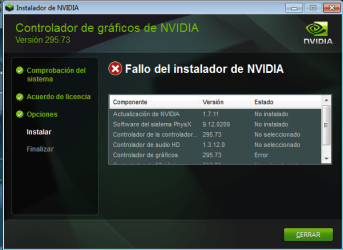
Here's a pic of what happenes half way through the installation process.
Sin título.png
(as you can see, I only selected the control panel, the update, and physix, nothing else)

What I have noticed is that some system32 SYSWOW64 files, starting in "nv...exe" keep appearing, even if i delete them, they automatically repear when I restart... Could that have something to do with it?
 

My Computer

Computer type
PC/Desktop
OS
Windows 7 Ultimate 64-bit SP1
CPU
Intel Core i5 4670K @ 3.40GHz
Motherboard
MSI Z87-G45 GAMING (MS-7821)
Memory
16.0GB Dual-Channel DDR3 @ 666MHz (9-9-9-24)
Graphics Card(s)
2047MB NVIDIA GeForce GTX 760 (MSI)
Monitor(s) Displays
Acer H236HL
Screen Resolution
1920x1080@60Hz
Hard Drives
111GB KINGSTON SV300S37A120G ATA Device (SSD)
2794GB Seagate ST3000DM001-9YN166 ATA Device (SATA)
465GB Seagate ST3500320NS ATA Device (SATA)
931GB Seagate ST1000DM003-1CH162 ATA Device (SATA)
3726GB Hitachi HGST HDS 5C4040ALE630 USB Device (USB
PSU
LEPA G 650W 80 PLUS Gold
Case
Fractal Design Define R4 (Arctic White)
Cooling
Corsair H60 74.4 CFM Liquid CPU Cooler
Antivirus
Common sense
Browser
Firefox
Omg Omg! I finally got them to work!
I had to Run Device Manager as Admin, and manually locate the folder to update the drivers!
Thanks guys!!!
 

My Computer

Computer type
PC/Desktop
OS
Windows 7 Ultimate 64-bit SP1
CPU
Intel Core i5 4670K @ 3.40GHz
Motherboard
MSI Z87-G45 GAMING (MS-7821)
Memory
16.0GB Dual-Channel DDR3 @ 666MHz (9-9-9-24)
Graphics Card(s)
2047MB NVIDIA GeForce GTX 760 (MSI)
Monitor(s) Displays
Acer H236HL
Screen Resolution
1920x1080@60Hz
Hard Drives
111GB KINGSTON SV300S37A120G ATA Device (SSD)
2794GB Seagate ST3000DM001-9YN166 ATA Device (SATA)
465GB Seagate ST3500320NS ATA Device (SATA)
931GB Seagate ST1000DM003-1CH162 ATA Device (SATA)
3726GB Hitachi HGST HDS 5C4040ALE630 USB Device (USB
PSU
LEPA G 650W 80 PLUS Gold
Case
Fractal Design Define R4 (Arctic White)
Cooling
Corsair H60 74.4 CFM Liquid CPU Cooler
Antivirus
Common sense
Browser
Firefox
Back
Top