NVIDIA GeForce 9400 GT & Desktop Performance 4.8...?

Ok so how do I overclock my CPU and Graphics card..? Can someone help me achieve this..? I want a high score...Lol. No I just want better :D
 

My Computer My Computer

At a glance

Windows 7 Pro x64AMD Athlon 64 x2 Dual Core Processor 5000+ 2....8 GigGeForce GT 240
Computer Manufacturer/Model Number
HP Pavilion Case
OS
Windows 7 Pro x64
CPU
AMD Athlon 64 x2 Dual Core Processor 5000+ 2.60 GHz
Motherboard
Pegatron - Violet 3.02
Memory
8 Gig
Graphics Card(s)
GeForce GT 240
Sound Card
Realtek HD
Monitor(s) Displays
26 Inch and 19 Inch Dual Monitor
Screen Resolution
1920 X 1200 -- 1440 X 900
Hard Drives
Internal 500 GB Sata Drive and 1TB Hatachi External HD & 1TB Western Digital Network Drive
PSU
550 Watts
Case
HP Pavilion
Cooling
4" and 5" Fans
Keyboard
Logitech Solar K750
Mouse
Microsoft Wireless 3500
Internet Speed
50 Meg Fibre Optic Cable Broadband
Other Info
Samsung DP-U350 - 23" Touch Screen PC
Grab Nvidia System Tools.

www.Nvidia.com

Just search for "Nvidia System Tools"

It has an overclocking feature.

I warn you though, mucking with clock speeds WILL shorten the life of your card if done poorly.

Consult some of us Forum Goers who know the in's and outs of clocking GPU's or use GPUReview.com

Be careful, and good luck!!

Matt~
 

My Computer My Computer

At a glance

Windows 7 Ultimate x64Intel Core i7 920 at 2.886 Ghrz3 Gb DDR3 Patriot KitNVidia GeForce BFG 9600 GT
Computer Manufacturer/Model Number
Myself
OS
Windows 7 Ultimate x64
CPU
Intel Core i7 920 at 2.886 Ghrz
Motherboard
Asus P6T
Memory
3 Gb DDR3 Patriot Kit
Graphics Card(s)
NVidia GeForce BFG 9600 GT
Sound Card
Creative X-Fi Xtreme Music
Monitor(s) Displays
Twin LG 19" Flatpanels (DVI)
Hard Drives
750 GB Western Digital Caviar Black
PSU
Cooler Master 550W
Case
Antec 300
Cooling
Passive (I like it quite)
Thanks Matt for the link. I will be very careful and if I come across any problems I will be sure to post away for help :D
 

My Computer My Computer

At a glance

Windows 7 Pro x64AMD Athlon 64 x2 Dual Core Processor 5000+ 2....8 GigGeForce GT 240
Computer Manufacturer/Model Number
HP Pavilion Case
OS
Windows 7 Pro x64
CPU
AMD Athlon 64 x2 Dual Core Processor 5000+ 2.60 GHz
Motherboard
Pegatron - Violet 3.02
Memory
8 Gig
Graphics Card(s)
GeForce GT 240
Sound Card
Realtek HD
Monitor(s) Displays
26 Inch and 19 Inch Dual Monitor
Screen Resolution
1920 X 1200 -- 1440 X 900
Hard Drives
Internal 500 GB Sata Drive and 1TB Hatachi External HD & 1TB Western Digital Network Drive
PSU
550 Watts
Case
HP Pavilion
Cooling
4" and 5" Fans
Keyboard
Logitech Solar K750
Mouse
Microsoft Wireless 3500
Internet Speed
50 Meg Fibre Optic Cable Broadband
Other Info
Samsung DP-U350 - 23" Touch Screen PC
Hey Guys,

I have some questions for you before I do this.

Device Settings


Question 1:

CPU

HT Bus is at 200MHz but will go higher. Whats the optimum or desired MHz here..>?

Question 2:

Cooling is set to 100%. This is correct...? I can only reduce this slider.

Motherboard Settings

Question 3:

Clock Speeds

HT Bus is set to 200MHz but will go to 500MHz plus has a 5x multiplier

Question 4:

PCIe clock, slot 3: is set to 2500MHz but this is the lowest setting, what can I adjust this to..?

Question 5:


Cooling

nForce SPP 0%

Auxilary 1: 0%

System 0%

Auxilary 2: 0%

Memory Settings

tRAS 15 tRWT 4
tRCD 5 tWTR 3
tRP 5 tWRRD 0
tRC 21 tREF 7.8us
tWR 5 tRDRD 2
tRRD 3 tWRWR 2

Memory Frequency: 666 (DDR 2) MHz
Memory Ratio 1.7x
FSB Frequency 200MHz
CAS Latency: 5

GPU Settings

The above I was not sure if it would be needed by the Guys here at SevenForums to help me get the best overclocking


The GPU is set to factory default frequencies

Cooling again is at 100%

Not sure what to do here because all there is is a slider which doesn't slide even when ticked but it allows me to type into the box beside it that ups the MHz of the GPU.

Please can someone help me do this..?

Thanks guys for all your help in this thread. I really do appreciate it :D
 

My Computer My Computer

At a glance

Windows 7 Pro x64AMD Athlon 64 x2 Dual Core Processor 5000+ 2....8 GigGeForce GT 240
Computer Manufacturer/Model Number
HP Pavilion Case
OS
Windows 7 Pro x64
CPU
AMD Athlon 64 x2 Dual Core Processor 5000+ 2.60 GHz
Motherboard
Pegatron - Violet 3.02
Memory
8 Gig
Graphics Card(s)
GeForce GT 240
Sound Card
Realtek HD
Monitor(s) Displays
26 Inch and 19 Inch Dual Monitor
Screen Resolution
1920 X 1200 -- 1440 X 900
Hard Drives
Internal 500 GB Sata Drive and 1TB Hatachi External HD & 1TB Western Digital Network Drive
PSU
550 Watts
Case
HP Pavilion
Cooling
4" and 5" Fans
Keyboard
Logitech Solar K750
Mouse
Microsoft Wireless 3500
Internet Speed
50 Meg Fibre Optic Cable Broadband
Other Info
Samsung DP-U350 - 23" Touch Screen PC
Thanks Matt for the link. I will be very careful and if I come across any problems I will be sure to post away for help :D


Wrams,

Hey, no problem! Always here to try and help fellow Forum members.

I only have two concerns. The first one being your Memory timings...

While I've had "Little" experience with Memory timings, I do know that this is a dangerous field. (Yes, even more dangerous than GPU overclocking)

I've had "Minor" tweaks turn into BSOD's and OS corruption. Please be careful in here and always modify timings in order. I'll find you a link to help you with Memory timing orders.

As for CPU overclocking, this generally requires more Power. If your Power Supply is sufficient, go nuts so long as you have the proper cooling. If you are still running stock cooling on your CPU (The fan that came with the Processor), I suggest only minor clocking.

GPU Overclocking I know more about. You say your Core stock clock is 200Mhz? Bump that baby up 45 Points and see where that takes you.

I've noticed that Core clocks are unstable at higher clocks or major Overclocking "Jumps" (200 Mhz to 500, say) and Memory Clocks are far more stable.

If you have a customizable Memory clock, bump that up 100 points and again, see where that takes you.

You might want to grab a benchmark tool (3Dmark, Etc). These tend to be far better examples of your system performance.

Get back to me with your results. :) Excited to see how things go!

And please, REMEMBER!! Don't take Overclock your cards. It Shortens life and damages components!! Overclocking is Bad, M'kay?

(So I don't get yelled at)

Matt~
 

My Computer My Computer

At a glance

Windows 7 Ultimate x64Intel Core i7 920 at 2.886 Ghrz3 Gb DDR3 Patriot KitNVidia GeForce BFG 9600 GT
Computer Manufacturer/Model Number
Myself
OS
Windows 7 Ultimate x64
CPU
Intel Core i7 920 at 2.886 Ghrz
Motherboard
Asus P6T
Memory
3 Gb DDR3 Patriot Kit
Graphics Card(s)
NVidia GeForce BFG 9600 GT
Sound Card
Creative X-Fi Xtreme Music
Monitor(s) Displays
Twin LG 19" Flatpanels (DVI)
Hard Drives
750 GB Western Digital Caviar Black
PSU
Cooler Master 550W
Case
Antec 300
Cooling
Passive (I like it quite)
I get 4.9 from a 9500GT in Win7. So you seem to be in-line. Cannot expect more from a $50 card.
 

My Computer My Computer

At a glance

Vista, Windows7, Mint Mate, Zorin, Windows 8from 1.6GHz Duo to i7
Computer Manufacturer/Model Number
HP, Dell, Gateway, Toshiba - 4 laptops and 2 desktops
OS
Vista, Windows7, Mint Mate, Zorin, Windows 8
CPU
from 1.6GHz Duo to i7
Monitor(s) Displays
2x HP w2207
Hard Drives
5x HDD, 7x SSD, 12x Externals
Keyboard
with trackball - no mices
Mouse
Trackball mice
Internet Speed
DSL 6000
You might want to grab a benchmark tool (3Dmark, Etc). These tend to be far better examples of your system performance.

Get back to me with your results. :) Excited to see how things go!

And please, REMEMBER!! Don't take Overclock your cards. It Shortens life and damages components!! Overclocking is Bad, M'kay?

(So I don't get yelled at)

Matt~
Hi Matt,

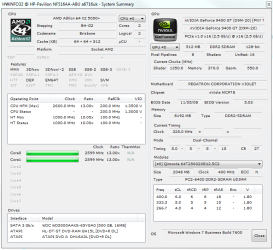
Not sure if this is what you want, The benchmark tool you suggested for some reason kept freezing up my PC so I used a free one ;)

Look at the attached image

P.S. Rep Added ;)
 

Attachments

  • PC Stats.PNG
    PC Stats.PNG
    31.7 KB · Views: 95

My Computer My Computer

At a glance

Windows 7 Pro x64AMD Athlon 64 x2 Dual Core Processor 5000+ 2....8 GigGeForce GT 240
Computer Manufacturer/Model Number
HP Pavilion Case
OS
Windows 7 Pro x64
CPU
AMD Athlon 64 x2 Dual Core Processor 5000+ 2.60 GHz
Motherboard
Pegatron - Violet 3.02
Memory
8 Gig
Graphics Card(s)
GeForce GT 240
Sound Card
Realtek HD
Monitor(s) Displays
26 Inch and 19 Inch Dual Monitor
Screen Resolution
1920 X 1200 -- 1440 X 900
Hard Drives
Internal 500 GB Sata Drive and 1TB Hatachi External HD & 1TB Western Digital Network Drive
PSU
550 Watts
Case
HP Pavilion
Cooling
4" and 5" Fans
Keyboard
Logitech Solar K750
Mouse
Microsoft Wireless 3500
Internet Speed
50 Meg Fibre Optic Cable Broadband
Other Info
Samsung DP-U350 - 23" Touch Screen PC
Hm.. my several years old laptop gets a 5.1 on graphics with a GeForce Go 7600 (256MB). It is overclocked a little through RivaTuner. Mobile GPUs are usually slower than the desktop versions.

I just got a 9600gt (512MB) for my desktop. It gets 6.8 rating with factory clocks. I was hoping it would be a bit higher but apparently it's normal. Testing first with Microsoft generic drivers and nvidia's latest drivers didn't change the score.
 

My Computer My Computer

At a glance

win7
OS
win7
Yes, those are excellent! :)

Okay, Wrams, I can finally see your clock speeds (At factory, no?) Those are actually wrong... Strangley enough...

Take a look: make sure to click on specifications. Your clocks are all wrong... Under, that is.

GeForce 9400 GT

You should try and clock up a bit, it may help. But remember Clocking is bad, M'kay?

Matt~

*EDIT* Forgot to ask...Who made that card, MSI? BFG? Let me know.
 

My Computer My Computer

At a glance

Windows 7 Ultimate x64Intel Core i7 920 at 2.886 Ghrz3 Gb DDR3 Patriot KitNVidia GeForce BFG 9600 GT
Computer Manufacturer/Model Number
Myself
OS
Windows 7 Ultimate x64
CPU
Intel Core i7 920 at 2.886 Ghrz
Motherboard
Asus P6T
Memory
3 Gb DDR3 Patriot Kit
Graphics Card(s)
NVidia GeForce BFG 9600 GT
Sound Card
Creative X-Fi Xtreme Music
Monitor(s) Displays
Twin LG 19" Flatpanels (DVI)
Hard Drives
750 GB Western Digital Caviar Black
PSU
Cooler Master 550W
Case
Antec 300
Cooling
Passive (I like it quite)
Just to let everyone know I know longer have the graphics card. I can't understand what happened but before I even got a chance to clock anything and it burnt out :( I have however bought a new one. I shal now get the details of the new card and let you know.

Thanks Mike for your reply. :D
 

My Computer My Computer

At a glance

Windows 7 Pro x64AMD Athlon 64 x2 Dual Core Processor 5000+ 2....8 GigGeForce GT 240
Computer Manufacturer/Model Number
HP Pavilion Case
OS
Windows 7 Pro x64
CPU
AMD Athlon 64 x2 Dual Core Processor 5000+ 2.60 GHz
Motherboard
Pegatron - Violet 3.02
Memory
8 Gig
Graphics Card(s)
GeForce GT 240
Sound Card
Realtek HD
Monitor(s) Displays
26 Inch and 19 Inch Dual Monitor
Screen Resolution
1920 X 1200 -- 1440 X 900
Hard Drives
Internal 500 GB Sata Drive and 1TB Hatachi External HD & 1TB Western Digital Network Drive
PSU
550 Watts
Case
HP Pavilion
Cooling
4" and 5" Fans
Keyboard
Logitech Solar K750
Mouse
Microsoft Wireless 3500
Internet Speed
50 Meg Fibre Optic Cable Broadband
Other Info
Samsung DP-U350 - 23" Touch Screen PC
lower end cards only last about a year.. just long enough for the warrenty to expire,

I had 2 8500 gt's in SLI but one died within a year so I couldn't live with the power of one 8500 so I boaught a 9800GT and that was pretty cool.. I sold it to my buddy and then got my 260GTX thats really sweet. it scores 7.2.
 

My Computer My Computer

At a glance

windows 7AMD Phenom II x3 Black Edition 720OCZ Gold XTC DDR2 1066 2GB x2BFG NVidia GTX 260
OS
windows 7
CPU
AMD Phenom II x3 Black Edition 720
Motherboard
ASUS M3N72-D
Memory
OCZ Gold XTC DDR2 1066 2GB x2
Graphics Card(s)
BFG NVidia GTX 260
Monitor(s) Displays
Samsung 42" Plasma 1920x1080
Hard Drives
WDC 2TB
Segate Free Agent 3TB
PSU
OCZ XTreme 600w
Case
Antec 300
Cooling
Air x4 12" antec fans
I now have the GT 250 which scores 6.5 so am pleased, 1GB memory so alot better than my 256mb card :)
 

My Computer My Computer

At a glance

Windows 7 Pro x64AMD Athlon 64 x2 Dual Core Processor 5000+ 2....8 GigGeForce GT 240
Computer Manufacturer/Model Number
HP Pavilion Case
OS
Windows 7 Pro x64
CPU
AMD Athlon 64 x2 Dual Core Processor 5000+ 2.60 GHz
Motherboard
Pegatron - Violet 3.02
Memory
8 Gig
Graphics Card(s)
GeForce GT 240
Sound Card
Realtek HD
Monitor(s) Displays
26 Inch and 19 Inch Dual Monitor
Screen Resolution
1920 X 1200 -- 1440 X 900
Hard Drives
Internal 500 GB Sata Drive and 1TB Hatachi External HD & 1TB Western Digital Network Drive
PSU
550 Watts
Case
HP Pavilion
Cooling
4" and 5" Fans
Keyboard
Logitech Solar K750
Mouse
Microsoft Wireless 3500
Internet Speed
50 Meg Fibre Optic Cable Broadband
Other Info
Samsung DP-U350 - 23" Touch Screen PC
awesome, as long as you're happy man.
 

My Computer My Computer

At a glance

windows 7AMD Phenom II x3 Black Edition 720OCZ Gold XTC DDR2 1066 2GB x2BFG NVidia GTX 260
OS
windows 7
CPU
AMD Phenom II x3 Black Edition 720
Motherboard
ASUS M3N72-D
Memory
OCZ Gold XTC DDR2 1066 2GB x2
Graphics Card(s)
BFG NVidia GTX 260
Monitor(s) Displays
Samsung 42" Plasma 1920x1080
Hard Drives
WDC 2TB
Segate Free Agent 3TB
PSU
OCZ XTreme 600w
Case
Antec 300
Cooling
Air x4 12" antec fans
I now have the GT 250 which scores 6.5 so am pleased, 1GB memory so alot better than my 256mb card :)

surprised it's only a 6.5 considering my 9600gt 512MB gets a 6.9 when overclocked.
 

My Computer My Computer

At a glance

win7
OS
win7
I now have the GT 250 which scores 6.5 so am pleased, 1GB memory so alot better than my 256mb card :)

surprised it's only a 6.5 considering my 9600gt 512MB gets a 6.9 when overclocked.

Mine gets 6.8 overclocked but we have to remember it's not just the Graphics card when it comes to windows Scoring...
 

My Computer My Computer

At a glance

Windows 7 Ultimate x64Intel Core i7 920 at 2.886 Ghrz3 Gb DDR3 Patriot KitNVidia GeForce BFG 9600 GT
Computer Manufacturer/Model Number
Myself
OS
Windows 7 Ultimate x64
CPU
Intel Core i7 920 at 2.886 Ghrz
Motherboard
Asus P6T
Memory
3 Gb DDR3 Patriot Kit
Graphics Card(s)
NVidia GeForce BFG 9600 GT
Sound Card
Creative X-Fi Xtreme Music
Monitor(s) Displays
Twin LG 19" Flatpanels (DVI)
Hard Drives
750 GB Western Digital Caviar Black
PSU
Cooler Master 550W
Case
Antec 300
Cooling
Passive (I like it quite)
Well for one my new card has NOT been overclocked as yet. If it was I am sure I would be seeing a 7.9 ;)

I wish I was across the board :D
 

My Computer My Computer

At a glance

Windows 7 Pro x64AMD Athlon 64 x2 Dual Core Processor 5000+ 2....8 GigGeForce GT 240
Computer Manufacturer/Model Number
HP Pavilion Case
OS
Windows 7 Pro x64
CPU
AMD Athlon 64 x2 Dual Core Processor 5000+ 2.60 GHz
Motherboard
Pegatron - Violet 3.02
Memory
8 Gig
Graphics Card(s)
GeForce GT 240
Sound Card
Realtek HD
Monitor(s) Displays
26 Inch and 19 Inch Dual Monitor
Screen Resolution
1920 X 1200 -- 1440 X 900
Hard Drives
Internal 500 GB Sata Drive and 1TB Hatachi External HD & 1TB Western Digital Network Drive
PSU
550 Watts
Case
HP Pavilion
Cooling
4" and 5" Fans
Keyboard
Logitech Solar K750
Mouse
Microsoft Wireless 3500
Internet Speed
50 Meg Fibre Optic Cable Broadband
Other Info
Samsung DP-U350 - 23" Touch Screen PC
It doesn't jump that significantly with overclocking.. maybe .1 or .2 points.
 

My Computer My Computer

At a glance

win7
OS
win7
I know mate I'm just messing about, ;)
 

My Computer My Computer

At a glance

Windows 7 Pro x64AMD Athlon 64 x2 Dual Core Processor 5000+ 2....8 GigGeForce GT 240
Computer Manufacturer/Model Number
HP Pavilion Case
OS
Windows 7 Pro x64
CPU
AMD Athlon 64 x2 Dual Core Processor 5000+ 2.60 GHz
Motherboard
Pegatron - Violet 3.02
Memory
8 Gig
Graphics Card(s)
GeForce GT 240
Sound Card
Realtek HD
Monitor(s) Displays
26 Inch and 19 Inch Dual Monitor
Screen Resolution
1920 X 1200 -- 1440 X 900
Hard Drives
Internal 500 GB Sata Drive and 1TB Hatachi External HD & 1TB Western Digital Network Drive
PSU
550 Watts
Case
HP Pavilion
Cooling
4" and 5" Fans
Keyboard
Logitech Solar K750
Mouse
Microsoft Wireless 3500
Internet Speed
50 Meg Fibre Optic Cable Broadband
Other Info
Samsung DP-U350 - 23" Touch Screen PC
I tried this on my machine

I can't understand why I am only getting a 4.8 on the Desktop Performance For Windows with my NVIDIA GeForce 9400 GT

I mean for a card I paid good money for I would think that the graphics would be better than they are. I have my settings running correctly but still it should be better.

I have done a driver update and its still the same, is there anything else I can do without having to purchase another card..?

Thanks for any replies you may have. :)


hey try this put another fan in the cabinet try to point it direct at graphics cards or get a plastic diverter I did and it worked my machine used to read 3.3 on graphics now it at 4.8
 

My Computer My Computer

At a glance

vista ultimate 32bitintel2gbnvidia
Computer type
PC/Desktop
Computer Manufacturer/Model Number
dell
OS
vista ultimate 32bit
CPU
intel
Motherboard
dell
Memory
2gb
Graphics Card(s)
nvidia
Hard Drives
seagate
Antivirus
clamwin plus my own
Browser
any
Back
Top