Nvidia integrated Hi-Def audio not working! Drivers anyone?

schandler

New member
Local time
4:23 AM
Messages
13
Hello everyone

Hvae just got W7 Ultimate x64 installed on my Alienware ALX desktop - thanks to awesone help from BFK and Dave76.

Most stuff has installed OK, but the sound isn't working at all. I saw another post where a member had a very similar problem to me - an Alienware with on-board hi-def graphics - NVIDIA C55-MB. The other member was looking for an external sound card to solve the problem, but I am trying just to fix the existing hardware as it always worked very well under Vista.

I am hoping all I need is a W7 driver for the Nvidia C55-MB... can't find anything on Alienware website , or on Nvidia - anyone any ideas?

For some reason W7 has automatically installed awhat seems to be a generic hi-def driver. It says it is "working properly" but there isn't any sound at all! This is actually worse then the other post, as I think their front speakers were working - none of mine are now working.


Very grateful for any help

Cheers
Stephen
 

My Computer My Computer

At a glance

Windows 7 Ultimate x64Intel4GBNVDIA GeForce dual 8800
Computer Manufacturer/Model Number
Alienware ALX51
OS
Windows 7 Ultimate x64
CPU
Intel
Motherboard
NVIDIA
Memory
4GB
Graphics Card(s)
NVDIA GeForce dual 8800
Sound Card
Logitech
Monitor(s) Displays
Dell Ultrasharp
Hard Drives
1TB RAID (2 x 500GB) Hitachi
2 x 1TB Hitachi
PSU
Alienware
Case
Alienware
Cooling
Alienware

My Computer My Computer

At a glance

Win 7 Ultimate x64FX-8350 @ 4.6 GHz so farADATA XPG V1 Series Black 8GB DDR3 1600Sapphire R9 270x Dual-X
Computer type
PC/Desktop
Computer Manufacturer/Model Number
Me
OS
Win 7 Ultimate x64
CPU
FX-8350 @ 4.6 GHz so far
Motherboard
Asus M5A97 EVO
Memory
ADATA XPG V1 Series Black 8GB DDR3 1600
Graphics Card(s)
Sapphire R9 270x Dual-X
Sound Card
Xonar DGX w/ Corsair Vengence 1300
Monitor(s) Displays
Acer S232HL Abid
Screen Resolution
1920x1080
Hard Drives
120 GB OCZ Vertex 3
500 GB Seagate 7200.12
PSU
Antec Earthwatts 650W Green
Case
Antec Three Hundred
Cooling
Cooler Master 212 EVO
Keyboard
Logitech G510
Mouse
Logitech G500s
Internet Speed
35000/3000
Hi Stormy 13

Thanks a lot for this but unfortunately they dudbt work much better than the generic HD audio driver that was auto-installed by W7. Still no sound :(

When I look at the sound dialogue on W7 control panel, with the generic driver installed, it says that the "speakers are not plugged in" (which they are).

The Relatek driver you kindly showed me did a little better, it showed that the speakers were there, nut it still doesn't play sounds.

I'm beginning to think that the previous owner of this Alienware maybe installed a 3rd party sound card. Do you know if there is any way I can check what hardware is in the computer, without opening it all up?

The speakers are Creative Inspire T6100 surround sound but they dont need installation or drivers - I just checked that on the Creative website.

I have a recollection that the computer before I upgraded from Vista to W7, had a Logitech sound driver? I would prefer not to pull the computer all to pieces to find which sound card it has, so is there a way I can "scan" to detect hardware? The auto scan function iin Windows 7 isn't picking the card up?

Many thanks for any advice!!
Kind regards

Stephen
 

My Computer My Computer

At a glance

Windows 7 Ultimate x64Intel4GBNVDIA GeForce dual 8800
Computer Manufacturer/Model Number
Alienware ALX51
OS
Windows 7 Ultimate x64
CPU
Intel
Motherboard
NVIDIA
Memory
4GB
Graphics Card(s)
NVDIA GeForce dual 8800
Sound Card
Logitech
Monitor(s) Displays
Dell Ultrasharp
Hard Drives
1TB RAID (2 x 500GB) Hitachi
2 x 1TB Hitachi
PSU
Alienware
Case
Alienware
Cooling
Alienware
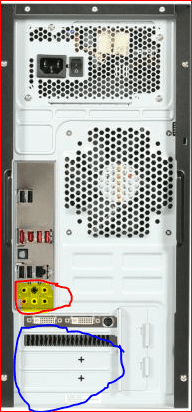
Do you know if there is any way I can check what hardware is in the computer, without opening it all up?

backpanel.PNG

The red circle is the onboard jacks, and if there is a sound card installed it will be somewhere in the blue circle. From the download page for that computer it could have also come with a X-Fi Xtreme Audio installed.

If it didn't come with that and the previous owner did add a card, then the only way to find out what it is is to pop the side off and pull the card.

I have a recollection that the computer before I upgraded from Vista to W7, had a Logitech sound driver?

If that is/was the case the only reason for something like to be there would be if the speakers were USB, as speakers that plug in to a sound card do not have any drivers.
 

My Computer My Computer

At a glance

Win 7 Ultimate x64FX-8350 @ 4.6 GHz so farADATA XPG V1 Series Black 8GB DDR3 1600Sapphire R9 270x Dual-X
Computer type
PC/Desktop
Computer Manufacturer/Model Number
Me
OS
Win 7 Ultimate x64
CPU
FX-8350 @ 4.6 GHz so far
Motherboard
Asus M5A97 EVO
Memory
ADATA XPG V1 Series Black 8GB DDR3 1600
Graphics Card(s)
Sapphire R9 270x Dual-X
Sound Card
Xonar DGX w/ Corsair Vengence 1300
Monitor(s) Displays
Acer S232HL Abid
Screen Resolution
1920x1080
Hard Drives
120 GB OCZ Vertex 3
500 GB Seagate 7200.12
PSU
Antec Earthwatts 650W Green
Case
Antec Three Hundred
Cooling
Cooler Master 212 EVO
Keyboard
Logitech G510
Mouse
Logitech G500s
Internet Speed
35000/3000
Back
Top