NVIDIA nForce Network Adapter problems

PaulS

New member
Local time
10:45 AM
Messages
15
Hello!

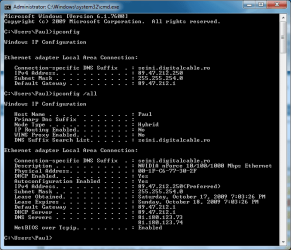
I have a problem with my Internet connection on Windows 7 x64 build 7600. My Internet connection is dropping randomly almost every day. I have an Asus M3N H/HDMI motherboard with NVIDIA nForce Network Adapter. I tried numerous drivers (even drivers for Vista x64), disabling IPv6 (with the DisabledComponents registry entry), disabling Receive Side Scaling and many other possible solutions with no luck. I have a high-speed Internet connection through LAN. My IPs are set by the DHCP but I don't have access to the Internet even when the IPs are configured correctly.
Sometimes, the DHCP allocates strange IPs like 169.xxx... or 192.168.xxx... , my default being 89.47.212.250 for my IP and 89.47.212.1 for the default gateway. The strange thing is that the connection can work for like 9-12 hours without any drop and the next day I don't have access right after I turn on my PC and it stays down for random periods of time (10 minutes, 30 minutes or hours). Also, if i have Internet access and I disable and enable the adapter the connection is lost but my IPs and DNS are fine.
I've uploaded a printscreen with the ipconfig /all command. Hope someone else had a similar problem and solved it. Thanks in advance!
 

Attachments
  • ipconfig.jpg
    ipconfig.jpg
    169.5 KB · Views: 791

My Computer

OS
Windows 7 Ultimate x64
CPU
Athlon X2 6000+
Motherboard
Asus M3N-H/HDMI
Memory
6GB DDR2 800Mhz Corsair
Graphics Card(s)
TwinTech Geforce 9800GT OC
Sound Card
Audigy SE
PaulS, welcome to the forums.

When you installed the Nvidia drivers did you also happen to install the included Network Management Tools (v73.16) "Sedona"? If so that could be the problem. If it is installed, uninstall it and see if the problem goes away.
 

My Computer

Computer type
PC/Desktop
Computer Manufacturer/Model Number
Me
OS
Win 7 Ultimate x64
CPU
FX-8350 @ 4.6 GHz so far
Motherboard
Asus M5A97 EVO
Memory
ADATA XPG V1 Series Black 8GB DDR3 1600
Graphics Card(s)
Sapphire R9 270x Dual-X
Sound Card
Xonar DGX w/ Corsair Vengence 1300
Monitor(s) Displays
Acer S232HL Abid
Screen Resolution
1920x1080
Hard Drives
120 GB OCZ Vertex 3
500 GB Seagate 7200.12
PSU
Antec Earthwatts 650W Green
Case
Antec Three Hundred
Cooling
Cooler Master 212 EVO
Keyboard
Logitech G510
Mouse
Logitech G500s
Internet Speed
35000/3000
Thank you, stormy13. No, I didn't install Network Management Tools or Network Access Manager. Only the ethernet driver.
It's driving me insane today. I get access to the Internet for like 1-2 minutes and then it drops and I have to wait to reconnect. Yesterday worked the whole day with no drops. While it's down, I can't ping anything so it's not a browser issue and I've checked with my ISP - the servers are fine. My Windows firewall is disabled and I have Eset NOD32 Antivirus which hasn't got a firewall built-in. The network icon shows Internet Access almost all the time even when I can't browse. Sometimes I get connected to other networks: Network 2, 3, 4 even 5 but the IPs remain the same as for the default Network. Funny thing, if I start to download something and during the download my Internet goes off the download doesn't stop.
I forgot to say that on XP x64 everything works fine.
 

My Computer

OS
Windows 7 Ultimate x64
CPU
Athlon X2 6000+
Motherboard
Asus M3N-H/HDMI
Memory
6GB DDR2 800Mhz Corsair
Graphics Card(s)
TwinTech Geforce 9800GT OC
Sound Card
Audigy SE
I see that no one has a similar problem like me. I've been thinking of buying another network adapter. Is this a certain solution or the problem is more likely coming from the router/gateway computer? Unfortunately, I don't have access to my router because it's outside my house on a pole and the only persons who can mess with it are the employees from my ISP. Is it also possible that my gateway computer software blocks in some way my internet connection coming from Windows 7?
 

My Computer

OS
Windows 7 Ultimate x64
CPU
Athlon X2 6000+
Motherboard
Asus M3N-H/HDMI
Memory
6GB DDR2 800Mhz Corsair
Graphics Card(s)
TwinTech Geforce 9800GT OC
Sound Card
Audigy SE
Me too!

I'm having this issue as well with my evga montherboard with Nvidia nForce 15.51 drivers. I didn't notice if you said what router you are using; I know it is unlikely that this is the cause but I am using a Linksys WRT54GL with Tomato v1.25 bios.

I'm connected directly to my cable modem to see if the problem continues. The only other thing I see that might be causing the issue for me is that we are both using the "Hybrid" node type. I do not think this was the case for me when I was using Vista but I don't recall for sure.

Please let me know if you find any solutions and I will do the same. Thanks!
 

My Computer

OS
Windows 7 64-bit
Thanks for the reply, ogunther.
I don't know anything about my router because my ISP owns it and they don't allow access to it. The other day my Internet connection didn't drop for about 10 hours and I didn't change anything. It's very strange that there isn't an obvious pattern for the drops.
 

My Computer

OS
Windows 7 Ultimate x64
CPU
Athlon X2 6000+
Motherboard
Asus M3N-H/HDMI
Memory
6GB DDR2 800Mhz Corsair
Graphics Card(s)
TwinTech Geforce 9800GT OC
Sound Card
Audigy SE
Nvidia Ethernet solution...

Try disabling "Recieve Side Scaling" in the driver's Advanced Tab.

Worked for me.
 

My Computer

OS
Windows 7 Ultimate x64 Signature Edition, Genuine and Activated.
CPU
Intel Core2Quad QX9650
Motherboard
EVGA, Nvidia 680i chipset
Graphics Card(s)
Nvidia GeForce 260GTX
Mouse
Razer Mamba
Internet Speed
10Mbit/s vdsl
I don't have that option in the driver's Advanced tab, but I managed to disable it from cmd using the "netsh int tcp set global rss=disabled" command. Nothing changed. I also tried to disable the autotuning option. Didn't work either.
 

My Computer

OS
Windows 7 Ultimate x64
CPU
Athlon X2 6000+
Motherboard
Asus M3N-H/HDMI
Memory
6GB DDR2 800Mhz Corsair
Graphics Card(s)
TwinTech Geforce 9800GT OC
Sound Card
Audigy SE
Possible solution

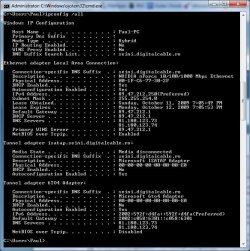
I think I may have found a solution to this problem. I presumed it had something to do with IPv6 so I tried to disable it from cmd. So, start cmd (command prompt) and type the following comands:

netsh interface ipv6 6to4 set state disabled disabled

netsh interface ipv6 6to4 set routing disabled disabled

netsh interface ipv6 isatap set router default disabled

netsh interface ipv6 isatap set state disabled

netsh interface ipv6 set teredo disabled

If the operation was succesful, when you type ipconfig in cmd you should see only your IPv4 parameters (something similar with my printscreen)
 

Attachments

  • ipconfig.png
    ipconfig.png
    76.4 KB · Views: 676

My Computer

OS
Windows 7 Ultimate x64
CPU
Athlon X2 6000+
Motherboard
Asus M3N-H/HDMI
Memory
6GB DDR2 800Mhz Corsair
Graphics Card(s)
TwinTech Geforce 9800GT OC
Sound Card
Audigy SE
Why by chance did you disable everything.?
I would suggest that you leave all enabled that is default.
-----------------
C:\Users\Snuffy>ipconfig /all
Windows IP Configuration
Host Name . . . . . . . . . . . . : Snuffy-PC
Primary Dns Suffix . . . . . . . :
Node Type . . . . . . . . . . . . : Hybrid
IP Routing Enabled. . . . . . . . : No
WINS Proxy Enabled. . . . . . . . : No
DNS Suffix Search List. . . . . . : gateway.2wire.net
Ethernet adapter Local Area Connection:
Connection-specific DNS Suffix . : gateway.2wire.net
Description . . . . . . . . . . . : Realtek PCIe GBE Family Controller
Physical Address. . . . . . . . . : 00-13-8F-F0-71-3B
DHCP Enabled. . . . . . . . . . . : Yes
Autoconfiguration Enabled . . . . : Yes
Link-local IPv6 Address . . . . . : fe80::11fd:3fb8:321b:14ff%11(Preferred)
IPv4 Address. . . . . . . . . . . : 71.158.208.221(Preferred)
Subnet Mask . . . . . . . . . . . : 255.255.255.252
Lease Obtained. . . . . . . . . . : Wednesday, October 21, 2009 12:35:26
Lease Expires . . . . . . . . . . : Wednesday, October 21, 2009 20:30:36
Default Gateway . . . . . . . . . : 71.158.208.222
DHCP Server . . . . . . . . . . . : 192.168.1.xxx
DHCPv6 IAID . . . . . . . . . . . : 234886031
DHCPv6 Client DUID. . . . . . . . : 00-01-00-01-12-03-D1-58-00-13-8F-F0-71-3B
DNS Servers . . . . . . . . . . . : 192.168.1.254
NetBIOS over Tcpip. . . . . . . . : Enabled
Tunnel adapter isatap.gateway.2wire.net:
Media State . . . . . . . . . . . : Media disconnected
Connection-specific DNS Suffix . : gateway.2wire.net
Description . . . . . . . . . . . : Microsoft ISATAP Adapter
Physical Address. . . . . . . . . : 00-00-00-00-00-00-00-E0
DHCP Enabled. . . . . . . . . . . : No
Autoconfiguration Enabled . . . . : Yes
Tunnel adapter 6TO4 Adapter:
Connection-specific DNS Suffix . : gateway.2wire.net
Description . . . . . . . . . . . : Microsoft 6to4 Adapter
Physical Address. . . . . . . . . : 00-00-00-00-00-00-00-E0
DHCP Enabled. . . . . . . . . . . : No
Autoconfiguration Enabled . . . . : Yes
IPv6 Address. . . . . . . . . . . : 2002:479e:d0dd::479e:d0dd(Preferred)
Default Gateway . . . . . . . . . : 2002:c058:6301::c058:6301
DNS Servers . . . . . . . . . . . : 192.168.1.xxx
NetBIOS over Tcpip. . . . . . . . : Disabled
Tunnel adapter Local Area Connection* 12:
Connection-specific DNS Suffix . :
Description . . . . . . . . . . . : Teredo Tunneling Pseudo-Interface
Physical Address. . . . . . . . . : 00-00-00-00-00-00-00-E0
DHCP Enabled. . . . . . . . . . . : No
Autoconfiguration Enabled . . . . : Yes
Link-local IPv6 Address . . . . . : fe80::3c14:8da:b861:2f22%14(Preferred)
Default Gateway . . . . . . . . . :
DHCPv6 IAID . . . . . . . . . . . : 318767104
DHCPv6 Client DUID. . . . . . . . : 00-01-00-01-12-03-D1-58-00-13-8F-F0-71-3B
NetBIOS over Tcpip. . . . . . . . : Disabled
C:\Users\Snuffy>
-----------------------
the 192.168.xxx.xxx ip is actually your computer. remember how to access the router via (your browser).
Seems to me your saying that for some reason you are not license updating properly. Make sure your refresh time is different. If your Modem and Router try to obtain license at the same time. your in trouble... so make sure the time is different.
-----------------------
I also noted that you say your using a MODIFIED FIRMWARE with you router. You might move back to authorized Firmware.

Let me know.
 
I have a very similar problem.. random drops from the internet.

4 other machines are hooked up to the internet and experience no problems (wireless Mac, wired Mac, wired Windows XP). When this machine is running XP, no issues.

Windows 7 keeps dropping the network randomly, usually when under load (streaming video, playing games). Still looking for a resolution.
 

My Computer

Computer Manufacturer/Model Number
Whitebox
OS
Windows 7 64-bit
CPU
E8400
Motherboard
P5N-D
Memory
4GB
Graphics Card(s)
GTX260
Sound Card
RealTek ACL883
Monitor(s) Displays
2x 22" Samsung
Hard Drives
1x 1TB 7200RPM Seagate
PSU
750W Corsair
Case
POS
Cooling
POS
I thought I'd add my 2 cents. I am also having this random dropping issue. I am running Win 7 Ultimate (64-bit) Signature Edition.

Since I switched over to the 7100 RC of Win 7 I did not have a problem until reformatting to the new software. Which I find weird since 7100 build is suppose to have the same issues. My system is listed below.
 

My Computer

OS
Windows 7 Ultimate - 64 bit - Signiture Edition
CPU
Wolfdale E8700
Motherboard
Evga 780i SLI
Memory
4GB G.Skill
Graphics Card(s)
XFX 9800 GTX+
Sound Card
N/A
Monitor(s) Displays
22" Samsung
Hard Drives
200GB 5400RPM Seagate (Apps & OS)
500GB 7400RPM Seagate (Movies / Music / TV)
640GB 7400RPM Seagate (Movies / Music / TV)
PSU
650W Antec
Case
Antec 900
Cooling
Zalman 9000
This seems to be an ongoing problem with no rhyme or reason to it at all. The same network adaptor either will or won't work on the same machine.

Some people with the Nvidia network adaptor's have the problem while others with the exact same system don't have the problem therefore making it very difficult to diagnose the problem.

It's a driver problem but since it doesn't seem to be the same on all machines there may be other factors involved.

Asus boards are really suffering from this one but it seems to randomly effect many different types of machines.
 

My Computer

Computer type
PC/Desktop
Computer Manufacturer/Model Number
Home built
OS
Windows 7 Ult, Windows 8.1 Pro,
CPU
Q9650-4.275GHz, E8600 4.5GHz, E6750-3.8GHz
Motherboard
Evga 780i FTW
Memory
G.Skill PC2 9600 1200Mhz 5 5 5 15 2T
Graphics Card(s)
GTX480
Sound Card
Asus Xonar D2
Monitor(s) Displays
HannsG
Screen Resolution
1680X1050
Hard Drives
GSkill Phoenix Pro 120GB SSD
PSU
ThermalTake Toughpower 1000Watt modular
Case
ThermalTake XaserV
Cooling
Xigmatek S1283
Keyboard
Logitech G15
Mouse
Logitech G9
Internet Speed
T1
Network trouble

Same problem here with the network problems on my Asus p5n32-e SLi motherboard wih Nforce6 chipset running Windows 7 . My netword also drops offline ...

I temporally fixed the problem by uninstalling ONLY the nvidia network driver and use the standard windows driver.

sorry for my type errors but i'm from Belgium .


greetz
 

My Computer

OS
Windows 7
Try disabling "Recieve Side Scaling" in the driver's Advanced Tab.

Worked for me.

That also has worked for me. Now I just have to figure out if the terrible latency I get now is caused by this issue or by my service provider...

Sometimes I get great latency (20-30ms) but sometimes I get **** (700+ms).

I just sucks because I downgraded my service from 16MB Blast (Comcast) to their 12MB Regular and saved $10. But now my service is absolute ****. I still get great speeds (sometimes, same as the latency issue) but the reliability is gone.

Any suggestions?
 

My Computer

OS
Windows 7 Ultimate - 64 bit - Signiture Edition
CPU
Wolfdale E8700
Motherboard
Evga 780i SLI
Memory
4GB G.Skill
Graphics Card(s)
XFX 9800 GTX+
Sound Card
N/A
Monitor(s) Displays
22" Samsung
Hard Drives
200GB 5400RPM Seagate (Apps & OS)
500GB 7400RPM Seagate (Movies / Music / TV)
640GB 7400RPM Seagate (Movies / Music / TV)
PSU
650W Antec
Case
Antec 900
Cooling
Zalman 9000
Disabling the Receive Side Scaling worked for me as well. I can now download torrents at full speed and keep more than a few tabs open. Yay!
 

My Computer

Computer Manufacturer/Model Number
Home-built
OS
Windows 7 Ultimate x64
CPU
Athlon 64 X2 5000+
Motherboard
EVGA NForce 590 SLI
Memory
4GB Corsair XMS2 800 (4x1GB)
Graphics Card(s)
GeForce 9800GTX 512MB DDR3
Sound Card
Sound Blaster X-Fi
Monitor(s) Displays
Dell 20" flat-tube CRT (I know, I know...shuddup)
Hard Drives
Western Digital Raptor 74GB - 10,000RPM
Western Digital Caviar 160 & 120 GB - Both 7,200RPM
PSU
Rosewill 550W
Case
ThermalTake XaserIII
Cooling
CoolerMaster Hyper TX2
I have an EVGA X58 motherboard with the Realtek NIC onboard, and this was happening. every so often I'd get "No Internet Access" in Win7's network center, with the exclamation sign over the system tray icon. Local network otherwise seemed OK. Usually internet would come back after a minute or so, but that's a minute of losing everything.. IM, mIRC, WoW, etc. turning off IPv6 was no help, trying different NIC drivers hasn't helped. but I did just try disabling Receive Side Scaling and things are OK for the time being... maybe that did it. I am hammering my connection to test. got dragon age origins preloading off Steam, IRC, some IMs going, posting here and surfing other sites... it's holding in there for now.
 

My Computer

OS
Windows 7 Home Premium
Hi all I already had this problem with windows vista x64, and my Nvidia network card Striker 2 Extreme and was not resolved until Nvidia drivers released nForce 15.25.

I believe with some certainty that it is a driver problem Nforce 15.51 with Windows 7 x64

It happened exactly the same, remained blocked communication with the router and the connection was blocked until the connection was repaired with the troubleshooting wizard connection windows

Greetings to all
 
Last edited:

My Computer

Computer Manufacturer/Model Number
Asus, Thermaltake, XFX, Supertalent, Zalman, Corsair, Auzentech, SoundGraph, LG
OS
Windows 7 Ultimate x64
CPU
QX9650
Motherboard
Asus Striker II Extreme
Memory
Supertalent DDR3 1800 Mhz 8-8-8-24
Graphics Card(s)
XFX 9800Gx2 Black Edition
Sound Card
Auzentech X-Fi HomeTheater HD
Monitor(s) Displays
LG 24W53 Smart
Hard Drives
4x Western Digital RE3 1 TB Raid 5
2x Western Digital RE2 500 Gb Raid 1
2x Western Digital Velocirraptors 300 Gb Raid 0 (Win7 x64)
PSU
Corsair XT1000
Case
Termaltake Level 10
Cooling
Zalman Reserator XT
not just an nvidia network adaptor issue

Hi,
I am experiencing similar (and v annoying) networking issues.
Sporadically, my network just drops as described by the originator of this post and the only way is to reset the network adaptor.
I have an ASUS P5K with integrated Atheros NIC.

I will try the steps described when next in front of my windows 7 pc

RB
 

My Computer

OS
windows 7 professional
Having exact same problem, had windows 7 awhile though, and suddenly started conking out one day.

Conks out underload, butI have no problems downloading 1MB/s torrents. Tends that if my CPUs underload it then conks out net if try and use it. But not exclusively. Almost without fail after 2 minutes of browsing maps.google.com it breaks. No idea why google maps has such an issue with it.

Done that disable side scaling thing, and been on google maps, and had no issues for a good few minutes. Hoping its fixed but will give it a couple days before claim it a success.
 

My Computer

OS
Windows 7
Back
Top