"Nvidia port io control driver" doesn't correctly work

flaubert

New member
Member
Local time
9:47 PM
Messages
40
Location
Italy
Hello!
I have a problem. I have adjourned the bios of the pc acer aspire M1641 and when I have restarted the pc tuneup utilities it signals me this problem:

the peripheral "Nvidia port io control driver" doesn't correctly work

Do you know as solution for this?
 

My Computer

OS
windows 7
Hi,
Did you find a solution to this problem? TuneUp Utilities report on an identical problem on my win7 system
 

My Computer

Computer type
PC/Desktop
OS
Triple boot: WinXP Pro + Win7 Ultimate + Win10 Ultimate
CPU
Intel Core 2 Duo 3.0GHz
Motherboard
Gigabyte GA-P43-ES3G
Memory
Transcend 2GB DDR2 800
Graphics Card(s)
NVIDIA GeForce 9500 GT
Sound Card
Realtek High Definition Audio
Monitor(s) Displays
Dell P2314H
Hard Drives
Samsung 1TB 32 MB 7200RPM
PSU
seasonic ss-500et active pfc
Case
Compucase 6A19 Black
Buen giorno!

Not that I would put 100% faith in pc tuneup utilities...

Look in your device manager. See if you have any yellow warning. Also check the driver and see if it reports that it's not working.

Please also list your system specs so we can better help you.
http://www.sevenforums.com/profile.php?do=extra
 

My Computer

Computer Manufacturer/Model Number
Dell and Custom
OS
Systems 1 and 2: Windows 7 Enterprise x64, Win 8 Developer
CPU
System 1: i7 [email protected], System 2: AMD FX-4100 Zambezi 3.6G
Motherboard
System 1:Dell 06NWYK System 2: ASUS M5A97 AM3+
Memory
System 1: 8GB System 2: 8GB
Graphics Card(s)
System 1: ATI FirePro V4800 System 2: Radeon HD 6850
Sound Card
System 1: onboard System 2: onboard
Monitor(s) Displays
System1: Viewsonic HDMI 24"
Screen Resolution
System 1: 1920x1080 System 2: 1920x1080
Hard Drives
System 1: Mirrored .5B drives System 2: Seagate Barracuda ST1000DM003 1TB 7200 RPM 64MB Cache SATA 6.0Gb/s
Case
System 1: Dell System 2: Cooler Master
Internet Speed
10 MBPS
Hi Lemur,
Thank you for your reply.
The complete set of specifications of my system is listed in my profile.
And now to the details of my current problem: My win7 ultimate system behaves strangely. When I do some typing, the screen shutters. When I type, the active window is replace by another one without any clear rationale, when I type, only part of the text gets typed, etc.
I ran an analysis by TuneUp Utilities 2012 and got the following hint:

Windows reports that the "NVIDIA PORT IO Control Driver" device is not working properly.

All I found of NVIDIA products on my task list is a display driver for NVIDIA 9500 GT, which functions with no fault.

What's wrong?
 

My Computer

Computer type
PC/Desktop
OS
Triple boot: WinXP Pro + Win7 Ultimate + Win10 Ultimate
CPU
Intel Core 2 Duo 3.0GHz
Motherboard
Gigabyte GA-P43-ES3G
Memory
Transcend 2GB DDR2 800
Graphics Card(s)
NVIDIA GeForce 9500 GT
Sound Card
Realtek High Definition Audio
Monitor(s) Displays
Dell P2314H
Hard Drives
Samsung 1TB 32 MB 7200RPM
PSU
seasonic ss-500et active pfc
Case
Compucase 6A19 Black
If you have GA-P43-ES3G revision 1.4

Go to

GIGABYTE - Motherboard - Socket 775 - GA-P43-ES3G (rev. 1.4)

and download all drivers that are applicable and newer than you currently have.

You can also get to revision 1.3, 1.2 and 1.1 from this site. You will have to know the revision of your motherboard, which I'm guessing you can discover in your bios, or visually from the motherboard.

Then make sure you have the latest video driver from NVidia:

NVIDIA DRIVERS 285.62 WHQL

Finally, go to Intel's site and auto detect for latest updates:

Intel® Driver Update Utility

You might also verify you have the latest bios - F14. This may vary is your motherboard revision is older, as discussed above.

Let me know how things are after these changes.
 

My Computer

Computer Manufacturer/Model Number
Dell and Custom
OS
Systems 1 and 2: Windows 7 Enterprise x64, Win 8 Developer
CPU
System 1: i7 [email protected], System 2: AMD FX-4100 Zambezi 3.6G
Motherboard
System 1:Dell 06NWYK System 2: ASUS M5A97 AM3+
Memory
System 1: 8GB System 2: 8GB
Graphics Card(s)
System 1: ATI FirePro V4800 System 2: Radeon HD 6850
Sound Card
System 1: onboard System 2: onboard
Monitor(s) Displays
System1: Viewsonic HDMI 24"
Screen Resolution
System 1: 1920x1080 System 2: 1920x1080
Hard Drives
System 1: Mirrored .5B drives System 2: Seagate Barracuda ST1000DM003 1TB 7200 RPM 64MB Cache SATA 6.0Gb/s
Case
System 1: Dell System 2: Cooler Master
Internet Speed
10 MBPS
Hi,
Sorry, nothing helped. I still find this error message when I run TuneUp Utilities
 

My Computer

Computer type
PC/Desktop
OS
Triple boot: WinXP Pro + Win7 Ultimate + Win10 Ultimate
CPU
Intel Core 2 Duo 3.0GHz
Motherboard
Gigabyte GA-P43-ES3G
Memory
Transcend 2GB DDR2 800
Graphics Card(s)
NVIDIA GeForce 9500 GT
Sound Card
Realtek High Definition Audio
Monitor(s) Displays
Dell P2314H
Hard Drives
Samsung 1TB 32 MB 7200RPM
PSU
seasonic ss-500et active pfc
Case
Compucase 6A19 Black
I got the following update from Lemur via email which I don't see on the forum:

"
Did you state you have the latest bios? I ask because that solved another OP's nvidia port io problem. ."

The answer is, yes, I did update the BIOS to the latest version. The update solved another nvidia problem, failure of complete driver update, but it didn't solve my currently reported problem.
 

My Computer

Computer type
PC/Desktop
OS
Triple boot: WinXP Pro + Win7 Ultimate + Win10 Ultimate
CPU
Intel Core 2 Duo 3.0GHz
Motherboard
Gigabyte GA-P43-ES3G
Memory
Transcend 2GB DDR2 800
Graphics Card(s)
NVIDIA GeForce 9500 GT
Sound Card
Realtek High Definition Audio
Monitor(s) Displays
Dell P2314H
Hard Drives
Samsung 1TB 32 MB 7200RPM
PSU
seasonic ss-500et active pfc
Case
Compucase 6A19 Black
I'm sorry. I saw you answer that question on another forum, and immediately pulled the question. I should have left it and amended it as such. After your received that message, did you uninstall, run drive sweeper, and reinstall?
 

My Computer

Computer Manufacturer/Model Number
Dell and Custom
OS
Systems 1 and 2: Windows 7 Enterprise x64, Win 8 Developer
CPU
System 1: i7 [email protected], System 2: AMD FX-4100 Zambezi 3.6G
Motherboard
System 1:Dell 06NWYK System 2: ASUS M5A97 AM3+
Memory
System 1: 8GB System 2: 8GB
Graphics Card(s)
System 1: ATI FirePro V4800 System 2: Radeon HD 6850
Sound Card
System 1: onboard System 2: onboard
Monitor(s) Displays
System1: Viewsonic HDMI 24"
Screen Resolution
System 1: 1920x1080 System 2: 1920x1080
Hard Drives
System 1: Mirrored .5B drives System 2: Seagate Barracuda ST1000DM003 1TB 7200 RPM 64MB Cache SATA 6.0Gb/s
Case
System 1: Dell System 2: Cooler Master
Internet Speed
10 MBPS
Yes, I did, but nothing changed. I keep getting this same error message.
 

My Computer

Computer type
PC/Desktop
OS
Triple boot: WinXP Pro + Win7 Ultimate + Win10 Ultimate
CPU
Intel Core 2 Duo 3.0GHz
Motherboard
Gigabyte GA-P43-ES3G
Memory
Transcend 2GB DDR2 800
Graphics Card(s)
NVIDIA GeForce 9500 GT
Sound Card
Realtek High Definition Audio
Monitor(s) Displays
Dell P2314H
Hard Drives
Samsung 1TB 32 MB 7200RPM
PSU
seasonic ss-500et active pfc
Case
Compucase 6A19 Black
Yes, I did, but nothing changed. I keep getting this same error message.

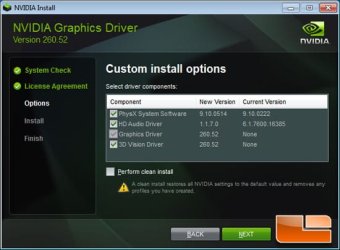
Do a clean reinstall of the lasted NVIDIA driver for your card, To do that look at the foto :p check 'Perform a clean install'
 

Attachments

  • new_driver3.jpg
    new_driver3.jpg
    29 KB · Views: 23

My Computer

Computer Manufacturer/Model Number
Homebuilt
OS
Windows 7 Home Premium x64
CPU
Core i7 2600K
Motherboard
Asus P8Z77-V LX
Memory
4GB DDR3 Kingston HyperX
Graphics Card(s)
Gigabyte GTX 670
Sound Card
Realtek HD Audio
Monitor(s) Displays
Delium Monitor
Screen Resolution
1360 x 768
Hard Drives
C: (500GB)
PSU
Corsair 620W
Case
Antec
Cooling
Cooling Master
Keyboard
Logitech
Mouse
Logitech wireless mouse M 505
Internet Speed
60MBPS
Back
Top