Nvlddmkm.sys one day after freshly reinstalling system

Stteffann

New member
Local time
9:29 AM
Messages
15
The main reason I reinstalled the system is to not have Nvlddmkm.sys show up. One day after reinstalling, there it is again. Windows 7 Pro SP1 x64. How do I create and upload an error log?
 

My Computer My Computer

At a glance

Windows 7 Professional SP1 x64AMD Athlon 6000+ x2Kingston 2X2GBXFX GeForce 9600GT 512 GDDR3
Computer type
PC/Desktop
OS
Windows 7 Professional SP1 x64
CPU
AMD Athlon 6000+ x2
Motherboard
MSI K9A2 CF-F
Memory
Kingston 2X2GB
Graphics Card(s)
XFX GeForce 9600GT 512 GDDR3
Hard Drives
Kingston SSD 60GB
Antivirus
Avast Internet Security
Browser
Mozilla Firefox
Hello and welcome Stteffann is the error accompanied by a blue screen??
 

My Computer My Computer

At a glance

Desk1 7 Home Prem / Desk2 10 Pro / Main lap A...Desk1 i5 3750K / Laptop i7 GTX 860M / Desk2 i...Desk1 8GB (1866) / Desk2 16GB (1333) / Laptop...Desk 1& 2NVidia GTX 650 & Laptops on board Intel
Computer type
PC/Desktop
Computer Manufacturer/Model Number
Own build (new) Desk1 / Asus ROG Win 7 / Desk2 1st build
OS
Desk1 7 Home Prem / Desk2 10 Pro / Main lap Asus ROG 10 Pro 2 laptop Toshiba 7 Pro Asus P2520 7 & 10
CPU
Desk1 i5 3750K / Laptop i7 GTX 860M / Desk2 i5 2500
Motherboard
Desk1 Asus P877-V / Desk2 Gigabyte H67 UD3H / Laptop ?
Memory
Desk1 8GB (1866) / Desk2 16GB (1333) / Laptop 8Gb DDR3
Graphics Card(s)
Desk 1& 2NVidia GTX 650 & Laptops on board Intel
Sound Card
Desk 1 & 2 -XONAR DG Realtek High Def audio Laptop
Monitor(s) Displays
Desk 1 Benq HD 2450 / Desk2 Philips 24" / Laptop 17.5"
Screen Resolution
1920x1080 D1 & D2 & Laptop 1
Hard Drives
Desk1 Samsung 120GB 830 SSD
Asus ROG 256GB 850 Pro SSD
Desk2 Samsung 840 256 SSD
Toshiba 120GB EVO
PSU
Desk 1 Corsair HX 1050/ Laptop ? / Desk 2 Corsair HX 650
Case
Desk 1 Cooler HAF XM ? Toshiba laptop / Desk2 Coolermaster
Cooling
Fans on all Desk1 -2 Desk2 - all Coolermasters 5 Laptop ?
Keyboard
Desk 1 MS Sidewinder X6 Desk 2 MS Sidewinder X 4
Mouse
Desk 1&2 - Gigabyte MS 900 gamer - laptop - Logitec wireless
Internet Speed
ADSL2+
Other Info
One other Desktop (tester) and spare Toshba laptop both with SSD's
Running Kaspersky 2016 ISS on all machines config'd identically
Logitec audio stereo systems on each machine (x3)
Canon MG5250MFC
Router/modem TP-Link running WPA2SK
Yes, it was a blue screen!
BTW, my PSU exploded this morning, I think this could have been the cause of the problem... I will buy a new power supply Monday.
 

My Computer My Computer

At a glance

Windows 7 Professional SP1 x64AMD Athlon 6000+ x2Kingston 2X2GBXFX GeForce 9600GT 512 GDDR3
Computer type
PC/Desktop
OS
Windows 7 Professional SP1 x64
CPU
AMD Athlon 6000+ x2
Motherboard
MSI K9A2 CF-F
Memory
Kingston 2X2GB
Graphics Card(s)
XFX GeForce 9600GT 512 GDDR3
Hard Drives
Kingston SSD 60GB
Antivirus
Avast Internet Security
Browser
Mozilla Firefox
Also, I remeber the PC beibg unusually noisy, VERY noisy, I assume it was the cooler inside the PSU that was problematic. It could be that the cause of the problem was hardware, not a driver or malware issue..
 

My Computer My Computer

At a glance

Windows 7 Professional SP1 x64AMD Athlon 6000+ x2Kingston 2X2GBXFX GeForce 9600GT 512 GDDR3
Computer type
PC/Desktop
OS
Windows 7 Professional SP1 x64
CPU
AMD Athlon 6000+ x2
Motherboard
MSI K9A2 CF-F
Memory
Kingston 2X2GB
Graphics Card(s)
XFX GeForce 9600GT 512 GDDR3
Hard Drives
Kingston SSD 60GB
Antivirus
Avast Internet Security
Browser
Mozilla Firefox
Yes mate it really could have been the problem but bit late to use my little check ditty for it. The noise could have been the cooling fan and or the caps going south as both can get extremely noisy when at fault. Thing is the PSU is one component very often forgotten when issues arise and it is always wise to just keep a check on the state of it as I have pulled some out that are so full of dust hair and general crud it isn't funny.

Now just a word of warning DO NOT ever attempt to disassemble a PSU unless you know what you are doing because inside there are lethally high voltages very similar to those used for resuscitating heart attack individuals and those defibrillator machines are designed to actually stop the heart in an attempt to get it back into a natural rhythm and the same happens if PSU's are handled by the unwary to foolish people.

See what the new PSU does to improve things but if you want you can attach BSOD dumps with these
http://www.sevenforums.com/tutorials/174459-dump-files-configure-windows-create-bsod.html
&
http://www.sevenforums.com/bsod-help-support/96879-blue-screen-death-bsod-posting-instructions.html
 

My Computer My Computer

At a glance

Desk1 7 Home Prem / Desk2 10 Pro / Main lap A...Desk1 i5 3750K / Laptop i7 GTX 860M / Desk2 i...Desk1 8GB (1866) / Desk2 16GB (1333) / Laptop...Desk 1& 2NVidia GTX 650 & Laptops on board Intel
Computer type
PC/Desktop
Computer Manufacturer/Model Number
Own build (new) Desk1 / Asus ROG Win 7 / Desk2 1st build
OS
Desk1 7 Home Prem / Desk2 10 Pro / Main lap Asus ROG 10 Pro 2 laptop Toshiba 7 Pro Asus P2520 7 & 10
CPU
Desk1 i5 3750K / Laptop i7 GTX 860M / Desk2 i5 2500
Motherboard
Desk1 Asus P877-V / Desk2 Gigabyte H67 UD3H / Laptop ?
Memory
Desk1 8GB (1866) / Desk2 16GB (1333) / Laptop 8Gb DDR3
Graphics Card(s)
Desk 1& 2NVidia GTX 650 & Laptops on board Intel
Sound Card
Desk 1 & 2 -XONAR DG Realtek High Def audio Laptop
Monitor(s) Displays
Desk 1 Benq HD 2450 / Desk2 Philips 24" / Laptop 17.5"
Screen Resolution
1920x1080 D1 & D2 & Laptop 1
Hard Drives
Desk1 Samsung 120GB 830 SSD
Asus ROG 256GB 850 Pro SSD
Desk2 Samsung 840 256 SSD
Toshiba 120GB EVO
PSU
Desk 1 Corsair HX 1050/ Laptop ? / Desk 2 Corsair HX 650
Case
Desk 1 Cooler HAF XM ? Toshiba laptop / Desk2 Coolermaster
Cooling
Fans on all Desk1 -2 Desk2 - all Coolermasters 5 Laptop ?
Keyboard
Desk 1 MS Sidewinder X6 Desk 2 MS Sidewinder X 4
Mouse
Desk 1&2 - Gigabyte MS 900 gamer - laptop - Logitec wireless
Internet Speed
ADSL2+
Other Info
One other Desktop (tester) and spare Toshba laptop both with SSD's
Running Kaspersky 2016 ISS on all machines config'd identically
Logitec audio stereo systems on each machine (x3)
Canon MG5250MFC
Router/modem TP-Link running WPA2SK
Is the PSU dangerous to open even when completely disconnected from the computer? Does it have any internal charge? I wouldnt open it either way since its still under guarantee since its just 9 mts old, I might get a free replacement. But I think I will switch to another brand since this seems like garbage, no wonder when it costed around 15€...
 
Last edited:

My Computer My Computer

At a glance

Windows 7 Professional SP1 x64AMD Athlon 6000+ x2Kingston 2X2GBXFX GeForce 9600GT 512 GDDR3
Computer type
PC/Desktop
OS
Windows 7 Professional SP1 x64
CPU
AMD Athlon 6000+ x2
Motherboard
MSI K9A2 CF-F
Memory
Kingston 2X2GB
Graphics Card(s)
XFX GeForce 9600GT 512 GDDR3
Hard Drives
Kingston SSD 60GB
Antivirus
Avast Internet Security
Browser
Mozilla Firefox
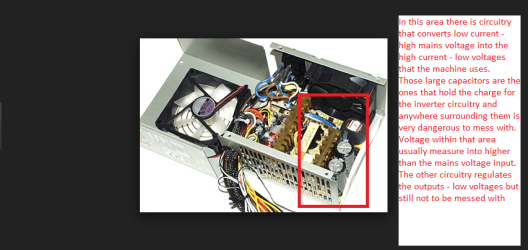
Yes Stefan some can hold the charge for days and even when disconnected from any mains power supply.See pic
Now if you are in the market for a PSU then use this to find out what size you may need it usually exceeds what you need as a safety margin - you may add more components in the future;)
OuterVision Power Supply Calculator type in what will be in the machine and it automatically works it out for you and by the by get a good brand PSU it is worth it in the long run.
Myself I like Corsair, Thermaltake, Coolermaster, Seasonic - the one that you have looks to be oen of those awful OEM ones that come with the case.

A good article if you are interested is this https://en.wikipedia.org/wiki/Power_supply_unit_(computer) - there is a good pic of the 24 pin output volts should you need to know what is what.
 

Attachments

  • PSU 1.PNG
    PSU 1.PNG
    75.5 KB · Views: 0

My Computer My Computer

At a glance

Desk1 7 Home Prem / Desk2 10 Pro / Main lap A...Desk1 i5 3750K / Laptop i7 GTX 860M / Desk2 i...Desk1 8GB (1866) / Desk2 16GB (1333) / Laptop...Desk 1& 2NVidia GTX 650 & Laptops on board Intel
Computer type
PC/Desktop
Computer Manufacturer/Model Number
Own build (new) Desk1 / Asus ROG Win 7 / Desk2 1st build
OS
Desk1 7 Home Prem / Desk2 10 Pro / Main lap Asus ROG 10 Pro 2 laptop Toshiba 7 Pro Asus P2520 7 & 10
CPU
Desk1 i5 3750K / Laptop i7 GTX 860M / Desk2 i5 2500
Motherboard
Desk1 Asus P877-V / Desk2 Gigabyte H67 UD3H / Laptop ?
Memory
Desk1 8GB (1866) / Desk2 16GB (1333) / Laptop 8Gb DDR3
Graphics Card(s)
Desk 1& 2NVidia GTX 650 & Laptops on board Intel
Sound Card
Desk 1 & 2 -XONAR DG Realtek High Def audio Laptop
Monitor(s) Displays
Desk 1 Benq HD 2450 / Desk2 Philips 24" / Laptop 17.5"
Screen Resolution
1920x1080 D1 & D2 & Laptop 1
Hard Drives
Desk1 Samsung 120GB 830 SSD
Asus ROG 256GB 850 Pro SSD
Desk2 Samsung 840 256 SSD
Toshiba 120GB EVO
PSU
Desk 1 Corsair HX 1050/ Laptop ? / Desk 2 Corsair HX 650
Case
Desk 1 Cooler HAF XM ? Toshiba laptop / Desk2 Coolermaster
Cooling
Fans on all Desk1 -2 Desk2 - all Coolermasters 5 Laptop ?
Keyboard
Desk 1 MS Sidewinder X6 Desk 2 MS Sidewinder X 4
Mouse
Desk 1&2 - Gigabyte MS 900 gamer - laptop - Logitec wireless
Internet Speed
ADSL2+
Other Info
One other Desktop (tester) and spare Toshba laptop both with SSD's
Running Kaspersky 2016 ISS on all machines config'd identically
Logitec audio stereo systems on each machine (x3)
Canon MG5250MFC
Router/modem TP-Link running WPA2SK
Yes Stefan some can hold the charge for days and even when disconnected from any mains power supply.
WOW, I had no idea! I used to open old PSU when I wanted to remove dust... Never knew how dangerous that was haha!
Yes, I will consider Cooler Master or Thermaltake! Thanks for this info. I'll buy one tomorrow and report back on results.
 

My Computer My Computer

At a glance

Windows 7 Professional SP1 x64AMD Athlon 6000+ x2Kingston 2X2GBXFX GeForce 9600GT 512 GDDR3
Computer type
PC/Desktop
OS
Windows 7 Professional SP1 x64
CPU
AMD Athlon 6000+ x2
Motherboard
MSI K9A2 CF-F
Memory
Kingston 2X2GB
Graphics Card(s)
XFX GeForce 9600GT 512 GDDR3
Hard Drives
Kingston SSD 60GB
Antivirus
Avast Internet Security
Browser
Mozilla Firefox
Just as well you asked mate I have had some near misses myself while rigging some up for a power supply source for testing fans, spinner hard drives etc etc That is not encouraging you to do the same just best left alone really until you know exactly what you are doing with them.

Yep my particular favourite is Corsair to be honest but Seasonic are good. Having said that many are made by the same companies and I am guessing the the brand people are in control of the manufacturing specs so one brand made by Joe Blow may be more precisely made than another made by Joe;)

Anyway that calculator will show you what size you need to get.
 

My Computer My Computer

At a glance

Desk1 7 Home Prem / Desk2 10 Pro / Main lap A...Desk1 i5 3750K / Laptop i7 GTX 860M / Desk2 i...Desk1 8GB (1866) / Desk2 16GB (1333) / Laptop...Desk 1& 2NVidia GTX 650 & Laptops on board Intel
Computer type
PC/Desktop
Computer Manufacturer/Model Number
Own build (new) Desk1 / Asus ROG Win 7 / Desk2 1st build
OS
Desk1 7 Home Prem / Desk2 10 Pro / Main lap Asus ROG 10 Pro 2 laptop Toshiba 7 Pro Asus P2520 7 & 10
CPU
Desk1 i5 3750K / Laptop i7 GTX 860M / Desk2 i5 2500
Motherboard
Desk1 Asus P877-V / Desk2 Gigabyte H67 UD3H / Laptop ?
Memory
Desk1 8GB (1866) / Desk2 16GB (1333) / Laptop 8Gb DDR3
Graphics Card(s)
Desk 1& 2NVidia GTX 650 & Laptops on board Intel
Sound Card
Desk 1 & 2 -XONAR DG Realtek High Def audio Laptop
Monitor(s) Displays
Desk 1 Benq HD 2450 / Desk2 Philips 24" / Laptop 17.5"
Screen Resolution
1920x1080 D1 & D2 & Laptop 1
Hard Drives
Desk1 Samsung 120GB 830 SSD
Asus ROG 256GB 850 Pro SSD
Desk2 Samsung 840 256 SSD
Toshiba 120GB EVO
PSU
Desk 1 Corsair HX 1050/ Laptop ? / Desk 2 Corsair HX 650
Case
Desk 1 Cooler HAF XM ? Toshiba laptop / Desk2 Coolermaster
Cooling
Fans on all Desk1 -2 Desk2 - all Coolermasters 5 Laptop ?
Keyboard
Desk 1 MS Sidewinder X6 Desk 2 MS Sidewinder X 4
Mouse
Desk 1&2 - Gigabyte MS 900 gamer - laptop - Logitec wireless
Internet Speed
ADSL2+
Other Info
One other Desktop (tester) and spare Toshba laptop both with SSD's
Running Kaspersky 2016 ISS on all machines config'd identically
Logitec audio stereo systems on each machine (x3)
Canon MG5250MFC
Router/modem TP-Link running WPA2SK

My Computer My Computer

At a glance

Windows 7 Professional SP1 x64AMD Athlon 6000+ x2Kingston 2X2GBXFX GeForce 9600GT 512 GDDR3
Computer type
PC/Desktop
OS
Windows 7 Professional SP1 x64
CPU
AMD Athlon 6000+ x2
Motherboard
MSI K9A2 CF-F
Memory
Kingston 2X2GB
Graphics Card(s)
XFX GeForce 9600GT 512 GDDR3
Hard Drives
Kingston SSD 60GB
Antivirus
Avast Internet Security
Browser
Mozilla Firefox
Ok, here's the report!
 

Attachments

My Computer My Computer

At a glance

Windows 7 Professional SP1 x64AMD Athlon 6000+ x2Kingston 2X2GBXFX GeForce 9600GT 512 GDDR3
Computer type
PC/Desktop
OS
Windows 7 Professional SP1 x64
CPU
AMD Athlon 6000+ x2
Motherboard
MSI K9A2 CF-F
Memory
Kingston 2X2GB
Graphics Card(s)
XFX GeForce 9600GT 512 GDDR3
Hard Drives
Kingston SSD 60GB
Antivirus
Avast Internet Security
Browser
Mozilla Firefox
Ok Stefan it may well have been the PSU all along. Now I don't understand the currency mate because RSD 1.99 equates to AUD$0.25 unless I am calculating the wrong currency of course because 25 Australian cents for a PSU seems hardly credible.
For example this would be a fairly ordinary PSU that I would put in a low work machine https://www.pccasegear.com/products/21569/corsair-cx-500-v3-power-supply. Personally for my machine I would spend quite a bit more because I want the peace of mind - somethng like this https://www.pccasegear.com/products/28764/corsair-hx750i-750w-80-plus-platinum-power-supply

Now in the report there are no BSOD dumps and the only thing that sticks out to me because a lot of the info is real techie stuff is that there are no Blu tooth drivers installed in msinfo log under problem devices.
Just try following those two tutorials again because the blue screen iif it was not just a steady blue one with no text is probably not a true BSOD.
 

My Computer My Computer

At a glance

Desk1 7 Home Prem / Desk2 10 Pro / Main lap A...Desk1 i5 3750K / Laptop i7 GTX 860M / Desk2 i...Desk1 8GB (1866) / Desk2 16GB (1333) / Laptop...Desk 1& 2NVidia GTX 650 & Laptops on board Intel
Computer type
PC/Desktop
Computer Manufacturer/Model Number
Own build (new) Desk1 / Asus ROG Win 7 / Desk2 1st build
OS
Desk1 7 Home Prem / Desk2 10 Pro / Main lap Asus ROG 10 Pro 2 laptop Toshiba 7 Pro Asus P2520 7 & 10
CPU
Desk1 i5 3750K / Laptop i7 GTX 860M / Desk2 i5 2500
Motherboard
Desk1 Asus P877-V / Desk2 Gigabyte H67 UD3H / Laptop ?
Memory
Desk1 8GB (1866) / Desk2 16GB (1333) / Laptop 8Gb DDR3
Graphics Card(s)
Desk 1& 2NVidia GTX 650 & Laptops on board Intel
Sound Card
Desk 1 & 2 -XONAR DG Realtek High Def audio Laptop
Monitor(s) Displays
Desk 1 Benq HD 2450 / Desk2 Philips 24" / Laptop 17.5"
Screen Resolution
1920x1080 D1 & D2 & Laptop 1
Hard Drives
Desk1 Samsung 120GB 830 SSD
Asus ROG 256GB 850 Pro SSD
Desk2 Samsung 840 256 SSD
Toshiba 120GB EVO
PSU
Desk 1 Corsair HX 1050/ Laptop ? / Desk 2 Corsair HX 650
Case
Desk 1 Cooler HAF XM ? Toshiba laptop / Desk2 Coolermaster
Cooling
Fans on all Desk1 -2 Desk2 - all Coolermasters 5 Laptop ?
Keyboard
Desk 1 MS Sidewinder X6 Desk 2 MS Sidewinder X 4
Mouse
Desk 1&2 - Gigabyte MS 900 gamer - laptop - Logitec wireless
Internet Speed
ADSL2+
Other Info
One other Desktop (tester) and spare Toshba laptop both with SSD's
Running Kaspersky 2016 ISS on all machines config'd identically
Logitec audio stereo systems on each machine (x3)
Canon MG5250MFC
Router/modem TP-Link running WPA2SK
Ok Stefan it may well have been the PSU all along. Now I don't understand the currency mate because RSD 1.99 equates to AUD$0.25 unless I am calculating the wrong currency of course because 25 Australian cents for a PSU seems hardly credible.
For example this would be a fairly ordinary PSU that I would put in a low work machine https://www.pccasegear.com/products/21569/corsair-cx-500-v3-power-supply. Personally for my machine I would spend quite a bit more because I want the peace of mind - somethng like this https://www.pccasegear.com/products/28764/corsair-hx750i-750w-80-plus-platinum-power-supply
Now in the report there are no BSOD dumps and the only thing that sticks out to me because a lot of the info is real techie stuff is that there are no Blu tooth drivers installed in msinfo log under problem devices.
Just try following those two tutorials again because the blue screen iif it was not just a steady blue one with no text is probably not a true BSOD.

Haha, if only! 1 AUD is around 84 dinars...Both are expensive for my budget, especially the second one haha! The average salary here is around 560AUD so you can imagine how prohibitive the second price is...

I do have a USB bluetooth, a small one, and I didnt get a drive CD with it, so that could be showing up as a problem but I used ut for at least 4 years, no problems with that...

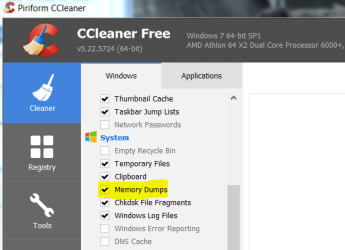
Maybe the BSOD report was deleted by Ccleaner, I use it quite often without thinking, and that program even clears the Recycle bin completely so it could be the one to blame for the bluescreen report not existing in the archive. For just in case I will try posting again but I expect the exact same result.
 

My Computer My Computer

At a glance

Windows 7 Professional SP1 x64AMD Athlon 6000+ x2Kingston 2X2GBXFX GeForce 9600GT 512 GDDR3
Computer type
PC/Desktop
OS
Windows 7 Professional SP1 x64
CPU
AMD Athlon 6000+ x2
Motherboard
MSI K9A2 CF-F
Memory
Kingston 2X2GB
Graphics Card(s)
XFX GeForce 9600GT 512 GDDR3
Hard Drives
Kingston SSD 60GB
Antivirus
Avast Internet Security
Browser
Mozilla Firefox
Here it is again...
 

Attachments

My Computer My Computer

At a glance

Windows 7 Professional SP1 x64AMD Athlon 6000+ x2Kingston 2X2GBXFX GeForce 9600GT 512 GDDR3
Computer type
PC/Desktop
OS
Windows 7 Professional SP1 x64
CPU
AMD Athlon 6000+ x2
Motherboard
MSI K9A2 CF-F
Memory
Kingston 2X2GB
Graphics Card(s)
XFX GeForce 9600GT 512 GDDR3
Hard Drives
Kingston SSD 60GB
Antivirus
Avast Internet Security
Browser
Mozilla Firefox
Hmm sorry re the pricing on the PSU mate I didn't mean to sound rude or anything and if you lived a bit closer I could give you one of my spares I have collected over time that would have been good to go.

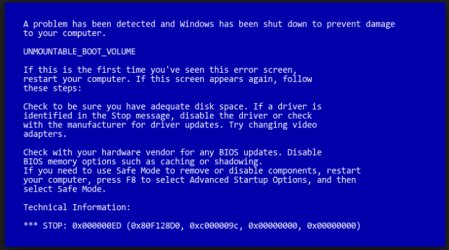
Still no BSOD dumps in that zip file and I am not sure if CCleaner does in fact clear BSOD dump files - it has never occurred to me to be honest. So the BSOD screen did it look something like what is in the pic attached?

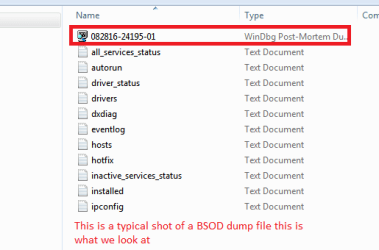
The BSOD dump files show up as in the other pic and have that typical small blue computer like looking icon
 

Attachments

  • BSOD.PNG
    BSOD.PNG
    26 KB · Views: 1
  • BSOD 2.PNG
    BSOD 2.PNG
    5.8 KB · Views: 4

My Computer My Computer

At a glance

Desk1 7 Home Prem / Desk2 10 Pro / Main lap A...Desk1 i5 3750K / Laptop i7 GTX 860M / Desk2 i...Desk1 8GB (1866) / Desk2 16GB (1333) / Laptop...Desk 1& 2NVidia GTX 650 & Laptops on board Intel
Computer type
PC/Desktop
Computer Manufacturer/Model Number
Own build (new) Desk1 / Asus ROG Win 7 / Desk2 1st build
OS
Desk1 7 Home Prem / Desk2 10 Pro / Main lap Asus ROG 10 Pro 2 laptop Toshiba 7 Pro Asus P2520 7 & 10
CPU
Desk1 i5 3750K / Laptop i7 GTX 860M / Desk2 i5 2500
Motherboard
Desk1 Asus P877-V / Desk2 Gigabyte H67 UD3H / Laptop ?
Memory
Desk1 8GB (1866) / Desk2 16GB (1333) / Laptop 8Gb DDR3
Graphics Card(s)
Desk 1& 2NVidia GTX 650 & Laptops on board Intel
Sound Card
Desk 1 & 2 -XONAR DG Realtek High Def audio Laptop
Monitor(s) Displays
Desk 1 Benq HD 2450 / Desk2 Philips 24" / Laptop 17.5"
Screen Resolution
1920x1080 D1 & D2 & Laptop 1
Hard Drives
Desk1 Samsung 120GB 830 SSD
Asus ROG 256GB 850 Pro SSD
Desk2 Samsung 840 256 SSD
Toshiba 120GB EVO
PSU
Desk 1 Corsair HX 1050/ Laptop ? / Desk 2 Corsair HX 650
Case
Desk 1 Cooler HAF XM ? Toshiba laptop / Desk2 Coolermaster
Cooling
Fans on all Desk1 -2 Desk2 - all Coolermasters 5 Laptop ?
Keyboard
Desk 1 MS Sidewinder X6 Desk 2 MS Sidewinder X 4
Mouse
Desk 1&2 - Gigabyte MS 900 gamer - laptop - Logitec wireless
Internet Speed
ADSL2+
Other Info
One other Desktop (tester) and spare Toshba laptop both with SSD's
Running Kaspersky 2016 ISS on all machines config'd identically
Logitec audio stereo systems on each machine (x3)
Canon MG5250MFC
Router/modem TP-Link running WPA2SK
There's nothing to apologize for! BTW, we couldn't be further more away from each other!
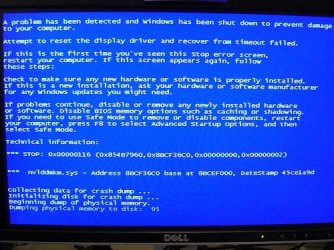
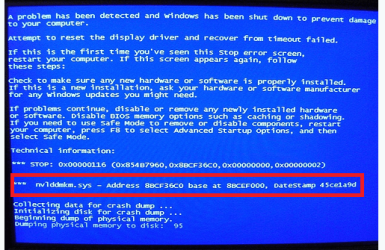
This is what the screen looked like:
 

Attachments

  • 461991088_a4143c3298.jpg
    461991088_a4143c3298.jpg
    46.2 KB · Views: 4
Last edited:

My Computer My Computer

At a glance

Windows 7 Professional SP1 x64AMD Athlon 6000+ x2Kingston 2X2GBXFX GeForce 9600GT 512 GDDR3
Computer type
PC/Desktop
OS
Windows 7 Professional SP1 x64
CPU
AMD Athlon 6000+ x2
Motherboard
MSI K9A2 CF-F
Memory
Kingston 2X2GB
Graphics Card(s)
XFX GeForce 9600GT 512 GDDR3
Hard Drives
Kingston SSD 60GB
Antivirus
Avast Internet Security
Browser
Mozilla Firefox
Also, CCleaner DOES indeed remove dump files! So that is why there was nothing to show...
 

Attachments

  • Capture.PNG
    Capture.PNG
    17.4 KB · Views: 4

My Computer My Computer

At a glance

Windows 7 Professional SP1 x64AMD Athlon 6000+ x2Kingston 2X2GBXFX GeForce 9600GT 512 GDDR3
Computer type
PC/Desktop
OS
Windows 7 Professional SP1 x64
CPU
AMD Athlon 6000+ x2
Motherboard
MSI K9A2 CF-F
Memory
Kingston 2X2GB
Graphics Card(s)
XFX GeForce 9600GT 512 GDDR3
Hard Drives
Kingston SSD 60GB
Antivirus
Avast Internet Security
Browser
Mozilla Firefox
Ok I see now re the CC and if that is the actual blue screen the machine threw then it states in it there is an issue with the NVidia graphics as you can see from my snip/ pic

The usual suggestion is to update the driver for the GPU.
 

Attachments

  • BSOD 3.PNG
    BSOD 3.PNG
    108.9 KB · Views: 4

My Computer My Computer

At a glance

Desk1 7 Home Prem / Desk2 10 Pro / Main lap A...Desk1 i5 3750K / Laptop i7 GTX 860M / Desk2 i...Desk1 8GB (1866) / Desk2 16GB (1333) / Laptop...Desk 1& 2NVidia GTX 650 & Laptops on board Intel
Computer type
PC/Desktop
Computer Manufacturer/Model Number
Own build (new) Desk1 / Asus ROG Win 7 / Desk2 1st build
OS
Desk1 7 Home Prem / Desk2 10 Pro / Main lap Asus ROG 10 Pro 2 laptop Toshiba 7 Pro Asus P2520 7 & 10
CPU
Desk1 i5 3750K / Laptop i7 GTX 860M / Desk2 i5 2500
Motherboard
Desk1 Asus P877-V / Desk2 Gigabyte H67 UD3H / Laptop ?
Memory
Desk1 8GB (1866) / Desk2 16GB (1333) / Laptop 8Gb DDR3
Graphics Card(s)
Desk 1& 2NVidia GTX 650 & Laptops on board Intel
Sound Card
Desk 1 & 2 -XONAR DG Realtek High Def audio Laptop
Monitor(s) Displays
Desk 1 Benq HD 2450 / Desk2 Philips 24" / Laptop 17.5"
Screen Resolution
1920x1080 D1 & D2 & Laptop 1
Hard Drives
Desk1 Samsung 120GB 830 SSD
Asus ROG 256GB 850 Pro SSD
Desk2 Samsung 840 256 SSD
Toshiba 120GB EVO
PSU
Desk 1 Corsair HX 1050/ Laptop ? / Desk 2 Corsair HX 650
Case
Desk 1 Cooler HAF XM ? Toshiba laptop / Desk2 Coolermaster
Cooling
Fans on all Desk1 -2 Desk2 - all Coolermasters 5 Laptop ?
Keyboard
Desk 1 MS Sidewinder X6 Desk 2 MS Sidewinder X 4
Mouse
Desk 1&2 - Gigabyte MS 900 gamer - laptop - Logitec wireless
Internet Speed
ADSL2+
Other Info
One other Desktop (tester) and spare Toshba laptop both with SSD's
Running Kaspersky 2016 ISS on all machines config'd identically
Logitec audio stereo systems on each machine (x3)
Canon MG5250MFC
Router/modem TP-Link running WPA2SK
Ok I see now re the CC and if that is the actual blue screen the machine threw then it states in it there is an issue with the NVidia graphics as you can see from my snip/ pic

The usual suggestion is to update the driver for the GPU.

I don't think it was the driver. I would say that the computer shows this for this behaviour, but it could have been because of the instability of power supply to the graphic card, since all the elements on the screen switched in opposite direction and the screen started blinking about 3s before the PSU exploded. So I think it's just the instability that casued this to appear. Now with the new PSU, there are no BSODs, and by the way, I DID download the latest driver from Nvidia site directly, so that could not be it. I think that it is safe to say that the PSU was the main cause, so reinstalling the system was not really neccessary because there was no malware that caused errors. Thanks for all the help!
 

My Computer My Computer

At a glance

Windows 7 Professional SP1 x64AMD Athlon 6000+ x2Kingston 2X2GBXFX GeForce 9600GT 512 GDDR3
Computer type
PC/Desktop
OS
Windows 7 Professional SP1 x64
CPU
AMD Athlon 6000+ x2
Motherboard
MSI K9A2 CF-F
Memory
Kingston 2X2GB
Graphics Card(s)
XFX GeForce 9600GT 512 GDDR3
Hard Drives
Kingston SSD 60GB
Antivirus
Avast Internet Security
Browser
Mozilla Firefox
Ok Stefan you are probably right and that it was the power to the GPU being the issue the error numbers following that .sys would in all intents would mean just that to someone who is a lot cleverer than me at decyphering those things.

Now if the new PSU does fix the problem then we both have learnt something eh? because I only do this and build for a hobby.

Pity as usually one of the first things I ask in posts is the health of the PSU and it is more often than not missed as a machine's problems.
his is what I usually post
Using HW Info
PART A:
You can test the volts on the PSU with HW Info HWiNFO, HWiNFO32/64 - Download < download the right bit version and close the right hand window select Sensors and scroll down to the power section where you will see what the volts are doing see my pic. In my pic the section (Nuvoton) with VBATT as a dead give away you are in the section for the rail voltages. There are other section titles and one that pops up often is ITE (sometimes the usual one for Gigabyte boards)
Now the voltage on the different rails have to be within 5% =+/- of what is required or the machine will not work properly if at all.
Limits +/-
12v = 11.4 – 12.6v
5v = 4.74 – 5.25v
3.3v = 3.135 – 3.465v
The Power good signal voltage at pin 8 on the 24 pin plug (grey cable) should be the same as the 5v rail reading/s
See this for the rail voltage info
PSUs 101: A Detailed Look Into Power Supplies (Section 2.)
The original right hand window shows the machine running and is handy for that but for looking at the components in some detail close it and use the main left hand side panel
FOR OTHER COMPONENTS
PART B:
Open each small square with + in it on the section the components are in and then click on the individual component/s (it will highlight in blue) - in the right hand side will appear all sorts of details including brands speeds and other essential info that particular device. See pic for example.

The link within this is good reading and just as a by the by you might find this helpful too in getting the most out of your machine if you don't mind losing a bit of "bling" like transparency
Optimize Windows 7

 

Attachments

  • HW INFO DESKTOP PSU.PNG
    HW INFO DESKTOP PSU.PNG
    49.8 KB · Views: 0

My Computer My Computer

At a glance

Desk1 7 Home Prem / Desk2 10 Pro / Main lap A...Desk1 i5 3750K / Laptop i7 GTX 860M / Desk2 i...Desk1 8GB (1866) / Desk2 16GB (1333) / Laptop...Desk 1& 2NVidia GTX 650 & Laptops on board Intel
Computer type
PC/Desktop
Computer Manufacturer/Model Number
Own build (new) Desk1 / Asus ROG Win 7 / Desk2 1st build
OS
Desk1 7 Home Prem / Desk2 10 Pro / Main lap Asus ROG 10 Pro 2 laptop Toshiba 7 Pro Asus P2520 7 & 10
CPU
Desk1 i5 3750K / Laptop i7 GTX 860M / Desk2 i5 2500
Motherboard
Desk1 Asus P877-V / Desk2 Gigabyte H67 UD3H / Laptop ?
Memory
Desk1 8GB (1866) / Desk2 16GB (1333) / Laptop 8Gb DDR3
Graphics Card(s)
Desk 1& 2NVidia GTX 650 & Laptops on board Intel
Sound Card
Desk 1 & 2 -XONAR DG Realtek High Def audio Laptop
Monitor(s) Displays
Desk 1 Benq HD 2450 / Desk2 Philips 24" / Laptop 17.5"
Screen Resolution
1920x1080 D1 & D2 & Laptop 1
Hard Drives
Desk1 Samsung 120GB 830 SSD
Asus ROG 256GB 850 Pro SSD
Desk2 Samsung 840 256 SSD
Toshiba 120GB EVO
PSU
Desk 1 Corsair HX 1050/ Laptop ? / Desk 2 Corsair HX 650
Case
Desk 1 Cooler HAF XM ? Toshiba laptop / Desk2 Coolermaster
Cooling
Fans on all Desk1 -2 Desk2 - all Coolermasters 5 Laptop ?
Keyboard
Desk 1 MS Sidewinder X6 Desk 2 MS Sidewinder X 4
Mouse
Desk 1&2 - Gigabyte MS 900 gamer - laptop - Logitec wireless
Internet Speed
ADSL2+
Other Info
One other Desktop (tester) and spare Toshba laptop both with SSD's
Running Kaspersky 2016 ISS on all machines config'd identically
Logitec audio stereo systems on each machine (x3)
Canon MG5250MFC
Router/modem TP-Link running WPA2SK
Back
Top