
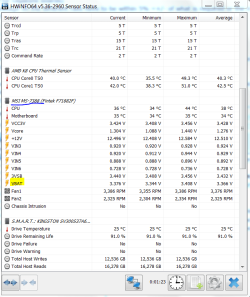
I have no idea how to interpret this, but here's a screenshot:Ok Stefan you are probably right and that it was the power to the GPU being the issue the error numbers following that .sys would in all intents would mean just that to someone who is a lot cleverer than me at decyphering those things.
Now if the new PSU does fix the problem then we both have learnt something eh? because I only do this and build for a hobby.
Pity as usually one of the first things I ask in posts is the health of the PSU and it is more often than not missed as a machine's problems.
his is what I usually post
Using HW Info
PART A:
You can test the volts on the PSU with HW Info HWiNFO, HWiNFO32/64 - Download < download the right bit version and close the right hand window select Sensors and scroll down to the power section where you will see what the volts are doing see my pic. In my pic the section (Nuvoton) with VBATT as a dead give away you are in the section for the rail voltages. There are other section titles and one that pops up often is ITE (sometimes the usual one for Gigabyte boards)
Now the voltage on the different rails have to be within 5% =+/- of what is required or the machine will not work properly if at all.
Limits +/-
12v = 11.4 – 12.6v
5v = 4.74 – 5.25v
3.3v = 3.135 – 3.465v
The Power good signal voltage at pin 8 on the 24 pin plug (grey cable) should be the same as the 5v rail reading/s
See this for the rail voltage info
PSUs 101: A Detailed Look Into Power Supplies (Section 2.)
The original right hand window shows the machine running and is handy for that but for looking at the components in some detail close it and use the main left hand side panel
FOR OTHER COMPONENTS
PART B:
Open each small square with + in it on the section the components are in and then click on the individual component/s (it will highlight in blue) - in the right hand side will appear all sorts of details including brands speeds and other essential info that particular device. See pic for example.
The link within this is good reading and just as a by the by you might find this helpful too in getting the most out of your machine if you don't mind losing a bit of "bling" like transparency
Optimize Windows 7
Attachments
My Computer
At a glance
Windows 7 Professional SP1 x64AMD Athlon 6000+ x2Kingston 2X2GBXFX GeForce 9600GT 512 GDDR3
- Computer type
- PC/Desktop
- OS
- Windows 7 Professional SP1 x64
- CPU
- AMD Athlon 6000+ x2
- Motherboard
- MSI K9A2 CF-F
- Memory
- Kingston 2X2GB
- Graphics Card(s)
- XFX GeForce 9600GT 512 GDDR3
- Hard Drives
- Kingston SSD 60GB
- Antivirus
- Avast Internet Security
- Browser
- Mozilla Firefox


