
Solved nvlddmkm.sys

iTRiP

Banned
VIP
Local time
11:35 PM
Messages
134
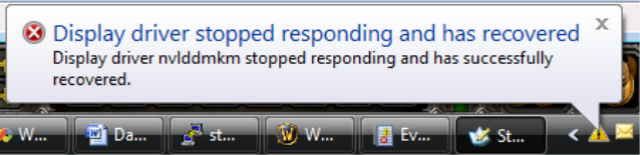
Display driver has stopped working, and has recovered. *But gaming progress is lost_.

Some new info I have figured out is the nvlddmkm.sys in (C:\Windows\System32\drivers) could be bad, the original found in (C:\NVIDIA\DisplayDriver\***.***\Display.Driver) can be used in it's stead, same holds true for any other driver files used by the system.

edit: "The original files are condensed and you might want to use the expand.exe cmd."

Tried and tested most know remedies to cure "Display driver has stopped responding and has recovered" including:

*Clean pc, Check hardware.

*Manually inspected the Windows Registry and deleted anomalies.

*Utilized known anti-virus and malicious software applications.

*Set PhysX Configuration to Gpu instead of Auto or Cpu.

*New drivers, legacy drivers.

*Heat paste (Thermal grease) replaced on Gpu and on Cpu.

*Different Os, Reformatted all drives and fresh install of Os, Swap components with other pc.

*New game install, repair installs with accompanying DirectX, Microsoft C++. Net.

*Downloaded and installed Windows recommended optimal updates.

*Out of the box new pc.

*Applied known TrdDelay and similar Regedit fixes.

*Removed everything except Microsoft Services from the services and start-up
tabs in MsConfig.

*Upgraded windows registry video control with known missing entries...


PS: "This problem has been observed regardless the iteration
graphics card used or the driver version set installed!"
I will post if I find out something new, if you do please do post it here.:grouphug:
 
Last edited:

My Computer My Computer

At a glance

[Genuine Custom DOS 5.0] & [Genuine Custom Wi...
OS
[Genuine Custom DOS 5.0] & [Genuine Custom Windows 7 Home Premium 64Bit SP1]
Please do the following:

Run Driver Verifier for 24 hours or the occurrence of the next crash, whichever is earlier.
http://www.sevenforums.com/tutorials/101379-driver-verifier-enable-disable.html

Driver Verifier will cause your computer to run very sluggishly - this is normal. What it is trying to do is force your system to BSOD and isolate the offending driver/s. When it does, reboot, disable driver verifier, reboot as normal and upload the new dmp file/s here using this:
http://www.sevenforums.com/bsod-help-support/96879-blue-screen-death-bsod-posting-instructions.html

I recommend creating a system restore point before turning on driver verifier:
http://www.sevenforums.com/tutorials/697-system-restore-point-create.html

If your system fails to boot to desktop once driver verifier is enabled, turn it off by booting into Safe Mode:
http://www.sevenforums.com/tutorials/69585-safe-mode.html
 

My Computer My Computer

At a glance

Windows 10 Pro x64 ; Xubuntu x64Intel i7 860 @ 2.80 GHz O/C'ed to 4.0GHz16GB Corsair Vengance DDR3 @ 661 MHz Dual Cha...EVGA NVidia GTX 560 1024MB
Computer type
PC/Desktop
Computer Manufacturer/Model Number
Golden Mk. I.4
OS
Windows 10 Pro x64 ; Xubuntu x64
CPU
Intel i7 860 @ 2.80 GHz O/C'ed to 4.0GHz
Motherboard
Gigabyte P55A-UD3R Rev.1. Award BIOS F13
Memory
16GB Corsair Vengance DDR3 @ 661 MHz Dual Channel (9-9-9-24)
Graphics Card(s)
EVGA NVidia GTX 560 1024MB
Sound Card
Realtek Integrated
Monitor(s) Displays
Dual Samsung SyncMaster 2494HS
Screen Resolution
1920*1080 and 1920*1080
Hard Drives
1*Samsung 840 EVO 120GB SSD;
1*OCZ Vertex 2 60GB SSD;
2*Samsung F3 SpinPoint 1TB in RAID0;
1*Samsung F1 SpinPoint 1TB;
2*Western Digital 1TB External USB 3.0
1*Western Digital 500GB External USB 3.0
1*Seagate 500GB External USB 2.0
PSU
Thermaltake ToughPower QFan 750W
Case
Thermaltake Element S VK60001W2Z
Cooling
Corsair H60 Water Cooling, 2*230mm and 2*80mm case fans
Keyboard
Logitech G110
Mouse
Logitech MX518
Display driver has stopped working, and has recovered.
Like this?
image016.png

Well, do what Golden suggested, and do one more thing alongwith that.

Get any other WHQL driver from Drivers | GeForce (the 2015-03-08_163410.jpg button will list them all) and do a clean install of it following http://www.sevenforums.com/tutorials/327414-nvidia-drivers-avoid-problems.html and see if the issue recurs or not.

We just need a documentation that the issue is persisting over multiple version of the display driver installed.

Which nvidia card you are using, BTW? And how old it is?
 

My Computer My Computer

At a glance

Microsoft Windows 10 Pro Insider Preview 64-bitIntel(R) Core(TM) i3-4130 CPU @ 3.40GHzCorsair Vengence 4GB x2 (8.00GB Dual-Channel ...2047MB GeForce GTS 450 (ZOTAC International)
Computer type
PC/Desktop
Computer Manufacturer/Model Number
Self Assembled
OS
Microsoft Windows 10 Pro Insider Preview 64-bit
CPU
Intel(R) Core(TM) i3-4130 CPU @ 3.40GHz
Motherboard
Gigabyte Technology Co., Ltd. B85M-D3H
Memory
Corsair Vengence 4GB x2 (8.00GB Dual-Channel DDR3 @ 798MHz)
Graphics Card(s)
2047MB GeForce GTS 450 (ZOTAC International)
Sound Card
Onboard (Realtek High Definition Audio)
Monitor(s) Displays
LG Flatron E2040T
Screen Resolution
1600x900
Hard Drives
Western Digital 1 TB
Seagate 500 GB
PSU
Corsair VS550
Case
Cooler Master K380
Cooling
Cooler Master Seidon 120V Plus
Keyboard
Logitech MK260r
Mouse
Logitech MK260r
Internet Speed
PMPL Broadband
Antivirus
Windows Defender + MBAM
Browser
Firefox
Other Info
Dell Studio 15" Laptop
*Removed everything except Microsoft services from the services and start-up
tabs in MsConfig. Edit: "Please note [Regediting] this does remove the ability to utilize GPU control panel"

*Upgraded windows registry video control with known missing entries...

:grouphug:

Update: These last two alterations did seem to be an 96% accurate cure for the NViDiA card problem, I have thoroughly tested it for a couple of months now and appears to be a sound solution.

I'm not sure if this cure is supposed to public knowledge. But I think I might be able to help you if you pm me.
 

Attachments

  • image016_edit.jpg
    image016_edit.jpg
    9.3 KB · Views: 27
Last edited:

My Computer My Computer

At a glance

[Genuine Custom DOS 5.0] & [Genuine Custom Wi...
OS
[Genuine Custom DOS 5.0] & [Genuine Custom Windows 7 Home Premium 64Bit SP1]
What cure are you talking about? Fixing 116's has long been public??? After all, you were the one requesting the solution.

Do you think you can cut down on all the colors you use in your posts?
 

My Computer My Computer

At a glance

Windows 10 Pro x64 ; Xubuntu x64Intel i7 860 @ 2.80 GHz O/C'ed to 4.0GHz16GB Corsair Vengance DDR3 @ 661 MHz Dual Cha...EVGA NVidia GTX 560 1024MB
Computer type
PC/Desktop
Computer Manufacturer/Model Number
Golden Mk. I.4
OS
Windows 10 Pro x64 ; Xubuntu x64
CPU
Intel i7 860 @ 2.80 GHz O/C'ed to 4.0GHz
Motherboard
Gigabyte P55A-UD3R Rev.1. Award BIOS F13
Memory
16GB Corsair Vengance DDR3 @ 661 MHz Dual Channel (9-9-9-24)
Graphics Card(s)
EVGA NVidia GTX 560 1024MB
Sound Card
Realtek Integrated
Monitor(s) Displays
Dual Samsung SyncMaster 2494HS
Screen Resolution
1920*1080 and 1920*1080
Hard Drives
1*Samsung 840 EVO 120GB SSD;
1*OCZ Vertex 2 60GB SSD;
2*Samsung F3 SpinPoint 1TB in RAID0;
1*Samsung F1 SpinPoint 1TB;
2*Western Digital 1TB External USB 3.0
1*Western Digital 500GB External USB 3.0
1*Seagate 500GB External USB 2.0
PSU
Thermaltake ToughPower QFan 750W
Case
Thermaltake Element S VK60001W2Z
Cooling
Corsair H60 Water Cooling, 2*230mm and 2*80mm case fans
Keyboard
Logitech G110
Mouse
Logitech MX518
What cure are you talking about? Fixing 116's has long been public??? After all, you were the one requesting the solution.

The "Cure" I'm talking about is the methods I posted in a matter of attempts to solve the nvlddmkm.sys error plaguing gamers using windows seven.

Fixing 116's: I don't know that term, neither should it matter since this forum is meant for noviceses through masters to easily interpret what the solution to a problem is without having to search the web first to unravel code talk.


Do you think you can cut down on all the colors you use in your posts?

Possibly, terribly sorry if it's hard to read: select the coloured text "highlight it" with your cursor might help with that.

Now, please back to the topic at hand. Reply below if you know alternate methods for resolving nvlddmkm.sys for NViDiA cards or similar display driver has stopped responding and has recovered related issues on Windows, we might also try and sort this problem out for AMD cards while we are at it.
 
Last edited:

My Computer My Computer

At a glance

[Genuine Custom DOS 5.0] & [Genuine Custom Wi...
OS
[Genuine Custom DOS 5.0] & [Genuine Custom Windows 7 Home Premium 64Bit SP1]
Back
Top

