Solved Nvme Driver

Thanks; I will give it a try.
I used Acronis but with the same result. A decision has been taken to abandon the attempt to use the addlink SSD and use a (more expensive) Samsung drive.


Thanks for all the suggestions S1W1.
 

My Computer

Computer type
PC/Desktop
OS
W 7 Ultimate x64
Finally solved my problem. This is what worked for me…

Bought a Samsung 970 Evo Plus 2Tb NVMe SSD

Installed Samsung’s latest NVMe drivers version 3.2 (.exe file)

No joy following cloning.

Found this site with “unpacked” Samsung drivers Forum - Recommended AHCI/RAID and NVMe Drivers

Copied drivers to W7 recovery flash drive

Created Windows system image

Booted from recovery drive and selected “repair my computer”

Installed Samsung drivers from flash drive

Installed system image

4 hours later laptop booted from the copied system image.
 

My Computer

Computer type
PC/Desktop
OS
W 7 Ultimate x64
:-)
 

My Computers

System One System Two

  • Computer type
    PC/Desktop
    OS
    7 X64
    CPU
    i5 8400
    Motherboard
    gigabyte b365m ds3h
    Memory
    2x8gb 3200mhz
    Hard Drives
    various
    PSU
    pure power 11 400w cm
    Case
    Coolermaster
    Cooling
    cryorig m9i
  • Computer type
    PC/Desktop
    OS
    7x64
    CPU
    g5400
    Motherboard
    ga b365m ds3h
    Memory
    8gb ddr4 2400
    PSU
    xfx pro 450w
just registered for this fix. thanks.
 

My Computer

Computer type
PC/Desktop
OS
Win7Ultimatex64
:-)
 

My Computers

System One System Two

  • Computer type
    PC/Desktop
    OS
    7 X64
    CPU
    i5 8400
    Motherboard
    gigabyte b365m ds3h
    Memory
    2x8gb 3200mhz
    Hard Drives
    various
    PSU
    pure power 11 400w cm
    Case
    Coolermaster
    Cooling
    cryorig m9i
  • Computer type
    PC/Desktop
    OS
    7x64
    CPU
    g5400
    Motherboard
    ga b365m ds3h
    Memory
    8gb ddr4 2400
    PSU
    xfx pro 450w
Literally registered here just for these drivers and wanted to say thanks! My M2 SSD now works like a charm. Surprisingly these drivers are not available at ASUS or ADATA websites. Being my MB maker and where my drive came from I figured they were there but nope.


I went through ASUS support and all they did was have me do the driver install dance (which I already had everything updated). ADATA was more closer, gave me google links to NVMe drivers, but I had already found them.


My big question is why can't these drivers be hosted at their sites? I assume MS doesn't want them too.


Anyway, thanks again dude, much appreciated! :-)


(this driver scavenger hunt reminded of the old days) ;)


Same here, registered just for these drivers. Thanks so much SIW2 and for step by step guide:
update-your-win-7-installation-media
 

My Computer

Computer type
PC/Desktop
Computer Manufacturer/Model Number
custom build
OS
Windows 7 Home Premium 64bit
CPU
ryzen 5 3600
Motherboard
Asus
Memory
16GB
A little more please

It depends what you mean by post install.

If you already have win7 installed on a regular disk and wish to add an nvme device to your machine, then you can just integrate the msu files into the already installed win7 so that it can see the nvme drive.

Registered for your file for x64 W7Pro, MS had the hotfix pulled way early. My question is how to apply this into the running system for later addition of NVMe drive? Have new WD SSDs that don't show up in WDs SSD dashboard because the NVME driver isn't on the machine.
 

My Computer

Computer type
PC/Desktop
Computer Manufacturer/Model Number
custom build
OS
Windowe 7 Proffessional x64
CPU
AMD A-10 6800K
Motherboard
Asus A88x Plus
Memory
16 gb crucial ddr3
Graphics Card(s)
on board
Hard Drives
WD 500 ssd Wd, 500 gb 7200rpm Wd 350 GB ssd
Antivirus
Norton
Browser
Firefox-Mozilla
My question is how to apply this into the running system for later addition of NVMe drive?


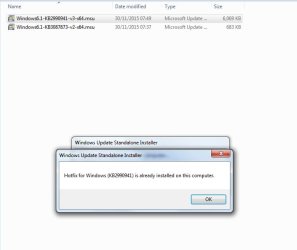
They are .msu ( microsoft standalone update ) files. Just click on them as with any .msu file, and they will install.

I have just clicked on the first one and it tells me ( correctly) that it is already installed.


msu.jpg
 

My Computers

System One System Two

  • Computer type
    PC/Desktop
    OS
    7 X64
    CPU
    i5 8400
    Motherboard
    gigabyte b365m ds3h
    Memory
    2x8gb 3200mhz
    Hard Drives
    various
    PSU
    pure power 11 400w cm
    Case
    Coolermaster
    Cooling
    cryorig m9i
  • Computer type
    PC/Desktop
    OS
    7x64
    CPU
    g5400
    Motherboard
    ga b365m ds3h
    Memory
    8gb ddr4 2400
    PSU
    xfx pro 450w
Thanks for the speedy reply and the file,will try it out later today.
 

My Computer

Computer type
PC/Desktop
Computer Manufacturer/Model Number
custom build
OS
Windowe 7 Proffessional x64
CPU
AMD A-10 6800K
Motherboard
Asus A88x Plus
Memory
16 gb crucial ddr3
Graphics Card(s)
on board
Hard Drives
WD 500 ssd Wd, 500 gb 7200rpm Wd 350 GB ssd
Antivirus
Norton
Browser
Firefox-Mozilla
Hi guys! Siemanko from Poland :-)


I need help :-)


Trying to set up new computer.

X570 motherboard
Ryzen 3900X
And Aorus GEN4 SSD.

Aorus GEN4, like others PCIE x4 SSDs is operated with E16 PCIe4 NVMe Controller - vendor 1987, device 5016. No luck finding proper driver.

Tried the trick with updated Win 7 instalation (Update your Win 7 installation media thread), but no luck got usb during installation, setup detected m.2 disk, windows installed on in, booted, and... that's all. First reboot and crash, with blue screen for milisecond. No possibility to pass that, safe mode crash as well. I thought maybe it is something with this updated installation, but it works perfectly on ATA drive.

No luck with installing both MS updates KB2990941 and KB3087873.

OMG

OMG

Something very funny happened. I was writing this post during fighting with this subject and it seems I actually won :-D Not war yet, but a battle for sure.


Last time I installed new Win 7 on SATA disk, tried everything - new drivers, chipset drivers, this and that. Nothing worked, PCI Device was still not recognized in Device Manager. But, I used not updated win 7 installation. This time I did used updated one on this old ATA HDD (USB 3 worked during installation, but not in installed windows). Then, on fresh system I installed KB2990941 and KB3087873 updates first (previously I was not able to do it, maybe because I ran all automatic Windows Updates). Then I installed AMD_Chipset_Software form AMD site (52 698 736 bytes) and voila - Standard NVM Express Controller appeared in Storage Controllers in Device Manager.
GEN4 is now visible in My Computer --> Manage --> Manage disks. Cool, will do new install to SATA HDD, clone and we will see :-) Huh, it's a load off my mind :-)

I am curious, if it is thanks to your updated win 7 installation, or MS updates installed first.


Still, need to find a way to install Intel Wi-Fi 6 AX200 drivers and USB-C (vendor 10DE, ID 1AD9) drivers on MEG UNIFY. One USB controller is still not installed, vendor 10DE, ID 1AD8, I do not know why.

 
Last edited:

My Computer

Computer type
PC/Desktop
OS
Win 7 64bit
Last edited:

My Computers

System One System Two

  • Computer type
    PC/Desktop
    OS
    7 X64
    CPU
    i5 8400
    Motherboard
    gigabyte b365m ds3h
    Memory
    2x8gb 3200mhz
    Hard Drives
    various
    PSU
    pure power 11 400w cm
    Case
    Coolermaster
    Cooling
    cryorig m9i
  • Computer type
    PC/Desktop
    OS
    7x64
    CPU
    g5400
    Motherboard
    ga b365m ds3h
    Memory
    8gb ddr4 2400
    PSU
    xfx pro 450w
Thanks SIW2!


I replayed fresh installation to SATA HDD, in this order:
1. Updated Windows 7
2. NVMe hotfixes KB2990941-v3 and KB3087873-v2
3. AMD_Chipset_Software form AMD site (resulting NVMe disk being recognized)
4. AMD_USB3.2_WinA_Beta_9.0_7052 (resulting USB 3 working)
5. Ethernet drivers frol Realtek www (Install_Win7_7130_03232020)
6. .NET Framework 4.5
7. AMD_Raid_Software


So far, so good.
What is KB3033929 for? I read that it tends to crash Windows and this update needs to be removed.
In SHA1 and SHA256 I did not find any drivers that would want to install in Device Manager.
 

My Computer

Computer type
PC/Desktop
OS
Win 7 64bit
Seems like all is fine. Win7 cloned from SATA HDD to Aorus GEN4 using EaseUS Todo Backup Free 12.0. Crystal Disk Mark shows 5000 MB/s read :-D


In my case, installation process was:


1. Setting SATA HDD to GPT

2. Installing Updated Windows 7 (using UEFI, or it will not instal to GPT disk)

3. NVMe hotfixes KB2990941-v3 and KB3087873-v2 and KB3033929
4. AMD_Chipset_Software form AMD site (resulting NVMe disk being recognized)
5. AMD_USB3.2_WinA_Beta_9.0_7052 (resulting USB 3 working)
6. Ethernet drivers frol Realtek www (Install_Win7_7130_03232020)
7. .NET Framework 4.5
8. AMD_Raid_Software
9. Cloning HDD to M.2 using EaseUS Todo Backup Free 12.0
10. All Windows Updates.


Still, need to find a way to install Intel Wi-Fi 6 AX200 drivers and USB-C (vendor 10DE, ID 1AD9) drivers on MEG UNIFY. One USB controller is still not installed, vendor 10DE, ID 1AD8, I do not know why.
 

My Computer

Computer type
PC/Desktop
OS
Win 7 64bit
Dear SIW2,
it seems to me that you are a very experienced user regarding this topic.
I was happy to see that you postet the missing windows hotfix on the first page of this thread.
However, after installing it, only my device manager issue (unknown device having a "!") got solved and now I properly see that a NVME Controller can be found. So, even though I installed both hotfixes, the SSD is not detected.

I have Win7 64 Bit, a P1 Crucial PCIe NVME SSD and a H97-Pro Gamer Motherboard. Could you please help me?
Reinstalling windows is not an option and I only need the drive as a data drive, not as the main boot OS partition.
 

My Computer

Computer type
PC/Desktop
OS
Win 7
I dont know how I did it, but its finally done.
I had to use windwos partition tool to make the new drive visisble for the explorer, besides that I updates my bios, downloaded the windows hotfixes and refreshed chipset drivers.
 

My Computer

Computer type
PC/Desktop
OS
Win 7
Yes, it needs a drive letter to see it in explorer
 

My Computers

System One System Two

  • Computer type
    PC/Desktop
    OS
    7 X64
    CPU
    i5 8400
    Motherboard
    gigabyte b365m ds3h
    Memory
    2x8gb 3200mhz
    Hard Drives
    various
    PSU
    pure power 11 400w cm
    Case
    Coolermaster
    Cooling
    cryorig m9i
  • Computer type
    PC/Desktop
    OS
    7x64
    CPU
    g5400
    Motherboard
    ga b365m ds3h
    Memory
    8gb ddr4 2400
    PSU
    xfx pro 450w
Thanks for your answer.
Do you know if the workaround you and Microsoft have provided here offers full / 100% integration?
For instance, HD Tune Pro does recognice the drive, however, crstystaldisk and Crucials own (I have a Crucial P1) Software do not recognice the drive fully. In addition, I dont have access to SMART diagnostics and the speed of the drive is very low (while using windows, the tests with HD Tune are quite fine, reaching 450-600 MB/s).
Is this normal?
 

My Computer

Computer type
PC/Desktop
OS
Win 7
I don't know. If you think the crucial software isn't functionong fully, best ask on the crucial site.

Is there a special oem driver crucial suggest for for that nvme disk? If there is maybe integrate that as well.

There are some oem drivers which have speed benefits over the ms generic updates. Possibly that is affecting the crucial software. Ask crucial.
 

My Computers

System One System Two

  • Computer type
    PC/Desktop
    OS
    7 X64
    CPU
    i5 8400
    Motherboard
    gigabyte b365m ds3h
    Memory
    2x8gb 3200mhz
    Hard Drives
    various
    PSU
    pure power 11 400w cm
    Case
    Coolermaster
    Cooling
    cryorig m9i
  • Computer type
    PC/Desktop
    OS
    7x64
    CPU
    g5400
    Motherboard
    ga b365m ds3h
    Memory
    8gb ddr4 2400
    PSU
    xfx pro 450w
Probably a good advice, thanks.
No the tool is really stupid, it says "press the button for updating the drivers" but there is no button.
 

My Computer

Computer type
PC/Desktop
OS
Win 7
Back
Top