Hi guys! Siemanko from Poland

I need help
Trying to set up new computer.
X570 motherboard
Ryzen 3900X
And Aorus GEN4 SSD.
Aorus GEN4, like others PCIE x4 SSDs is operated with E16 PCIe4 NVMe Controller - vendor 1987, device 5016. No luck finding proper driver.
Tried the trick with updated Win 7 instalation (Update your Win 7 installation media thread), but no luck got usb during installation, setup detected m.2 disk, windows installed on in, booted, and... that's all. First reboot and crash, with blue screen for milisecond. No possibility to pass that, safe mode crash as well. I thought maybe it is something with this updated installation, but it works perfectly on ATA drive.
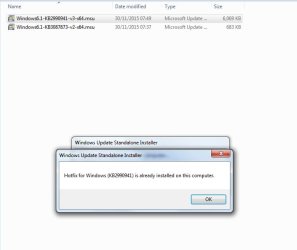
No luck with installing both MS updates KB2990941 and KB3087873.
OMG
OMG
Something very funny happened. I was writing this post during fighting with this subject and it seems I actually won :-D Not war yet, but a battle for sure.
Last time I installed new Win 7 on SATA disk, tried everything - new drivers, chipset drivers, this and that. Nothing worked, PCI Device was still not recognized in Device Manager. But, I used not updated win 7 installation. This time I did used updated one on this old ATA HDD (USB 3 worked during installation, but not in installed windows). Then, on fresh system I installed KB2990941 and KB3087873 updates first (previously I was not able to do it, maybe because I ran all automatic Windows Updates). Then I installed AMD_Chipset_Software form AMD site (52 698 736 bytes) and voila - Standard NVM Express Controller appeared in Storage Controllers in Device Manager.
GEN4 is now visible in My Computer --> Manage --> Manage disks. Cool, will do new install to SATA HDD, clone and we will see
Huh, it's a load off my mind
I am curious, if it is thanks to your updated win 7 installation, or MS updates installed first.
Still, need to find a way to install Intel Wi-Fi 6 AX200 drivers and USB-C (vendor 10DE, ID 1AD9) drivers on MEG UNIFY. One USB controller is still not installed, vendor 10DE, ID 1AD8, I do not know why.