NWSC not seeing network I'm connected to

steele84

New member
Local time
6:58 PM
Messages
30
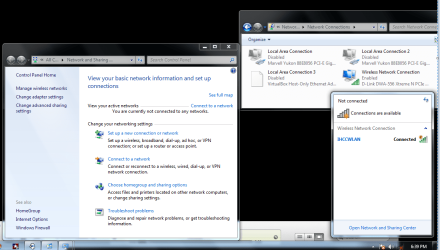
I've heard this is a issue out there right now so I think you guys could help me out. See photo, windows says that no networks are found, but obviously im connected to the internet. I have 5 connections on this pc: wireless, 2 ethernet , VPN, and a virtual v box connection. All connections are currently disabled, and my vpn is deleted atm. The only way I can get windows to see my network connection in NW/SC is if I stop and restart the Network Location Awareness service. That will fix the problem temporarily, but upon restart the network is lost again.

I think this problem is why im having vpn connection issues so I need to get this sorted out fast thanks!
 

Attachments
  • netprob.PNG
    netprob.PNG
    72.2 KB · Views: 117

My Computer My Computer

OS
Windows7 Pro x64
CPU
Intel Q6600
Motherboard
Asus X38
Memory
GSkill DD2 1066 6-6-6-18
Graphics Card(s)
CF XFX 4870's
Sound Card
Creative X-fi XtreamGamer Fata1ity Pro
Monitor(s) Displays
ViewSonic 22" 2ms
Screen Resolution
1680 x 1050
Hard Drives
Samsung F1 750 GB
W/D 160
PSU
CM1000W
Case
CMstacker
Cooling
Air 7 120mm fans
Keyboard
Saitek red backlit
Mouse
Logitech G9
Internet Speed
3mbs
Are you running an A/V software or a third party firewall?
 

My Computer My Computer

Computer type
PC/Desktop
Computer Manufacturer/Model Number
Home built
OS
Windows 7 Ult, Windows 8.1 Pro,
CPU
Q9650-4.275GHz, E8600 4.5GHz, E6750-3.8GHz
Motherboard
Evga 780i FTW
Memory
G.Skill PC2 9600 1200Mhz 5 5 5 15 2T
Graphics Card(s)
GTX480
Sound Card
Asus Xonar D2
Monitor(s) Displays
HannsG
Screen Resolution
1680X1050
Hard Drives
GSkill Phoenix Pro 120GB SSD
PSU
ThermalTake Toughpower 1000Watt modular
Case
ThermalTake XaserV
Cooling
Xigmatek S1283
Keyboard
Logitech G15
Mouse
Logitech G9
Internet Speed
T1
No pretty wide open atm
 

My Computer My Computer

OS
Windows7 Pro x64
CPU
Intel Q6600
Motherboard
Asus X38
Memory
GSkill DD2 1066 6-6-6-18
Graphics Card(s)
CF XFX 4870's
Sound Card
Creative X-fi XtreamGamer Fata1ity Pro
Monitor(s) Displays
ViewSonic 22" 2ms
Screen Resolution
1680 x 1050
Hard Drives
Samsung F1 750 GB
W/D 160
PSU
CM1000W
Case
CMstacker
Cooling
Air 7 120mm fans
Keyboard
Saitek red backlit
Mouse
Logitech G9
Internet Speed
3mbs
It looks like the connection is enabled in the top right window, but the first window on the left says not connected....and the lower right window looks connected also. That little shield indicates a problem with the security settings I believe.

Looks like something is there blocking the connection to me. If you have AVG or anything like that installed you may need to uninstall it completely. It also shows a problem in the action center where the little flag is. That might give you a clue.
 

My Computer My Computer

Computer type
PC/Desktop
Computer Manufacturer/Model Number
Home built
OS
Windows 7 Ult, Windows 8.1 Pro,
CPU
Q9650-4.275GHz, E8600 4.5GHz, E6750-3.8GHz
Motherboard
Evga 780i FTW
Memory
G.Skill PC2 9600 1200Mhz 5 5 5 15 2T
Graphics Card(s)
GTX480
Sound Card
Asus Xonar D2
Monitor(s) Displays
HannsG
Screen Resolution
1680X1050
Hard Drives
GSkill Phoenix Pro 120GB SSD
PSU
ThermalTake Toughpower 1000Watt modular
Case
ThermalTake XaserV
Cooling
Xigmatek S1283
Keyboard
Logitech G15
Mouse
Logitech G9
Internet Speed
T1
That little shield indicates a problem with the security settings I believe. Looks like something is there blocking the connection to me.


That is just a icon to make you aware that it is a unsecured connection. I'm almost certain .
 

My Computer My Computer

OS
Windows7 Pro x64
CPU
Intel Q6600
Motherboard
Asus X38
Memory
GSkill DD2 1066 6-6-6-18
Graphics Card(s)
CF XFX 4870's
Sound Card
Creative X-fi XtreamGamer Fata1ity Pro
Monitor(s) Displays
ViewSonic 22" 2ms
Screen Resolution
1680 x 1050
Hard Drives
Samsung F1 750 GB
W/D 160
PSU
CM1000W
Case
CMstacker
Cooling
Air 7 120mm fans
Keyboard
Saitek red backlit
Mouse
Logitech G9
Internet Speed
3mbs
Yes I believe it's a security warning, you need to check the message in the action center by clicking on that little flag, tell it not to alert you because it could be causing the problem.

My wireless connection isn't secured but has no shield, I think it's just an action center warning but Windows may be blocking the connection because of it.
 

My Computer My Computer

Computer type
PC/Desktop
Computer Manufacturer/Model Number
Home built
OS
Windows 7 Ult, Windows 8.1 Pro,
CPU
Q9650-4.275GHz, E8600 4.5GHz, E6750-3.8GHz
Motherboard
Evga 780i FTW
Memory
G.Skill PC2 9600 1200Mhz 5 5 5 15 2T
Graphics Card(s)
GTX480
Sound Card
Asus Xonar D2
Monitor(s) Displays
HannsG
Screen Resolution
1680X1050
Hard Drives
GSkill Phoenix Pro 120GB SSD
PSU
ThermalTake Toughpower 1000Watt modular
Case
ThermalTake XaserV
Cooling
Xigmatek S1283
Keyboard
Logitech G15
Mouse
Logitech G9
Internet Speed
T1
K took care of the flags, problem still exists. Any other idea's ?
 

My Computer My Computer

OS
Windows7 Pro x64
CPU
Intel Q6600
Motherboard
Asus X38
Memory
GSkill DD2 1066 6-6-6-18
Graphics Card(s)
CF XFX 4870's
Sound Card
Creative X-fi XtreamGamer Fata1ity Pro
Monitor(s) Displays
ViewSonic 22" 2ms
Screen Resolution
1680 x 1050
Hard Drives
Samsung F1 750 GB
W/D 160
PSU
CM1000W
Case
CMstacker
Cooling
Air 7 120mm fans
Keyboard
Saitek red backlit
Mouse
Logitech G9
Internet Speed
3mbs
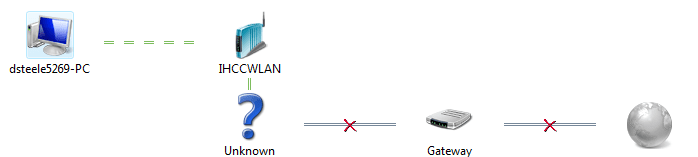
Is the shield still there next too the network icon lower right? If so that indicates a problem with Windows seeing or accepting the connection. What does the network map show?
 

My Computer My Computer

Computer type
PC/Desktop
Computer Manufacturer/Model Number
Home built
OS
Windows 7 Ult, Windows 8.1 Pro,
CPU
Q9650-4.275GHz, E8600 4.5GHz, E6750-3.8GHz
Motherboard
Evga 780i FTW
Memory
G.Skill PC2 9600 1200Mhz 5 5 5 15 2T
Graphics Card(s)
GTX480
Sound Card
Asus Xonar D2
Monitor(s) Displays
HannsG
Screen Resolution
1680X1050
Hard Drives
GSkill Phoenix Pro 120GB SSD
PSU
ThermalTake Toughpower 1000Watt modular
Case
ThermalTake XaserV
Cooling
Xigmatek S1283
Keyboard
Logitech G15
Mouse
Logitech G9
Internet Speed
T1
hope that helps.
 

Attachments

  • map.PNG
    map.PNG
    6.6 KB · Views: 15

My Computer My Computer

OS
Windows7 Pro x64
CPU
Intel Q6600
Motherboard
Asus X38
Memory
GSkill DD2 1066 6-6-6-18
Graphics Card(s)
CF XFX 4870's
Sound Card
Creative X-fi XtreamGamer Fata1ity Pro
Monitor(s) Displays
ViewSonic 22" 2ms
Screen Resolution
1680 x 1050
Hard Drives
Samsung F1 750 GB
W/D 160
PSU
CM1000W
Case
CMstacker
Cooling
Air 7 120mm fans
Keyboard
Saitek red backlit
Mouse
Logitech G9
Internet Speed
3mbs
Are you using two routers there? Might be a good time to reset your router.
 

My Computer My Computer

Computer type
PC/Desktop
Computer Manufacturer/Model Number
Home built
OS
Windows 7 Ult, Windows 8.1 Pro,
CPU
Q9650-4.275GHz, E8600 4.5GHz, E6750-3.8GHz
Motherboard
Evga 780i FTW
Memory
G.Skill PC2 9600 1200Mhz 5 5 5 15 2T
Graphics Card(s)
GTX480
Sound Card
Asus Xonar D2
Monitor(s) Displays
HannsG
Screen Resolution
1680X1050
Hard Drives
GSkill Phoenix Pro 120GB SSD
PSU
ThermalTake Toughpower 1000Watt modular
Case
ThermalTake XaserV
Cooling
Xigmatek S1283
Keyboard
Logitech G15
Mouse
Logitech G9
Internet Speed
T1
well its a campus network, so I really don't have access to it, but i think the problem is at my level b/c I was working last week, and my laptop is running seven can connect to the vpn.
 

My Computer My Computer

OS
Windows7 Pro x64
CPU
Intel Q6600
Motherboard
Asus X38
Memory
GSkill DD2 1066 6-6-6-18
Graphics Card(s)
CF XFX 4870's
Sound Card
Creative X-fi XtreamGamer Fata1ity Pro
Monitor(s) Displays
ViewSonic 22" 2ms
Screen Resolution
1680 x 1050
Hard Drives
Samsung F1 750 GB
W/D 160
PSU
CM1000W
Case
CMstacker
Cooling
Air 7 120mm fans
Keyboard
Saitek red backlit
Mouse
Logitech G9
Internet Speed
3mbs
Something upstream is blocking access there according to the network map but it's hard to say what it might be, firewall, A/V something.
 

My Computer My Computer

Computer type
PC/Desktop
Computer Manufacturer/Model Number
Home built
OS
Windows 7 Ult, Windows 8.1 Pro,
CPU
Q9650-4.275GHz, E8600 4.5GHz, E6750-3.8GHz
Motherboard
Evga 780i FTW
Memory
G.Skill PC2 9600 1200Mhz 5 5 5 15 2T
Graphics Card(s)
GTX480
Sound Card
Asus Xonar D2
Monitor(s) Displays
HannsG
Screen Resolution
1680X1050
Hard Drives
GSkill Phoenix Pro 120GB SSD
PSU
ThermalTake Toughpower 1000Watt modular
Case
ThermalTake XaserV
Cooling
Xigmatek S1283
Keyboard
Logitech G15
Mouse
Logitech G9
Internet Speed
T1
alright this is getting weird, windows says that the DNS server isn't responding, and if that was the case I wouldn't be online. Verified by pinging it.
 

My Computer My Computer

OS
Windows7 Pro x64
CPU
Intel Q6600
Motherboard
Asus X38
Memory
GSkill DD2 1066 6-6-6-18
Graphics Card(s)
CF XFX 4870's
Sound Card
Creative X-fi XtreamGamer Fata1ity Pro
Monitor(s) Displays
ViewSonic 22" 2ms
Screen Resolution
1680 x 1050
Hard Drives
Samsung F1 750 GB
W/D 160
PSU
CM1000W
Case
CMstacker
Cooling
Air 7 120mm fans
Keyboard
Saitek red backlit
Mouse
Logitech G9
Internet Speed
3mbs
So you are online even though you shouldn't be it seems? This is very stange, I can't help but to think that a third party program is involved here somehow... Something is partially blocking the connection but I can't say what. :confused:
 

My Computer My Computer

Computer type
PC/Desktop
Computer Manufacturer/Model Number
Home built
OS
Windows 7 Ult, Windows 8.1 Pro,
CPU
Q9650-4.275GHz, E8600 4.5GHz, E6750-3.8GHz
Motherboard
Evga 780i FTW
Memory
G.Skill PC2 9600 1200Mhz 5 5 5 15 2T
Graphics Card(s)
GTX480
Sound Card
Asus Xonar D2
Monitor(s) Displays
HannsG
Screen Resolution
1680X1050
Hard Drives
GSkill Phoenix Pro 120GB SSD
PSU
ThermalTake Toughpower 1000Watt modular
Case
ThermalTake XaserV
Cooling
Xigmatek S1283
Keyboard
Logitech G15
Mouse
Logitech G9
Internet Speed
T1
K, I'm gonna restart in safemode w/ networking and see if it clears up, I'll let you know.
 

My Computer My Computer

OS
Windows7 Pro x64
CPU
Intel Q6600
Motherboard
Asus X38
Memory
GSkill DD2 1066 6-6-6-18
Graphics Card(s)
CF XFX 4870's
Sound Card
Creative X-fi XtreamGamer Fata1ity Pro
Monitor(s) Displays
ViewSonic 22" 2ms
Screen Resolution
1680 x 1050
Hard Drives
Samsung F1 750 GB
W/D 160
PSU
CM1000W
Case
CMstacker
Cooling
Air 7 120mm fans
Keyboard
Saitek red backlit
Mouse
Logitech G9
Internet Speed
3mbs
Ok keep me posted this getting interesting. :geek:
 

My Computer My Computer

Computer type
PC/Desktop
Computer Manufacturer/Model Number
Home built
OS
Windows 7 Ult, Windows 8.1 Pro,
CPU
Q9650-4.275GHz, E8600 4.5GHz, E6750-3.8GHz
Motherboard
Evga 780i FTW
Memory
G.Skill PC2 9600 1200Mhz 5 5 5 15 2T
Graphics Card(s)
GTX480
Sound Card
Asus Xonar D2
Monitor(s) Displays
HannsG
Screen Resolution
1680X1050
Hard Drives
GSkill Phoenix Pro 120GB SSD
PSU
ThermalTake Toughpower 1000Watt modular
Case
ThermalTake XaserV
Cooling
Xigmatek S1283
Keyboard
Logitech G15
Mouse
Logitech G9
Internet Speed
T1

My Computer My Computer

OS
Windows7 Pro x64
CPU
Intel Q6600
Motherboard
Asus X38
Memory
GSkill DD2 1066 6-6-6-18
Graphics Card(s)
CF XFX 4870's
Sound Card
Creative X-fi XtreamGamer Fata1ity Pro
Monitor(s) Displays
ViewSonic 22" 2ms
Screen Resolution
1680 x 1050
Hard Drives
Samsung F1 750 GB
W/D 160
PSU
CM1000W
Case
CMstacker
Cooling
Air 7 120mm fans
Keyboard
Saitek red backlit
Mouse
Logitech G9
Internet Speed
3mbs
Yes the problem looks similar. He's having him check a network setting in services to make sure it's enabled. Have you tried unplugging your other network interfaces yet? Reinstalling the network driver in Device Manager may have an effect.

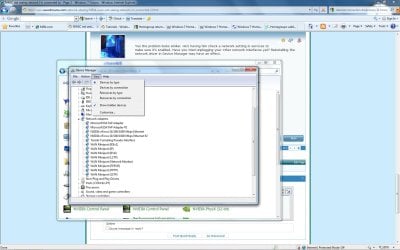
You might want to look here in Device Manage with "show hidden devices" enabled. A screen shot of this might be helpful. That "Unknown Device" on the map seems to be where the problem is but that looks upstream of you.
 

Attachments

  • Network adaptors show hidden.jpg
    Network adaptors show hidden.jpg
    158.5 KB · Views: 16

My Computer My Computer

Computer type
PC/Desktop
Computer Manufacturer/Model Number
Home built
OS
Windows 7 Ult, Windows 8.1 Pro,
CPU
Q9650-4.275GHz, E8600 4.5GHz, E6750-3.8GHz
Motherboard
Evga 780i FTW
Memory
G.Skill PC2 9600 1200Mhz 5 5 5 15 2T
Graphics Card(s)
GTX480
Sound Card
Asus Xonar D2
Monitor(s) Displays
HannsG
Screen Resolution
1680X1050
Hard Drives
GSkill Phoenix Pro 120GB SSD
PSU
ThermalTake Toughpower 1000Watt modular
Case
ThermalTake XaserV
Cooling
Xigmatek S1283
Keyboard
Logitech G15
Mouse
Logitech G9
Internet Speed
T1
Yea, I'll reinstall my wireless nic and dump all of the "hidden" 6to4 tunnel connections and see if it works out. Worth a shot !
 

My Computer My Computer

OS
Windows7 Pro x64
CPU
Intel Q6600
Motherboard
Asus X38
Memory
GSkill DD2 1066 6-6-6-18
Graphics Card(s)
CF XFX 4870's
Sound Card
Creative X-fi XtreamGamer Fata1ity Pro
Monitor(s) Displays
ViewSonic 22" 2ms
Screen Resolution
1680 x 1050
Hard Drives
Samsung F1 750 GB
W/D 160
PSU
CM1000W
Case
CMstacker
Cooling
Air 7 120mm fans
Keyboard
Saitek red backlit
Mouse
Logitech G9
Internet Speed
3mbs
Yes those extra toredo tunnels don't help either, just had one of those last night and it was caused by the Eset firewall. Windows may be confused with all those extra connections also.
 

My Computer My Computer

Computer type
PC/Desktop
Computer Manufacturer/Model Number
Home built
OS
Windows 7 Ult, Windows 8.1 Pro,
CPU
Q9650-4.275GHz, E8600 4.5GHz, E6750-3.8GHz
Motherboard
Evga 780i FTW
Memory
G.Skill PC2 9600 1200Mhz 5 5 5 15 2T
Graphics Card(s)
GTX480
Sound Card
Asus Xonar D2
Monitor(s) Displays
HannsG
Screen Resolution
1680X1050
Hard Drives
GSkill Phoenix Pro 120GB SSD
PSU
ThermalTake Toughpower 1000Watt modular
Case
ThermalTake XaserV
Cooling
Xigmatek S1283
Keyboard
Logitech G15
Mouse
Logitech G9
Internet Speed
T1
Back
Top