ObjectDock-Snipping tool

Bongo

Jerry ☮ 1956-2019 R.I.P.
VIP
SF Team
Local time
5:52 PM
Messages
10,864
Location
Iowa
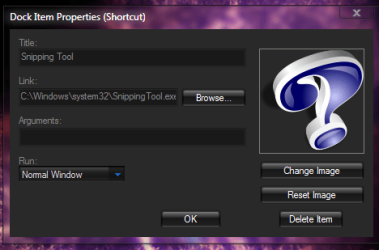
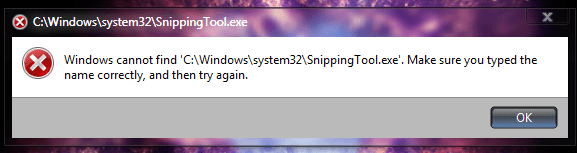
On ObjectDock I had snipping tool working in Window 7 32 bit. I installed Window 7 64 bit now it will not work. I have dragged it from the start menu & from C:\Windows\System32\SnippingTool.exe & I get a error (screenshot) Window cannot find "C:\Windows\System32\SnippingTool.exe" but it's there (screenshot)
Does anyone know how to fix this. As you can see it works from the start menu.
Thanks Jerry
 

Attachments
  • Capture.PNG
    Capture.PNG
    18.3 KB · Views: 33
  • Capture1.PNG
    Capture1.PNG
    128.4 KB · Views: 139
  • Capture2.PNG
    Capture2.PNG
    23.4 KB · Views: 73

My Computer

Computer type
Laptop
Computer Manufacturer/Model Number
Sager NP9170
OS
Win 7 Pro x64 / Win 10 Pro
CPU
Intel(R) Core(TM) i7-3630QM CPU @ 2.40GHz
Motherboard
CLEVO P170EM
Memory
12 GB
Graphics Card(s)
(1) Intel(R) HD Graphics 4000 (2) NVIDIA GeForce GTX 675M
Sound Card
(1) Realtek High Definition Audio (2) Intel(R) Display Aud
Monitor(s) Displays
17.3
Screen Resolution
1920x1080
Hard Drives
(1) Samsung 860 EVO 500GB(OS) (1) Samsung 860 EVO 500GB(Data)
Keyboard
Backlite
Antivirus
MSE, Malwarebytes Pro
Browser
Firefox
Other Info
DESKTOP: Custom-built.
OS: Win 10 Pro x64.
CASE: Rosewill R5.
CPU: Intel I5 4670K CPU @ 3.40GHz.
CPU COOLER: Cool Master Hyper 212 EVO.
MOTHERBOARD: Asus Z87-A.
MEMORY: Kingston HyperX 2x4 GB.
GPU: Nvidia Geforce 650 TI.
PSU: Corsair TX750.
DRIVES: (1) Samsung 840 120 GB SSD (2) Western Digital blue 500 GB 7200 RPM.
I got it fixed
You have to do the following:
-Start - All Programs - Accessories - Right Click on SnippingTool - Open file location.
Copy SnippingTool.exe and paste it to any other folder on your pc. Now you can create a shortcut on objectdock.


Got the fix here post #11
SnippingTool on ObjectDock? Forum Post by Skiny

Mark as solved
 

My Computer

Computer type
Laptop
Computer Manufacturer/Model Number
Sager NP9170
OS
Win 7 Pro x64 / Win 10 Pro
CPU
Intel(R) Core(TM) i7-3630QM CPU @ 2.40GHz
Motherboard
CLEVO P170EM
Memory
12 GB
Graphics Card(s)
(1) Intel(R) HD Graphics 4000 (2) NVIDIA GeForce GTX 675M
Sound Card
(1) Realtek High Definition Audio (2) Intel(R) Display Aud
Monitor(s) Displays
17.3
Screen Resolution
1920x1080
Hard Drives
(1) Samsung 860 EVO 500GB(OS) (1) Samsung 860 EVO 500GB(Data)
Keyboard
Backlite
Antivirus
MSE, Malwarebytes Pro
Browser
Firefox
Other Info
DESKTOP: Custom-built.
OS: Win 10 Pro x64.
CASE: Rosewill R5.
CPU: Intel I5 4670K CPU @ 3.40GHz.
CPU COOLER: Cool Master Hyper 212 EVO.
MOTHERBOARD: Asus Z87-A.
MEMORY: Kingston HyperX 2x4 GB.
GPU: Nvidia Geforce 650 TI.
PSU: Corsair TX750.
DRIVES: (1) Samsung 840 120 GB SSD (2) Western Digital blue 500 GB 7200 RPM.
I got it fixed
You have to do the following:
-Start - All Programs - Accessories - Right Click on SnippingTool - Open file location.
Copy SnippingTool.exe and paste it to any other folder on your pc. Now you can create a shortcut on objectdock.


Got the fix here post #11
SnippingTool on ObjectDock? Forum Post by Skiny

Mark as solved

This stop working.

so I did this
Replacing this C:\Windows\System32\SnippingTool.exe

with this C:\Windows\Sysnative\SnippingTool.exe
know it's OK


got it from here
ObjectDock-SnippingTool Forum Post by 1bongo
 

My Computer

Computer type
Laptop
Computer Manufacturer/Model Number
Sager NP9170
OS
Win 7 Pro x64 / Win 10 Pro
CPU
Intel(R) Core(TM) i7-3630QM CPU @ 2.40GHz
Motherboard
CLEVO P170EM
Memory
12 GB
Graphics Card(s)
(1) Intel(R) HD Graphics 4000 (2) NVIDIA GeForce GTX 675M
Sound Card
(1) Realtek High Definition Audio (2) Intel(R) Display Aud
Monitor(s) Displays
17.3
Screen Resolution
1920x1080
Hard Drives
(1) Samsung 860 EVO 500GB(OS) (1) Samsung 860 EVO 500GB(Data)
Keyboard
Backlite
Antivirus
MSE, Malwarebytes Pro
Browser
Firefox
Other Info
DESKTOP: Custom-built.
OS: Win 10 Pro x64.
CASE: Rosewill R5.
CPU: Intel I5 4670K CPU @ 3.40GHz.
CPU COOLER: Cool Master Hyper 212 EVO.
MOTHERBOARD: Asus Z87-A.
MEMORY: Kingston HyperX 2x4 GB.
GPU: Nvidia Geforce 650 TI.
PSU: Corsair TX750.
DRIVES: (1) Samsung 840 120 GB SSD (2) Western Digital blue 500 GB 7200 RPM.
Thank you

C:\Windows\Sysnative\SnippingTool.exe

This works 100%! Thank you!!!:party:

Before I paste it in differend folders and it worked, but then suddelly stopped working
 

My Computer

Computer type
PC/Desktop
Computer Manufacturer/Model Number
Custom build
OS
Windows 7 SP1 x64 Ultimate
CPU
FX 8320 4ghz
Motherboard
Gigabyte 970A UD3P
Memory
Crucial Ballistix Tactical 8GB 240-Pin DDR3 1600 Mhz
Graphics Card(s)
Sapphire R9 270 Dual X
Sound Card
VIA HD Audio
Monitor(s) Displays
Samsung SyncMaster 2032BW
Screen Resolution
1680 * 1050
Hard Drives
WD Blue WD10EZEX
PSU
Energon 650w
Case
Aerocool Strike X One
Cooling
Xigmatek Dark Knight SD1283 Night Hawk Edition
Keyboard
Typhoon CarbonKey
Mouse
Trust GXT 25 Gaming Mouse
Internet Speed
120mb/4mb
Antivirus
Comodo Internet Security 8.1
Browser
Firefox
Other Info
CfosSpeed 10
C:\Windows\Sysnative\SnippingTool.exe

This works 100%! Thank you!!!:party:

Before I paste it in differend folders and it worked, but then suddelly stopped working


That stopped working to. I get this error window

untitled.png
 

My Computer

Computer type
PC/Desktop
Computer Manufacturer/Model Number
Custom build
OS
Windows 7 SP1 x64 Ultimate
CPU
FX 8320 4ghz
Motherboard
Gigabyte 970A UD3P
Memory
Crucial Ballistix Tactical 8GB 240-Pin DDR3 1600 Mhz
Graphics Card(s)
Sapphire R9 270 Dual X
Sound Card
VIA HD Audio
Monitor(s) Displays
Samsung SyncMaster 2032BW
Screen Resolution
1680 * 1050
Hard Drives
WD Blue WD10EZEX
PSU
Energon 650w
Case
Aerocool Strike X One
Cooling
Xigmatek Dark Knight SD1283 Night Hawk Edition
Keyboard
Typhoon CarbonKey
Mouse
Trust GXT 25 Gaming Mouse
Internet Speed
120mb/4mb
Antivirus
Comodo Internet Security 8.1
Browser
Firefox
Other Info
CfosSpeed 10
Why so complicated. Either just make a shortcut to the desktop of the .exe and drag that into object dock or pin it to the taskbar.
If you want a really neat deal, use Jing. That you can program to a function key plus you have all sorts of highlight, arrow, box, etc. tools. FastStone Capture has similar capabilities. Both are far superior to the snipping tool.
 

My Computer

Computer Manufacturer/Model Number
HP, Dell, Gateway, Toshiba - 4 laptops and 2 desktops
OS
Vista, Windows7, Mint Mate, Zorin, Windows 8
CPU
from 1.6GHz Duo to i7
Monitor(s) Displays
2x HP w2207
Hard Drives
5x HDD, 7x SSD, 12x Externals
Keyboard
with trackball - no mices
Mouse
Trackball mice
Internet Speed
DSL 6000
Why so complicated. Either just make a shortcut to the desktop of the .exe and drag that into object dock or pin it to the taskbar.
If you want a really neat deal, use Jing. That you can program to a function key plus you have all sorts of highlight, arrow, box, etc. tools. FastStone Capture has similar capabilities. Both are far superior to the snipping tool.


It doesnt work that way eather. I ll hav it in startup menu or desktop or maybe use this, wich I used before. It s very good tool HyperSnap
 

My Computer

Computer type
PC/Desktop
Computer Manufacturer/Model Number
Custom build
OS
Windows 7 SP1 x64 Ultimate
CPU
FX 8320 4ghz
Motherboard
Gigabyte 970A UD3P
Memory
Crucial Ballistix Tactical 8GB 240-Pin DDR3 1600 Mhz
Graphics Card(s)
Sapphire R9 270 Dual X
Sound Card
VIA HD Audio
Monitor(s) Displays
Samsung SyncMaster 2032BW
Screen Resolution
1680 * 1050
Hard Drives
WD Blue WD10EZEX
PSU
Energon 650w
Case
Aerocool Strike X One
Cooling
Xigmatek Dark Knight SD1283 Night Hawk Edition
Keyboard
Typhoon CarbonKey
Mouse
Trust GXT 25 Gaming Mouse
Internet Speed
120mb/4mb
Antivirus
Comodo Internet Security 8.1
Browser
Firefox
Other Info
CfosSpeed 10
Back
Top