Occasional slow boot time despite using an SSD.

Raynian

New member
Member
VIP
Local time
10:32 PM
Messages
126
I have been using a Samsung 830 SSD for a few months for my laptop.

However, occasionally the boot times tend to be slow, as it spins at the "Welcome" screen for quite some time.

Is there any way to troubleshoot this ? :eek:
 

My Computer

Computer type
Laptop
Computer Manufacturer/Model Number
Sony Vaio S 13 A
OS
Microsoft Windows 7 Professional 64-bit
CPU
Intel(R) Core(TM) i7-3520M CPU @ 2.90GHz
Memory
12.00 GB
Graphics Card(s)
(1) Intel(R) HD Graphics 4000 (2) NVIDIA GeForce GT 640M L
Screen Resolution
1600x900
Hard Drives
ATA SAMSUNG SSD 830 SCSI Disk Device
Mouse
Logitech / Microsoft touch Mouse
Other Info
Weight: 1.67 Kg
Yup TRIM is enabled on my laptop.

Will try to run SFC now :)
 

My Computer

Computer type
Laptop
Computer Manufacturer/Model Number
Sony Vaio S 13 A
OS
Microsoft Windows 7 Professional 64-bit
CPU
Intel(R) Core(TM) i7-3520M CPU @ 2.90GHz
Memory
12.00 GB
Graphics Card(s)
(1) Intel(R) HD Graphics 4000 (2) NVIDIA GeForce GT 640M L
Screen Resolution
1600x900
Hard Drives
ATA SAMSUNG SSD 830 SCSI Disk Device
Mouse
Logitech / Microsoft touch Mouse
Other Info
Weight: 1.67 Kg

My Computer

Computer Manufacturer/Model Number
Custom Built
OS
Windows 7 Ultimate 32-Bit & Windows 7 Ultimate 64-Bit
CPU
Intel Core i7 CPU 950 @ 3.07GHz
Motherboard
ASUS P6T DELUXE V2
Memory
OCZ 6GB (3 x 2GB) 240-Pin DDR3 SDRAM DDR3 1600 OCZ3X1600R2
Graphics Card(s)
ATI Radeon HD 5700 Series
Sound Card
OnBoard
Hard Drives
WD6400AACS-00M3B0 (640GB SATA )
PSU
CORSAIR 850w
Case
NZXT LEXA
Cooling
Intel Stock Heatsink Fan
Keyboard
Microsoft Wireless Laser Keyboard 7000
Mouse
Microsoft Wireless Laser Mouse 7000

My Computer

Computer type
Laptop
Computer Manufacturer/Model Number
Sony Vaio S 13 A
OS
Microsoft Windows 7 Professional 64-bit
CPU
Intel(R) Core(TM) i7-3520M CPU @ 2.90GHz
Memory
12.00 GB
Graphics Card(s)
(1) Intel(R) HD Graphics 4000 (2) NVIDIA GeForce GT 640M L
Screen Resolution
1600x900
Hard Drives
ATA SAMSUNG SSD 830 SCSI Disk Device
Mouse
Logitech / Microsoft touch Mouse
Other Info
Weight: 1.67 Kg
I have been using a Samsung 830 SSD for a few months for my laptop.

However, occasionally the boot times tend to be slow, as it spins at the "Welcome" screen for quite some time.

Is there any way to troubleshoot this ? :eek:

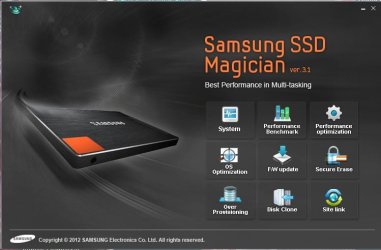
Open Samsung Magician and make sure you have clicked "over provisioning" "OS and performance optimization"

Then download Download CrystalDiskMark 3.0.2f Free - A small HDD benchmark utility for your hard drive - Softpedia

If your mobo supports 6g - make sure the SSD is in that port (Usually port one).
 

Attachments

  • magician pic.jpg
    magician pic.jpg
    35.9 KB · Views: 5

My Computer

Computer type
PC/Desktop
Computer Manufacturer/Model Number
Self-Built
OS
Windows 7 Professional X64
CPU
Core i7 (2nd gen) i7-2600K / 3.40GHz
Motherboard
ASUS P8Z77-V Intel 7 Series Motherboard
Memory
DDR3 2400MHz (OC) 16gb
Graphics Card(s)
Intel(R) HD Graphics 3000, -1988 Mb
Sound Card
8 ChannelsAudio Chipset Realtek ALC892
Monitor(s) Displays
LG 29UM65 Black 29"
Screen Resolution
2560 x 1080
Hard Drives
840 EVO 250 GB SSD ;2tb (2);Seagate;1tb Seagate; 750 gb Seagate; wd ext (2) 750 gb,WD 2tb X 2;WD 3TB Black
PSU
750 watt
Case
Thermaltake RX -1
Cooling
2120mm Fans Included 1Other Fan Ports 5x 200mm Fan Ports
Keyboard
Microsoft Digital Media Pro
Mouse
Microsoft Wireless 6000
Internet Speed
U-verse 18 mbps
Antivirus
MSE
Browser
Firefox, Chrome and my favorite: Pale Moon
Other Info
HdHomerun Dual Tuner.
SRS Audio Lab,
Pioneer BDR 208-DBK
PS3-What a difference in my Surround Sound Receiver!
HP 4540s - My new Toy.
Epson R280 Printer- To personalize my Dvds.
Canon MP 560 - For scanning.
occasionally the boot times tend to be slow, as it spins at the "Welcome" screen for quite some time
Like what are we talking here? One second, ten seconds, a minute longer?

Post an old and new boot log entry and your start ups so we can see if it's Session 1 or Session 2 that may be causing a problem. There's a whole slue of things that can cause a slow boot. Guessing and tweaking blind takes too much time. ;)
 

My Computer

Computer type
PC/Desktop
Computer Manufacturer/Model Number
Built 2/11/2011
OS
Windows 7 Pro-x64
CPU
i7-2600 3.4GHz - 3.8GHz Turbo
Motherboard
Intel DH67BL-B3
Memory
8Gb - 2x4GB, Muskin 991770 PC3-1333
Graphics Card(s)
Integrated Intel HD 2000
Sound Card
Integrated Intel 10.1 HD, RealTek ALC892
Monitor(s) Displays
Asus LCD VH222H, Haier HL24XSL2a
Screen Resolution
1920x1080, 1920x1080
Hard Drives
Crucial SSD C300-128Gb,
Western Digital WD5002AALX - 500Gb,
Western Digital WD7501AALS - 750Gb
PSU
Seasonic 650W 80+ Gold Modular
Case
Rosewill Defender
Cooling
Stock CPU, Four 120mm case fans, PCH fan added
Keyboard
Logitech EX100 Y-RBH94 Wireless
Mouse
Logitech EX100 M-RCE95 Wireless
Internet Speed
3.0/1.5 Mbs
Antivirus
Microsoft Security Essentials
Browser
Microsoft Internet Explorer 11
Other Info
Antec Veris Premier-Multimedia IR Station,
Cyber Accoustics-3602 Speakers,
AFT XM-5U Card Reader,
Hauppauge TV-HVR-2250,
Sony LX300 USB Turntable
@PSCO2007 : Crystaldiskinfo is stating my SSD as 100% good condition. I updated the Samsung Magician software to v4.0, and now it states that there is insuffcient diskspace for over-provisioning ?! I recalled that there is some over-provisioning when the software is v3.2.

My SSD still has 89GB free.. That's still a reasonable amount I guess..

@carwiz : By boot logs, do you mean the auto-generated ntbtlog.txt ? :)
 

My Computer

Computer type
Laptop
Computer Manufacturer/Model Number
Sony Vaio S 13 A
OS
Microsoft Windows 7 Professional 64-bit
CPU
Intel(R) Core(TM) i7-3520M CPU @ 2.90GHz
Memory
12.00 GB
Graphics Card(s)
(1) Intel(R) HD Graphics 4000 (2) NVIDIA GeForce GT 640M L
Screen Resolution
1600x900
Hard Drives
ATA SAMSUNG SSD 830 SCSI Disk Device
Mouse
Logitech / Microsoft touch Mouse
Other Info
Weight: 1.67 Kg
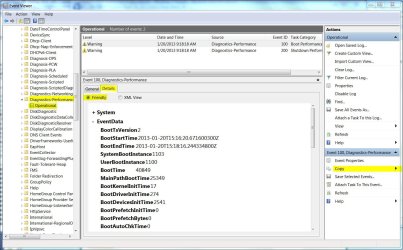
These will be *.EVTX files. Click the Orb, type Event then select Event Viewer.

Expand: Applications and Services Logs
>Microsoft
>Windows
>Diagnostics-Performance
Select Operational

In the lower-center pane, click on the Details tab. This will display Windows Boot times by major steps. You can click on the Copy in the right pane to copy the data as a text file then post it here.

The screen will look something like this.
 

Attachments

  • Boot Event.JPG
    Boot Event.JPG
    171.1 KB · Views: 9

My Computer

Computer type
PC/Desktop
Computer Manufacturer/Model Number
Built 2/11/2011
OS
Windows 7 Pro-x64
CPU
i7-2600 3.4GHz - 3.8GHz Turbo
Motherboard
Intel DH67BL-B3
Memory
8Gb - 2x4GB, Muskin 991770 PC3-1333
Graphics Card(s)
Integrated Intel HD 2000
Sound Card
Integrated Intel 10.1 HD, RealTek ALC892
Monitor(s) Displays
Asus LCD VH222H, Haier HL24XSL2a
Screen Resolution
1920x1080, 1920x1080
Hard Drives
Crucial SSD C300-128Gb,
Western Digital WD5002AALX - 500Gb,
Western Digital WD7501AALS - 750Gb
PSU
Seasonic 650W 80+ Gold Modular
Case
Rosewill Defender
Cooling
Stock CPU, Four 120mm case fans, PCH fan added
Keyboard
Logitech EX100 Y-RBH94 Wireless
Mouse
Logitech EX100 M-RCE95 Wireless
Internet Speed
3.0/1.5 Mbs
Antivirus
Microsoft Security Essentials
Browser
Microsoft Internet Explorer 11
Other Info
Antec Veris Premier-Multimedia IR Station,
Cyber Accoustics-3602 Speakers,
AFT XM-5U Card Reader,
Hauppauge TV-HVR-2250,
Sony LX300 USB Turntable
Forgot to mention: In the upper-center pane, you'll need to select a recent Event ID 100 entry. If you can find one that's about the time of your lag, it would help. Also check one from an earlier date to see if there is a large change in "Boot Time" shown in the list.

By the way, Even ID 200 records are shutdown times.
 

My Computer

Computer type
PC/Desktop
Computer Manufacturer/Model Number
Built 2/11/2011
OS
Windows 7 Pro-x64
CPU
i7-2600 3.4GHz - 3.8GHz Turbo
Motherboard
Intel DH67BL-B3
Memory
8Gb - 2x4GB, Muskin 991770 PC3-1333
Graphics Card(s)
Integrated Intel HD 2000
Sound Card
Integrated Intel 10.1 HD, RealTek ALC892
Monitor(s) Displays
Asus LCD VH222H, Haier HL24XSL2a
Screen Resolution
1920x1080, 1920x1080
Hard Drives
Crucial SSD C300-128Gb,
Western Digital WD5002AALX - 500Gb,
Western Digital WD7501AALS - 750Gb
PSU
Seasonic 650W 80+ Gold Modular
Case
Rosewill Defender
Cooling
Stock CPU, Four 120mm case fans, PCH fan added
Keyboard
Logitech EX100 Y-RBH94 Wireless
Mouse
Logitech EX100 M-RCE95 Wireless
Internet Speed
3.0/1.5 Mbs
Antivirus
Microsoft Security Essentials
Browser
Microsoft Internet Explorer 11
Other Info
Antec Veris Premier-Multimedia IR Station,
Cyber Accoustics-3602 Speakers,
AFT XM-5U Card Reader,
Hauppauge TV-HVR-2250,
Sony LX300 USB Turntable
These will be *.EVTX files. Click the Orb, type Event then select Event Viewer.

Expand: Applications and Services Logs
>Microsoft
>Windows
>Diagnostics-Performance
Select Operational

In the lower-center pane, click on the Details tab. This will display Windows Boot times by major steps. You can click on the Copy in the right pane to copy the data as a text file then post it here.

The screen will look something like this.

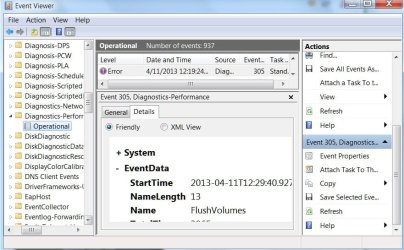
I use a different program (mentioned on this forum), but following your method there is no boot time entry.
 

Attachments

  • EVENT PIC 4,1,13.jpg
    EVENT PIC 4,1,13.jpg
    78.7 KB · Views: 7

My Computer

Computer type
PC/Desktop
Computer Manufacturer/Model Number
Self-Built
OS
Windows 7 Professional X64
CPU
Core i7 (2nd gen) i7-2600K / 3.40GHz
Motherboard
ASUS P8Z77-V Intel 7 Series Motherboard
Memory
DDR3 2400MHz (OC) 16gb
Graphics Card(s)
Intel(R) HD Graphics 3000, -1988 Mb
Sound Card
8 ChannelsAudio Chipset Realtek ALC892
Monitor(s) Displays
LG 29UM65 Black 29"
Screen Resolution
2560 x 1080
Hard Drives
840 EVO 250 GB SSD ;2tb (2);Seagate;1tb Seagate; 750 gb Seagate; wd ext (2) 750 gb,WD 2tb X 2;WD 3TB Black
PSU
750 watt
Case
Thermaltake RX -1
Cooling
2120mm Fans Included 1Other Fan Ports 5x 200mm Fan Ports
Keyboard
Microsoft Digital Media Pro
Mouse
Microsoft Wireless 6000
Internet Speed
U-verse 18 mbps
Antivirus
MSE
Browser
Firefox, Chrome and my favorite: Pale Moon
Other Info
HdHomerun Dual Tuner.
SRS Audio Lab,
Pioneer BDR 208-DBK
PS3-What a difference in my Surround Sound Receiver!
HP 4540s - My new Toy.
Epson R280 Printer- To personalize my Dvds.
Canon MP 560 - For scanning.
@PSCO2007 : Crystaldiskinfo is stating my SSD as 100% good condition. I updated the Samsung Magician software to v4.0, and now it states that there is insuffcient diskspace for over-provisioning ?! I recalled that there is some over-provisioning when the software is v3.2.

My SSD still has 89GB free.. That's still a reasonable amount I guess..

@carwiz : By boot logs, do you mean the auto-generated ntbtlog.txt ? :)

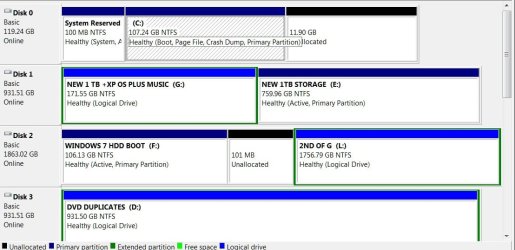
I use the 3.10 version - does your SSD show an unallocated segment?
 

Attachments

  • DISC MGMT 4,11,13.jpg
    DISC MGMT 4,11,13.jpg
    71.9 KB · Views: 7

My Computer

Computer type
PC/Desktop
Computer Manufacturer/Model Number
Self-Built
OS
Windows 7 Professional X64
CPU
Core i7 (2nd gen) i7-2600K / 3.40GHz
Motherboard
ASUS P8Z77-V Intel 7 Series Motherboard
Memory
DDR3 2400MHz (OC) 16gb
Graphics Card(s)
Intel(R) HD Graphics 3000, -1988 Mb
Sound Card
8 ChannelsAudio Chipset Realtek ALC892
Monitor(s) Displays
LG 29UM65 Black 29"
Screen Resolution
2560 x 1080
Hard Drives
840 EVO 250 GB SSD ;2tb (2);Seagate;1tb Seagate; 750 gb Seagate; wd ext (2) 750 gb,WD 2tb X 2;WD 3TB Black
PSU
750 watt
Case
Thermaltake RX -1
Cooling
2120mm Fans Included 1Other Fan Ports 5x 200mm Fan Ports
Keyboard
Microsoft Digital Media Pro
Mouse
Microsoft Wireless 6000
Internet Speed
U-verse 18 mbps
Antivirus
MSE
Browser
Firefox, Chrome and my favorite: Pale Moon
Other Info
HdHomerun Dual Tuner.
SRS Audio Lab,
Pioneer BDR 208-DBK
PS3-What a difference in my Surround Sound Receiver!
HP 4540s - My new Toy.
Epson R280 Printer- To personalize my Dvds.
Canon MP 560 - For scanning.
However, occasionally the boot times tend to be slow, as it spins at the "Welcome" screen for quite some time.


Well I was thrown by this post#1 and the only reason I asked re the TRIM and SFC as I always like to start simple but I suppose that is what I must be.

Anyway see the others have got it under control so hope things get fixed for you.
 

My Computer

Computer type
PC/Desktop
Computer Manufacturer/Model Number
Own build (new) Desk1 / Asus ROG Win 7 / Desk2 1st build
OS
Desk1 7 Home Prem / Desk2 10 Pro / Main lap Asus ROG 10 Pro 2 laptop Toshiba 7 Pro Asus P2520 7 & 10
CPU
Desk1 i5 3750K / Laptop i7 GTX 860M / Desk2 i5 2500
Motherboard
Desk1 Asus P877-V / Desk2 Gigabyte H67 UD3H / Laptop ?
Memory
Desk1 8GB (1866) / Desk2 16GB (1333) / Laptop 8Gb DDR3
Graphics Card(s)
Desk 1& 2NVidia GTX 650 & Laptops on board Intel
Sound Card
Desk 1 & 2 -XONAR DG Realtek High Def audio Laptop
Monitor(s) Displays
Desk 1 Benq HD 2450 / Desk2 Philips 24" / Laptop 17.5"
Screen Resolution
1920x1080 D1 & D2 & Laptop 1
Hard Drives
Desk1 Samsung 120GB 830 SSD
Asus ROG 256GB 850 Pro SSD
Desk2 Samsung 840 256 SSD
Toshiba 120GB EVO
PSU
Desk 1 Corsair HX 1050/ Laptop ? / Desk 2 Corsair HX 650
Case
Desk 1 Cooler HAF XM ? Toshiba laptop / Desk2 Coolermaster
Cooling
Fans on all Desk1 -2 Desk2 - all Coolermasters 5 Laptop ?
Keyboard
Desk 1 MS Sidewinder X6 Desk 2 MS Sidewinder X 4
Mouse
Desk 1&2 - Gigabyte MS 900 gamer - laptop - Logitec wireless
Internet Speed
ADSL2+
Other Info
One other Desktop (tester) and spare Toshba laptop both with SSD's
Running Kaspersky 2016 ISS on all machines config'd identically
Logitec audio stereo systems on each machine (x3)
Canon MG5250MFC
Router/modem TP-Link running WPA2SK
I attached .txt file with a few selected evt 100 entries with longer than usual boot times. There are a few with extremely abnormal boot times and is categorised as an error too.

My boot time is usally around 22000-35000ms .

On a sidenote, I booted up today and my laptop hung at the Windows logo. But the Event Viewer didn't show any related errors.. =/

View attachment logs.txt
 

My Computer

Computer type
Laptop
Computer Manufacturer/Model Number
Sony Vaio S 13 A
OS
Microsoft Windows 7 Professional 64-bit
CPU
Intel(R) Core(TM) i7-3520M CPU @ 2.90GHz
Memory
12.00 GB
Graphics Card(s)
(1) Intel(R) HD Graphics 4000 (2) NVIDIA GeForce GT 640M L
Screen Resolution
1600x900
Hard Drives
ATA SAMSUNG SSD 830 SCSI Disk Device
Mouse
Logitech / Microsoft touch Mouse
Other Info
Weight: 1.67 Kg
@PSCO2007 : Nope, my SSD is still shown as a primary partition.
 

My Computer

Computer type
Laptop
Computer Manufacturer/Model Number
Sony Vaio S 13 A
OS
Microsoft Windows 7 Professional 64-bit
CPU
Intel(R) Core(TM) i7-3520M CPU @ 2.90GHz
Memory
12.00 GB
Graphics Card(s)
(1) Intel(R) HD Graphics 4000 (2) NVIDIA GeForce GT 640M L
Screen Resolution
1600x900
Hard Drives
ATA SAMSUNG SSD 830 SCSI Disk Device
Mouse
Logitech / Microsoft touch Mouse
Other Info
Weight: 1.67 Kg
These will be *.EVTX files. Click the Orb, type Event then select Event Viewer.

Expand: Applications and Services Logs
>Microsoft
>Windows
>Diagnostics-Performance
Select Operational

In the lower-center pane, click on the Details tab. This will display Windows Boot times by major steps. You can click on the Copy in the right pane to copy the data as a text file then post it here.

The screen will look something like this.

I use a different program (mentioned on this forum), but following your method there is no boot time entry.
Event 305 is a log file validation error. So you either changed/modified logging parameters or you have some type of disk error occurring. I can't help any more from the log side so I'll stand back and watch. ;)
 

My Computer

Computer type
PC/Desktop
Computer Manufacturer/Model Number
Built 2/11/2011
OS
Windows 7 Pro-x64
CPU
i7-2600 3.4GHz - 3.8GHz Turbo
Motherboard
Intel DH67BL-B3
Memory
8Gb - 2x4GB, Muskin 991770 PC3-1333
Graphics Card(s)
Integrated Intel HD 2000
Sound Card
Integrated Intel 10.1 HD, RealTek ALC892
Monitor(s) Displays
Asus LCD VH222H, Haier HL24XSL2a
Screen Resolution
1920x1080, 1920x1080
Hard Drives
Crucial SSD C300-128Gb,
Western Digital WD5002AALX - 500Gb,
Western Digital WD7501AALS - 750Gb
PSU
Seasonic 650W 80+ Gold Modular
Case
Rosewill Defender
Cooling
Stock CPU, Four 120mm case fans, PCH fan added
Keyboard
Logitech EX100 Y-RBH94 Wireless
Mouse
Logitech EX100 M-RCE95 Wireless
Internet Speed
3.0/1.5 Mbs
Antivirus
Microsoft Security Essentials
Browser
Microsoft Internet Explorer 11
Other Info
Antec Veris Premier-Multimedia IR Station,
Cyber Accoustics-3602 Speakers,
AFT XM-5U Card Reader,
Hauppauge TV-HVR-2250,
Sony LX300 USB Turntable
Code:
<Data Name="[COLOR=red]BootNumStartupApps[/COLOR]">[COLOR=red]23[/COLOR]</Data>
 
<Data Name="OSLoaderDuration">1028</Data>
<Data Name="BootPNPInitDuration">557</Data>
<Data Name="OtherKernelInitDuration">432</Data>
<Data Name="SystemPNPInitDuration">406</Data>
<Data Name="Session0InitDuration">3091</Data>
<Data Name="Session1InitDuration">181</Data>
<Data Name="SessionInitOtherDuration">610</Data>
 
<Data Name="[COLOR=red]OtherLogonInitActivityDuration[/COLOR]">[COLOR=red]28772[/COLOR]</Data>
<Data Name="UserLogonWaitDuration">6548</Data>

You have 23 startup apps! :shock: Some of those under a user account are taking almost 29 seconds to start up. You should review these and see if they are all really necessary or check to see if auto update is an option and turn it off. You may have one or more "phoning home" to check for updates or authentication. (Or sending your "habits" data - Google tool bar is good for doing this, as well as others.)
 

My Computer

Computer type
PC/Desktop
Computer Manufacturer/Model Number
Built 2/11/2011
OS
Windows 7 Pro-x64
CPU
i7-2600 3.4GHz - 3.8GHz Turbo
Motherboard
Intel DH67BL-B3
Memory
8Gb - 2x4GB, Muskin 991770 PC3-1333
Graphics Card(s)
Integrated Intel HD 2000
Sound Card
Integrated Intel 10.1 HD, RealTek ALC892
Monitor(s) Displays
Asus LCD VH222H, Haier HL24XSL2a
Screen Resolution
1920x1080, 1920x1080
Hard Drives
Crucial SSD C300-128Gb,
Western Digital WD5002AALX - 500Gb,
Western Digital WD7501AALS - 750Gb
PSU
Seasonic 650W 80+ Gold Modular
Case
Rosewill Defender
Cooling
Stock CPU, Four 120mm case fans, PCH fan added
Keyboard
Logitech EX100 Y-RBH94 Wireless
Mouse
Logitech EX100 M-RCE95 Wireless
Internet Speed
3.0/1.5 Mbs
Antivirus
Microsoft Security Essentials
Browser
Microsoft Internet Explorer 11
Other Info
Antec Veris Premier-Multimedia IR Station,
Cyber Accoustics-3602 Speakers,
AFT XM-5U Card Reader,
Hauppauge TV-HVR-2250,
Sony LX300 USB Turntable
Code:
<Data Name="[COLOR=red]BootNumStartupApps[/COLOR]">[COLOR=red]23[/COLOR]</Data>
 
<Data Name="OSLoaderDuration">1028</Data>
<Data Name="BootPNPInitDuration">557</Data>
<Data Name="OtherKernelInitDuration">432</Data>
<Data Name="SystemPNPInitDuration">406</Data>
<Data Name="Session0InitDuration">3091</Data>
<Data Name="Session1InitDuration">181</Data>
<Data Name="SessionInitOtherDuration">610</Data>
 
<Data Name="[COLOR=red]OtherLogonInitActivityDuration[/COLOR]">[COLOR=red]28772[/COLOR]</Data>
<Data Name="UserLogonWaitDuration">6548</Data>
You have 23 startup apps! :shock: Some of those under a user account are taking almost 29 seconds to start up. You should review these and see if they are all really necessary or check to see if auto update is an option and turn it off. You may have one or more "phoning home" to check for updates or authentication. (Or sending your "habits" data - Google tool bar is good for doing this, as well as others.)

I've reduced the number of startup apps to about 18 via AutoRuns.

The remaining ones are usually Intel and system processes such as the HD audio background process.

Hopefully it is better now. Will report back with logs if it has abnormal boot times once again.
 

My Computer

Computer type
Laptop
Computer Manufacturer/Model Number
Sony Vaio S 13 A
OS
Microsoft Windows 7 Professional 64-bit
CPU
Intel(R) Core(TM) i7-3520M CPU @ 2.90GHz
Memory
12.00 GB
Graphics Card(s)
(1) Intel(R) HD Graphics 4000 (2) NVIDIA GeForce GT 640M L
Screen Resolution
1600x900
Hard Drives
ATA SAMSUNG SSD 830 SCSI Disk Device
Mouse
Logitech / Microsoft touch Mouse
Other Info
Weight: 1.67 Kg

My Computer

Computer type
PC/Desktop
Computer Manufacturer/Model Number
Home made Desktop
OS
Windows 10 Pro. 64/ version 1709 Windows 7 Pro/64
CPU
Intel i7-6800K @ 4.3
Motherboard
ASUS X-99 Deluxe II
Memory
Corsair Platinum 16 gig @2400
Graphics Card(s)
EVGA GTX 1070 OC
Monitor(s) Displays
Asus 27" LED LCD/VE278Q
Screen Resolution
1920-1080 or 1280-720 HDMI
Hard Drives
INTEL SSD 730-240 Gb Sata 3.0/
PSU
EVGA Platium 1200W
Case
Phanteks Luxe Tempered Glass 8 fans/ one radiator
Cooling
XSPC/ Water Cooled CPU
Keyboard
Das 4 Professional
Mouse
Logitech M705/MX Anywhere 2-S
Internet Speed
100 mbits
Antivirus
Microsoft Security Essentials/ Malwarebytes Premium 3.0/ SAS
Browser
I.E. 11 default/Firefox/ ISP Time Warner Cable/Spectrum
Other Info
LG BluRay Burner/
Sound system-KLipsch-THX/
Icy Dock ssd Hot Swap bays.
I was going to say that 'bootup' time includes all your startup apps also, so Windows itself is speedy, but all the post boot loads still need you to be patient.

SSD wear and tear wise, I dedicated another HD's partition strictly for all the temp stuff that I could, and you go in and aim windows at that partition and folders made there for that purpose.

Sean's guide probably covered that all.

I hope you don't have your pagefile.sys on your SSD (Virtual memory) or Hibernation on there.
 

My Computer

Computer type
PC/Desktop
Computer Manufacturer/Model Number
Self Built Custom
OS
Windows 7 Ultimate Retail Box (64-bit installed) + Service Pack 1
CPU
AMD FX-8350 CPU v1.15 (or 1.0F) BIOS was required!
Motherboard
MSI 890FXA-GD70
Memory
8G CAS-7 G-Skill DDR3 @1333 (2 fours) [mobo nonOC max rec'd]
Graphics Card(s)
Radeon HD 7950 [3 gigs of GDDR5] MSI Twin Frozr model
Sound Card
Realtek High Definition Audio (onboard mobo, ALC-889 chip)
Monitor(s) Displays
2 WS LED Monitors: One LG One Viewsonic
Screen Resolution
1920 by 1080
Hard Drives
SSD for OS: Samsung 840 Pro
SSD for VM and utilities: Adata SX900
7200 RPM SATA HDs for the rest: Hitachi and Seagate
PSU
Corsair TX850 - 850W max, in service since August 2010.
Case
Thermaltake Armor A90
Cooling
Thermaltake Spin Q CPU Cooler, in service since August 2010
Keyboard
Logitech G11
Mouse
Logitech M310 Wireless
Internet Speed
100 Megabit broadband supposedly upgraded from 50 (Cable)
Antivirus
Bitdefender Internet Security 2014 suite
Browser
Pale Moon 64-bit main, also IceDragon, Opera, and Maxthon.
Other Info
CompTIA A+ certified (220-800 series) in July 2013.
What's wrong with a pagefile on SSD? That's where it ought to be. Sequential reads and writes (which is how the pagefile is used) is lightening fast. If you got it, use it. My SSD is over two years old and still shows 99% life. I can live with that wear and tear to get the biggest bang for the buck out my SSD. Next to more RAM, a SSD is perfect for a pagefile. And, I'm still getting a 7.9 out of it on WEI. Use it or loose it! :)

Hibernation is a different story. It too is sequential but it's not like it needs to be fast. Personally, I don't use it and save the disk space. If I'm not going to be on my PC for several hours, I shut it down.
 

My Computer

Computer type
PC/Desktop
Computer Manufacturer/Model Number
Built 2/11/2011
OS
Windows 7 Pro-x64
CPU
i7-2600 3.4GHz - 3.8GHz Turbo
Motherboard
Intel DH67BL-B3
Memory
8Gb - 2x4GB, Muskin 991770 PC3-1333
Graphics Card(s)
Integrated Intel HD 2000
Sound Card
Integrated Intel 10.1 HD, RealTek ALC892
Monitor(s) Displays
Asus LCD VH222H, Haier HL24XSL2a
Screen Resolution
1920x1080, 1920x1080
Hard Drives
Crucial SSD C300-128Gb,
Western Digital WD5002AALX - 500Gb,
Western Digital WD7501AALS - 750Gb
PSU
Seasonic 650W 80+ Gold Modular
Case
Rosewill Defender
Cooling
Stock CPU, Four 120mm case fans, PCH fan added
Keyboard
Logitech EX100 Y-RBH94 Wireless
Mouse
Logitech EX100 M-RCE95 Wireless
Internet Speed
3.0/1.5 Mbs
Antivirus
Microsoft Security Essentials
Browser
Microsoft Internet Explorer 11
Other Info
Antec Veris Premier-Multimedia IR Station,
Cyber Accoustics-3602 Speakers,
AFT XM-5U Card Reader,
Hauppauge TV-HVR-2250,
Sony LX300 USB Turntable
Back
Top