Solved Odd behavior on one website

iknowjohnny

New member
Power User
VIP
Local time
11:34 AM
Messages
237
It's a forum i've used for years and never had this issue till the other day. No other websites are affected so i figured the site had changed. Problem is, the guy that runs it rarely doesn't anything to it and said he hasn't made any changes in a very long time. I know him well and i know thats the truth.

Whats happening is when i hold the ctrl key and turn the mouse wheel as you know it increases or decreases the text size depending on which way you turn the wheel. I use this function a lot. But it does NOT change the page size so that the borders go past the edges of the screen. Once they get to the edge the page gets no larger but the text keeps enlarging. Thats so that none of the page goes off screen. On this one site thats what is happening however, and it never did before the other day. If i increase text size to where it's easy to see, the page size increases so part of it is off screen and i constantly have to scroll back and fourth horizontally to read everything. I went to the browser's view menu and chose "zoom text only" but that didn't work. In fact, it wasn't checked yet no other site had a problem ever and this one only in the last couple day even w/o that checked. Pale moon is the browser i use, yet i still have firefox and IE and the same issue exists on that one site but not any others no matter which of the 3 browsers i use.

I have no idea what could cause this and not affect any other sites and happen in all, browsers short of the site itself being changed which as i said it wasn't it's not even a commercial site and has zero ads. And the member's user settings are minimal and have nothing in the setting that have anything to do with this. Any ideas?
 

My Computer

OS
windows 7 professional
So what's the website?
 

My Computer

Computer type
Laptop
Computer Manufacturer/Model Number
ASUS
OS
Microsoft Windows 7 Home Premium 64-bit 7601 Multiprocessor Free Service Pack 1
CPU
AMD C-60 APU with Radeon(tm) HD Graphics
Motherboard
ASUSTeK COMPUTER INC. X501U
Memory
4.00 GB
Graphics Card(s)
AMD Radeon HD 6290 Graphics
Sound Card
(1) AMD High Definition Audio Device (2) Realtek High Defi
Screen Resolution
1366 x 768 x 32 bits (4294967296 colors) @ 60 Hz
Hard Drives
Hitachi HTS545050A7E380 SATA Disk Device
Antivirus
Comodo CIS & FW, SecureAplus App Whitelisting, Threatfire
Browser
Cyberfox 64bit, Opera 64bit, Airfox
Other Info
Spy-The-Spy, HitmanPro.Alert, Norton Connect Safe, MJRegWatcher, BitDefender TrafficLight, Voodoo Shield, Zemana AntiMalware
Okay it's to do with scripting. Bear in mind that I'm not expert on this subject.

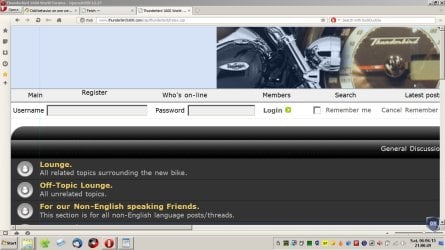
Removing some code from the script does mean that I can zoom as you would expect. See this fullscreen image:

Page Zoom.jpg

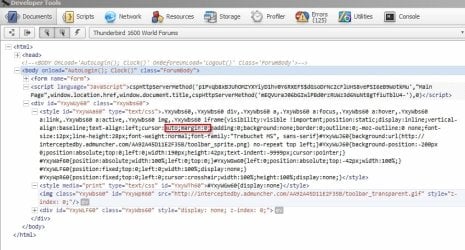
If I manually edit the script and remove the following (highlighted in red) I can zoom as normal as in the above screenshot.

Developer Tools.jpg
 

My Computer

Computer type
Laptop
Computer Manufacturer/Model Number
ASUS
OS
Microsoft Windows 7 Home Premium 64-bit 7601 Multiprocessor Free Service Pack 1
CPU
AMD C-60 APU with Radeon(tm) HD Graphics
Motherboard
ASUSTeK COMPUTER INC. X501U
Memory
4.00 GB
Graphics Card(s)
AMD Radeon HD 6290 Graphics
Sound Card
(1) AMD High Definition Audio Device (2) Realtek High Defi
Screen Resolution
1366 x 768 x 32 bits (4294967296 colors) @ 60 Hz
Hard Drives
Hitachi HTS545050A7E380 SATA Disk Device
Antivirus
Comodo CIS & FW, SecureAplus App Whitelisting, Threatfire
Browser
Cyberfox 64bit, Opera 64bit, Airfox
Other Info
Spy-The-Spy, HitmanPro.Alert, Norton Connect Safe, MJRegWatcher, BitDefender TrafficLight, Voodoo Shield, Zemana AntiMalware
How do i do that? Or CAN I even do it?
 

My Computer

OS
windows 7 professional
It depends on your browser. If you want to make permanent changes to how that website displays on your own machine you'd need something like this for Firefox:

Greasespot

Then you'd need to either write your own script or get someone to write one for you. Why not just ask the website owner to modify it?
 

My Computer

Computer type
Laptop
Computer Manufacturer/Model Number
ASUS
OS
Microsoft Windows 7 Home Premium 64-bit 7601 Multiprocessor Free Service Pack 1
CPU
AMD C-60 APU with Radeon(tm) HD Graphics
Motherboard
ASUSTeK COMPUTER INC. X501U
Memory
4.00 GB
Graphics Card(s)
AMD Radeon HD 6290 Graphics
Sound Card
(1) AMD High Definition Audio Device (2) Realtek High Defi
Screen Resolution
1366 x 768 x 32 bits (4294967296 colors) @ 60 Hz
Hard Drives
Hitachi HTS545050A7E380 SATA Disk Device
Antivirus
Comodo CIS & FW, SecureAplus App Whitelisting, Threatfire
Browser
Cyberfox 64bit, Opera 64bit, Airfox
Other Info
Spy-The-Spy, HitmanPro.Alert, Norton Connect Safe, MJRegWatcher, BitDefender TrafficLight, Voodoo Shield, Zemana AntiMalware
But that sounds like a bandaid, not fixing whatever caused it to begin with. I think i'll hold out for that if someone here might know what it could be.
 

My Computer

OS
windows 7 professional
Well interestingly I tried Cyberfox (browser) and I don't see the same issue. Must be browser specific.
 

My Computer

Computer type
Laptop
Computer Manufacturer/Model Number
ASUS
OS
Microsoft Windows 7 Home Premium 64-bit 7601 Multiprocessor Free Service Pack 1
CPU
AMD C-60 APU with Radeon(tm) HD Graphics
Motherboard
ASUSTeK COMPUTER INC. X501U
Memory
4.00 GB
Graphics Card(s)
AMD Radeon HD 6290 Graphics
Sound Card
(1) AMD High Definition Audio Device (2) Realtek High Defi
Screen Resolution
1366 x 768 x 32 bits (4294967296 colors) @ 60 Hz
Hard Drives
Hitachi HTS545050A7E380 SATA Disk Device
Antivirus
Comodo CIS & FW, SecureAplus App Whitelisting, Threatfire
Browser
Cyberfox 64bit, Opera 64bit, Airfox
Other Info
Spy-The-Spy, HitmanPro.Alert, Norton Connect Safe, MJRegWatcher, BitDefender TrafficLight, Voodoo Shield, Zemana AntiMalware
Okay so more research shows that if "Page - Fit to Width" is selected in Opera I see the zoom behaviour you describe. Uncheck that option and zoom returns to normal.

So check your page view settings in your browser.
 

My Computer

Computer type
Laptop
Computer Manufacturer/Model Number
ASUS
OS
Microsoft Windows 7 Home Premium 64-bit 7601 Multiprocessor Free Service Pack 1
CPU
AMD C-60 APU with Radeon(tm) HD Graphics
Motherboard
ASUSTeK COMPUTER INC. X501U
Memory
4.00 GB
Graphics Card(s)
AMD Radeon HD 6290 Graphics
Sound Card
(1) AMD High Definition Audio Device (2) Realtek High Defi
Screen Resolution
1366 x 768 x 32 bits (4294967296 colors) @ 60 Hz
Hard Drives
Hitachi HTS545050A7E380 SATA Disk Device
Antivirus
Comodo CIS & FW, SecureAplus App Whitelisting, Threatfire
Browser
Cyberfox 64bit, Opera 64bit, Airfox
Other Info
Spy-The-Spy, HitmanPro.Alert, Norton Connect Safe, MJRegWatcher, BitDefender TrafficLight, Voodoo Shield, Zemana AntiMalware
Thats would be the first thing i considered, but once i tried it in 2 others and the fact it never did it before and still doesn't in any browser with any other site seems to rule that out. Thats not to say there can't be a browser that works right but the question is what is it that makes that one work and most others not. Even wierder, since nothings been changed at that forum why now? It's obviously got something to do with that page. Maybe something on my PC has changed and affected only something thats specific to that page's code.
 

My Computer

OS
windows 7 professional
It doesn't have anything along those lines, but even if it did how would that be site specific?

Okay so more research shows that if "Page - Fit to Width" is selected in Opera I see the zoom behaviour you describe. Uncheck that option and zoom returns to normal.

So check your page view settings in your browser.
 

My Computer

OS
windows 7 professional
Tested using IE (64bit) and there's no problem. I don't use PaleMoon. So it seems that something on your machine might be the cause. Do you use any cross browser script blocking software? Try running PaleMoon with all add ons disabled and see if that makes any difference.

Click on Palemoon options (shows Cyberfox in screenshot but it should be the same procedure).

Cyberfox.jpg
 

My Computer

Computer type
Laptop
Computer Manufacturer/Model Number
ASUS
OS
Microsoft Windows 7 Home Premium 64-bit 7601 Multiprocessor Free Service Pack 1
CPU
AMD C-60 APU with Radeon(tm) HD Graphics
Motherboard
ASUSTeK COMPUTER INC. X501U
Memory
4.00 GB
Graphics Card(s)
AMD Radeon HD 6290 Graphics
Sound Card
(1) AMD High Definition Audio Device (2) Realtek High Defi
Screen Resolution
1366 x 768 x 32 bits (4294967296 colors) @ 60 Hz
Hard Drives
Hitachi HTS545050A7E380 SATA Disk Device
Antivirus
Comodo CIS & FW, SecureAplus App Whitelisting, Threatfire
Browser
Cyberfox 64bit, Opera 64bit, Airfox
Other Info
Spy-The-Spy, HitmanPro.Alert, Norton Connect Safe, MJRegWatcher, BitDefender TrafficLight, Voodoo Shield, Zemana AntiMalware
I did that. I even restored PM which i cringed at doing because i did it before and lost every setting, addon, you name it. Tok me hours to get it back. And in the end it still does it. I'm done, i'll live with it. However, i have another question regarding the restore function. This time it left a folder on my desktop called "old pale moon data" which has all the pre-restore stuff in it. How can i restore PM with that folder? I don't see any restore function in the browser options. I was going to start a new thread but i figured i'd ask here first. Thanks for the help in any case. Appreciate it.
 

My Computer

OS
windows 7 professional
Well, i don't know what i did but when i did the restore of pale moon it was still doing it, then i started reconfiguring the browser since restore set everything i'd done back to default, and maybe it was something in doing that but it's working right now. Take me back to the 70's please. I don't want a computer, i want simpler times.
 

My Computer

OS
windows 7 professional
Well since I don't use PaleMoon I can't say much about it. For Cyberfox - if I've needed a freah install I copy the profiles folder and profiles.ini file to a backup loacation away from the profile then fully remove Cyberfox and reboot before installing a fresh copy thenI selectively restore files where needed.

If you are only concerned about loosing bookmarks you can back them up and restore them to a new profile fairly easily.
 

My Computer

Computer type
Laptop
Computer Manufacturer/Model Number
ASUS
OS
Microsoft Windows 7 Home Premium 64-bit 7601 Multiprocessor Free Service Pack 1
CPU
AMD C-60 APU with Radeon(tm) HD Graphics
Motherboard
ASUSTeK COMPUTER INC. X501U
Memory
4.00 GB
Graphics Card(s)
AMD Radeon HD 6290 Graphics
Sound Card
(1) AMD High Definition Audio Device (2) Realtek High Defi
Screen Resolution
1366 x 768 x 32 bits (4294967296 colors) @ 60 Hz
Hard Drives
Hitachi HTS545050A7E380 SATA Disk Device
Antivirus
Comodo CIS & FW, SecureAplus App Whitelisting, Threatfire
Browser
Cyberfox 64bit, Opera 64bit, Airfox
Other Info
Spy-The-Spy, HitmanPro.Alert, Norton Connect Safe, MJRegWatcher, BitDefender TrafficLight, Voodoo Shield, Zemana AntiMalware
No, i'm concerned about many things including website passwords forms and many things of that nature. I guess i could just go thru the PM folders in prog files and elsewhere and swap files. PM by the way is just a version of firefox basically. Most everything is the same except it works better for me.
 

My Computer

OS
windows 7 professional
Palemoon Profile Backup & Restore

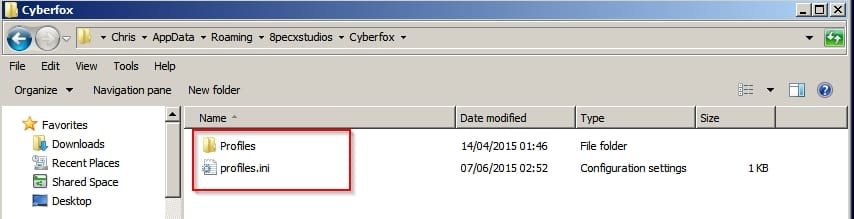
Okay so I have had the same problem with backing up Firefox variant profiles in the past. Usually I attempt to use MozBackup and aslo make a backup copy of the existing profile:

Copy these files to a folder on your desktop then you've got your original profile to refer to.
Profile.jpg

I've just tested a (new to me) backup solution and I backed up my Cyberfox Profile using the above method.

Then I tried an additional profile backup using this newly found software which was very easy to use:

Hekasoft Backup & Restore 0.53

Note: Avoid the Green download link as it comes bundled with additional software. Use the tiny link underneath.

Where it says:
If you like to download the version without third-party software you can download the software from this link.

I then deleted some bookmarks and extensions. I don't allow passwords to be stored so couln't test that.

Launched Cyberfox and confirmed that bookmarks / extensions were indeed missing.

Quit Cyberfox and used Hekasoft Backup & Restore to restore the Cyberfox profile and relaunched Cyberfox.

Everything was back in place.

Palemoon Backup.jpg
 

My Computer

Computer type
Laptop
Computer Manufacturer/Model Number
ASUS
OS
Microsoft Windows 7 Home Premium 64-bit 7601 Multiprocessor Free Service Pack 1
CPU
AMD C-60 APU with Radeon(tm) HD Graphics
Motherboard
ASUSTeK COMPUTER INC. X501U
Memory
4.00 GB
Graphics Card(s)
AMD Radeon HD 6290 Graphics
Sound Card
(1) AMD High Definition Audio Device (2) Realtek High Defi
Screen Resolution
1366 x 768 x 32 bits (4294967296 colors) @ 60 Hz
Hard Drives
Hitachi HTS545050A7E380 SATA Disk Device
Antivirus
Comodo CIS & FW, SecureAplus App Whitelisting, Threatfire
Browser
Cyberfox 64bit, Opera 64bit, Airfox
Other Info
Spy-The-Spy, HitmanPro.Alert, Norton Connect Safe, MJRegWatcher, BitDefender TrafficLight, Voodoo Shield, Zemana AntiMalware
Back
Top