
Odd "pop-up" font formatting

awenthol

Pretending to be a Poser
Power User
Local time
11:46 PM
Messages
147
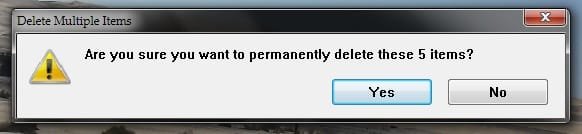
I recently tried forcebly ripping out Office 2007 and I ended up having to use two different programs/methods to get rid of it. The problem now (and I think it's related to one or both programs, as I don't remember it being this way before) is, the pop-up windows for anything (trash, notifications, etc) are formatted weird. I've already gone into the "advanced appearance settings" to try and fix the issue but it is having no effect. I've attached a picture if it helps. The font is set to Palantino Linotype, non-bold, standard size..etc and this is what shows in many of the windows. Start menu, folder icons, etc all show up as Palantino...

Anyone know what's going on? Worse comes to worse I'll system restore to before the '07 removal, but I would prefer not.
 

Attachments
  • Font.jpg
    Font.jpg
    11.8 KB · Views: 32

My Computer

Computer Manufacturer/Model Number
Sony VPCZ1390X CTO
OS
7 Pro x64
CPU
Intel Core i7-640M
Motherboard
Sony/Intel
Memory
8GB
Graphics Card(s)
GT330M
Monitor(s) Displays
Built-in 13" + 24" LG Flatron
Screen Resolution
1920x1080, 1920x1080
Hard Drives
Internal-2x128GB SSD (Raid 0), 500GB WD Caviar Green
External- 3TB WD
Keyboard
Logitech Illuminated
Mouse
Logitech Performance MX
Internet Speed
7 MB -- Sprint Overdrive on 4G
Other Info
Sprint EVO 3D (Synergy 2.3.4)
I would suggest you open an administrative command window and type:

SFC /scannow

Maybe it will replace a system font.
 

My Computer

Computer Manufacturer/Model Number
Homebuilt
OS
Windows 7 x64
CPU
i7-2600K
Motherboard
Asus P8Z77-v Pro
Memory
8 G
Graphics Card(s)
GTX 480
Sound Card
Onboard
Monitor(s) Displays
LG W2753V
Screen Resolution
1920x1080
Hard Drives
Crucial M4 128 G SSD

My Computer

Computer type
PC/Desktop
Computer Manufacturer/Model Number
Dell XPS 420
OS
Windows 10, Home Clean Install
CPU
Intel Core2 processsor Q8200(2.33Ghz 1333FSB) Quad Core Tech
Motherboard
Dell
Memory
6 gb
Graphics Card(s)
ATI Radeon 256MB HD3650
Sound Card
Intergrated 7.1 Channel Audio
Monitor(s) Displays
Dell SP2009W 20"
Hard Drives
640 GB Serial ATA Hard drive
Cooling
Fan
Keyboard
Dell USB Keyboard
Mouse
Dell Premium Optical USB
Internet Speed
DSL 2.85
Awenthol:

I am having the same identical issue.

How did you resolve your issue? Anything other than reinstalling Win 7?

Thanks for your reply.

Steve
 

My Computer

OS
Windows 7 Home x64

My Computer

Computer Manufacturer/Model Number
Toshiba Satellite S875D-S7239 laptop
OS
MS Windows 7 Ultimate SP1 64-bit
CPU
AMD A10-4600M
Motherboard
AMD Pumori (Socket FT1)
Memory
6.00 GB Dual-Channel DDR3 @ 798MHz (11-11-12-28)
Graphics Card(s)
AMD Radeon HD 7660G
Sound Card
High Definition Audio Device
Monitor(s) Displays
Generic PnP Monitor (1600x900@60Hz)
Screen Resolution
1600x900@60Hz
Hard Drives
SSD 119GB Corsair CSSD-V128GB2 ATA Device
Keyboard
Standard PS/2 Keyboard
Mouse
HP Wireless Optical Mobile Mouse Model FHA-3410
Internet Speed
What the local pub, local coffee shop offers.
Other Info
Optical Drive:MATSHITA BD-CMB UJ160B ATA Device


Also have an Asus ha1002xp netbook with Win 7 Ultimate installed.
The case might be that you're missing some system fonts, perhaps they were deleted when you forced uninstall Office. Check your Fonts folder in %windir%\Fonts and see if any important ones are missing, especially the SegoeUI fonts, which Windows uses for all it's formatting by default.
 

My Computer

Computer type
Laptop
Computer Manufacturer/Model Number
Custom
OS
Windows 7 Home Premium x64
CPU
Intel Core i5 2500K
Motherboard
MSI MS-7750
Memory
8GB DDR3
Graphics Card(s)
nVidia GeForce GTX650 Ti BOOST
Sound Card
Realtek
Monitor(s) Displays
21' Philips
Screen Resolution
Full HD
Hard Drives
1TB
PSU
500W
To awenthol: Did scanning with this program completely resolve the issue?

To Gornot: Those fonts you mentioned are in the fonts folder. I don't think that it is a font's issue.

Thanks for replying.
 

My Computer

OS
Windows 7 Home x64
Multiple fonts displayed like in the screenshot can mean only a few things, the most common being either third party themes that have various font settings, or the lack of some fonts, which results in Windows not being able to display it, but uses older fonts (like in XP) instead. I had the same issue like this back when I bought and installed Left 4 Dead (1) and then uninstalled it. I know what I'm talking about :rolleyes:
You might not have this problem, but perhaps the OP does.
 

My Computer

Computer type
Laptop
Computer Manufacturer/Model Number
Custom
OS
Windows 7 Home Premium x64
CPU
Intel Core i5 2500K
Motherboard
MSI MS-7750
Memory
8GB DDR3
Graphics Card(s)
nVidia GeForce GTX650 Ti BOOST
Sound Card
Realtek
Monitor(s) Displays
21' Philips
Screen Resolution
Full HD
Hard Drives
1TB
PSU
500W
AWENTHAL,

Have any of the suggestions help to solve your problem?

A status report would be appreciated.

thanks,
 

My Computer

Computer Manufacturer/Model Number
Toshiba Satellite S875D-S7239 laptop
OS
MS Windows 7 Ultimate SP1 64-bit
CPU
AMD A10-4600M
Motherboard
AMD Pumori (Socket FT1)
Memory
6.00 GB Dual-Channel DDR3 @ 798MHz (11-11-12-28)
Graphics Card(s)
AMD Radeon HD 7660G
Sound Card
High Definition Audio Device
Monitor(s) Displays
Generic PnP Monitor (1600x900@60Hz)
Screen Resolution
1600x900@60Hz
Hard Drives
SSD 119GB Corsair CSSD-V128GB2 ATA Device
Keyboard
Standard PS/2 Keyboard
Mouse
HP Wireless Optical Mobile Mouse Model FHA-3410
Internet Speed
What the local pub, local coffee shop offers.
Other Info
Optical Drive:MATSHITA BD-CMB UJ160B ATA Device


Also have an Asus ha1002xp netbook with Win 7 Ultimate installed.
Back
Top