
Windows 7 gets slow even after formatting.

Legjendat

New member
Local time
4:19 AM
Messages
13
Ok, I got quite a big problem that's been going on for quite a lot of time now (more than one year probably). My PC looks fine for like 1 hour of formatting, after that, it gets slow "in the same way".

Like it will lag a bit when I open a program (or switch between programs), it will get real slow when I boot it (around 3 mins with just avast internet security launching during start-up).

Another slow happens when I launch outlook.com to check my mails, it will 'load' for like 10 seconds after the page has actually loaded before I can start checking my e-mails, and this is not an internet speed problem, the page loads, but seems to kind of be getting ready to load the e-mails, which doesn't happen in that 1 first hour after I've formatted my PC.
Then, when there are flash contents in my firefox, firefox gets totally slow.

Another big problem is multi-tasking. If I'm installing something, it will be almost impossible to do something else.

I installed ubuntu a couple of months ago, and I only kept it for a week, but it never got slow, while with windows 7 it gets slow almost immediately. Now I could try to test dual-booting with XP to see if XP will get slow or not, because honestly I'm clueless as to what could the problem actually be.

During hard work, my (CPU I think) will make this 'grgrgrgrgrgrgr' noise which makes it look really stressed.

I would like to say that my pc is 'a bit' old (bought it almost 4 years ago), but when I first bought it, none of these problems happened, and I used windows 7 back then, so maybe it is from old age.

Bottom line, anyone got any ideas or suggestions to try, I'm out of ideas and I don't think it's normal for a PC to be that slow, given that it was not like that when I first bought it.
I'm posting a SS below with how my CPU is working during an installation and my PC basic hardware info.
 

Attachments
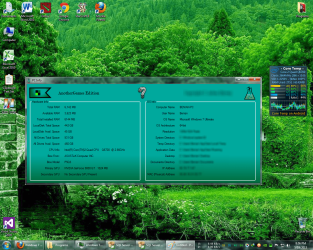
  • Untitled.png
    Untitled.png
    636.5 KB · Views: 10

My Computer

Computer type
PC/Desktop
Computer Manufacturer/Model Number
ASUSTeK
OS
Microsoft Windows 7 Ultimate 64-bit Service Pack 1
CPU
Intel(R) Core(TM)2 Quad CPU Q6700 @ 2.66GHz
Motherboard
ASUSTeK Computer INC. P5Q3
Memory
6.00 GB
Graphics Card(s)
NVIDIA GeForce 9800 GT
Sound Card
High Definition Audio Device
Screen Resolution
1280 x 1024 x 32 bits (4294967296 colors) @ 60 Hz
Hard Drives
Hitachi HDT721010SLA360 ATA Device
Hmm, given your specs, you should be zipping around. Heck it's a quad-core with 6 Gb of RAM.
I have similar specs and I have no issues at all.

Can you specify what you mean by "formatting"? I think you may be calling "formatting" something that isn't formatting.
If you reformat your drive everything on it is erased and you have to reinstall Windows 7 and then all your stuff. From the screen I see that you have around 300 Gb of stuff in your primary drive.
I doubt it's something you do so light-headed.

Then, for the sake of ease of reading specs, please follow this tutorial to scan and load all your PC's specs in your profile. So that everyone here can look them up easily.

Now, with only what you said, there could be various issues:
-a failing hard drive
-overheating
-missing drivers

For the first you need to know what is the model of the drive and then download the program that scans it for errors from it's manufacturer's site.

For the second, try running the PC with the case open. And possibly identify better what is the component that is doing the noise.
It is either a fan or a hard drive. If it is a fan and it is doing really a lot of noise, then changing it may be necessary, as it is a sign that it is breaking. You should have a fan over the CPU, a fan over the GPU (graphic card) and maybe a fan attached to the case. And a fan in the PSU (the box where the power cable from the wall plug attaches to).
If it is a hard drive, again this is a bad sign, it may be dying.

After you installed Windows 7 did you install all the drivers from the motherboard manufacturer's site?
 

My Computer

Computer type
PC/Desktop
Computer Manufacturer/Model Number
custom built
OS
Win 7 Pro 64-bit 7601
CPU
AMD Phenom 9650 QuadCore, revision DR-B3
Motherboard
ASUS M4A78
Memory
5 GB yes I run 2x 2GB and 1x 1GB, different brand, spank me.
Graphics Card(s)
NVIDIA GeForce 9800 GT 512 Mb, unknown manufacturer.
Sound Card
Crappy Realtek Integrated Audio
Monitor(s) Displays
Fujitsu Siemens P19-3P
Screen Resolution
1280 x 1024 x 32 bits @ 60 Hz Oh yeah, 4:3 rocks!
Hard Drives
(1) MAXTOR S TM3320613AS SATA Disk Device (2) STM35004 18AS SATA Disk Device (3) TOSHIBA USB 2.5"-HDD
PSU
whatever, around 450w
Case
Scavenged from old company PC, 10+ years old
Cooling
CPU fan, GPU fan, case fan, nothing fancy
Keyboard
Microsoft, PS/2, white.
Mouse
Optical, logitec.
Internet Speed
effective max speeds: 70-ish kB/s down 30-ish kB/s up
Antivirus
Avira, free edition.
Browser
Firefox with FXChrome to make it look like Google Chrome :P
Other Info
Was discarded by previous owner due to "horrible performance".
Was running Win Xp from a IDE drive. Yeah. Was a pain.
SATA II drive and Win7 and it zips away! Yay!
Sounds like it could be a heat issue. Try cleaning it out real good, and reapplying the thermal paste for your heatsink.
 

My Computer

Computer type
PC/Desktop
Computer Manufacturer/Model Number
Dude Build
OS
Windows 10 Pro X64
CPU
Intel(R) Core(TM) i5-3570K CPU OC@ 4.5GHZ Turbo
Motherboard
MSI Z77A-G45 Gaming
Memory
8.00 GB DDR3 1600Mhz
Graphics Card(s)
MSI Gaming X GTX 1070
Sound Card
Realtek High Definition
Monitor(s) Displays
Dell S23O9W, HP L1710
Screen Resolution
DELL-1920 x 1080 HP-1280 x1024
Hard Drives
Crucial m4 256 SSD, WD 7200RPM 500GB WD 1TB
PSU
Seasonic X650 GOLD
Case
Zalman Z12
Cooling
Antec Kuhler 920
Keyboard
Logitech
Mouse
MSI DS100 Interceptor
Internet Speed
50 down and 5 up
Antivirus
MSE
Browser
Chrome, IE 11
Other Info
Logitech X-620 Speakers
The CPU doesn't make any noise because there are no moving parts in it. Well, the heatsink has a fan on it, but the sound you're hearing is likely the normal sounds of a hard drive.

I know that Ubuntu was working just fine, but it sounds to me like there could be something wrong with the hard drive (perhaps it's beginning to show its age and is beginning to die).

I guess it could also be driver-related, but that doesn't result in gradual slow-downs; it results in being slower than normal from the beginning.
 

My Computer

Computer type
PC/Desktop

My Computer

Computer type
PC/Desktop
Computer Manufacturer/Model Number
Home Built Desktop By DataTech
OS
Windows 7 Ultimate X64 SP1
CPU
Intel i5-2550K, Differing ~4.4-4.8GHz No built in GPU
Motherboard
ASUS P8Z68-V PRO/GEN3
Memory
16GB G.Skill Sniper 1866MHz @ 2133MHz 2x8GB
Graphics Card(s)
ASUS GTX650TIB-DC2OC-2GD5, (650TI Boost)
Sound Card
Onboard Realtek 5-1
Monitor(s) Displays
Samsung P2570HD
Screen Resolution
1920x1080
Hard Drives
Samsung 840 Pro 256GB SSD for OS, 500GB Seagate Constellation (Enterprise drive) for Data
PSU
Corsair HX650W
Case
Inwin Dragon Rider
Cooling
Hyper 212 EVO w/two Noctua fans, push-pull, @1300 RPM
Keyboard
E-Z Eyes, bright yellow keys with large characters
Mouse
steelseries SENSEI Laser Pro Gaming
Internet Speed
48-51Mbs Mbs down, 11 Mbs up Xfinity Cable
Antivirus
Norton Internet Security 2013
Browser
IE 10, Opera, Pale Moon if needed
Other Info
4 case fans, LG BluRay-RE, ASUS DVD-RW, Mr. Fusion power supply, 1.21 gigawatts.
My biggest fear is that my HDD is dying, the CPU Cooler should have no problem as I replaced it just a couple of months ago.

@bobafetthotmail
Yes, by formatting I mean real formatting, because at first I thought this could be caused by viruses, so I formatted many times in my desperate attempts to get my PC faster, but to no avail. I've partitioned my HDD, so I keep all my documents and projects in the other logical drive (D:) so I don't lose anything when I format.
Anyway, do you guys think there's any way of understanding if my HDD is dying, if I take it to a service store, can they find that out, because anything related to software I can probably do myself, but checking how HW is doing is not really my thing.
 

My Computer

Computer type
PC/Desktop
Computer Manufacturer/Model Number
ASUSTeK
OS
Microsoft Windows 7 Ultimate 64-bit Service Pack 1
CPU
Intel(R) Core(TM)2 Quad CPU Q6700 @ 2.66GHz
Motherboard
ASUSTeK Computer INC. P5Q3
Memory
6.00 GB
Graphics Card(s)
NVIDIA GeForce 9800 GT
Sound Card
High Definition Audio Device
Screen Resolution
1280 x 1024 x 32 bits (4294967296 colors) @ 60 Hz
Hard Drives
Hitachi HDT721010SLA360 ATA Device
See post number 5. :sarc:
 

My Computer

Computer type
PC/Desktop
Computer Manufacturer/Model Number
Home Built Desktop By DataTech
OS
Windows 7 Ultimate X64 SP1
CPU
Intel i5-2550K, Differing ~4.4-4.8GHz No built in GPU
Motherboard
ASUS P8Z68-V PRO/GEN3
Memory
16GB G.Skill Sniper 1866MHz @ 2133MHz 2x8GB
Graphics Card(s)
ASUS GTX650TIB-DC2OC-2GD5, (650TI Boost)
Sound Card
Onboard Realtek 5-1
Monitor(s) Displays
Samsung P2570HD
Screen Resolution
1920x1080
Hard Drives
Samsung 840 Pro 256GB SSD for OS, 500GB Seagate Constellation (Enterprise drive) for Data
PSU
Corsair HX650W
Case
Inwin Dragon Rider
Cooling
Hyper 212 EVO w/two Noctua fans, push-pull, @1300 RPM
Keyboard
E-Z Eyes, bright yellow keys with large characters
Mouse
steelseries SENSEI Laser Pro Gaming
Internet Speed
48-51Mbs Mbs down, 11 Mbs up Xfinity Cable
Antivirus
Norton Internet Security 2013
Browser
IE 10, Opera, Pale Moon if needed
Other Info
4 case fans, LG BluRay-RE, ASUS DVD-RW, Mr. Fusion power supply, 1.21 gigawatts.
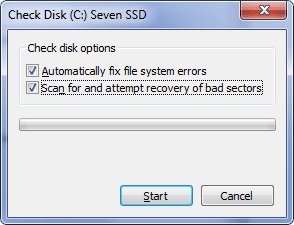
Hmm, I've tried check-disk and the results came out fine on both of my drives :(
 

My Computer

Computer type
PC/Desktop
Computer Manufacturer/Model Number
ASUSTeK
OS
Microsoft Windows 7 Ultimate 64-bit Service Pack 1
CPU
Intel(R) Core(TM)2 Quad CPU Q6700 @ 2.66GHz
Motherboard
ASUSTeK Computer INC. P5Q3
Memory
6.00 GB
Graphics Card(s)
NVIDIA GeForce 9800 GT
Sound Card
High Definition Audio Device
Screen Resolution
1280 x 1024 x 32 bits (4294967296 colors) @ 60 Hz
Hard Drives
Hitachi HDT721010SLA360 ATA Device
You did have both of these boxes checked and it asked for a reboot to continue?

chdsk.png
 

My Computer

Computer type
PC/Desktop
Computer Manufacturer/Model Number
Home Built Desktop By DataTech
OS
Windows 7 Ultimate X64 SP1
CPU
Intel i5-2550K, Differing ~4.4-4.8GHz No built in GPU
Motherboard
ASUS P8Z68-V PRO/GEN3
Memory
16GB G.Skill Sniper 1866MHz @ 2133MHz 2x8GB
Graphics Card(s)
ASUS GTX650TIB-DC2OC-2GD5, (650TI Boost)
Sound Card
Onboard Realtek 5-1
Monitor(s) Displays
Samsung P2570HD
Screen Resolution
1920x1080
Hard Drives
Samsung 840 Pro 256GB SSD for OS, 500GB Seagate Constellation (Enterprise drive) for Data
PSU
Corsair HX650W
Case
Inwin Dragon Rider
Cooling
Hyper 212 EVO w/two Noctua fans, push-pull, @1300 RPM
Keyboard
E-Z Eyes, bright yellow keys with large characters
Mouse
steelseries SENSEI Laser Pro Gaming
Internet Speed
48-51Mbs Mbs down, 11 Mbs up Xfinity Cable
Antivirus
Norton Internet Security 2013
Browser
IE 10, Opera, Pale Moon if needed
Other Info
4 case fans, LG BluRay-RE, ASUS DVD-RW, Mr. Fusion power supply, 1.21 gigawatts.
Back
Top