Solved OEM prtition

bigbingo

New member
Local time
1:30 AM
Messages
37
Hi All,

When I am looking at my disk management I found a disk that phisically is not available.
Disk 1 in the attached photo. It also can be seen that it is full free. I have tried to delet it but without success.
1. Is it possible to delete it?
2. How can I change disk 2 into disk 0? So that drive C: will be disk 0?

Thanks
 

Attachments

  • DM.PNG
    DM.PNG
    33.7 KB · Views: 7

My Computer

OS
Windows 7 Ultimate x64
Your System Specs say nothing about the computer. The first thing I'd do is open the computer case to see which drive is plugged into which SATA port on the motherboard. Next I'd look in the BIOS to see how the drives are recognized, in what order. I also noticed that the first partition of 2048GB on Disk 1 is not formatted or if formatted has not had a drive letter assigned, should show similar information as the second partition named Video shows.
 

My Computer

Computer type
PC/Desktop
Computer Manufacturer/Model Number
Customs, Dell, Gateway, HP, Toshiba, Acer, ASUS
OS
Windows 7 Ultimate 64-bit, Windows 8.1 64-bit, Mac OS X 10.10, Linux Mint 17, Windows 10 Pro TP
Keyboard
Microsoft
Mouse
Microsoft
Yes, make sure Disk 2 is hooked up to sata port #1.

Did you install Disk 1 yourself ?

Why are partitions D and E marked Active ?

As Berton says, just give that partition a letter, then you can do whatever you want with it, who labeled it OEM ?
 

My Computer

Computer type
PC/Desktop
Computer Manufacturer/Model Number
Skylake Special #666
OS
Windows 10 Pro x64
CPU
Intel Core i7 6700K
Motherboard
Asus Sabertooth Z170 Mark 1
Memory
GSkill TridentZ RGB 16GB 3600 16-16-16-36
Graphics Card(s)
EVGA GTX 980 Ti SC x2
Sound Card
Realtek High Definition
Monitor(s) Displays
AOC G2460PG
Screen Resolution
1920 x 1080 144Hz
Hard Drives
Samsung 860 Pro 256GB, Seagate Barracuda 4TB x2
PSU
EVGA 1000 P2, EVGA White Custom Braided Cables
Case
Corsair Vengeance C70 Gunmetal Black
Cooling
Corsair H100i v2, Corsair ML120 x2, Thermal Grizzly Kryonaut
Keyboard
Logitech G910 Orion Spectrum
Mouse
Logitech G700s
Internet Speed
Verizon Fios Quantum Gateway 75/75
Antivirus
Windows Defender, Malwarebytes Free 3.8.3
Browser
Chrome
Other Info
Corsair SP120 x4, LG Blu-ray Drive, Durabrand HT-395 100 Watt Dolby Digital Amp, Corsair H2100 Wireless 7.1 Headset
That partition doesn't have an OEM label, it doesn't have any label.
It's an OEM type of partition.
Normally aren't those used by PC manufacturers such as Dell, HP, ... for recovery, diagnostics, etc. ?

That and the Ultimate OS makes me wonder who built the PC and installed the OS.
To me it looks like some type custom-build or home-build.
 

My Computer

Computer type
PC/Desktop
Computer Manufacturer/Model Number
home built
OS
Multi-Boot W7_Pro_x64 W8.1_Pro_x64 W10_Pro_x64 +Linux_VMs +Chromium_VM
CPU
AMD Athlon II x4 620
Motherboard
Gigabyte GA-MA785G-UD3H
Memory
6GB GSkill DDR2 800
Graphics Card(s)
AMD 4670 GPU + AMD 4200 IGP
Sound Card
on board Realtek ALC889A
Monitor(s) Displays
RCA 40" LCD TV, Insignia 32" LCD TV, HP 15" LCD monitor
Screen Resolution
1680 x 1050
Hard Drives
OCZ Vertex 3 120GB,
Samsung F3 1TB (3),
Several others - WD, Seagate, Hitachi, ...
PSU
Corsair 500 W
Case
Rosewill mid tower
Cooling
CM 90mm rifle
Keyboard
Gyration wireless, Logitech wireless, Dell USB wired
Mouse
Gyration wireless, Logitech wireless, V7 USB wired
Internet Speed
Spectrum - 100Mbps D / 10Mbps U
Antivirus
Avast, MBAM3, EMET, WinPatrol
Browser
Pale Moon, Firefox, IE
Other Info
2 multi-boot PC's
Mainly HTPC/Office/Gen purpose (no gaming).
Trendnet USB KVM.
LG DVD burner/Blue Ray Player.
Tray system for removable SATA backup drives.

Not currently OCd, under-volted.
I use Hybrid sleep, rarely re-boot or shutdown.

Hauppauge HD-PVR, Avermedia PCIe TV Tuner, Hauppauge PCI TV Tuner.
Gentelmen'

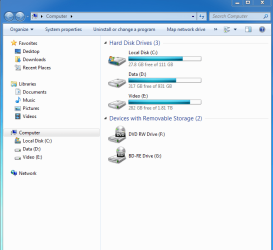
Sorry I am not expert, I install the Windows 7, I attached photos of my computer.
It is not possible to give a lable. neither to delete or format.
Please instruct how the fix it, from software point of view.

Thanks
 

Attachments

  • MC.PNG
    MC.PNG
    28.6 KB · Views: 0

My Computer

OS
Windows 7 Ultimate x64

My Computer

Computer type
PC/Desktop
Computer Manufacturer/Model Number
home built
OS
Multi-Boot W7_Pro_x64 W8.1_Pro_x64 W10_Pro_x64 +Linux_VMs +Chromium_VM
CPU
AMD Athlon II x4 620
Motherboard
Gigabyte GA-MA785G-UD3H
Memory
6GB GSkill DDR2 800
Graphics Card(s)
AMD 4670 GPU + AMD 4200 IGP
Sound Card
on board Realtek ALC889A
Monitor(s) Displays
RCA 40" LCD TV, Insignia 32" LCD TV, HP 15" LCD monitor
Screen Resolution
1680 x 1050
Hard Drives
OCZ Vertex 3 120GB,
Samsung F3 1TB (3),
Several others - WD, Seagate, Hitachi, ...
PSU
Corsair 500 W
Case
Rosewill mid tower
Cooling
CM 90mm rifle
Keyboard
Gyration wireless, Logitech wireless, Dell USB wired
Mouse
Gyration wireless, Logitech wireless, V7 USB wired
Internet Speed
Spectrum - 100Mbps D / 10Mbps U
Antivirus
Avast, MBAM3, EMET, WinPatrol
Browser
Pale Moon, Firefox, IE
Other Info
2 multi-boot PC's
Mainly HTPC/Office/Gen purpose (no gaming).
Trendnet USB KVM.
LG DVD burner/Blue Ray Player.
Tray system for removable SATA backup drives.

Not currently OCd, under-volted.
I use Hybrid sleep, rarely re-boot or shutdown.

Hauppauge HD-PVR, Avermedia PCIe TV Tuner, Hauppauge PCI TV Tuner.
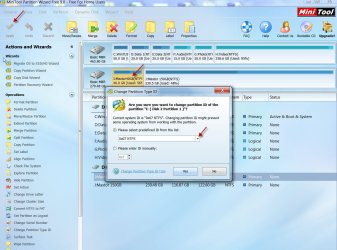
Yes, use Partition Wizard, Mark D inactive, Mark E inactive, Delete the 2048 GB partition to unallocated space.

Then do what you want with it in Disk management, or just keep using Partition Wizard to create a Partition out of it and format it.

Right click on the proper drive, use the drop down menu to set it inactive.

The only partition that should be marked Active is your System Reserved partition, which already is marked Active. D and E SHOULD NOT be marked Active.

When using Partition Wizard DO NOT forget to click APPLY in the top left corner or nothing will happen :)

And move Disk 2 to sata port #1 (You have to do this yourself manually, the motherboard is marked Sata port, 1 Sata port 2 etc)
 

Attachments

  • Untitled.jpg
    Untitled.jpg
    622.5 KB · Views: 4

My Computer

Computer type
PC/Desktop
Computer Manufacturer/Model Number
Skylake Special #666
OS
Windows 10 Pro x64
CPU
Intel Core i7 6700K
Motherboard
Asus Sabertooth Z170 Mark 1
Memory
GSkill TridentZ RGB 16GB 3600 16-16-16-36
Graphics Card(s)
EVGA GTX 980 Ti SC x2
Sound Card
Realtek High Definition
Monitor(s) Displays
AOC G2460PG
Screen Resolution
1920 x 1080 144Hz
Hard Drives
Samsung 860 Pro 256GB, Seagate Barracuda 4TB x2
PSU
EVGA 1000 P2, EVGA White Custom Braided Cables
Case
Corsair Vengeance C70 Gunmetal Black
Cooling
Corsair H100i v2, Corsair ML120 x2, Thermal Grizzly Kryonaut
Keyboard
Logitech G910 Orion Spectrum
Mouse
Logitech G700s
Internet Speed
Verizon Fios Quantum Gateway 75/75
Antivirus
Windows Defender, Malwarebytes Free 3.8.3
Browser
Chrome
Other Info
Corsair SP120 x4, LG Blu-ray Drive, Durabrand HT-395 100 Watt Dolby Digital Amp, Corsair H2100 Wireless 7.1 Headset
Hi bigbingo,

I shall limit myself to deleting the 2048GB OEM Partition, formatting the partition and also setting the active partitions Disk 0 D: and Disk 1 E: inactive ( I don't know how it came into being and I have never seen such a large OEM partition.)

Install and run MiniTool Partititon Wizard Free Edition 9 Best Free Partition Manager for Windows| MiniTool Partition Wizard Free

Launch application. Select the 2048GB OEM Partition by left clicking on it and then right click on it. In the right click Menu click on " delete" and then "Apply" This should delete the partition. Once deletion is completed right click on the same Partition and then " Format" as NTFS, "Apply"

(If by chance "Delete" is greyed out, click on "Change Partition Type ID". If in the ensuing Window "Please select predefined ID from list" shows anything other than 0x07 NTFS, from the drop down arrow select 0x07 NTFS and click on "Yes" > "Apply" Now you should be able to delete and format it as explained before.

20-05-2015 04-49-40.jpg)

To set the Active Partitions inactive: Right click on the Data and Video Partitions > Set Inactive > Yes > Apply.

Note: Make sure you do not do any of the above on your system drive with the 100MB System reserved and C: partitions.

I shall leave it to other experts on making the System drive Disk 0. I am a "confused Confucious" on it.:D
 

My Computer

OS
Windows 7 Home Premium 32 bit
Glad to see the solved mark. :) But let us know what you did that solved your problem.

That will help others in a similar situation and looking for help here. Not only those looking for help here, many do a goggle search and land up here seeing the solved tick mark.
 

My Computer

OS
Windows 7 Home Premium 32 bit
Again thank you
I just install Partition magic and follow your instruction.
So far I have not opened the computer and did not touch anything inside.
 

My Computer

OS
Windows 7 Ultimate x64
Please post another shot of Disk Management.
 

My Computer

Computer type
PC/Desktop
Computer Manufacturer/Model Number
Skylake Special #666
OS
Windows 10 Pro x64
CPU
Intel Core i7 6700K
Motherboard
Asus Sabertooth Z170 Mark 1
Memory
GSkill TridentZ RGB 16GB 3600 16-16-16-36
Graphics Card(s)
EVGA GTX 980 Ti SC x2
Sound Card
Realtek High Definition
Monitor(s) Displays
AOC G2460PG
Screen Resolution
1920 x 1080 144Hz
Hard Drives
Samsung 860 Pro 256GB, Seagate Barracuda 4TB x2
PSU
EVGA 1000 P2, EVGA White Custom Braided Cables
Case
Corsair Vengeance C70 Gunmetal Black
Cooling
Corsair H100i v2, Corsair ML120 x2, Thermal Grizzly Kryonaut
Keyboard
Logitech G910 Orion Spectrum
Mouse
Logitech G700s
Internet Speed
Verizon Fios Quantum Gateway 75/75
Antivirus
Windows Defender, Malwarebytes Free 3.8.3
Browser
Chrome
Other Info
Corsair SP120 x4, LG Blu-ray Drive, Durabrand HT-395 100 Watt Dolby Digital Amp, Corsair H2100 Wireless 7.1 Headset
Yep, in addition post a screenshot of first screen of Partition Wizard showing the drive. That drive is a 4TB drive. And all along I have been wondering whether it is an MBR drive using advanced formatting or a GPT drive. Partition Wizard will show it.
 
Last edited:

My Computer

OS
Windows 7 Home Premium 32 bit
Back
Top