Office 2007 updates

ydde1937

New member
Local time
9:10 PM
Messages
10
I am running Windows 7 Home Premium 32bit, updated correctly. For the last Two Months any update for my Office 2007 won't install. All other updates download and install properly. Suggestions for correcting this will be appreciated. Thanks.
 

My Computer

OS
windows 7 32 bit
Do you get any error codes while trying to install the updates?
 

My Computer

Computer type
PC/Desktop
Computer Manufacturer/Model Number
Self assembled
OS
Windows 10 Home 64Bit
CPU
Intel Core i5 10400 @ 2.90GHz
Motherboard
Intel Corporation DG41WV (PROCESSOR)
Memory
8.00GB Single-Channel Unknown @ 1329MHz (16-20-20-38)
Sound Card
Realtek High Definition Audio
Monitor(s) Displays
DELL E170S
Screen Resolution
1280x1024 pixels
Hard Drives
931GB TOSHIBA DT01ACA100 (SATA)
238GB TEAM TM8PS7256G (SATA SSD)
Case
Nothing Fancy
Cooling
Fans
Keyboard
A4 Tech Co LTD
Mouse
A4 Tech Co Ltd/Logitech
Internet Speed
25 Mbps
response

No error codes, only that the updates failed to install.
 

My Computer

OS
windows 7 32 bit
Can you go to Start>Control Panel>Windows Updates>View Updates History. You might be able to see the ones failed.
 

My Computer

Computer type
PC/Desktop
Computer Manufacturer/Model Number
Self assembled
OS
Windows 10 Home 64Bit
CPU
Intel Core i5 10400 @ 2.90GHz
Motherboard
Intel Corporation DG41WV (PROCESSOR)
Memory
8.00GB Single-Channel Unknown @ 1329MHz (16-20-20-38)
Sound Card
Realtek High Definition Audio
Monitor(s) Displays
DELL E170S
Screen Resolution
1280x1024 pixels
Hard Drives
931GB TOSHIBA DT01ACA100 (SATA)
238GB TEAM TM8PS7256G (SATA SSD)
Case
Nothing Fancy
Cooling
Fans
Keyboard
A4 Tech Co LTD
Mouse
A4 Tech Co Ltd/Logitech
Internet Speed
25 Mbps
In the absence of any clues as to why the updates failed, turn off UAC and try again.

If they succeed, you can then turn UAC back on.
 

My Computer

Computer Manufacturer/Model Number
HP Pavilion Elite 495UK
OS
Windows 7 Ultimate SP1 64-Bit
CPU
Intel Core i7 870 @ 2.93GHz
Motherboard
MSI 2A9C (CPU1)
Memory
8Gb Dual-Channel DDR3 @ 664MHz
Graphics Card(s)
nVidia GeForce GTX 460 1024MB dedicated RAM
Sound Card
Realtek HD Audio
Monitor(s) Displays
HP2310i
Screen Resolution
1920 x 1080
Hard Drives
1x1954GB Hitachi HDS22020ALA 330 (RAID), 1x1954GB Hitachi External for backup and storage
PSU
460W
Case
HP Elite
Cooling
Air cooled
Keyboard
Logitech K750 solar-powered keyboard
Mouse
Logitech Wireless M180 mouse
Internet Speed
2Mb
Other Info
Pure Avanti Flow Internet Radio with iPod Dock, 64Gb iPod, HP USB Speakers, Sony MDR-V500 Headphones, Sony Vaio F-Series Laptop
This may seem rather drastic but a uninstall and then reinstall might help. Use this tool: Microsoft Office 2007 Complete Registry Removal and Deletion Uninstaller « My Digital Life and uninstall it completely. Reboot your PC. Then reinstall using the same license key you got when you brought it. If it doesn't work, say activate over the phone and explain what you are doing. I've done it before and they happy to oblige (or normally are). Reboot again and check for updates.

If for some reason it doesn't work again, I will need the error code or update number to diagnose the issue properly.

Stephen
 

My Computer

Computer Manufacturer/Model Number
Dell XPS 15 L502x
OS
Windows 7 Home Premium 64bit (O.E.M)
CPU
Intel Core i7 2630QM @2.00GHz
Memory
6GB DDR3
Graphics Card(s)
Intel Intergrated Graphics 3000, nVidia GT525M (1GB)
Screen Resolution
1366x768
Hard Drives
750GB Seagate 7200rpm
Keyboard
Backlit Dell XPS 15 L502x Keyboard
Mouse
Microsoft Wireless Mobile Mouse 4000
Internet Speed
2.5 Mb/s down, 0.36 up
After removing Office 2007 succesfully then re-installing, the same problem was present.Took the Laptop to a Computer repair store, who identified a bad hard drive, after replacing the drive, now updates properly and works correctly.
 

My Computer

OS
windows 7 32 bit
Thank you for letting us know.
Glad all is well now.
Safe surfing...
 

My Computer

Computer Manufacturer/Model Number
LAPTOP. HP Pavilion dv7-4010TX .
OS
Win 7 Ultimate 64-bit. SP1.
CPU
Intel i7 -720QM.[1.6GHz Turbo Boost 2.8GHz. 6MB Cache.]
Memory
8 DDR 3 RAM. 1066MHZ
Graphics Card(s)
ATI 1024 MB. DDR3. Radeon HD5650
Monitor(s) Displays
17.3" High Definition Brightview LCD. LED Backlit.
Screen Resolution
1600 x 900.
Hard Drives
640GB
Case
Laptop / notebook.
Mouse
Logitech Anywhere mouse. MX.
Internet Speed
ADSL [ but too slow ]
Glad you managed to sort it and thanks for letting us know

Stephen
 

My Computer

Computer Manufacturer/Model Number
Dell XPS 15 L502x
OS
Windows 7 Home Premium 64bit (O.E.M)
CPU
Intel Core i7 2630QM @2.00GHz
Memory
6GB DDR3
Graphics Card(s)
Intel Intergrated Graphics 3000, nVidia GT525M (1GB)
Screen Resolution
1366x768
Hard Drives
750GB Seagate 7200rpm
Keyboard
Backlit Dell XPS 15 L502x Keyboard
Mouse
Microsoft Wireless Mobile Mouse 4000
Internet Speed
2.5 Mb/s down, 0.36 up
Microsoft Office 2007 problems

Thanks for the replies. Botton line was the hard-drive had to be replaced.My computer is a Compaq cq60, using Windows 7 premium home 32 bit. The shop replaced the hard drive, then new problem started. They modified it from 32bit to 64bit ( I have no idea how that was done). Before I gave them the computer I copied all of my documents and speadsheets on to USB sticks, then copied them back to the computer after I got it back. Now when I try to add to a document both Microsoft Word and Microsoft Excel tells me it can't store it because the disk is full or write protected. Reloaded Microsoft Office several times, went through the "repair" procedure, everytime it says no problem found.I have used LIBREOFFICE to open, change and store the Excel spreadsheets back but still can't do the same procedure using Excel.
Any suggestions will be appreciated
 

My Computer

OS
windows 7 32 bit
Thanks for the replies. Botton line was the hard-drive had to be replaced.My computer is a Compaq cq60, using Windows 7 premium home 32 bit. The shop replaced the hard drive, then new problem started. They modified it from 32bit to 64bit ( I have no idea how that was done). Before I gave them the computer I copied all of my documents and speadsheets on to USB sticks, then copied them back to the computer after I got it back. Now when I try to add to a document both Microsoft Word and Microsoft Excel tells me it can't store it because the disk is full or write protected. Reloaded Microsoft Office several times, went through the "repair" procedure, everytime it says no problem found.I have used LIBREOFFICE to open, change and store the Excel spreadsheets back but still can't do the same procedure using Excel.
Any suggestions will be appreciated

Hmmmm, now that gives me cause for concern. Did you have any Microsoft Genuine Software alerts when installing Office? There is potential that you have an illegal/pirated/modified copy of w7.

Stephen
 

My Computer

Computer Manufacturer/Model Number
Dell XPS 15 L502x
OS
Windows 7 Home Premium 64bit (O.E.M)
CPU
Intel Core i7 2630QM @2.00GHz
Memory
6GB DDR3
Graphics Card(s)
Intel Intergrated Graphics 3000, nVidia GT525M (1GB)
Screen Resolution
1366x768
Hard Drives
750GB Seagate 7200rpm
Keyboard
Backlit Dell XPS 15 L502x Keyboard
Mouse
Microsoft Wireless Mobile Mouse 4000
Internet Speed
2.5 Mb/s down, 0.36 up

My Computer

Computer Manufacturer/Model Number
Dell XPS 15 L502x
OS
Windows 7 Home Premium 64bit (O.E.M)
CPU
Intel Core i7 2630QM @2.00GHz
Memory
6GB DDR3
Graphics Card(s)
Intel Intergrated Graphics 3000, nVidia GT525M (1GB)
Screen Resolution
1366x768
Hard Drives
750GB Seagate 7200rpm
Keyboard
Backlit Dell XPS 15 L502x Keyboard
Mouse
Microsoft Wireless Mobile Mouse 4000
Internet Speed
2.5 Mb/s down, 0.36 up
I ran the test and it looks okay. i don't know how to copy it to wordpad
 

My Computer

OS
windows 7 32 bit
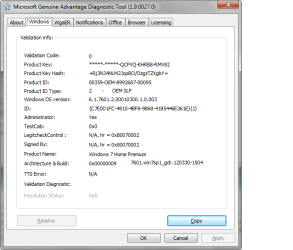
There should be a screen that looks like this:
MGADiag.png
Press copy and paste it into your next post.

I'm going to speak to someone who specialises in this tool to give me a hand.
 

My Computer

Computer Manufacturer/Model Number
Dell XPS 15 L502x
OS
Windows 7 Home Premium 64bit (O.E.M)
CPU
Intel Core i7 2630QM @2.00GHz
Memory
6GB DDR3
Graphics Card(s)
Intel Intergrated Graphics 3000, nVidia GT525M (1GB)
Screen Resolution
1366x768
Hard Drives
750GB Seagate 7200rpm
Keyboard
Backlit Dell XPS 15 L502x Keyboard
Mouse
Microsoft Wireless Mobile Mouse 4000
Internet Speed
2.5 Mb/s down, 0.36 up
Diagnostic Report (1.9.0027.0):
-----------------------------------------
Windows Validation Data-->
Validation Code: 0
Cached Online Validation Code: 0x0
Windows Product Key: *****-*****-FJQ9J-6CWDH-G7348
Windows Product Key Hash: HXbE4I9wEJ3nhLIlpZyF99PSr0o=
Windows Product ID: 00359-032-7957914-85012
Windows Product ID Type: 5
Windows License Type: Retail
Windows OS version: 6.1.7601.2.00010300.1.0.003
ID: {DEB5656E-4023-4487-9F60-060A7B333329}(3)
Is Admin: Yes
TestCab: 0x0
LegitcheckControl ActiveX: N/A, hr = 0x80070002
Signed By: N/A, hr = 0x80070002
Product Name: Windows 7 Home Premium
Architecture: 0x00000009
Build lab: 7601.win7sp1_gdr.120330-1504
TTS Error:
Validation Diagnostic:
Resolution Status: N/A
Vista WgaER Data-->
ThreatID(s): N/A, hr = 0x80070002
Version: N/A, hr = 0x80070002
Windows XP Notifications Data-->
Cached Result: N/A, hr = 0x80070002
File Exists: No
Version: N/A, hr = 0x80070002
WgaTray.exe Signed By: N/A, hr = 0x80070002
WgaLogon.dll Signed By: N/A, hr = 0x80070002
OGA Notifications Data-->
Cached Result: N/A, hr = 0x80070002
Version: N/A, hr = 0x80070002
OGAExec.exe Signed By: N/A, hr = 0x80070002
OGAAddin.dll Signed By: N/A, hr = 0x80070002
OGA Data-->
Office Status: 100 Genuine
Microsoft Office Home and Student 2007 - 100 Genuine
OGA Version: N/A, 0x80070002
Signed By: N/A, hr = 0x80070002
Office Diagnostics: 025D1FF3-364-80041010_025D1FF3-229-80041010_025D1FF3-230-1_025D1FF3-517-80040154_025D1FF3-237-80040154_025D1FF3-238-2_025D1FF3-244-80070002_025D1FF3-258-3
Browser Data-->
Proxy settings: N/A
User Agent: Mozilla/4.0 (compatible; MSIE 8.0; Win32)
Default Browser: C:\Program Files (x86)\Internet Explorer\IEXPLORE.exe
Download signed ActiveX controls: Prompt
Download unsigned ActiveX controls: Disabled
Run ActiveX controls and plug-ins: Allowed
Initialize and script ActiveX controls not marked as safe: Disabled
Allow scripting of Internet Explorer Webbrowser control: Disabled
Active scripting: Allowed
Script ActiveX controls marked as safe for scripting: Allowed
File Scan Data-->
Other data-->
Office Details: <GenuineResults><MachineData><UGUID>{DEB5656E-4023-4487-9F60-060A7B333329}</UGUID><Version>1.9.0027.0</Version><OS>6.1.7601.2.00010300.1.0.003</OS><Architecture>x64</Architecture><PKey>*****-*****-*****-*****-G7348</PKey><PID>00359-032-7957914-85012</PID><PIDType>5</PIDType><SID>S-1-5-21-1738946384-2514742628-1166088125</SID><SYSTEM><Manufacturer>Hewlett-Packard</Manufacturer><Model>Compaq Presario CQ60 Notebook PC</Model></SYSTEM><BIOS><Manufacturer>Hewlett-Packard</Manufacturer><Version>F.54</Version><SMBIOSVersion major="2" minor="4"/><Date>20090818000000.000000+000</Date></BIOS><HWID>5B083107018400F6</HWID><UserLCID>0409</UserLCID><SystemLCID>0409</SystemLCID><TimeZone>Central Standard Time(GMT-06:00)</TimeZone><iJoin>0</iJoin><SBID><stat>3</stat><msppid></msppid><name></name><model></model></SBID><OEM><OEMID>HPQOEM</OEMID><OEMTableID>SLIC-MPC</OEMTableID></OEM><GANotification/></MachineData><Software><Office><Result>100</Result><Products><Product GUID="{91120000-002F-0000-0000-0000000FF1CE}"><LegitResult>100</LegitResult><Name>Microsoft Office Home and Student 2007</Name><Ver>12</Ver><Val>4C51089CF425F32</Val><Hash>5siJ3gbmtRvrdGa/Ie8g7tfZ+RU=</Hash><Pid>81602-921-1833983-68421</Pid><PidType>1</PidType></Product></Products><Applications><App Id="16" Version="12" Result="100"/><App Id="18" Version="12" Result="100"/><App Id="1B" Version="12" Result="100"/><App Id="A1" Version="12" Result="100"/></Applications></Office></Software></GenuineResults>
Spsys.log Content: 0x80070002
Licensing Data-->
Software licensing service version: 6.1.7601.17514
Name: Windows(R) 7, HomePremium edition
Description: Windows Operating System - Windows(R) 7, RETAIL channel
Activation ID: 2e7d060d-4714-40f2-9896-1e4f15b612ad
Application ID: 55c92734-d682-4d71-983e-d6ec3f16059f
Extended PID: 00359-00170-032-795791-01-1033-7601.0000-1372012
Installation ID: 004074308683528105702291564376368896845252427975667132
Processor Certificate URL: http://go.microsoft.com/fwlink/?LinkID=88338
Machine Certificate URL: http://go.microsoft.com/fwlink/?LinkID=88339
Use License URL: http://go.microsoft.com/fwlink/?LinkID=88341
Product Key Certificate URL: http://go.microsoft.com/fwlink/?LinkID=88340
Partial Product Key: G7348
License Status: Licensed
Remaining Windows rearm count: 2
Trusted time: 5/19/2012 3:09:10 PM
Windows Activation Technologies-->
HrOffline: 0x00000000
HrOnline: 0x00000000
HealthStatus: 0x0000000000000000
Event Time Stamp: 5:17:2012 00:27
ActiveX: Registered, Version: 7.1.7600.16395
Admin Service: Registered, Version: 7.1.7600.16395
HealthStatus Bitmask Output:

HWID Data-->
HWID Hash Current: NAAAAAEABAABAAEAAAACAAAAAgABAAEA6GG074zslpJWECC1HvKUqxSWgjLgtiDJfJ5+KA==
OEM Activation 1.0 Data-->
N/A
OEM Activation 2.0 Data-->
BIOS valid for OA 2.0: yes
Windows marker version: 0x0
OEMID and OEMTableID Consistent: yes
BIOS Information:
ACPI Table Name OEMID Value OEMTableID Value
APIC HPQOEM SLIC-MPC
FACP HPQOEM SLIC-MPC
HPET HPQOEM SLIC-MPC
BOOT HPQOEM SLIC-MPC
MCFG HPQOEM SLIC-MPC
SLIC HPQOEM SLIC-MPC
SSDT HPQOEM SLIC-MP

 

My Computer

OS
windows 7 32 bit
The report looks like your sample, but when I copy it , you see the results
 

My Computer

OS
windows 7 32 bit
Ok, thanks for that. Now, I may be barking up the wrong tree entirely and your windows install might be perfectly genuine but I'm unsure. I've asked someone who is very good at this sort of thing to help so you'll have to wait around for him.

Stephen
 

My Computer

Computer Manufacturer/Model Number
Dell XPS 15 L502x
OS
Windows 7 Home Premium 64bit (O.E.M)
CPU
Intel Core i7 2630QM @2.00GHz
Memory
6GB DDR3
Graphics Card(s)
Intel Intergrated Graphics 3000, nVidia GT525M (1GB)
Screen Resolution
1366x768
Hard Drives
750GB Seagate 7200rpm
Keyboard
Backlit Dell XPS 15 L502x Keyboard
Mouse
Microsoft Wireless Mobile Mouse 4000
Internet Speed
2.5 Mb/s down, 0.36 up
Many thanks in your effort to help
 

My Computer

OS
windows 7 32 bit
Yep- the report looks good (doesn't surprise me, it's a retail copy, and shouldn't complain at the change in bitness).
As far as I can tell it's perfectly OK.
 

My Computer

Computer type
Laptop
Computer Manufacturer/Model Number
Asus K52F or Lenovo B51-80
OS
Win 7 x64 Home Premium (and x86 VirtualBox VM)/Win10
CPU
i3 370M/i7 6500U
Motherboard
Asus/Lenovo
Memory
8GB - finally :)/8GB
Graphics Card(s)
it's an i3, dude!/dual Intel&nVidia
Sound Card
onboard
Monitor(s) Displays
15.6" built-in
Screen Resolution
1366x768/1920x1080
Hard Drives
750GB Seagate internal
Sundry external drives attached to other computers on the local network
1TB SSD on the Lenovo
PSU
n/a
Internet Speed
as much as I can get - usually on a dongle/phone, so <1MB/s
Antivirus
MSE/Defender
Browser
IE11/12/Edge/Chrome/FF(if I must)
Back
Top