Solved Office 2007 will not SEND any email?

Mike Lynch

New member
Pro User
VIP
Local time
10:20 PM
Messages
958
Location
Clearwater Florida
For some reason Office 2007 will not send any email.

Any new / forward document I try and send just sits there and will not go.

Any ideas are appreciated.
 

My Computer My Computer

Computer type
PC/Desktop
Computer Manufacturer/Model Number
Two HP Desktops. One in the Laundry Room / Bed Room.
OS
Microsoft Windows 7 Professional 64-bit 7601 Multiprocessor Free Service Pack 1
CPU
Intel(R) Core(TM) i7-3770 CPU @ 3.40GHz
Motherboard
Hewlett-Packard 3396
Memory
8.00 GB
Graphics Card(s)
Intel(R) HD Graphics 4000
Sound Card
(1) Realtek High Definition Audio (2) Intel(R) Display Aud
Monitor(s) Displays
Hanns-G
Screen Resolution
1440 x 900 x 32 bits (4294967296 colors) @ 59 Hz
Hard Drives
(1) ATA WDC WD40EZRX-00S SCSI Disk Device (2) HP Officejet Pro 86 USB Device (3) WD My Book 1230 USB Device
PSU
Whatever came with the CMT.
Case
HP CMT Black.
Cooling
Whatever came with the CMT.
Keyboard
Logitech K740.
Mouse
Microsoft Optical Mouse 1000.
Internet Speed
Spectrum 25Mbs.
Antivirus
WebRoot, Microsoft Security Essentials.
Browser
EDGE
Other Info
HP Officejet Pro 8600 Plus.
WD MyBook 4TB.
Your not saying what your setting are or what errors you get I use it with no problems
 

My Computer My Computer

Computer type
PC/Desktop
OS
win 8 32 bit
Not being rude but there are no error messages, it just will not send anything.

Receiving works OK.

I spoke with Spectrum and their Agent thinks that something has gone wrong with the Setup.

The Agent did not know how to get to the Setup and it's been over a decade since I set it up.

I'd gladly follow instructions on how to get to it.

Once there however, I would not know what needs to be repaired or changed.

If you can, I'd appreciate your help.
 
Last edited:

My Computer My Computer

Computer type
PC/Desktop
Computer Manufacturer/Model Number
Two HP Desktops. One in the Laundry Room / Bed Room.
OS
Microsoft Windows 7 Professional 64-bit 7601 Multiprocessor Free Service Pack 1
CPU
Intel(R) Core(TM) i7-3770 CPU @ 3.40GHz
Motherboard
Hewlett-Packard 3396
Memory
8.00 GB
Graphics Card(s)
Intel(R) HD Graphics 4000
Sound Card
(1) Realtek High Definition Audio (2) Intel(R) Display Aud
Monitor(s) Displays
Hanns-G
Screen Resolution
1440 x 900 x 32 bits (4294967296 colors) @ 59 Hz
Hard Drives
(1) ATA WDC WD40EZRX-00S SCSI Disk Device (2) HP Officejet Pro 86 USB Device (3) WD My Book 1230 USB Device
PSU
Whatever came with the CMT.
Case
HP CMT Black.
Cooling
Whatever came with the CMT.
Keyboard
Logitech K740.
Mouse
Microsoft Optical Mouse 1000.
Internet Speed
Spectrum 25Mbs.
Antivirus
WebRoot, Microsoft Security Essentials.
Browser
EDGE
Other Info
HP Officejet Pro 8600 Plus.
WD MyBook 4TB.
For some reason Office 2007 will not send any email.
Any new / forward document I try and send just sits there and will not go.
Any ideas are appreciated.

Does your Office 2007 use Windows Live Mail to send your email?
If so, Windows Live Mail is dead. I had Office 2007 on my old Win 7 PC, I had no end of trouble with it, I tried uninstalling WLM and re-installing it, then importing a recent backup, still no luck.

In the end I installed a FREE copy of eMClient, imported all my mail from WLM, then uninstalled WLM.
eMClient is able to be customised too in lots of ways. I wouldn't even consider going back to WLM even if it was still working, or any version of Outlook for that matter.

Have a look and see if will suit you or not.
Download eM Client for Windows | eM Client
 

My Computer My Computer

Computer type
PC/Desktop
Computer Manufacturer/Model Number
Homebuild
OS
Windows 7 Ultimate 64 bit SP1
CPU
DualCore Intel Pentium D 820, 2800 MHz (14 x 200)
Motherboard
Gigabyte EX58-UD3R
Memory
Kingston DDR3 (PC3-10700H) 6.0GB
Graphics Card(s)
AMD Radeon HD 6450
Sound Card
Realtek ALC882/D/M
Monitor(s) Displays
Samsung SyncMaster 2233SW
Screen Resolution
1920 x 1080
Hard Drives
Drive #1 - WDC WD2500JB-22REA0 (232 GB)
Drive #2 - WDC WD6400AAKS-65A7B0 (596 GB)
PSU
EVGA Supernova 750w G2 Gold
Cooling
5 x 80mm Generic Fans
Keyboard
Microsoft Comfort Curve 2000
Mouse
SteelSeries IKARI 62001-1 Laser or Microsoft Laser 6000
Internet Speed
1500/256
Antivirus
NOD32 v10.1.235.0
Browser
FireFox 59.0.2 X64bit
Other Info
Telstra Technicolor TG799vac Modem
LG HL-DT-ST DVDRAM GH20NS15 ATA Device
16X52X32X52 COMBO SCSI CDRom Device
Logitech Wave Keyboard
Microsoft 6000 Laser Mouse
Once there however, I would not know what needs to be repaired or changed.

If you can, I'd appreciate your help.
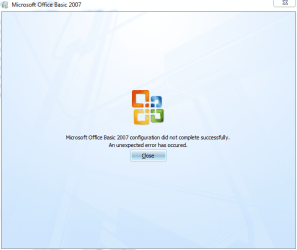
From programs & features click on Office and then find the change button. After clicking on it you'll be presented with the option to add/remove features or to repair it. Select repair and then continue. Setup will continue from there and tell you when it's done.

I would try to remove and readd your profile first. How to Delete an Outlook Profile in Office 2007 | Small Business - Chron.com
 

My Computers My Computers

System One System Two

I guess there isn't a Fix?


image.png
 

My Computer My Computer

Computer type
PC/Desktop
Computer Manufacturer/Model Number
Two HP Desktops. One in the Laundry Room / Bed Room.
OS
Microsoft Windows 7 Professional 64-bit 7601 Multiprocessor Free Service Pack 1
CPU
Intel(R) Core(TM) i7-3770 CPU @ 3.40GHz
Motherboard
Hewlett-Packard 3396
Memory
8.00 GB
Graphics Card(s)
Intel(R) HD Graphics 4000
Sound Card
(1) Realtek High Definition Audio (2) Intel(R) Display Aud
Monitor(s) Displays
Hanns-G
Screen Resolution
1440 x 900 x 32 bits (4294967296 colors) @ 59 Hz
Hard Drives
(1) ATA WDC WD40EZRX-00S SCSI Disk Device (2) HP Officejet Pro 86 USB Device (3) WD My Book 1230 USB Device
PSU
Whatever came with the CMT.
Case
HP CMT Black.
Cooling
Whatever came with the CMT.
Keyboard
Logitech K740.
Mouse
Microsoft Optical Mouse 1000.
Internet Speed
Spectrum 25Mbs.
Antivirus
WebRoot, Microsoft Security Essentials.
Browser
EDGE
Other Info
HP Officejet Pro 8600 Plus.
WD MyBook 4TB.
Have you got a backup of the important files in MS Office?
If so, you might have to try and uninstall Office 2007, then re-install it from scratch and see if that will work.
 

My Computer My Computer

Computer type
PC/Desktop
Computer Manufacturer/Model Number
Homebuild
OS
Windows 7 Ultimate 64 bit SP1
CPU
DualCore Intel Pentium D 820, 2800 MHz (14 x 200)
Motherboard
Gigabyte EX58-UD3R
Memory
Kingston DDR3 (PC3-10700H) 6.0GB
Graphics Card(s)
AMD Radeon HD 6450
Sound Card
Realtek ALC882/D/M
Monitor(s) Displays
Samsung SyncMaster 2233SW
Screen Resolution
1920 x 1080
Hard Drives
Drive #1 - WDC WD2500JB-22REA0 (232 GB)
Drive #2 - WDC WD6400AAKS-65A7B0 (596 GB)
PSU
EVGA Supernova 750w G2 Gold
Cooling
5 x 80mm Generic Fans
Keyboard
Microsoft Comfort Curve 2000
Mouse
SteelSeries IKARI 62001-1 Laser or Microsoft Laser 6000
Internet Speed
1500/256
Antivirus
NOD32 v10.1.235.0
Browser
FireFox 59.0.2 X64bit
Other Info
Telstra Technicolor TG799vac Modem
LG HL-DT-ST DVDRAM GH20NS15 ATA Device
16X52X32X52 COMBO SCSI CDRom Device
Logitech Wave Keyboard
Microsoft 6000 Laser Mouse

My Computers My Computers

System One System Two

Back
Top