
Solved office 2010 icons missing

kjub6

New member
Local time
5:15 PM
Messages
1
I have been loking all over the web ... also here

and for all you .... deleting Iconcache.db doesnt work !!!!!!

all icons are missing ... and after reinstall and repair ... it failed to bring them back ...

and using resource hacker and edit and put back icons is also NO SOLUTION

one guy somwhere supposed that all office icons are stored in windows /.../ {Installer} folder wt(fals)idea ...

if you have a solution than pls pls pls if not than dont full this tread
 

Attachments
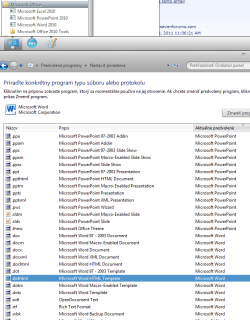
  • Bez názvu.png
    Bez názvu.png
    25.8 KB · Views: 366

My Computer

OS
32bit w7 ultimate

My Computer

Computer type
PC/Desktop
Computer Manufacturer/Model Number
Gateway DX4831-01e (Mid-Tower Desktop)
OS
Originally Win 7 Hm Prem x64 Ver 6.1.7600 Build 7601-SP1 | Upgraded to Windows 10 December 14, 2019
CPU
Intel i3 530 2.93GHz, 2933MHz 2 Cores 4 Logical Processors
Motherboard
Gateway H57M01 133 megahertz
Memory
6GB of 1,333MHz DDR3 SDRAM
Graphics Card(s)
32MB Intel Graphics Media Accelerator HD IGChip
Sound Card
Realtek High Definition Audio
Monitor(s) Displays
Gateway HX2000 20inch TFT active matrix TN
Screen Resolution
1600 x 900 x 59 hertz
Hard Drives
WDC WD10EADS-00M2B0 [HDD] (1000.20 GB) -- drive 0,
HL-DT-ST DVDRAM GH41N [CD-ROM dr]
Four card readers, and Four USB 2.0
PSU
300watts.
Case
Mid-Tower Desktop
Cooling
Stock from Gateway
Keyboard
Natural Ergonomic Keyboard 4000, see Other Info
Mouse
Orig. Gateway wore out now using Insignia USB wired optical
Internet Speed
Vz FIOS 10ms png 57.64Mbps down 65.53Mbps up Speedtest.org
Antivirus
Zamana Anti-logger with Anti-malware, MSE, Windows Firewall,
Browser
IE11.0.9600.19399-Upd ver11.0.135, Firefox 68.0.1 x64
Other Info
System Specs by Belarc.

BIOS: American Megatrends Inc. P01-A0 11/17/2009

Replaced the MS 'Natural' Standard PS/2 Enhanced 101-102 Keyboard with a new Natural Ergonomic Keyboard 4000 on August 1st 2014.

Canon Pixma MG3222 Printer.

Updated to IE11 on 12102015 | Fios Quantum Router g1100

Additional AV: SpywareBlaster, manual Mbam, SAS
Hi, kjub6, welcome to the Seven Forums! :D

Good advice, Anak! :)

One other thing, kjub6, do an uninstall, reboot, then reinstall. You mentioned you performed a re-install and a system repair but did you uninstall before the re-install?

You really should be able to fix the issue by doing an uninstall and then a re-install; all of your data will be preserved.
 

My Computer

Computer Manufacturer/Model Number
Toshiba L355D
OS
Windows 7 Ultimate x64 SP1
CPU
Core2 Duo
Motherboard
Intel
Memory
4 GB
Graphics Card(s)
GM965 on-board
Sound Card
RealTek on-board
Monitor(s) Displays
19"+17"(laptop)
Screen Resolution
1440x900 (x 2)
Hard Drives
500GB Ext. 200GB Internal
PSU
N/A
Case
N/A
Cooling
N/A
I had had that happen just recently. I went from office 2007 to office 2003 and some of the icons were messed up. Deleteing the IconCache.db file fixed it for me. Is this the procedure you followed?

Rebuilding the Icon Cache Database
1. Close all folder windows that are currently open.
2. Launch Task Manager using the CTRL+SHIFT+ESC key sequence, or by running taskmgr.exe.
3. In the Process tab, right-click on the Explorer.exe process and select End Process.
4. Click the End process button when asked for confirmation.
5. From the File menu of Task Manager, select New Task (Run…)
6. Type CMD.EXE, and click OK
7. In the Command Prompt window, type the commands one by one and press ENTER after each command:
CD /d %userprofile%\AppData\Local
DEL IconCache.db /a
EXIT
8. In Task Manager, click File, select New Task (Run…)
9. Type EXPLORER.EXE, and click OK.
 

My Computer

Computer type
PC/Desktop
Computer Manufacturer/Model Number
Home Built
OS
Windows 10 Education 64 bit
CPU
AMD Phenom II X4 980 Black Edition Deneb 3.7GHz
Motherboard
Asus M4N68T-M V2 µATX Motherboard
Memory
8GB 4GBx2 Kingston PC10600 DDR3 1333 Memory
Graphics Card(s)
Zotac NVIDIA Geforce GT640 2 Gig DDR3 PCIe
Sound Card
VIA VT1708s High Definition Audio 8-channel Onboard
Monitor(s) Displays
22" LG E2242 1080p and 2 19" I-INC AG191D
Screen Resolution
1280x1024 - 1920x1080 - 1280x1024
Hard Drives
Crucial M100 256 GB SSD and 500 GB WD Blue SATA
PSU
Thermaltake TR 620
Case
Power Up Black ATX Mid-Tower Case
Cooling
Stock heatsink and fan
Keyboard
Logitech Wireless K350 Wave
Mouse
Logitech Wireless M570 Trackman Wheel
Internet Speed
80 Mbps Down 30 Mbps Up
Antivirus
Windows Defender
Browser
Internet Explorer 11
Other Info
HP DVD1040e Lightscribe - External USB2

My Computer

Computer Manufacturer/Model Number
HP, Dell, Gateway, Toshiba - 4 laptops and 2 desktops
OS
Vista, Windows7, Mint Mate, Zorin, Windows 8
CPU
from 1.6GHz Duo to i7
Monitor(s) Displays
2x HP w2207
Hard Drives
5x HDD, 7x SSD, 12x Externals
Keyboard
with trackball - no mices
Mouse
Trackball mice
Internet Speed
DSL 6000
Rebuilding the icon cache did not work for me either. What did work was opening MS Office Tools --> Picture Manager --> Help --> Detect and Repair. Easy and all set.
 

My Computer

Computer type
PC/Desktop
Computer Manufacturer/Model Number
Dell M6600
OS
Windows 7 Enterprise 64-bit
I got my icons back

I cannot understand the relevance of using Microsoft Office Picture Tools Help "Detect & Repair" but it worked. Got my icons back. Just make sure all Office programs are closed before you do it. It was painless.
 

My Computer

Computer type
PC/Desktop
Computer Manufacturer/Model Number
Lenovo
OS
Windows 10 Pro 64-bit
CPU
lntei(R) Xeon(R) CPU W3S70 @ 3.20GHz 3.19 GHz
Motherboard
Unknown
Memory
4,00 GB
Graphics Card(s)
NVIDIA GeForce 9500 GT
Hard Drives
Seagate ST3750640NS ATA
Antivirus
Windows Defender
Browser
Chrome, Edge
That is indeed a strange fix - but if it works, so what.
 

My Computer

Computer Manufacturer/Model Number
HP, Dell, Gateway, Toshiba - 4 laptops and 2 desktops
OS
Vista, Windows7, Mint Mate, Zorin, Windows 8
CPU
from 1.6GHz Duo to i7
Monitor(s) Displays
2x HP w2207
Hard Drives
5x HDD, 7x SSD, 12x Externals
Keyboard
with trackball - no mices
Mouse
Trackball mice
Internet Speed
DSL 6000
Back
Top