Solved File browse icons missing

Raiderman

New member
Local time
6:15 PM
Messages
24
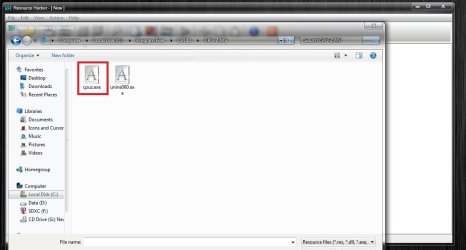
For example, using Resource hacker, I will browse for a file to open, and the windows default icon shows for .exe file extensions. See attached image. Even when uploading this picture, I browsed for it, and shortcut icons have the default windows icon. I have tried delete icon cache also.
 

Attachments
  • explore icon.jpg
    explore icon.jpg
    49.3 KB · Views: 0
  • missing icons.jpg
    missing icons.jpg
    143.5 KB · Views: 2

My Computer

Computer type
Laptop
Computer Manufacturer/Model Number
Toshiba Qosmio
OS
Windows 7 Ultimate 64bit
CPU
Intel Core I7
Is that just for file shortcuts? Or all executable files? The ones in your screenshot look like shortcuts.

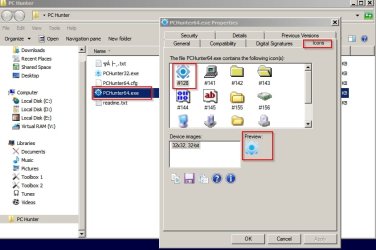
If you install IconViewer then when you right click an executable (any type) you can see the available icons.

IconViewer.jpg
 

My Computer

Computer type
Laptop
Computer Manufacturer/Model Number
ASUS
OS
Microsoft Windows 7 Home Premium 64-bit 7601 Multiprocessor Free Service Pack 1
CPU
AMD C-60 APU with Radeon(tm) HD Graphics
Motherboard
ASUSTeK COMPUTER INC. X501U
Memory
4.00 GB
Graphics Card(s)
AMD Radeon HD 6290 Graphics
Sound Card
(1) AMD High Definition Audio Device (2) Realtek High Defi
Screen Resolution
1366 x 768 x 32 bits (4294967296 colors) @ 60 Hz
Hard Drives
Hitachi HTS545050A7E380 SATA Disk Device
Antivirus
Comodo CIS & FW, SecureAplus App Whitelisting, Threatfire
Browser
Cyberfox 64bit, Opera 64bit, Airfox
Other Info
Spy-The-Spy, HitmanPro.Alert, Norton Connect Safe, MJRegWatcher, BitDefender TrafficLight, Voodoo Shield, Zemana AntiMalware

My Computer

Computer type
Laptop
Computer Manufacturer/Model Number
ASUS
OS
Microsoft Windows 7 Home Premium 64-bit 7601 Multiprocessor Free Service Pack 1
CPU
AMD C-60 APU with Radeon(tm) HD Graphics
Motherboard
ASUSTeK COMPUTER INC. X501U
Memory
4.00 GB
Graphics Card(s)
AMD Radeon HD 6290 Graphics
Sound Card
(1) AMD High Definition Audio Device (2) Realtek High Defi
Screen Resolution
1366 x 768 x 32 bits (4294967296 colors) @ 60 Hz
Hard Drives
Hitachi HTS545050A7E380 SATA Disk Device
Antivirus
Comodo CIS & FW, SecureAplus App Whitelisting, Threatfire
Browser
Cyberfox 64bit, Opera 64bit, Airfox
Other Info
Spy-The-Spy, HitmanPro.Alert, Norton Connect Safe, MJRegWatcher, BitDefender TrafficLight, Voodoo Shield, Zemana AntiMalware
Everything shows up fine in explorer, it is when I browse to a file or folder within different programs. Photoshop, res hacker, explorer etc. So if I am in reshacker, I browse to a file location to open a dll, all the executables are shown like in the screenshot. The second image I posted is taken from browsing to a directory to upload a screenshot.
 

My Computer

Computer type
Laptop
Computer Manufacturer/Model Number
Toshiba Qosmio
OS
Windows 7 Ultimate 64bit
CPU
Intel Core I7
Okay I understand what you are saying. Icons are fine navigating using explorer but not when using other software to browse.

I don't know how to fix that. Maybe other members will have ideas.
 

My Computer

Computer type
Laptop
Computer Manufacturer/Model Number
ASUS
OS
Microsoft Windows 7 Home Premium 64-bit 7601 Multiprocessor Free Service Pack 1
CPU
AMD C-60 APU with Radeon(tm) HD Graphics
Motherboard
ASUSTeK COMPUTER INC. X501U
Memory
4.00 GB
Graphics Card(s)
AMD Radeon HD 6290 Graphics
Sound Card
(1) AMD High Definition Audio Device (2) Realtek High Defi
Screen Resolution
1366 x 768 x 32 bits (4294967296 colors) @ 60 Hz
Hard Drives
Hitachi HTS545050A7E380 SATA Disk Device
Antivirus
Comodo CIS & FW, SecureAplus App Whitelisting, Threatfire
Browser
Cyberfox 64bit, Opera 64bit, Airfox
Other Info
Spy-The-Spy, HitmanPro.Alert, Norton Connect Safe, MJRegWatcher, BitDefender TrafficLight, Voodoo Shield, Zemana AntiMalware
Whatever it is, it is related to explorer. Third party programs use explorer to browse to files to open them. There are some apps that have their own built in explorer, but for the most part they use windows.
 

My Computer

Computer type
Laptop
Computer Manufacturer/Model Number
Toshiba Qosmio
OS
Windows 7 Ultimate 64bit
CPU
Intel Core I7
I think I figured it out. I have classic shell installed and think that is what was causing this. Either that or Microangelo. I will report back with what I find out.

Update: Found it was Microangelo on Display breaking the icon view in browsing.
 
Last edited:

My Computer

Computer type
Laptop
Computer Manufacturer/Model Number
Toshiba Qosmio
OS
Windows 7 Ultimate 64bit
CPU
Intel Core I7

My Computer

Computer type
Laptop
Computer Manufacturer/Model Number
ASUS
OS
Microsoft Windows 7 Home Premium 64-bit 7601 Multiprocessor Free Service Pack 1
CPU
AMD C-60 APU with Radeon(tm) HD Graphics
Motherboard
ASUSTeK COMPUTER INC. X501U
Memory
4.00 GB
Graphics Card(s)
AMD Radeon HD 6290 Graphics
Sound Card
(1) AMD High Definition Audio Device (2) Realtek High Defi
Screen Resolution
1366 x 768 x 32 bits (4294967296 colors) @ 60 Hz
Hard Drives
Hitachi HTS545050A7E380 SATA Disk Device
Antivirus
Comodo CIS & FW, SecureAplus App Whitelisting, Threatfire
Browser
Cyberfox 64bit, Opera 64bit, Airfox
Other Info
Spy-The-Spy, HitmanPro.Alert, Norton Connect Safe, MJRegWatcher, BitDefender TrafficLight, Voodoo Shield, Zemana AntiMalware
Back
Top