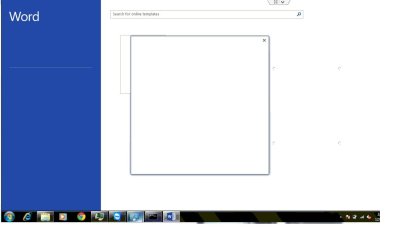
office 2013 interface white washed menus appearing as white spots

plumpf

New member
Member
VIP
Local time
6:14 AM
Messages
108
hi

i have a weired problem on one of our staff laptop. its core i3 system having windows 7 64 bit.
initialy it had visio 2010 and office 2013 installed .. the problem was that when outlook was opened it would open but no text / menus were visible. it was all a like a white window having only title bar.

when i wold open word/excel they would show same behaviour but it would also open some sort of dialog box which was all white.. no button to click on it.. only close button was visible .and clicking on it would exit word/excel/access.

i also tried outlooke.exe /safe .. /resetnavpane.. but no luck

so i removed visio 2010 32 bit and rebooted system . still same issue.

repaired office 2013 32 bit still same issue...

uninstall office 2013 and reboot and and install office 2013 32 bit still same issue.

uninstall 32 bit and installed 64 bit same issue.

sfc /scannow found no violations..

tried it with local administator account same behaviour.. also tried with another local admin priviledges account same issue.. tried with domain accounts same issue..

i removed display drivers and tried wiht standard drivers same issue..

updated to latest drivers still same issue..

i however created a .docx file and opened it with word .. it did opened but some menus were not visible they were just white places instead of the icons for vaiours actions (like bold/font etc).. but i by guess work wnet to options and tried disabling hardware acceleration but still same issue...

please help me.. how to resolve this strange issue..
 

My Computer My Computer

At a glance

Windows 7 Ultimate x64E65508GB DDR2
Computer type
PC/Desktop
Computer Manufacturer/Model Number
Dell 755
OS
Windows 7 Ultimate x64
CPU
E6550
Motherboard
Stock Q35 Chipset Based
Memory
8GB DDR2
Hard Drives
1TB
Keyboard
Microsoft Comfort 2000
Mouse
Microsoft
Antivirus
None
Browser
FireFox
A screenshot of the problem is attached. This is the first screen that opens when launching any office applications and as seem there is no click able button there just the cross button clicking it closes application.
 

Attachments

  • uploadfromtaptalk1419156828572.jpg
    uploadfromtaptalk1419156828572.jpg
    27.8 KB · Views: 7

My Computer My Computer

At a glance

Windows 7 Ultimate x64E65508GB DDR2
Computer type
PC/Desktop
Computer Manufacturer/Model Number
Dell 755
OS
Windows 7 Ultimate x64
CPU
E6550
Motherboard
Stock Q35 Chipset Based
Memory
8GB DDR2
Hard Drives
1TB
Keyboard
Microsoft Comfort 2000
Mouse
Microsoft
Antivirus
None
Browser
FireFox
That screen shot you supplied certainly helps describe your problem.

Where are you opening that Word document from?. Is it from the the Word short cut you have on the Task Bar or from the Explorer short cut that is actually highlighted in the screen shot.

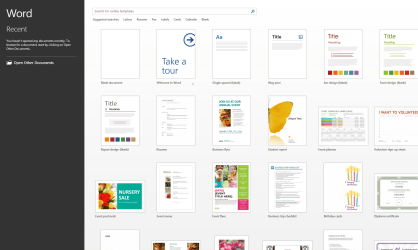
Have you tried clicking on the Start Button, selecting all Programs, scrolling down to Microsoft Office 2013, click on it & then click on Word & that should open a series of templates you can use. See attached screen shot, which is what mine does using this method. I am using Office 2013 Pro.

I also notice there is a red x next to the little flag on the right hand side of the Task Bar, so are there some problems with this computer, which may be causing some problems as well.

Word_open_for_Templates_to_start_a_new_document.png
 

My Computer My Computer

At a glance

Windows 7 Home Premium 64 bit sp1Intel i5 3570 3.4Ghz Ivy Bridge SKT 1155 quad...G-Skill Rip Jaws 16Gb (8x2) DDR3 -1600 PC3 12...Gigabyte NVIDIA GT610 1Gb DDR3 810/1200 PCI-E...
Computer type
PC/Desktop
Computer Manufacturer/Model Number
Self built using existing case
OS
Windows 7 Home Premium 64 bit sp1
CPU
Intel i5 3570 3.4Ghz Ivy Bridge SKT 1155 quad core
Motherboard
Gigabyte Z77-HD3 SKT 1155 2xSata 3, 4x USB 3.0
Memory
G-Skill Rip Jaws 16Gb (8x2) DDR3 -1600 PC3 12800 CL 10 red
Graphics Card(s)
Gigabyte NVIDIA GT610 1Gb DDR3 810/1200 PCI-E 2.0 Silent
Sound Card
NVIDIA High Definition & Realtech High Definition Audio
Monitor(s) Displays
2 x Philips 226V4L 16:9 aspect ratio
Screen Resolution
1920 x 1080 HD
Hard Drives
Samsung 840 Pro 256gb SSD, SATA 3.
Hitachi Touro Portable 1tb, USB 3.0 HDD used for image b/ups.
PSU
Corsair VS450
Case
Codeng
Cooling
PSU fan & CPU fan
Keyboard
Logitech
Mouse
Logitech Wireless trackball M570
Internet Speed
Wireless 3G. 3mg down & 550kb up.
Antivirus
Bitdefender Internet Security 2020
Browser
Opera (Current Version) & Firefox
Other Info
MS Office 2013 Pro. Davis weather station software. MGE Nova 600 avr UPS.
Yes you are right Ranger the red cross has something to do with a blocker of some sort I get it a lot in emails and some did describe what it was to me a while ago but I am blowed if I can remember what it is.

This may be of help and further Googles might just come up with the answer RED X instead of graphics
 

My Computer My Computer

At a glance

Desk1 7 Home Prem / Desk2 10 Pro / Main lap A...Desk1 i5 3750K / Laptop i7 GTX 860M / Desk2 i...Desk1 8GB (1866) / Desk2 16GB (1333) / Laptop...Desk 1& 2NVidia GTX 650 & Laptops on board Intel
Computer type
PC/Desktop
Computer Manufacturer/Model Number
Own build (new) Desk1 / Asus ROG Win 7 / Desk2 1st build
OS
Desk1 7 Home Prem / Desk2 10 Pro / Main lap Asus ROG 10 Pro 2 laptop Toshiba 7 Pro Asus P2520 7 & 10
CPU
Desk1 i5 3750K / Laptop i7 GTX 860M / Desk2 i5 2500
Motherboard
Desk1 Asus P877-V / Desk2 Gigabyte H67 UD3H / Laptop ?
Memory
Desk1 8GB (1866) / Desk2 16GB (1333) / Laptop 8Gb DDR3
Graphics Card(s)
Desk 1& 2NVidia GTX 650 & Laptops on board Intel
Sound Card
Desk 1 & 2 -XONAR DG Realtek High Def audio Laptop
Monitor(s) Displays
Desk 1 Benq HD 2450 / Desk2 Philips 24" / Laptop 17.5"
Screen Resolution
1920x1080 D1 & D2 & Laptop 1
Hard Drives
Desk1 Samsung 120GB 830 SSD
Asus ROG 256GB 850 Pro SSD
Desk2 Samsung 840 256 SSD
Toshiba 120GB EVO
PSU
Desk 1 Corsair HX 1050/ Laptop ? / Desk 2 Corsair HX 650
Case
Desk 1 Cooler HAF XM ? Toshiba laptop / Desk2 Coolermaster
Cooling
Fans on all Desk1 -2 Desk2 - all Coolermasters 5 Laptop ?
Keyboard
Desk 1 MS Sidewinder X6 Desk 2 MS Sidewinder X 4
Mouse
Desk 1&2 - Gigabyte MS 900 gamer - laptop - Logitec wireless
Internet Speed
ADSL2+
Other Info
One other Desktop (tester) and spare Toshba laptop both with SSD's
Running Kaspersky 2016 ISS on all machines config'd identically
Logitec audio stereo systems on each machine (x3)
Canon MG5250MFC
Router/modem TP-Link running WPA2SK
That screen shot you supplied certainly helps describe your problem.

Where are you opening that Word document from?. Is it from the the Word short cut you have on the Task Bar or from the Explorer short cut that is actually highlighted in the screen shot.

Have you tried clicking on the Start Button, selecting all Programs, scrolling down to Microsoft Office 2013, click on it & then click on Word & that should open a series of templates you can use. See attached screen shot, which is what mine does using this method. I am using Office 2013 Pro.

I also notice there is a red x next to the little flag on the right hand side of the Task Bar, so are there some problems with this computer, which may be causing some problems as well.

View attachment 343739
same issue if i open word from start menu.. shortcut on desktop .. or by double clicking on the word document itself..

the red mark is because i disabled the firewall temporarily..
 

My Computer My Computer

At a glance

Windows 7 Ultimate x64E65508GB DDR2
Computer type
PC/Desktop
Computer Manufacturer/Model Number
Dell 755
OS
Windows 7 Ultimate x64
CPU
E6550
Motherboard
Stock Q35 Chipset Based
Memory
8GB DDR2
Hard Drives
1TB
Keyboard
Microsoft Comfort 2000
Mouse
Microsoft
Antivirus
None
Browser
FireFox
That screen shot you supplied certainly helps describe your problem.

Where are you opening that Word document from?. Is it from the the Word short cut you have on the Task Bar or from the Explorer short cut that is actually highlighted in the screen shot.

Have you tried clicking on the Start Button, selecting all Programs, scrolling down to Microsoft Office 2013, click on it & then click on Word & that should open a series of templates you can use. See attached screen shot, which is what mine does using this method. I am using Office 2013 Pro.

I also notice there is a red x next to the little flag on the right hand side of the Task Bar, so are there some problems with this computer, which may be causing some problems as well.

View attachment 343739
same issue if i open word from start menu.. shortcut on desktop .. or by double clicking on the word document itself..

the red mark is because i disabled the firewall temporarily..

You certainly seem to have a stubborn issue here. Perhaps you might consider re-installing Windows as well as reformatting your HDD. I know this is a drastic move but there may be corruption somewhere in the main OS. Of course you will need to reinstall all programs again, so make sure all personal files are backed up & you have the activation codes for all necessary programs.
Read through these tutorials for a perfect install of Windows 7.

http://www.sevenforums.com/tutorials/1649-clean-install-windows-7-a.html

http://www.sevenforums.com/tutorials/219487-clean-reinstall-factory-oem-windows-7-a.html
 
Last edited:

My Computer My Computer

At a glance

Windows 7 Home Premium 64 bit sp1Intel i5 3570 3.4Ghz Ivy Bridge SKT 1155 quad...G-Skill Rip Jaws 16Gb (8x2) DDR3 -1600 PC3 12...Gigabyte NVIDIA GT610 1Gb DDR3 810/1200 PCI-E...
Computer type
PC/Desktop
Computer Manufacturer/Model Number
Self built using existing case
OS
Windows 7 Home Premium 64 bit sp1
CPU
Intel i5 3570 3.4Ghz Ivy Bridge SKT 1155 quad core
Motherboard
Gigabyte Z77-HD3 SKT 1155 2xSata 3, 4x USB 3.0
Memory
G-Skill Rip Jaws 16Gb (8x2) DDR3 -1600 PC3 12800 CL 10 red
Graphics Card(s)
Gigabyte NVIDIA GT610 1Gb DDR3 810/1200 PCI-E 2.0 Silent
Sound Card
NVIDIA High Definition & Realtech High Definition Audio
Monitor(s) Displays
2 x Philips 226V4L 16:9 aspect ratio
Screen Resolution
1920 x 1080 HD
Hard Drives
Samsung 840 Pro 256gb SSD, SATA 3.
Hitachi Touro Portable 1tb, USB 3.0 HDD used for image b/ups.
PSU
Corsair VS450
Case
Codeng
Cooling
PSU fan & CPU fan
Keyboard
Logitech
Mouse
Logitech Wireless trackball M570
Internet Speed
Wireless 3G. 3mg down & 550kb up.
Antivirus
Bitdefender Internet Security 2020
Browser
Opera (Current Version) & Firefox
Other Info
MS Office 2013 Pro. Davis weather station software. MGE Nova 600 avr UPS.
Hi,

Just try , access to Options>advanced>Display
and select(check) , "Disable hardware graphics acceleration"

note: You can access to Options in Windows SafeMode or RUN AppName in safeMode like "word /safe"
 

My Computer My Computer

At a glance

Windows 10 x64
Computer type
PC/Desktop
OS
Windows 10 x64
I tend to agree with Ranger but on a new drive budget permitting of course could be the drive (whatever type) has some bad sectors or controller whatever.

Hi,

Just try , access to Options>advanced>Display
and select(check) , "Disable hardware graphics acceleration"

note: You can access to Options in Windows SafeMode or RUN AppName in safeMode like "word /safe"

A point and worth a try at least doesn't cost anything.
 

My Computer My Computer

At a glance

Desk1 7 Home Prem / Desk2 10 Pro / Main lap A...Desk1 i5 3750K / Laptop i7 GTX 860M / Desk2 i...Desk1 8GB (1866) / Desk2 16GB (1333) / Laptop...Desk 1& 2NVidia GTX 650 & Laptops on board Intel
Computer type
PC/Desktop
Computer Manufacturer/Model Number
Own build (new) Desk1 / Asus ROG Win 7 / Desk2 1st build
OS
Desk1 7 Home Prem / Desk2 10 Pro / Main lap Asus ROG 10 Pro 2 laptop Toshiba 7 Pro Asus P2520 7 & 10
CPU
Desk1 i5 3750K / Laptop i7 GTX 860M / Desk2 i5 2500
Motherboard
Desk1 Asus P877-V / Desk2 Gigabyte H67 UD3H / Laptop ?
Memory
Desk1 8GB (1866) / Desk2 16GB (1333) / Laptop 8Gb DDR3
Graphics Card(s)
Desk 1& 2NVidia GTX 650 & Laptops on board Intel
Sound Card
Desk 1 & 2 -XONAR DG Realtek High Def audio Laptop
Monitor(s) Displays
Desk 1 Benq HD 2450 / Desk2 Philips 24" / Laptop 17.5"
Screen Resolution
1920x1080 D1 & D2 & Laptop 1
Hard Drives
Desk1 Samsung 120GB 830 SSD
Asus ROG 256GB 850 Pro SSD
Desk2 Samsung 840 256 SSD
Toshiba 120GB EVO
PSU
Desk 1 Corsair HX 1050/ Laptop ? / Desk 2 Corsair HX 650
Case
Desk 1 Cooler HAF XM ? Toshiba laptop / Desk2 Coolermaster
Cooling
Fans on all Desk1 -2 Desk2 - all Coolermasters 5 Laptop ?
Keyboard
Desk 1 MS Sidewinder X6 Desk 2 MS Sidewinder X 4
Mouse
Desk 1&2 - Gigabyte MS 900 gamer - laptop - Logitec wireless
Internet Speed
ADSL2+
Other Info
One other Desktop (tester) and spare Toshba laptop both with SSD's
Running Kaspersky 2016 ISS on all machines config'd identically
Logitec audio stereo systems on each machine (x3)
Canon MG5250MFC
Router/modem TP-Link running WPA2SK
This is a very old Thread, going back to Dec 2014, do I doubt the OP is still having the same problem.
 

My Computer My Computer

At a glance

Windows 7 Home Premium 64 bit sp1Intel i5 3570 3.4Ghz Ivy Bridge SKT 1155 quad...G-Skill Rip Jaws 16Gb (8x2) DDR3 -1600 PC3 12...Gigabyte NVIDIA GT610 1Gb DDR3 810/1200 PCI-E...
Computer type
PC/Desktop
Computer Manufacturer/Model Number
Self built using existing case
OS
Windows 7 Home Premium 64 bit sp1
CPU
Intel i5 3570 3.4Ghz Ivy Bridge SKT 1155 quad core
Motherboard
Gigabyte Z77-HD3 SKT 1155 2xSata 3, 4x USB 3.0
Memory
G-Skill Rip Jaws 16Gb (8x2) DDR3 -1600 PC3 12800 CL 10 red
Graphics Card(s)
Gigabyte NVIDIA GT610 1Gb DDR3 810/1200 PCI-E 2.0 Silent
Sound Card
NVIDIA High Definition & Realtech High Definition Audio
Monitor(s) Displays
2 x Philips 226V4L 16:9 aspect ratio
Screen Resolution
1920 x 1080 HD
Hard Drives
Samsung 840 Pro 256gb SSD, SATA 3.
Hitachi Touro Portable 1tb, USB 3.0 HDD used for image b/ups.
PSU
Corsair VS450
Case
Codeng
Cooling
PSU fan & CPU fan
Keyboard
Logitech
Mouse
Logitech Wireless trackball M570
Internet Speed
Wireless 3G. 3mg down & 550kb up.
Antivirus
Bitdefender Internet Security 2020
Browser
Opera (Current Version) & Firefox
Other Info
MS Office 2013 Pro. Davis weather station software. MGE Nova 600 avr UPS.
This is a very old Thread, going back to Dec 2014, do I doubt the OP is still having the same problem.
Yep your right Ranger. :)
 

My Computer My Computer

At a glance

Desk1 7 Home Prem / Desk2 10 Pro / Main lap A...Desk1 i5 3750K / Laptop i7 GTX 860M / Desk2 i...Desk1 8GB (1866) / Desk2 16GB (1333) / Laptop...Desk 1& 2NVidia GTX 650 & Laptops on board Intel
Computer type
PC/Desktop
Computer Manufacturer/Model Number
Own build (new) Desk1 / Asus ROG Win 7 / Desk2 1st build
OS
Desk1 7 Home Prem / Desk2 10 Pro / Main lap Asus ROG 10 Pro 2 laptop Toshiba 7 Pro Asus P2520 7 & 10
CPU
Desk1 i5 3750K / Laptop i7 GTX 860M / Desk2 i5 2500
Motherboard
Desk1 Asus P877-V / Desk2 Gigabyte H67 UD3H / Laptop ?
Memory
Desk1 8GB (1866) / Desk2 16GB (1333) / Laptop 8Gb DDR3
Graphics Card(s)
Desk 1& 2NVidia GTX 650 & Laptops on board Intel
Sound Card
Desk 1 & 2 -XONAR DG Realtek High Def audio Laptop
Monitor(s) Displays
Desk 1 Benq HD 2450 / Desk2 Philips 24" / Laptop 17.5"
Screen Resolution
1920x1080 D1 & D2 & Laptop 1
Hard Drives
Desk1 Samsung 120GB 830 SSD
Asus ROG 256GB 850 Pro SSD
Desk2 Samsung 840 256 SSD
Toshiba 120GB EVO
PSU
Desk 1 Corsair HX 1050/ Laptop ? / Desk 2 Corsair HX 650
Case
Desk 1 Cooler HAF XM ? Toshiba laptop / Desk2 Coolermaster
Cooling
Fans on all Desk1 -2 Desk2 - all Coolermasters 5 Laptop ?
Keyboard
Desk 1 MS Sidewinder X6 Desk 2 MS Sidewinder X 4
Mouse
Desk 1&2 - Gigabyte MS 900 gamer - laptop - Logitec wireless
Internet Speed
ADSL2+
Other Info
One other Desktop (tester) and spare Toshba laptop both with SSD's
Running Kaspersky 2016 ISS on all machines config'd identically
Logitec audio stereo systems on each machine (x3)
Canon MG5250MFC
Router/modem TP-Link running WPA2SK
Back
Top