Hi there
Unless you have an ACTIVE Internet connection (or other Network Mail Server connection such as Exchange) you will NOT be able to set up OUTLOOK 2013.
Outlook 2013 requires (and there is no option unlike in Outlook 2010 to disable it by unchecking a box) a TEST email to be sent and working before your account(s) can be configured-- Once it's done you don't have to be online but if you need to set up several accounts and you don't have a working internet connection -- Tough luck.
Why on earth did Ms do this --it's not necessary and it is a Hassle for some people who are on the road, have purchased Office 2013 and want to set it up instead of having to wait until they get home.
Also a hassle if they want to prepare company laptop computers with email parameters in advance of the new Exchange email servers being rolled out to the users.
Even if your work policy has mechanisms where the USER can configure the email connections themselves they won't be able to set it up until the Servers are actually in place so you can't set the accounts up in advance.
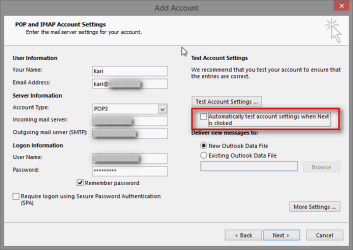
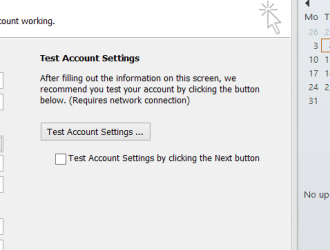
The box I've shown here is from Outlook 2010. In Outlook 2013 the option is filled in and greyed out so you can't change it.
BTW I prefer and use Office 2010 myself but was trying to help a colleague to set up Office 2013.
Cheers
jimbo
Unless you have an ACTIVE Internet connection (or other Network Mail Server connection such as Exchange) you will NOT be able to set up OUTLOOK 2013.
Outlook 2013 requires (and there is no option unlike in Outlook 2010 to disable it by unchecking a box) a TEST email to be sent and working before your account(s) can be configured-- Once it's done you don't have to be online but if you need to set up several accounts and you don't have a working internet connection -- Tough luck.
Why on earth did Ms do this --it's not necessary and it is a Hassle for some people who are on the road, have purchased Office 2013 and want to set it up instead of having to wait until they get home.
Also a hassle if they want to prepare company laptop computers with email parameters in advance of the new Exchange email servers being rolled out to the users.
Even if your work policy has mechanisms where the USER can configure the email connections themselves they won't be able to set it up until the Servers are actually in place so you can't set the accounts up in advance.
The box I've shown here is from Outlook 2010. In Outlook 2013 the option is filled in and greyed out so you can't change it.
BTW I prefer and use Office 2010 myself but was trying to help a colleague to set up Office 2013.
Cheers
jimbo
Attachments
My Computer
At a glance
Linux CENTOS 7 / various Windows OS'es and se...Intel i7 Intel i58GB, 16GBOn Motherboard
- Computer type
- PC/Desktop
- Computer Manufacturer/Model Number
- Custom built, several laptops HP/ASUS
- OS
- Linux CENTOS 7 / various Windows OS'es and servers
- CPU
- Intel i7 Intel i5
- Memory
- 8GB, 16GB
- Graphics Card(s)
- On Motherboard
- Sound Card
- Realtek HD audio
- Monitor(s) Displays
- Apple Cinema display, Samsung LCD
- Screen Resolution
- 1920 X 1080
- Hard Drives
- 4 X 1TB SATA
- Mouse
- Toshiba wireless laser
- Internet Speed
- > 20MB up

 .
.