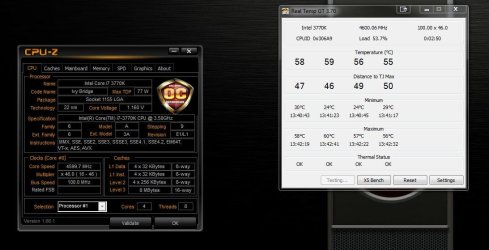
Official Seven Forums Overclock Leader boards

Status
Not open for further replies.
One question about overclocking Dram MHz & Cas Timing.

I'm actually overclocking my Ram Sticks to improve overall performances and i've set them to 1866MHz in Bios

=> Dram 1866MHz (9-10-9-28-2) for Dram Voltage 1,55V.

I want to know if it does looks correct for some 1600MHz CL9 1,5V stock Dram being pushed.

I want set them like that for some games i do use.

PS: Being able to boot with no probs from 1800MHz to 1866MHz (i know those sticks can handle, but...)
You should run memtest to verify the overclock works, just being able to boot is a good sign but not proof. What is the model of your mobo?
 

My Computer My Computer

At a glance

Windows 7 Ultimate X64 SP1Intel i5-2550K, Differing ~4.4-4.8GHz No buil...16GB G.Skill Sniper 1866MHz @ 2133MHz 2x8GBASUS GTX650TIB-DC2OC-2GD5, (650TI Boost)
Computer type
PC/Desktop
Computer Manufacturer/Model Number
Home Built Desktop By DataTech
OS
Windows 7 Ultimate X64 SP1
CPU
Intel i5-2550K, Differing ~4.4-4.8GHz No built in GPU
Motherboard
ASUS P8Z68-V PRO/GEN3
Memory
16GB G.Skill Sniper 1866MHz @ 2133MHz 2x8GB
Graphics Card(s)
ASUS GTX650TIB-DC2OC-2GD5, (650TI Boost)
Sound Card
Onboard Realtek 5-1
Monitor(s) Displays
Samsung P2570HD
Screen Resolution
1920x1080
Hard Drives
Samsung 840 Pro 256GB SSD for OS, 500GB Seagate Constellation (Enterprise drive) for Data
PSU
Corsair HX650W
Case
Inwin Dragon Rider
Cooling
Hyper 212 EVO w/two Noctua fans, push-pull, @1300 RPM
Keyboard
E-Z Eyes, bright yellow keys with large characters
Mouse
steelseries SENSEI Laser Pro Gaming
Internet Speed
48-51Mbs Mbs down, 11 Mbs up Xfinity Cable
Antivirus
Norton Internet Security 2013
Browser
IE 10, Opera, Pale Moon if needed
Other Info
4 case fans, LG BluRay-RE, ASUS DVD-RW, Mr. Fusion power supply, 1.21 gigawatts.
Good going Gary!Nice oc's mate :thumbsup:

Good luck with that ram Non, I was trying the same for the last week or so but gave up due to the sheer amount of hassle lol. My ram would boot/bench @ 1866 but would not pass more than 1 pass of memtest no matter what i did. I've filled my head with more info on ram ready to try again but whether i do or not is a yet to be seen. Too much hassle for the very small gains ;)

Yeah I know it is a small gain but if they can stay that MHz amount, i'll be pleased so.

On my way to memtest, im aware not cheating with those Ram sticks.
 

My Computer My Computer

At a glance

Windows 7 Professional SP1 - x64 [Non-UEFI Boot]Ivy Bridge Core i5 3570K (Delidded)G.Skill "Ares" DDR3 PC3-12800 - 1600MHz (16Gb)Asus Dual-RX480-O4G
Computer type
PC/Desktop
Computer Manufacturer/Model Number
Custom Build
OS
Windows 7 Professional SP1 - x64 [Non-UEFI Boot]
CPU
Ivy Bridge Core i5 3570K (Delidded)
Motherboard
Asus P8Z77-V LE PLUS
Memory
G.Skill "Ares" DDR3 PC3-12800 - 1600MHz (16Gb)
Graphics Card(s)
Asus Dual-RX480-O4G
Sound Card
Creative Sound Blaster Z w/5.1 sound system
Monitor(s) Displays
Asus IPS 23"
Screen Resolution
16/9
Hard Drives
Internal:
500Go Sata 6Gb/s (x2)
500Go Sata 3Gb/s (x2)
SSD 60Go Sata 6Gb/s
PSU
In Win C 900W Series 80+ Platinum
Case
Thermaltake Chaser A71
Cooling
Custom Water Cooling Loop
Keyboard
Cooler Master QuickFire XTi
Mouse
Razer Imperator 2012 (4G)
Antivirus
MSE
Browser
IE 11.0.xxx Rtm
Other Info
"Raid0" with Intel Smart Response Technology (HDD/SSD)
One question about overclocking Dram MHz & Cas Timing.

I'm actually overclocking my Ram Sticks to improve overall performances and i've set them to 1866MHz in Bios

=> Dram 1866MHz (9-10-9-28-2) for Dram Voltage 1,55V.

I want to know if it does looks correct for some 1600MHz CL9 1,5V stock Dram being pushed.

I want set them like that for some games i do use.

PS: Being able to boot with no probs from 1800MHz to 1866MHz (i know those sticks can handle, but...)
You should run memtest to verify the overclock works, just being able to boot is a good sign but not proof. What is the model of your mobo?

Got an asus z77-v le plus....and yes i'll run memtest. I was checking computer post first and events viewer shows nothing bad...

Got only some warnings on the 5.0V rail but it looks to me it does come from Software AI Suite II, as HWiNFO64 launched at the same time didn't show any sign of weakness on that rail.
 

My Computer My Computer

At a glance

Windows 7 Professional SP1 - x64 [Non-UEFI Boot]Ivy Bridge Core i5 3570K (Delidded)G.Skill "Ares" DDR3 PC3-12800 - 1600MHz (16Gb)Asus Dual-RX480-O4G
Computer type
PC/Desktop
Computer Manufacturer/Model Number
Custom Build
OS
Windows 7 Professional SP1 - x64 [Non-UEFI Boot]
CPU
Ivy Bridge Core i5 3570K (Delidded)
Motherboard
Asus P8Z77-V LE PLUS
Memory
G.Skill "Ares" DDR3 PC3-12800 - 1600MHz (16Gb)
Graphics Card(s)
Asus Dual-RX480-O4G
Sound Card
Creative Sound Blaster Z w/5.1 sound system
Monitor(s) Displays
Asus IPS 23"
Screen Resolution
16/9
Hard Drives
Internal:
500Go Sata 6Gb/s (x2)
500Go Sata 3Gb/s (x2)
SSD 60Go Sata 6Gb/s
PSU
In Win C 900W Series 80+ Platinum
Case
Thermaltake Chaser A71
Cooling
Custom Water Cooling Loop
Keyboard
Cooler Master QuickFire XTi
Mouse
Razer Imperator 2012 (4G)
Antivirus
MSE
Browser
IE 11.0.xxx Rtm
Other Info
"Raid0" with Intel Smart Response Technology (HDD/SSD)
So, the standard embedded Memory Diagnostics Tool in Windows 7 returned me "No errors are found" and success in events viewer, report a "Non Critical code 4097" aswell.

That's a good start! :)

i'll run later that day a Memtest86+ memory diagnostic program from boot to inquire futher the stability, looks Ok for those sticks at the moment.:rolleyes:

It had heat-up a bit 2°c to 3°c the overall computer temps, but it is not too bad.
 

Attachments

  • DSCN1263.JPG
    DSCN1263.JPG
    63.5 KB · Views: 38

My Computer My Computer

At a glance

Windows 7 Professional SP1 - x64 [Non-UEFI Boot]Ivy Bridge Core i5 3570K (Delidded)G.Skill "Ares" DDR3 PC3-12800 - 1600MHz (16Gb)Asus Dual-RX480-O4G
Computer type
PC/Desktop
Computer Manufacturer/Model Number
Custom Build
OS
Windows 7 Professional SP1 - x64 [Non-UEFI Boot]
CPU
Ivy Bridge Core i5 3570K (Delidded)
Motherboard
Asus P8Z77-V LE PLUS
Memory
G.Skill "Ares" DDR3 PC3-12800 - 1600MHz (16Gb)
Graphics Card(s)
Asus Dual-RX480-O4G
Sound Card
Creative Sound Blaster Z w/5.1 sound system
Monitor(s) Displays
Asus IPS 23"
Screen Resolution
16/9
Hard Drives
Internal:
500Go Sata 6Gb/s (x2)
500Go Sata 3Gb/s (x2)
SSD 60Go Sata 6Gb/s
PSU
In Win C 900W Series 80+ Platinum
Case
Thermaltake Chaser A71
Cooling
Custom Water Cooling Loop
Keyboard
Cooler Master QuickFire XTi
Mouse
Razer Imperator 2012 (4G)
Antivirus
MSE
Browser
IE 11.0.xxx Rtm
Other Info
"Raid0" with Intel Smart Response Technology (HDD/SSD)
Looking good Non! You're having better luck than i did, Saying that Gskill memory is much better for overclocking than the Corsair ram i use.
 

My Computer My Computer

At a glance

Win7 Home Premium x64 SP1i7 4770k8Gb Kingston HyperX Beast 2400MHz @2133MHz 11...MSI GTX 780ti Gaming Oc x2
Computer type
PC/Desktop
Computer Manufacturer/Model Number
Custom build
OS
Win7 Home Premium x64 SP1
CPU
i7 4770k
Motherboard
Asus maximus VI Hero
Memory
8Gb Kingston HyperX Beast 2400MHz @2133MHz 11-12-11-30
Graphics Card(s)
MSI GTX 780ti Gaming Oc x2
Sound Card
Onboard ROG SupremeFX
Monitor(s) Displays
Asus VG248QE
Screen Resolution
3840X1080 144Hz
Hard Drives
Samung Evo 256Gb, OCZ Agility4 128Gb
1x1TB hitachi storage
PSU
EVGA Supernova 1000w Platinum
Case
Corsair Air 540
Cooling
Corsair H100i
Keyboard
Coolermaster Quickfire Pro
Mouse
Corsair M65 RGB
Internet Speed
74mb dwn/16up
Antivirus
MSE,Malwarebytes
Browser
Chrome
I am done OC'ing this CPU past my daily OC of 4.5GHz. I met my goal of 5GHz without breaking anything, so I'm happy with it lol. You guys are doing some really impressive things though!

After my last fiascal running 5.2 I have been sticking to my 4.5 too. But every now and then I run a 5.0 just because I like to see it:p
 

My Computer My Computer

At a glance

Windows 10 Pro X64Intel(R) Core(TM) i5-3570K CPU OC@ 4.5GHZ Turbo8.00 GB DDR3 1600MhzMSI Gaming X GTX 1070
Computer type
PC/Desktop
Computer Manufacturer/Model Number
Dude Build
OS
Windows 10 Pro X64
CPU
Intel(R) Core(TM) i5-3570K CPU OC@ 4.5GHZ Turbo
Motherboard
MSI Z77A-G45 Gaming
Memory
8.00 GB DDR3 1600Mhz
Graphics Card(s)
MSI Gaming X GTX 1070
Sound Card
Realtek High Definition
Monitor(s) Displays
Dell S23O9W, HP L1710
Screen Resolution
DELL-1920 x 1080 HP-1280 x1024
Hard Drives
Crucial m4 256 SSD, WD 7200RPM 500GB WD 1TB
PSU
Seasonic X650 GOLD
Case
Zalman Z12
Cooling
Antec Kuhler 920
Keyboard
Logitech
Mouse
MSI DS100 Interceptor
Internet Speed
50 down and 5 up
Antivirus
MSE
Browser
Chrome, IE 11
Other Info
Logitech X-620 Speakers
OK people, it`s time to help a member out, it seems I have all the appropriate hardware to do some type of OCing, but yet I can`t even get it to boot at 4.5 :cry: What am I doing wrong or what am I not doing right ? You guys are all having great results and I`m not getting anywhere, even with the new hardware. Temps are great running all the tests, but I`m still not doing or setting something right.:( So Sad and I was expecting soo much more, sad does not begin to describe the emotion :cry:
 

My Computer My Computer

At a glance

Windows 10 Pro x64Intel Core i7 6700KGSkill TridentZ RGB 16GB 3600 16-16-16-36EVGA GTX 980 Ti SC x2
Computer type
PC/Desktop
Computer Manufacturer/Model Number
Skylake Special #666
OS
Windows 10 Pro x64
CPU
Intel Core i7 6700K
Motherboard
Asus Sabertooth Z170 Mark 1
Memory
GSkill TridentZ RGB 16GB 3600 16-16-16-36
Graphics Card(s)
EVGA GTX 980 Ti SC x2
Sound Card
Realtek High Definition
Monitor(s) Displays
AOC G2460PG
Screen Resolution
1920 x 1080 144Hz
Hard Drives
Samsung 860 Pro 256GB, Seagate Barracuda 4TB x2
PSU
EVGA 1000 P2, EVGA White Custom Braided Cables
Case
Corsair Vengeance C70 Gunmetal Black
Cooling
Corsair H100i v2, Corsair ML120 x2, Thermal Grizzly Kryonaut
Keyboard
Logitech G910 Orion Spectrum
Mouse
Logitech G700s
Internet Speed
Verizon Fios Quantum Gateway 75/75
Antivirus
Windows Defender, Malwarebytes Free 3.8.3
Browser
Chrome
Other Info
Corsair SP120 x4, LG Blu-ray Drive, Durabrand HT-395 100 Watt Dolby Digital Amp, Corsair H2100 Wireless 7.1 Headset
It's fun and for show, I run my Sandy at 4400 day to day. The Ivy I think will do well at 4700 but will take more validation and tests.
 

My Computer My Computer

At a glance

Windows 7 Ultimate X64 SP1Intel i5-2550K, Differing ~4.4-4.8GHz No buil...16GB G.Skill Sniper 1866MHz @ 2133MHz 2x8GBASUS GTX650TIB-DC2OC-2GD5, (650TI Boost)
Computer type
PC/Desktop
Computer Manufacturer/Model Number
Home Built Desktop By DataTech
OS
Windows 7 Ultimate X64 SP1
CPU
Intel i5-2550K, Differing ~4.4-4.8GHz No built in GPU
Motherboard
ASUS P8Z68-V PRO/GEN3
Memory
16GB G.Skill Sniper 1866MHz @ 2133MHz 2x8GB
Graphics Card(s)
ASUS GTX650TIB-DC2OC-2GD5, (650TI Boost)
Sound Card
Onboard Realtek 5-1
Monitor(s) Displays
Samsung P2570HD
Screen Resolution
1920x1080
Hard Drives
Samsung 840 Pro 256GB SSD for OS, 500GB Seagate Constellation (Enterprise drive) for Data
PSU
Corsair HX650W
Case
Inwin Dragon Rider
Cooling
Hyper 212 EVO w/two Noctua fans, push-pull, @1300 RPM
Keyboard
E-Z Eyes, bright yellow keys with large characters
Mouse
steelseries SENSEI Laser Pro Gaming
Internet Speed
48-51Mbs Mbs down, 11 Mbs up Xfinity Cable
Antivirus
Norton Internet Security 2013
Browser
IE 10, Opera, Pale Moon if needed
Other Info
4 case fans, LG BluRay-RE, ASUS DVD-RW, Mr. Fusion power supply, 1.21 gigawatts.
It's fun and for show, I run my Sandy at 4400 day to day. The Ivy I think will do well at 4700 but will take more validation and tests.


Yup after I got mine stable @ 4.8 with a super low V-core 1.296 :geek:

I see no point in going further unless they come up with a cooling solution that makes a CPU - Minus Degrees/ 0-c lol
 

My Computer My Computer

At a glance

Windows 10 Home Premium 64bit sp1Intel I7-6700K @ 4.6 Ghz 1.344 volts everyday OC32GB G-Skill TridentZ 3200mhz 16-18-18-38 DDR4Sli Gigabyte Windforce GTX 980 G1
Computer type
PC/Desktop
Computer Manufacturer/Model Number
CoreI7-6700K MrFingerIII Special Builds
OS
Windows 10 Home Premium 64bit sp1
CPU
Intel I7-6700K @ 4.6 Ghz 1.344 volts everyday OC
Motherboard
Asrock Fatality K6 Z170 Socket 1151
Memory
32GB G-Skill TridentZ 3200mhz 16-18-18-38 DDR4
Graphics Card(s)
Sli Gigabyte Windforce GTX 980 G1
Sound Card
AC97 Creative Rage Tactic 3D Headphones Bluetooth
Monitor(s) Displays
27" Asus ROG Swift PG278Q G-Sync 48" Vizio Smart HD TV
Screen Resolution
2560x1440p 27"- 48" Currently Gaming at 2560x1440p Res 2K
Hard Drives
250GB Samsung Evo840SSD Seagate baracuda 500 GB WD Mybook 500Gb 1TB Seagate Barracuda
PSU
HX1050w Corsair Silver 80plus certified crosfire/sli
Case
Enthod Pro Full Tower
Cooling
Corsair H110i GT 280 mm High Performance WaterBlock
Keyboard
Logitech wireless keyboard
Mouse
Logitech wireless mouse
Internet Speed
Cox Cable 100+ mb
Antivirus
WebRoot Spysweeper with Antivirus
Browser
IE-10, Chrome, Opera
Other Info
My Other Rig is a AMD FX8320E @4.6Ghz 16GB Ballistic Sport Ram
Mobo Asrock Fatality 990FX 120GB OCZ SSD 1TB Seagate Barracuda Corsair H75 Cooling PSU Corsair CX750
GPU GTX Gigabyte 970G1
OK people, it`s time to help a member out, it seems I have all the appropriate hardware to do some type of OCing, but yet I can`t even get it to boot at 4.5 :cry: What am I doing wrong or what am I not doing right ? You guys are all having great results and I`m not getting anywhere, even with the new hardware. Temps are great running all the tests, but I`m still not doing or setting something right.:( So Sad and I was expecting soo much more, sad does not begin to describe the emotion :cry:

What voltage are you trying it at? They all vary. Mine requires 1.280v for my daily 4.6ghz
 

My Computer My Computer

At a glance

Windows 7 Professional 64 bit
OS
Windows 7 Professional 64 bit
OK people, it`s time to help a member out, it seems I have all the appropriate hardware to do some type of OCing, but yet I can`t even get it to boot at 4.5 :cry: What am I doing wrong or what am I not doing right ? You guys are all having great results and I`m not getting anywhere, even with the new hardware. Temps are great running all the tests, but I`m still not doing or setting something right.:( So Sad and I was expecting soo much more, sad does not begin to describe the emotion :cry:

Brian set VDroop to 100%. With OC Genie disabled, set the Core Ratios all to 45X. Disable Overspeed Protection. Disable C-State and enable C1E instead. Set the power limits to 250 - 255. Leave Primary Plane (a) at 1024, but set secondary Plane limit at 60-128. Primary and Secondary Turbo to 250 - 255
 

My Computer My Computer

At a glance

Windows 10 Pro X64Intel(R) Core(TM) i5-3570K CPU OC@ 4.5GHZ Turbo8.00 GB DDR3 1600MhzMSI Gaming X GTX 1070
Computer type
PC/Desktop
Computer Manufacturer/Model Number
Dude Build
OS
Windows 10 Pro X64
CPU
Intel(R) Core(TM) i5-3570K CPU OC@ 4.5GHZ Turbo
Motherboard
MSI Z77A-G45 Gaming
Memory
8.00 GB DDR3 1600Mhz
Graphics Card(s)
MSI Gaming X GTX 1070
Sound Card
Realtek High Definition
Monitor(s) Displays
Dell S23O9W, HP L1710
Screen Resolution
DELL-1920 x 1080 HP-1280 x1024
Hard Drives
Crucial m4 256 SSD, WD 7200RPM 500GB WD 1TB
PSU
Seasonic X650 GOLD
Case
Zalman Z12
Cooling
Antec Kuhler 920
Keyboard
Logitech
Mouse
MSI DS100 Interceptor
Internet Speed
50 down and 5 up
Antivirus
MSE
Browser
Chrome, IE 11
Other Info
Logitech X-620 Speakers
AddRam, I Know you have an MSI board, but this is a guide for Asus boards. (Ivy Bridge Overclocking Guide) While yours may not have the same options, it will explain a lot of the terms and where to set the bios options you do have. Personally, I find it easier to set the voltage to manual to find the lowest voltage I can run at a given multiplier. It is then fairly simple to convert that to offset. I have an Asus board and have my bios set almost exactly by this guide and it works for me. I think whatever board you have there are only a couple of options that are critical, LLC being the most. I have mine set to Ultra High. I also use Core Temp to monitor temps. I have found it to be accurate and also shows my VID, which tells you a lot about your chip. I believe Dud has an MSI board so he could probably help more. But, this guide will help you understand the terms of bios and what thwy mean and what they do.
 

My Computers My Computers

  • At a glance

    Windows 11 ProRyzen 9 5900X32GB G Skill DDR4-3600EVGA RTX 3080 FTW 3 Ultra
    Computer type
    PC/Desktop
    Computer Manufacturer/Model Number
    ALWAYS UNDER CONSTRUCTION
    OS
    Windows 11 Pro
    CPU
    Ryzen 9 5900X
    Motherboard
    Asus X570 Crosshair Viii Hero
    Memory
    32GB G Skill DDR4-3600
    Graphics Card(s)
    EVGA RTX 3080 FTW 3 Ultra
    Sound Card
    On Board/Sennheiser PC37X Headset
    Monitor(s) Displays
    3 X Asus 27"
    Screen Resolution
    2560x1440
    Hard Drives
    2 X 1 TB NVME drives
    PSU
    EVGA 850
    Case
    Phanteks Eclipse P400A
    Cooling
    EVGA 280 AIO
    Keyboard
    Logitech G510s/ Logitech G13
    Mouse
    Logitech G502
    Internet Speed
    24/1
    Antivirus
    ESET/MBAM Pro/SAS Pro
    Browser
    Chrome/ Firefox/ Edge
  • At a glance

    Windows 11 ProIntel Ultra 9 288V32 GB LPDDR5X 8533
    Computer type
    Laptop
    System Manufacturer/Model Number
    Dell 16 Plus
    OS
    Windows 11 Pro
    CPU
    Intel Ultra 9 288V
    Memory
    32 GB LPDDR5X 8533
    Monitor(s) Displays
    16" Mini-LED HDR600 Touch 90 Hz
    Screen Resolution
    2560X1600
    Hard Drives
    1 TB NVME
AddRam, I Know you have an MSI board, but this is a guide for Asus boards. (Ivy Bridge Overclocking Guide) While yours may not have the same options, it will explain a lot of the terms and where to set the bios options you do have. Personally, I find it easier to set the voltage to manual to find the lowest voltage I can run at a given multiplier. It is then fairly simple to convert that to offset. I have an Asus board and have my bios set almost exactly by this guide and it works for me. I think whatever board you have there are only a couple of options that are critical, LLC being the most. I have mine set to Ultra High. I also use Core Temp to monitor temps. I have found it to be accurate and also shows my VID, which tells you a lot about your chip. I believe Dud has an MSI board so he could probably help more. But, this guide will help you understand the terms of bios and what thwy mean and what they do.


I just PM him the same thing but had to look at his specs

MSI has none of those features it is a total new Mister ,I hated it Doug will have to be the Lead with this one MSi is no longer my thing
 

My Computer My Computer

At a glance

Windows 10 Home Premium 64bit sp1Intel I7-6700K @ 4.6 Ghz 1.344 volts everyday OC32GB G-Skill TridentZ 3200mhz 16-18-18-38 DDR4Sli Gigabyte Windforce GTX 980 G1
Computer type
PC/Desktop
Computer Manufacturer/Model Number
CoreI7-6700K MrFingerIII Special Builds
OS
Windows 10 Home Premium 64bit sp1
CPU
Intel I7-6700K @ 4.6 Ghz 1.344 volts everyday OC
Motherboard
Asrock Fatality K6 Z170 Socket 1151
Memory
32GB G-Skill TridentZ 3200mhz 16-18-18-38 DDR4
Graphics Card(s)
Sli Gigabyte Windforce GTX 980 G1
Sound Card
AC97 Creative Rage Tactic 3D Headphones Bluetooth
Monitor(s) Displays
27" Asus ROG Swift PG278Q G-Sync 48" Vizio Smart HD TV
Screen Resolution
2560x1440p 27"- 48" Currently Gaming at 2560x1440p Res 2K
Hard Drives
250GB Samsung Evo840SSD Seagate baracuda 500 GB WD Mybook 500Gb 1TB Seagate Barracuda
PSU
HX1050w Corsair Silver 80plus certified crosfire/sli
Case
Enthod Pro Full Tower
Cooling
Corsair H110i GT 280 mm High Performance WaterBlock
Keyboard
Logitech wireless keyboard
Mouse
Logitech wireless mouse
Internet Speed
Cox Cable 100+ mb
Antivirus
WebRoot Spysweeper with Antivirus
Browser
IE-10, Chrome, Opera
Other Info
My Other Rig is a AMD FX8320E @4.6Ghz 16GB Ballistic Sport Ram
Mobo Asrock Fatality 990FX 120GB OCZ SSD 1TB Seagate Barracuda Corsair H75 Cooling PSU Corsair CX750
GPU GTX Gigabyte 970G1
Solar, I agree. The worst part is, I think all manufacturers have the same basic options, they just have a different name for them. I'm not sure why they can't all have the same name for the same thing. It just makes everything confusing if you change manufacturers or try helping someone with a different brand board.
 

My Computers My Computers

  • At a glance

    Windows 11 ProRyzen 9 5900X32GB G Skill DDR4-3600EVGA RTX 3080 FTW 3 Ultra
    Computer type
    PC/Desktop
    Computer Manufacturer/Model Number
    ALWAYS UNDER CONSTRUCTION
    OS
    Windows 11 Pro
    CPU
    Ryzen 9 5900X
    Motherboard
    Asus X570 Crosshair Viii Hero
    Memory
    32GB G Skill DDR4-3600
    Graphics Card(s)
    EVGA RTX 3080 FTW 3 Ultra
    Sound Card
    On Board/Sennheiser PC37X Headset
    Monitor(s) Displays
    3 X Asus 27"
    Screen Resolution
    2560x1440
    Hard Drives
    2 X 1 TB NVME drives
    PSU
    EVGA 850
    Case
    Phanteks Eclipse P400A
    Cooling
    EVGA 280 AIO
    Keyboard
    Logitech G510s/ Logitech G13
    Mouse
    Logitech G502
    Internet Speed
    24/1
    Antivirus
    ESET/MBAM Pro/SAS Pro
    Browser
    Chrome/ Firefox/ Edge
  • At a glance

    Windows 11 ProIntel Ultra 9 288V32 GB LPDDR5X 8533
    Computer type
    Laptop
    System Manufacturer/Model Number
    Dell 16 Plus
    OS
    Windows 11 Pro
    CPU
    Intel Ultra 9 288V
    Memory
    32 GB LPDDR5X 8533
    Monitor(s) Displays
    16" Mini-LED HDR600 Touch 90 Hz
    Screen Resolution
    2560X1600
    Hard Drives
    1 TB NVME
Also set digital compensation to high. I would try for about 1.3vs. You can try auto first, then manual if not working. I have read a lot of people not being happy with MSI. I have even said I want to switch to ASUS. But I am really happy with the performance I get with mine, I just want more options. You can try 87.5-100 on the vdroop. You should get 4.5-4.6 easy with those settings, good luck!
 

My Computer My Computer

At a glance

Windows 10 Pro X64Intel(R) Core(TM) i5-3570K CPU OC@ 4.5GHZ Turbo8.00 GB DDR3 1600MhzMSI Gaming X GTX 1070
Computer type
PC/Desktop
Computer Manufacturer/Model Number
Dude Build
OS
Windows 10 Pro X64
CPU
Intel(R) Core(TM) i5-3570K CPU OC@ 4.5GHZ Turbo
Motherboard
MSI Z77A-G45 Gaming
Memory
8.00 GB DDR3 1600Mhz
Graphics Card(s)
MSI Gaming X GTX 1070
Sound Card
Realtek High Definition
Monitor(s) Displays
Dell S23O9W, HP L1710
Screen Resolution
DELL-1920 x 1080 HP-1280 x1024
Hard Drives
Crucial m4 256 SSD, WD 7200RPM 500GB WD 1TB
PSU
Seasonic X650 GOLD
Case
Zalman Z12
Cooling
Antec Kuhler 920
Keyboard
Logitech
Mouse
MSI DS100 Interceptor
Internet Speed
50 down and 5 up
Antivirus
MSE
Browser
Chrome, IE 11
Other Info
Logitech X-620 Speakers
Are the volts ok ? Too low ? I don`t have anything called Digital Compensation.
 

Attachments

  • Capture.JPG
    Capture.JPG
    82.3 KB · Views: 8

My Computer My Computer

At a glance

Windows 10 Pro x64Intel Core i7 6700KGSkill TridentZ RGB 16GB 3600 16-16-16-36EVGA GTX 980 Ti SC x2
Computer type
PC/Desktop
Computer Manufacturer/Model Number
Skylake Special #666
OS
Windows 10 Pro x64
CPU
Intel Core i7 6700K
Motherboard
Asus Sabertooth Z170 Mark 1
Memory
GSkill TridentZ RGB 16GB 3600 16-16-16-36
Graphics Card(s)
EVGA GTX 980 Ti SC x2
Sound Card
Realtek High Definition
Monitor(s) Displays
AOC G2460PG
Screen Resolution
1920 x 1080 144Hz
Hard Drives
Samsung 860 Pro 256GB, Seagate Barracuda 4TB x2
PSU
EVGA 1000 P2, EVGA White Custom Braided Cables
Case
Corsair Vengeance C70 Gunmetal Black
Cooling
Corsair H100i v2, Corsair ML120 x2, Thermal Grizzly Kryonaut
Keyboard
Logitech G910 Orion Spectrum
Mouse
Logitech G700s
Internet Speed
Verizon Fios Quantum Gateway 75/75
Antivirus
Windows Defender, Malwarebytes Free 3.8.3
Browser
Chrome
Other Info
Corsair SP120 x4, LG Blu-ray Drive, Durabrand HT-395 100 Watt Dolby Digital Amp, Corsair H2100 Wireless 7.1 Headset
That is good to oc with that voltage, good job
 

My Computer My Computer

At a glance

Windows 10 Pro X64Intel(R) Core(TM) i5-3570K CPU OC@ 4.5GHZ Turbo8.00 GB DDR3 1600MhzMSI Gaming X GTX 1070
Computer type
PC/Desktop
Computer Manufacturer/Model Number
Dude Build
OS
Windows 10 Pro X64
CPU
Intel(R) Core(TM) i5-3570K CPU OC@ 4.5GHZ Turbo
Motherboard
MSI Z77A-G45 Gaming
Memory
8.00 GB DDR3 1600Mhz
Graphics Card(s)
MSI Gaming X GTX 1070
Sound Card
Realtek High Definition
Monitor(s) Displays
Dell S23O9W, HP L1710
Screen Resolution
DELL-1920 x 1080 HP-1280 x1024
Hard Drives
Crucial m4 256 SSD, WD 7200RPM 500GB WD 1TB
PSU
Seasonic X650 GOLD
Case
Zalman Z12
Cooling
Antec Kuhler 920
Keyboard
Logitech
Mouse
MSI DS100 Interceptor
Internet Speed
50 down and 5 up
Antivirus
MSE
Browser
Chrome, IE 11
Other Info
Logitech X-620 Speakers
OK, So what`s next ? Change all the core#s to 47 and reboot ? or do I have to do anything else ?
 

My Computer My Computer

At a glance

Windows 10 Pro x64Intel Core i7 6700KGSkill TridentZ RGB 16GB 3600 16-16-16-36EVGA GTX 980 Ti SC x2
Computer type
PC/Desktop
Computer Manufacturer/Model Number
Skylake Special #666
OS
Windows 10 Pro x64
CPU
Intel Core i7 6700K
Motherboard
Asus Sabertooth Z170 Mark 1
Memory
GSkill TridentZ RGB 16GB 3600 16-16-16-36
Graphics Card(s)
EVGA GTX 980 Ti SC x2
Sound Card
Realtek High Definition
Monitor(s) Displays
AOC G2460PG
Screen Resolution
1920 x 1080 144Hz
Hard Drives
Samsung 860 Pro 256GB, Seagate Barracuda 4TB x2
PSU
EVGA 1000 P2, EVGA White Custom Braided Cables
Case
Corsair Vengeance C70 Gunmetal Black
Cooling
Corsair H100i v2, Corsair ML120 x2, Thermal Grizzly Kryonaut
Keyboard
Logitech G910 Orion Spectrum
Mouse
Logitech G700s
Internet Speed
Verizon Fios Quantum Gateway 75/75
Antivirus
Windows Defender, Malwarebytes Free 3.8.3
Browser
Chrome
Other Info
Corsair SP120 x4, LG Blu-ray Drive, Durabrand HT-395 100 Watt Dolby Digital Amp, Corsair H2100 Wireless 7.1 Headset
Yes try 4.7
 

My Computer My Computer

At a glance

Windows 10 Pro X64Intel(R) Core(TM) i5-3570K CPU OC@ 4.5GHZ Turbo8.00 GB DDR3 1600MhzMSI Gaming X GTX 1070
Computer type
PC/Desktop
Computer Manufacturer/Model Number
Dude Build
OS
Windows 10 Pro X64
CPU
Intel(R) Core(TM) i5-3570K CPU OC@ 4.5GHZ Turbo
Motherboard
MSI Z77A-G45 Gaming
Memory
8.00 GB DDR3 1600Mhz
Graphics Card(s)
MSI Gaming X GTX 1070
Sound Card
Realtek High Definition
Monitor(s) Displays
Dell S23O9W, HP L1710
Screen Resolution
DELL-1920 x 1080 HP-1280 x1024
Hard Drives
Crucial m4 256 SSD, WD 7200RPM 500GB WD 1TB
PSU
Seasonic X650 GOLD
Case
Zalman Z12
Cooling
Antec Kuhler 920
Keyboard
Logitech
Mouse
MSI DS100 Interceptor
Internet Speed
50 down and 5 up
Antivirus
MSE
Browser
Chrome, IE 11
Other Info
Logitech X-620 Speakers
OK, changed all cores to 47. Windows starts and immediately blue screens.

So what`s the next thing to adjust ?

Do I raise the core voltage some more ?
 

My Computer My Computer

At a glance

Windows 10 Pro x64Intel Core i7 6700KGSkill TridentZ RGB 16GB 3600 16-16-16-36EVGA GTX 980 Ti SC x2
Computer type
PC/Desktop
Computer Manufacturer/Model Number
Skylake Special #666
OS
Windows 10 Pro x64
CPU
Intel Core i7 6700K
Motherboard
Asus Sabertooth Z170 Mark 1
Memory
GSkill TridentZ RGB 16GB 3600 16-16-16-36
Graphics Card(s)
EVGA GTX 980 Ti SC x2
Sound Card
Realtek High Definition
Monitor(s) Displays
AOC G2460PG
Screen Resolution
1920 x 1080 144Hz
Hard Drives
Samsung 860 Pro 256GB, Seagate Barracuda 4TB x2
PSU
EVGA 1000 P2, EVGA White Custom Braided Cables
Case
Corsair Vengeance C70 Gunmetal Black
Cooling
Corsair H100i v2, Corsair ML120 x2, Thermal Grizzly Kryonaut
Keyboard
Logitech G910 Orion Spectrum
Mouse
Logitech G700s
Internet Speed
Verizon Fios Quantum Gateway 75/75
Antivirus
Windows Defender, Malwarebytes Free 3.8.3
Browser
Chrome
Other Info
Corsair SP120 x4, LG Blu-ray Drive, Durabrand HT-395 100 Watt Dolby Digital Amp, Corsair H2100 Wireless 7.1 Headset
Status
Not open for further replies.
Back
Top