OK To Do All Updates Now?

michael diemer

New member
Guru
VIP
Local time
9:33 AM
Messages
753
Location
Maine
During the GWX fiasco, like many I stopped doing all updates, instead installing the security only one. But my computer seems sluggish, and I wonder if it's sufering from not having all the updates. I am still wary of telemetry, and that pesky 296xxxx update that keeps coming back. Should I just bite the bullet and install the Rollup? I can always install my last Windows Image if I need to. I'm just curious whether people's thinking has changed on this.
 

My Computer

Computer type
PC/Desktop
Computer Manufacturer/Model Number
Gateway GT5656
OS
Windows 7 x64 SP1
CPU
AMD Athlon 64 X2 6000+ / 3.0 GHz
Motherboard
NVIDIA GeForce 6150 SE
Memory
6 GB
Monitor(s) Displays
Lenovo LED
Screen Resolution
1920 X 1080
Hard Drives
Windows on 500 GB spinner; Ubuntu 16 on Sandisk 250GB SSD; Bodhi5 on Samsung 250GB SSD; another old spinner for fooling around.
PSU
Original that came with computer
Keyboard
Logitech wireless
Mouse
Logitech wireless
Antivirus
Microsoft Sec Essentials
Browser
Vivaldi
"OK with who?".

The Convenience rollup update for Windows 7 SP1 (if you dont have these already).
Followed by security only updates.
You may need the WSUS patches that were issues after the GWX era, unless you download manually.
 

My Computer

Computer type
PC/Desktop
OS
Windows 7 x64, Vista x64, 8.1 smartphone
CPU
Intel E8400 65W 64-bit
Motherboard
Gigabyte EP45-UD3LR
Memory
DDR2 2 x 2GB, 1GB x 2
Graphics Card(s)
XFX Radeon HD5750
Sound Card
AMD High Definition Audio; Realtek High Definition Audio
Monitor(s) Displays
iiyama prolite X2377HDS
Screen Resolution
1920 x 1080
Hard Drives
500GB 7200 rpm Seagate ST3500413AS 16MB, 500GB 5400 rpm Toshiba MQ02ABF050H 32MB, 200GB 7200 rpm Seagate ST3200820AS 8MB, 2TB 7200 rpm Western Digital WD20EZRX 64MB
PSU
Enermax Liberty Modular
Case
Antec P193 Midi Tower
Keyboard
Mionix ZIBAL 60
Mouse
Razer USB 2.0 Diamondback Mouse or Huion Graphics Tablet
Browser
Internet Explorer, Lunascape, Firefox, Opera, Avast Safezone
Hi Michael,

The days of GWX are over, allthough the KB296xxxx is still REGULARLY offered as Optional.
So change your WU option to let me choose, after running the latest roll-up.
December 12, 2017 - KB4054518 (Monthly Rollup) Windows 7 - Windows 7 Help Forums
I like many others avoid the Preview roll-up


As for your machine being sluggish its unlikely that its caused by lack of updates.

Suggest you run the standard repair options
KB947821
sfc /scannow (from an elevated command prompt)

After installing the updates also suggest you run, the inbuilt MS clean up tool. Its much improved.
If you have never run it, it could take a while to process BOTH sides of your next reboot 30min+


Roy
 

My Computer

Computer type
PC/Desktop
Computer Manufacturer/Model Number
medionl/Aspire 6930G/acer x55a
OS
W7 home premium 32bit/W7HP 64bit/w10 tp insider ring
CPU
E5300 dual core
Motherboard
medion MS7366
Memory
3gb
Graphics Card(s)
Nvidia Geforce 7100 Nforce 630i
Monitor(s) Displays
avixc
Internet Speed
n (isp resticted to 72)
Antivirus
mse/pands
Browser
palemoon
Other Info
Belkin Fd7050 n USB using Railink RT2870 drivers, more upto date
Thanks folks, will consider responses and decide what to do.
 

My Computer

Computer type
PC/Desktop
Computer Manufacturer/Model Number
Gateway GT5656
OS
Windows 7 x64 SP1
CPU
AMD Athlon 64 X2 6000+ / 3.0 GHz
Motherboard
NVIDIA GeForce 6150 SE
Memory
6 GB
Monitor(s) Displays
Lenovo LED
Screen Resolution
1920 X 1080
Hard Drives
Windows on 500 GB spinner; Ubuntu 16 on Sandisk 250GB SSD; Bodhi5 on Samsung 250GB SSD; another old spinner for fooling around.
PSU
Original that came with computer
Keyboard
Logitech wireless
Mouse
Logitech wireless
Antivirus
Microsoft Sec Essentials
Browser
Vivaldi
Hello Michael, Hello Tourchwood, I suddenly remembered the occassion when removing the replaced or superceeded updates from the operating system, speeded up my computer for me.

I used DISM++ to find superceeded updates. With DISM++ I only removed all of about two or three superceeded updates. I do not know why that would affect performance, but I noticed a positive improvement thereafter.

The link to download DISM++ is here https://www.chuyu.me/en/index.html.

The English documentation is a bit lacky, so this is a screenshot of the Update History after the State Tab had been selected one or two times: DISM plus plus.PNG


Hope that helps
 
Last edited:

My Computer

Computer type
PC/Desktop
OS
Windows 7 x64, Vista x64, 8.1 smartphone
CPU
Intel E8400 65W 64-bit
Motherboard
Gigabyte EP45-UD3LR
Memory
DDR2 2 x 2GB, 1GB x 2
Graphics Card(s)
XFX Radeon HD5750
Sound Card
AMD High Definition Audio; Realtek High Definition Audio
Monitor(s) Displays
iiyama prolite X2377HDS
Screen Resolution
1920 x 1080
Hard Drives
500GB 7200 rpm Seagate ST3500413AS 16MB, 500GB 5400 rpm Toshiba MQ02ABF050H 32MB, 200GB 7200 rpm Seagate ST3200820AS 8MB, 2TB 7200 rpm Western Digital WD20EZRX 64MB
PSU
Enermax Liberty Modular
Case
Antec P193 Midi Tower
Keyboard
Mionix ZIBAL 60
Mouse
Razer USB 2.0 Diamondback Mouse or Huion Graphics Tablet
Browser
Internet Explorer, Lunascape, Firefox, Opera, Avast Safezone
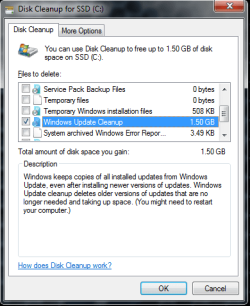
Windows Disk Clean-up will do that for your as well:
Start Orb > type disk cleanup > choose drive > OK
Wait while Disk Cleanup calculates space savings.
 

Attachments

  • Disk Cleanup.png
    Disk Cleanup.png
    17.4 KB · Views: 26

My Computer

Computer type
PC/Desktop
Computer Manufacturer/Model Number
HP Desktop & Compaq Laptop
OS
Win 10 x64, Linux Lite, Win 7 x64, BlackArch, & Kali
Hard Drives
Samsung 850 Pro 256Gb,
Hitachi HDD 1Tb,
Crucial MX SSD 250Gb
Segate 3Tb USB 3.0 Ext. Backup HDD
Internet Speed
150Mbps dn, 20Mbps up
Antivirus
Avast Free, Malwarebytes Anti-Exploit & Anti-Ransomware
Browser
Firefox, Chrome, Opera, & VPN
I've updating from the KB3020369,(KB3125574), and (KB3172605), and the GWX never appeared again. and I still using windows 7 with auto update every month like before, it's working well, So it should for you. Anyway I start with full refresh OS(newly installed with home basic, and upgrade to ultimate), then install that kb via MS catalog using IE and it just start all update automatically until December roll up.
 

My Computer

Computer type
Laptop
Computer Manufacturer/Model Number
ASUS A43SV-VX072D | Custom Build CPU
OS
Windows 7 Ultimate x64
CPU
i7-2670QM
Motherboard
ASUS MotherBoard (ASUS A43SV Mobo American Megatrends)
Memory
16GB Crossair Value
Graphics Card(s)
GT540M NVidia 1GB
Sound Card
Realtek
Monitor(s) Displays
LG and BOC
Screen Resolution
1366x768
Hard Drives
SAMSUNG EVO 860 MZ-76P1T0BW 1TB
-------------- DEPRECATED -------------
HGST 7200rpm TRAVELSTAR 1TB
WD Blue 5400rpm 750GB
Cooling
taffware external Cooler
Keyboard
Logitec MK220
Mouse
Prolink without any specific number
Internet Speed
1mbps(small one :v)
Antivirus
AVAST PREMIER
Browser
Chrome
Back
Top