Windows Update Error 80070643 & 80071A91 on all updates - Win7 64 SP1

j1a1c1k

New member
Local time
8:35 AM
Messages
5
Windows Update Error 80070643 & 80071A91 on all updates - Win7 64 SP1

Hi,

I've got a Win 7 pro 64 bit SP1 machine on a domain, pointing to a local WSUS server which has stopped installing updates. The update gets to the point in the progress bar where it should be installed but then returns failed with 80070643 & 80071A91 error codes. Currently there are 45 updates outstanding. All other machines on the domain receive and apply updates successfully.

If I try to apply updates 1 by 1, I get a mixture of the errors already stated depending on the update i'm applying.

I've run chkdsk & sfc /scannow.

SURT has been run.

Updates still coming back with the same error.

CBS log is 185Mb, so even zipped to large to attach, CheckSUR is reporting no errors detected.

Anti-Virus is: Sophos Endpoint 10.3

If anyone can help it would be massively appreciated!

Thanks,
Jack
 

My Computer My Computer

At a glance

Windows 7 Professional 64-bit SP1
Computer type
PC/Desktop
Computer Manufacturer/Model Number
HP
OS
Windows 7 Professional 64-bit SP1
Delete the older CBSPersist files from the archive until it's below 8MB - or post the entire archive to a fileshare site and post a link,
 

My Computer My Computer

At a glance

Win 7 x64 Home Premium (and x86 VirtualBox VM...i3 370M/i7 6500U8GB - finally :)/8GBit's an i3, dude!/dual Intel&nVidia
Computer type
Laptop
Computer Manufacturer/Model Number
Asus K52F or Lenovo B51-80
OS
Win 7 x64 Home Premium (and x86 VirtualBox VM)/Win10
CPU
i3 370M/i7 6500U
Motherboard
Asus/Lenovo
Memory
8GB - finally :)/8GB
Graphics Card(s)
it's an i3, dude!/dual Intel&nVidia
Sound Card
onboard
Monitor(s) Displays
15.6" built-in
Screen Resolution
1366x768/1920x1080
Hard Drives
750GB Seagate internal
Sundry external drives attached to other computers on the local network
1TB SSD on the Lenovo
PSU
n/a
Internet Speed
as much as I can get - usually on a dongle/phone, so <1MB/s
Antivirus
MSE/Defender
Browser
IE11/12/Edge/Chrome/FF(if I must)
Yep ;)
downloading 180+MB as I type...
Here's the detail on the first error in the CBS.log file...
Code:
2015-03-26 11:34:21, Info                  CSI    23 c25942990451c9ebab64883e980576f8, pA = PROCESSOR_ARCHITECTURE_AMD64 (9), Culture neutral, VersionScope = 1 nonSxS, PublicKeyToken = {l:8 b:31bf3856ad364e35}, Type neutral, TypeName neutral, PublicKey neutral }
  { 6.1.7601.17514 -> 6.1.7601.18523 WCF-M_SM_CFG_INS_EXE, pA = PROCESSOR_ARCHITECTURE_INTEL (0), Culture neutral, VersionScope = 1 nonSxS, PublicKeyToken = {l:8 b:31bf3856ad364e35}, Type neutral, TypeName neutral, PublicKey neutral }
2015-03-26 11:34:22, Info                  CSI    00000338 ICSITransaction::Commit calling IStorePendingTransaction::Apply - coldpatching=FALSE applyflags=15 (0x0000000f)
2015-03-26 11:34:22, Info                  CSI    00000339 Creating NT transaction (seq 2), objectname [6]"(null)"
2015-03-26 11:34:22, Info                  CSI    0000033a Created NT transaction (seq 2) result 0x00000000, handle @0x1ac0
2015-03-26 11:34:23, Error                 CSI    0000033b (F) STATUS_RM_NOT_ACTIVE #7104030# from Windows::Rtl::SystemImplementation::DirectFileSystemProvider::SysCreateFile(flags = (AllowSharingViolation|AllowTransactionalConflict|0x00000400), handle = {provider=NULL, handle=0}, da = (FILE_GENERIC_READ), oa = @0xfce578->OBJECT_ATTRIBUTES {s:48; rd:NULL; on:[39]"\SystemRoot\WinSxS\Temp\PendingRenames\"; a:(OBJ_CASE_INSENSITIVE)}, iosb = @0xfce600, as = (null), fa = (FILE_ATTRIBUTE_DIRECTORY), sa = (FILE_SHARE_READ|FILE_SHARE_WRITE|FILE_SHARE_DELETE), cd = FILE_OPEN, co = (FILE_DIRECTORY_FILE|FILE_SYNCHRONOUS_IO_NONALERT|0x00004000), eab = NULL, eal = 0, disp = Invalid)

try this first...

open an Elevated COmmand Prompt and run the following command...

fsutil resource setautoreset true C:\

then close the command prompt window wait 10 minutes, and reboot - try Windows Updates again.
 

My Computer My Computer

At a glance

Win 7 x64 Home Premium (and x86 VirtualBox VM...i3 370M/i7 6500U8GB - finally :)/8GBit's an i3, dude!/dual Intel&nVidia
Computer type
Laptop
Computer Manufacturer/Model Number
Asus K52F or Lenovo B51-80
OS
Win 7 x64 Home Premium (and x86 VirtualBox VM)/Win10
CPU
i3 370M/i7 6500U
Motherboard
Asus/Lenovo
Memory
8GB - finally :)/8GB
Graphics Card(s)
it's an i3, dude!/dual Intel&nVidia
Sound Card
onboard
Monitor(s) Displays
15.6" built-in
Screen Resolution
1366x768/1920x1080
Hard Drives
750GB Seagate internal
Sundry external drives attached to other computers on the local network
1TB SSD on the Lenovo
PSU
n/a
Internet Speed
as much as I can get - usually on a dongle/phone, so <1MB/s
Antivirus
MSE/Defender
Browser
IE11/12/Edge/Chrome/FF(if I must)
Command run - put it on a shutdown timer for in 10 minutes while I travel home. I'll reply between 7 and 8 with the results!

Thanks a lot for your help - this ones been driving me mad. Out of 175 PCs, I have 2 with Windows Update issues that I just can't cure!

Jack
 

My Computer My Computer

At a glance

Windows 7 Professional 64-bit SP1
Computer type
PC/Desktop
Computer Manufacturer/Model Number
HP
OS
Windows 7 Professional 64-bit SP1
I'll be in the pub then ;)
 

My Computer My Computer

At a glance

Win 7 x64 Home Premium (and x86 VirtualBox VM...i3 370M/i7 6500U8GB - finally :)/8GBit's an i3, dude!/dual Intel&nVidia
Computer type
Laptop
Computer Manufacturer/Model Number
Asus K52F or Lenovo B51-80
OS
Win 7 x64 Home Premium (and x86 VirtualBox VM)/Win10
CPU
i3 370M/i7 6500U
Motherboard
Asus/Lenovo
Memory
8GB - finally :)/8GB
Graphics Card(s)
it's an i3, dude!/dual Intel&nVidia
Sound Card
onboard
Monitor(s) Displays
15.6" built-in
Screen Resolution
1366x768/1920x1080
Hard Drives
750GB Seagate internal
Sundry external drives attached to other computers on the local network
1TB SSD on the Lenovo
PSU
n/a
Internet Speed
as much as I can get - usually on a dongle/phone, so <1MB/s
Antivirus
MSE/Defender
Browser
IE11/12/Edge/Chrome/FF(if I must)
Enjoy the pub! Unfortunately same 2 errors after completing those steps :(

Jack
 

My Computer My Computer

At a glance

Windows 7 Professional 64-bit SP1
Computer type
PC/Desktop
Computer Manufacturer/Model Number
HP
OS
Windows 7 Professional 64-bit SP1
Not that unexpected... I'll post another potential fix later.
 

My Computer My Computer

At a glance

Win 7 x64 Home Premium (and x86 VirtualBox VM...i3 370M/i7 6500U8GB - finally :)/8GBit's an i3, dude!/dual Intel&nVidia
Computer type
Laptop
Computer Manufacturer/Model Number
Asus K52F or Lenovo B51-80
OS
Win 7 x64 Home Premium (and x86 VirtualBox VM)/Win10
CPU
i3 370M/i7 6500U
Motherboard
Asus/Lenovo
Memory
8GB - finally :)/8GB
Graphics Card(s)
it's an i3, dude!/dual Intel&nVidia
Sound Card
onboard
Monitor(s) Displays
15.6" built-in
Screen Resolution
1366x768/1920x1080
Hard Drives
750GB Seagate internal
Sundry external drives attached to other computers on the local network
1TB SSD on the Lenovo
PSU
n/a
Internet Speed
as much as I can get - usually on a dongle/phone, so <1MB/s
Antivirus
MSE/Defender
Browser
IE11/12/Edge/Chrome/FF(if I must)
This is an extension of the first failed fix - it may shift a road-block ....

**Back up first!!**
Once you are backed up, see if this helps

Open an Elevated Command Prompt
Copy and paste the following command to the prompt

fsutil resource setautoreset true C:\
attrib -r -s -h %SystemRoot%\System32\Config\TxR\*
del %SystemRoot%\System32\Config\TxR\*


If you are asked for confirmation, type Y and hit Enter

Close the window and reboot.
 

My Computer My Computer

At a glance

Win 7 x64 Home Premium (and x86 VirtualBox VM...i3 370M/i7 6500U8GB - finally :)/8GBit's an i3, dude!/dual Intel&nVidia
Computer type
Laptop
Computer Manufacturer/Model Number
Asus K52F or Lenovo B51-80
OS
Win 7 x64 Home Premium (and x86 VirtualBox VM)/Win10
CPU
i3 370M/i7 6500U
Motherboard
Asus/Lenovo
Memory
8GB - finally :)/8GB
Graphics Card(s)
it's an i3, dude!/dual Intel&nVidia
Sound Card
onboard
Monitor(s) Displays
15.6" built-in
Screen Resolution
1366x768/1920x1080
Hard Drives
750GB Seagate internal
Sundry external drives attached to other computers on the local network
1TB SSD on the Lenovo
PSU
n/a
Internet Speed
as much as I can get - usually on a dongle/phone, so <1MB/s
Antivirus
MSE/Defender
Browser
IE11/12/Edge/Chrome/FF(if I must)
Hi Noel,

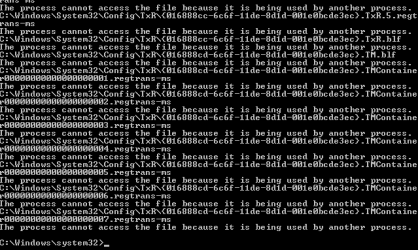
I've given that a try, the 3rd line returned errors (image attached).

Rebooted and tried installing just 1 of the updates KB2981580 and it returned error 80070643. (I only get both errors when I try to install 45 at once). If i go through individually I either get 1 error or the other depending on the specific update.

Jack
 

Attachments

  • cmd.PNG
    cmd.PNG
    1.7 KB · Views: 11

My Computer My Computer

At a glance

Windows 7 Professional 64-bit SP1
Computer type
PC/Desktop
Computer Manufacturer/Model Number
HP
OS
Windows 7 Professional 64-bit SP1
Try running those commands again while in Safe Mode - that may prevent the interference.
 

My Computer My Computer

At a glance

Win 7 x64 Home Premium (and x86 VirtualBox VM...i3 370M/i7 6500U8GB - finally :)/8GBit's an i3, dude!/dual Intel&nVidia
Computer type
Laptop
Computer Manufacturer/Model Number
Asus K52F or Lenovo B51-80
OS
Win 7 x64 Home Premium (and x86 VirtualBox VM)/Win10
CPU
i3 370M/i7 6500U
Motherboard
Asus/Lenovo
Memory
8GB - finally :)/8GB
Graphics Card(s)
it's an i3, dude!/dual Intel&nVidia
Sound Card
onboard
Monitor(s) Displays
15.6" built-in
Screen Resolution
1366x768/1920x1080
Hard Drives
750GB Seagate internal
Sundry external drives attached to other computers on the local network
1TB SSD on the Lenovo
PSU
n/a
Internet Speed
as much as I can get - usually on a dongle/phone, so <1MB/s
Antivirus
MSE/Defender
Browser
IE11/12/Edge/Chrome/FF(if I must)
Back
Top