
Solved Old battery not charging, charger rating incorrect? Win7 Starter

chigwells

New member
Local time
9:11 PM
Messages
19
Location
Currently residing on planet earth
Hi everyone, maybe someone can shed some light on my predicament. I have acquired an Acer Aspire One D255E 10" Win7 Starter x32 Intel Atom laptop to attempt to bring back to life.

The laptop hasn't been touched for some four years, but it runs fine and has been updating for the past few days. The problem is with the battery and charger. The battery isn't charging, although the battery charging light is flashing all the time (it always flashes, never on constantly). Additionally, the charger cable is damaged at the point where it leaves the laptop, it only works if I twist and bend the cable to a certain angle, so I've bought a replacement.

The charger I received with it with does not look original. It is a Delta Electronics, input: 100-240V 1.2A, 50-60Hz, output: 19V 2.15A.

I have bought a compatible charger off amazon uk and is a Sunydeal replacement ac adapter, input: 100-240V 1.5A 50-60Hz, output: 19V 3.42A

On the underside of the laptop it says: Acer Aspire One Series, Model No. PAV70, DC Rating 19V, 2.15A.

I wonder if it is a software problem not a hardware one. I am also unsure if the current rating of either charger is correctly suitable for the laptop, as the ratings are different and I don't know if this is important or not.

Most of the time I have been using it with the new replacement charger, and the charging light flashes, but it does not charge.

Yesterday evening with the laptop shut down, I plugged in the old charger so the battery charging light was on (flashing), and let it sit there all night. This morning, with the charging light still flashing, it said the same as it did last night, '6% charged, not charging'. So the old charger is not charging the battery.

However, with the old charger, I have seen a couple of times that it has registered as charging. With my new charger, this has not happened.

I have taken the battery out, cleaned it, and visually (connectors etc) it looks in perfect condition.

So my questions are:
1. is the replacement charger completely wrong for this model, and I need to return it.
2. could it be some internal problem in the laptop, and not the fault of either of the chargers. Is there anything I can do to kickstart the battery to start it charging again.


All advice and suggestions greatly appreciated, Chigwells.


Edit: attached screenshot of Device Manager
 

Attachments
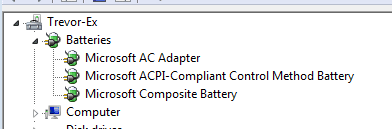
  • 2018-11-25-Device Manager.png
    2018-11-25-Device Manager.png
    2.8 KB · Views: 30
Last edited:

My Computer My Computer

At a glance

W8.1 Pro, x64Intel Core i78GB
Computer type
Laptop
Computer Manufacturer/Model Number
Lenovo Thinkpad T440s
OS
W8.1 Pro, x64
CPU
Intel Core i7
Memory
8GB
Monitor(s) Displays
Built-in, nice matt job
Hard Drives
250GB SSD
Mouse
built-in track-pad
Antivirus
Panda Dome free
Browser
Firefox
Other Info
Binisoft WFC Windows Firewall Control, MBAM on-demand, SandboxIE
Hello Chigwells

I'd have bought a battery and power unit together, as one sale item. Then you'd know that that battery works with that charger.

Sometimes, new rechargeable batteries do not work until they have been left on charge for 24 hours.
 

My Computer My Computer

At a glance

Windows 7 x64, Vista x64, 8.1 smartphoneIntel E8400 65W 64-bitDDR2 2 x 2GB, 1GB x 2XFX Radeon HD5750
Computer type
PC/Desktop
OS
Windows 7 x64, Vista x64, 8.1 smartphone
CPU
Intel E8400 65W 64-bit
Motherboard
Gigabyte EP45-UD3LR
Memory
DDR2 2 x 2GB, 1GB x 2
Graphics Card(s)
XFX Radeon HD5750
Sound Card
AMD High Definition Audio; Realtek High Definition Audio
Monitor(s) Displays
iiyama prolite X2377HDS
Screen Resolution
1920 x 1080
Hard Drives
500GB 7200 rpm Seagate ST3500413AS 16MB, 500GB 5400 rpm Toshiba MQ02ABF050H 32MB, 200GB 7200 rpm Seagate ST3200820AS 8MB, 2TB 7200 rpm Western Digital WD20EZRX 64MB
PSU
Enermax Liberty Modular
Case
Antec P193 Midi Tower
Keyboard
Mionix ZIBAL 60
Mouse
Razer USB 2.0 Diamondback Mouse or Huion Graphics Tablet
Browser
Internet Explorer, Lunascape, Firefox, Opera, Avast Safezone
That is the proper rating for the charger. Battery probably needs replacing. If you want I can give you the info for the one I got from Amazon.
Art.
 

My Computer My Computer

At a glance

Win7 sp1 Pro 64bit / XP sp2 Pro (games only)Intel Core 2 Duo E8400 @ 3.00GHz8.00 GB Dual-Channel DDR2 @ 400MHz (5-5-5-18)1024MB GeForce GTX 560
Computer type
PC/Desktop
Computer Manufacturer/Model Number
Home built
OS
Win7 sp1 Pro 64bit / XP sp2 Pro (games only)
CPU
Intel Core 2 Duo E8400 @ 3.00GHz
Motherboard
Intel Corporation DP35DP (CPU1)
Memory
8.00 GB Dual-Channel DDR2 @ 400MHz (5-5-5-18)
Graphics Card(s)
1024MB GeForce GTX 560
Sound Card
NVIDIA High Definition Audio
Monitor(s) Displays
SyncMaster (2048x1152@60Hz)
Hard Drives
240GB Sandisc Extreme Pro SSD
244GB Seagate ST3250410AS
488GB Seagate ST500DM002-1BD142
931GB Western Digital WDC WD1003FZEX
PSU
Corsair 720
Case
ATX
Keyboard
HID Keyboard Device Logitech
Mouse
HID-compliant mouse Microsoft
Other Info
TSSTcorp CDDVDW SH-S223L

HL-DT-ST BD-RE BH12LS35
The replacement charger, as per the specs posted here (and assuming that the first one is fine) is OK for that. The only difference is the current capability, and since it's greater that the first one, it won't have any problem with the same battery.
The rule for being "compatible" is that the output voltage must be the same (19V both) and current must be at least the same, no matter how greater it is (2.15A for the first, 3.42A for the second). The input must be whaterver you have with your local electrical outlet.

The real problem is most likely with the battery itself, rather than the charger. Collecting dust during four years is a sure way to degrade it to the point of little to no charge capacity, which Windows will likely point out. The charger itself won't matter too much, as over time battery cells degrade, specially when not used in a long period of time. I would look for a replacement battery instead.

Software is pretty much irrelevant. A dead battery won't work no matter what OS or programs you try to run.
 

My Computer My Computer

At a glance

Windows 7 Ultimate x64Intel Core i7-740QM8 GB DDR3NVIDIA GeForce 330GT
Computer type
Laptop
Computer Manufacturer/Model Number
Toshiba Sattelite A665-S6092
OS
Windows 7 Ultimate x64
CPU
Intel Core i7-740QM
Memory
8 GB DDR3
Graphics Card(s)
NVIDIA GeForce 330GT
Screen Resolution
1366x768
Hard Drives
Samsung 840 SSD 500GB
1TB USB3 external HD
Cooling
Coolermaster Notepal U3 notebook cooling pad
Internet Speed
3mbps ASDL
Antivirus
ClamWin 0.98.7
Browser
Opera 12.17 x86 (main), Firefox 38 (sec), IE11 (last resort)
:thumbsup::thumbsup:
The replacement charger, as per the specs posted here (and assuming that the first one is fine) is OK for that. The only difference is the current capability, and since it's greater that the first one, it won't have any problem with the same battery.
The rule for being "compatible" is that the output voltage must be the same (19V both) and current must be at least the same, no matter how greater it is (2.15A for the first, 3.42A for the second). The input must be whaterver you have with your local electrical outlet.

The real problem is most likely with the battery itself, rather than the charger. Collecting dust during four years is a sure way to degrade it to the point of little to no charge capacity, which Windows will likely point out. The charger itself won't matter too much, as over time battery cells degrade, specially when not used in a long period of time. I would look for a replacement battery instead.

Software is pretty much irrelevant. A dead battery won't work no matter what OS or programs you try to run.
:thumbsup::thumbsup:

There is nothing wrong with the new charger.
As the battery is old and hasn't been charged for a long time it has degenerated.
My advice is to buy a new battery and remove the old one. Bad battery may damage the laptop internal power supply.
 

My Computers My Computers

  • At a glance

    Windows 7 HP 64i5 6600K - 800MHz to 4200MHz4+4G GSkill DDR4 3000IG - Intel 530
    Computer type
    PC/Desktop
    Computer Manufacturer/Model Number
    custom build
    OS
    Windows 7 HP 64
    CPU
    i5 6600K - 800MHz to 4200MHz
    Motherboard
    GA-Z170-HD3P
    Memory
    4+4G GSkill DDR4 3000
    Graphics Card(s)
    IG - Intel 530
    Monitor(s) Displays
    Samsung 226BW
    Screen Resolution
    1680x1050
    Hard Drives
    (1) -1 SM951 – 128GB M.2 AHCI PCIe SSD drive for Windows 7 and Lubuntu
    (2) -1 WD SATA 3 - 1T for Data
    (3) -1 WD SATA 3 - 1T for backup
    PSU
    Thermaltake 450W TR2 gold
    Keyboard
    Old and good Chicony mechanical keyboard
    Mouse
    Logitech mX performance - 9 buttons (had to disable some)
    Internet Speed
    500Mb/s
    Browser
    Firefox 64
    Other Info
    TinyWall firewall
  • At a glance

    Windows 7 Proi7-4500U 800MHz to 3.0GHz(4+4)G DDR3 1600IG intel 4400 + NVIDIA GeForce GT 745M
    Computer type
    Laptop
    System Manufacturer/Model Number
    Asus Q550LF
    OS
    Windows 7 Pro
    CPU
    i7-4500U 800MHz to 3.0GHz
    Motherboard
    Asus Q550LF
    Memory
    (4+4)G DDR3 1600
    Graphics Card(s)
    IG intel 4400 + NVIDIA GeForce GT 745M
    Sound Card
    Realtek
    Monitor(s) Displays
    LG Display LP156WF4-SPH1
    Screen Resolution
    1920 x 1080
    Hard Drives
    BX500 120G SSD for Windows and programs +
    1T HDD for data
    Internet Speed
    500 Mb/s
    Browser
    Firefox
    Other Info
    TinyWall firewall
Hello guys, thanks to one and all for wonderfully helpful replies. :thumbsup:
My main lack of understanding was around the differing ratings of the old and new chargers. From Alejandro and Megahertz I understand that there is nothing wrong with the new charger, although its rating is different. Also, that the output voltage must be the same, and so long as the output current is at least the same, it is a 'compatible' charger. Many thanks for that clarification. :cool:

Returning to my two questions, the first one is answered, the compatible charger with different ratings is okay.
The second question is also answered, software is not the problem here, the problem is a very old battery.

Massive thanks also to Iko and the Wandering One for their inputs. Marked as solved! :D
 

My Computer My Computer

At a glance

W8.1 Pro, x64Intel Core i78GB
Computer type
Laptop
Computer Manufacturer/Model Number
Lenovo Thinkpad T440s
OS
W8.1 Pro, x64
CPU
Intel Core i7
Memory
8GB
Monitor(s) Displays
Built-in, nice matt job
Hard Drives
250GB SSD
Mouse
built-in track-pad
Antivirus
Panda Dome free
Browser
Firefox
Other Info
Binisoft WFC Windows Firewall Control, MBAM on-demand, SandboxIE
Remove the bad battery as it may damage the laptop internal power supply. Use the laptop without battery, only connected to the external PS.
 

My Computers My Computers

  • At a glance

    Windows 7 HP 64i5 6600K - 800MHz to 4200MHz4+4G GSkill DDR4 3000IG - Intel 530
    Computer type
    PC/Desktop
    Computer Manufacturer/Model Number
    custom build
    OS
    Windows 7 HP 64
    CPU
    i5 6600K - 800MHz to 4200MHz
    Motherboard
    GA-Z170-HD3P
    Memory
    4+4G GSkill DDR4 3000
    Graphics Card(s)
    IG - Intel 530
    Monitor(s) Displays
    Samsung 226BW
    Screen Resolution
    1680x1050
    Hard Drives
    (1) -1 SM951 – 128GB M.2 AHCI PCIe SSD drive for Windows 7 and Lubuntu
    (2) -1 WD SATA 3 - 1T for Data
    (3) -1 WD SATA 3 - 1T for backup
    PSU
    Thermaltake 450W TR2 gold
    Keyboard
    Old and good Chicony mechanical keyboard
    Mouse
    Logitech mX performance - 9 buttons (had to disable some)
    Internet Speed
    500Mb/s
    Browser
    Firefox 64
    Other Info
    TinyWall firewall
  • At a glance

    Windows 7 Proi7-4500U 800MHz to 3.0GHz(4+4)G DDR3 1600IG intel 4400 + NVIDIA GeForce GT 745M
    Computer type
    Laptop
    System Manufacturer/Model Number
    Asus Q550LF
    OS
    Windows 7 Pro
    CPU
    i7-4500U 800MHz to 3.0GHz
    Motherboard
    Asus Q550LF
    Memory
    (4+4)G DDR3 1600
    Graphics Card(s)
    IG intel 4400 + NVIDIA GeForce GT 745M
    Sound Card
    Realtek
    Monitor(s) Displays
    LG Display LP156WF4-SPH1
    Screen Resolution
    1920 x 1080
    Hard Drives
    BX500 120G SSD for Windows and programs +
    1T HDD for data
    Internet Speed
    500 Mb/s
    Browser
    Firefox
    Other Info
    TinyWall firewall

My Computer My Computer

At a glance

Linux Mint 18.2 xfce 64-bit (VMWare host) / W...Haswell4 GB
Computer type
PC/Desktop
Computer Manufacturer/Model Number
Dell
OS
Linux Mint 18.2 xfce 64-bit (VMWare host) / Windows 8.1 Pro 32-bit (VMWare guest)
CPU
Haswell
Memory
4 GB
Monitor(s) Displays
Acer 23"
Screen Resolution
1920 x 1080
Hard Drives
Two hard drives, 1TB each: One for Linux, one for my data.
Keyboard
IBM Model M
Antivirus
Sophos (Linux), Trend Micro (Windows)
Browser
Firefox, Opera
Other Info
I use Samba to share my data drive with the other computers at my house and with my guest session in VMWare Workstation Player.
Back
Top