
Old PC does not post

ToxicXGL

New member
Member
VIP
Local time
3:13 PM
Messages
266
Location
Canada Alberta, Edmonton
Ok so my friend gave me his old PC and said it wasn't working so I decided to take a look at it. He had said that nothing was showing up on the monitor when he turned it on so I assumed the on board graphics were probably shot. So first thing I did was try using a different working gpu, but still no response from the monitor. Next thing I tried was using a better psu; the fan still was not spinning and still no signal. From here I assumed the mobo was dead, but not 100% sure as the fans plugged in were still spinning and the hdd was still able to run. Also checked if the cmos battery was still good and it was. My next step was to check if the mobo would give me any beep codes so I removed everything buy the CPU and the psu as well as the on button, and to my surprise it gave my no response. Not sure if I just don't have the speaker plugged in or if it doesn't have one.

Now current day the machine doesn't post what so ever and I'm really stumped as to if it is the mobo or something else is the culprit.

The monitor is confirmed working.
 

My Computer

Computer type
PC/Desktop
Computer Manufacturer/Model Number
Custom Build
OS
Microsoft Windows 7 Ultimate 64-bit 7601 Multiprocessor Free Service Pack 1
CPU
Intel(R) Core(TM) i5-2400 CPU @ 3.10GHz
Motherboard
ASUSTeK COMPUTER INC. P8H61-M LE/CSM
Memory
16.00 GB
Graphics Card(s)
NVIDIA GeForce GTX 660 Ti SC 3GB
Sound Card
(1) NVIDIA High Definition Audio (2) Realtek High Definiti
Monitor(s) Displays
21.5" HP
Screen Resolution
1600 x 900 x 32 bits (4294967296 colors) @ 60 Hz
Hard Drives
ST31000524AS ATA Device 7200
PSU
OCZ 650W Bronze Plus
Case
Zalman Z9 Plus
Mouse
Razer naga molten edition
Antivirus
Microsoft Security Essentials along with Malwarbytes
Browser
Chrome
Other Info
Love computers but wanting to learn more about troubleshooting and wanting to contribute to this community!
Try CMOS reset if you haven't yet. You should get a PC speaker. You may even have one from your own PC case, you left lying somewhere. I guess they are a couple of bucks if you don't have one.
 

My Computer

Computer type
PC/Desktop
Computer Manufacturer/Model Number
Custom Build
OS
Windows 7 Ultimate x64 SP1
CPU
AMD Phenom 2 1090T
Motherboard
Gigabyte GA-890FXA-UD5
Memory
2x8GB Kingston HyperX Fury Black 1600Mhz Unganged
Graphics Card(s)
MSI GTX 970 Gaming 4G
Sound Card
Realtek On-Board HD 7.1 Audio / Logitech G35
Monitor(s) Displays
3xAcer GD245HQ
Screen Resolution
1920x1080
Hard Drives
Samsung 850 Pro 512GB SSD - OS /
WD Caviar Black SATA 3 - 1 TBx2 - Dynamic RAID 0 /
WD Caviar Green SATA 2 - 640GBx2 - Dynamic RAID 0 /
WD Caviar Green SATA 2 - 640GB - Internal Backup /
Seagate Barracude SATA 3 - 3TB - External Backup/ Sync
PSU
HighPower 1000W
Case
Cooler Master HAF 932
Cooling
Noctua NH-D14
Keyboard
Logitech G19
Mouse
Logitech G500
Internet Speed
100/4 Mbit Cable (100GB quota)
Antivirus
ZoneAlarm Extreme Security / MBAM Pro / MBAE Free / SAS Free
Browser
IE 11 - Firefox - Chrome
Other Info
Logitech F710/ G27/ G940/ Z5500 // TrackIR 5 // Nvidia 3D Surround Vision
Try CMOS reset if you haven't yet. You should get a PC speaker. You may even have one from your own PC case, you left lying somewhere. I guess they are a couple of bucks if you don't have one.

Ok so I plugged a set of speakers into the audio jack and it's giving me nothing. I've tried the cmos reset, but I'm not sure if it's even in the original position. Now my friend said he didn't really do anything to this PC but you can never be to sure.
 

My Computer

Computer type
PC/Desktop
Computer Manufacturer/Model Number
Custom Build
OS
Microsoft Windows 7 Ultimate 64-bit 7601 Multiprocessor Free Service Pack 1
CPU
Intel(R) Core(TM) i5-2400 CPU @ 3.10GHz
Motherboard
ASUSTeK COMPUTER INC. P8H61-M LE/CSM
Memory
16.00 GB
Graphics Card(s)
NVIDIA GeForce GTX 660 Ti SC 3GB
Sound Card
(1) NVIDIA High Definition Audio (2) Realtek High Definiti
Monitor(s) Displays
21.5" HP
Screen Resolution
1600 x 900 x 32 bits (4294967296 colors) @ 60 Hz
Hard Drives
ST31000524AS ATA Device 7200
PSU
OCZ 650W Bronze Plus
Case
Zalman Z9 Plus
Mouse
Razer naga molten edition
Antivirus
Microsoft Security Essentials along with Malwarbytes
Browser
Chrome
Other Info
Love computers but wanting to learn more about troubleshooting and wanting to contribute to this community!
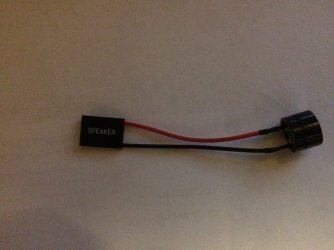
Nope, it won't work like that, a PC speaker is two cables and a little speaker that you attach to a little plug (usually near where the front panel cables are connected) on the motherboard.

It is used to diagnose BIOS beep codes during POST (Power-On-Self-Test). Computer POST and beep codes

20150723_181105510_iOS.jpg
 

My Computer

Computer type
PC/Desktop
Computer Manufacturer/Model Number
Custom Build
OS
Windows 7 Ultimate x64 SP1
CPU
AMD Phenom 2 1090T
Motherboard
Gigabyte GA-890FXA-UD5
Memory
2x8GB Kingston HyperX Fury Black 1600Mhz Unganged
Graphics Card(s)
MSI GTX 970 Gaming 4G
Sound Card
Realtek On-Board HD 7.1 Audio / Logitech G35
Monitor(s) Displays
3xAcer GD245HQ
Screen Resolution
1920x1080
Hard Drives
Samsung 850 Pro 512GB SSD - OS /
WD Caviar Black SATA 3 - 1 TBx2 - Dynamic RAID 0 /
WD Caviar Green SATA 2 - 640GBx2 - Dynamic RAID 0 /
WD Caviar Green SATA 2 - 640GB - Internal Backup /
Seagate Barracude SATA 3 - 3TB - External Backup/ Sync
PSU
HighPower 1000W
Case
Cooler Master HAF 932
Cooling
Noctua NH-D14
Keyboard
Logitech G19
Mouse
Logitech G500
Internet Speed
100/4 Mbit Cable (100GB quota)
Antivirus
ZoneAlarm Extreme Security / MBAM Pro / MBAE Free / SAS Free
Browser
IE 11 - Firefox - Chrome
Other Info
Logitech F710/ G27/ G940/ Z5500 // TrackIR 5 // Nvidia 3D Surround Vision
Nope, it won't work like that, a PC speaker is two cables and a little speaker that you attach to a little plug (usually near where the front panel cables are connected) on the motherboard.

It is used to diagnose BIOS beep codes during POST (Power-On-Self-Test). Computer POST and beep codes

View attachment 366734

Ahh I see. Well I don't think my current PC has one so I'll have to buy one. Will do that asap
 

My Computer

Computer type
PC/Desktop
Computer Manufacturer/Model Number
Custom Build
OS
Microsoft Windows 7 Ultimate 64-bit 7601 Multiprocessor Free Service Pack 1
CPU
Intel(R) Core(TM) i5-2400 CPU @ 3.10GHz
Motherboard
ASUSTeK COMPUTER INC. P8H61-M LE/CSM
Memory
16.00 GB
Graphics Card(s)
NVIDIA GeForce GTX 660 Ti SC 3GB
Sound Card
(1) NVIDIA High Definition Audio (2) Realtek High Definiti
Monitor(s) Displays
21.5" HP
Screen Resolution
1600 x 900 x 32 bits (4294967296 colors) @ 60 Hz
Hard Drives
ST31000524AS ATA Device 7200
PSU
OCZ 650W Bronze Plus
Case
Zalman Z9 Plus
Mouse
Razer naga molten edition
Antivirus
Microsoft Security Essentials along with Malwarbytes
Browser
Chrome
Other Info
Love computers but wanting to learn more about troubleshooting and wanting to contribute to this community!
Nope, it won't work like that, a PC speaker is two cables and a little speaker that you attach to a little plug (usually near where the front panel cables are connected) on the motherboard.

It is used to diagnose BIOS beep codes during POST (Power-On-Self-Test). Computer POST and beep codes

View attachment 366734

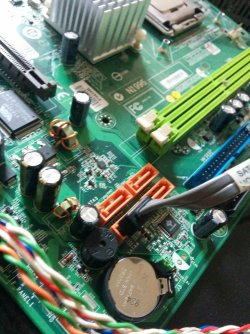
Ok so it seems the mobo has one attached to it (didn't realize till I went out and bought one) but it doesnt seem to be giving any beep codes.
 

Attachments

  • IMG_20150729_105701.jpg
    IMG_20150729_105701.jpg
    823.9 KB · Views: 7

My Computer

Computer type
PC/Desktop
Computer Manufacturer/Model Number
Custom Build
OS
Microsoft Windows 7 Ultimate 64-bit 7601 Multiprocessor Free Service Pack 1
CPU
Intel(R) Core(TM) i5-2400 CPU @ 3.10GHz
Motherboard
ASUSTeK COMPUTER INC. P8H61-M LE/CSM
Memory
16.00 GB
Graphics Card(s)
NVIDIA GeForce GTX 660 Ti SC 3GB
Sound Card
(1) NVIDIA High Definition Audio (2) Realtek High Definiti
Monitor(s) Displays
21.5" HP
Screen Resolution
1600 x 900 x 32 bits (4294967296 colors) @ 60 Hz
Hard Drives
ST31000524AS ATA Device 7200
PSU
OCZ 650W Bronze Plus
Case
Zalman Z9 Plus
Mouse
Razer naga molten edition
Antivirus
Microsoft Security Essentials along with Malwarbytes
Browser
Chrome
Other Info
Love computers but wanting to learn more about troubleshooting and wanting to contribute to this community!
Are the fans start working? Try with the other speaker too just in case old one is damaged.

Still no go, remove everything but the CPU and see if you get any beeps.
 

My Computer

Computer type
PC/Desktop
Computer Manufacturer/Model Number
Custom Build
OS
Windows 7 Ultimate x64 SP1
CPU
AMD Phenom 2 1090T
Motherboard
Gigabyte GA-890FXA-UD5
Memory
2x8GB Kingston HyperX Fury Black 1600Mhz Unganged
Graphics Card(s)
MSI GTX 970 Gaming 4G
Sound Card
Realtek On-Board HD 7.1 Audio / Logitech G35
Monitor(s) Displays
3xAcer GD245HQ
Screen Resolution
1920x1080
Hard Drives
Samsung 850 Pro 512GB SSD - OS /
WD Caviar Black SATA 3 - 1 TBx2 - Dynamic RAID 0 /
WD Caviar Green SATA 2 - 640GBx2 - Dynamic RAID 0 /
WD Caviar Green SATA 2 - 640GB - Internal Backup /
Seagate Barracude SATA 3 - 3TB - External Backup/ Sync
PSU
HighPower 1000W
Case
Cooler Master HAF 932
Cooling
Noctua NH-D14
Keyboard
Logitech G19
Mouse
Logitech G500
Internet Speed
100/4 Mbit Cable (100GB quota)
Antivirus
ZoneAlarm Extreme Security / MBAM Pro / MBAE Free / SAS Free
Browser
IE 11 - Firefox - Chrome
Other Info
Logitech F710/ G27/ G940/ Z5500 // TrackIR 5 // Nvidia 3D Surround Vision
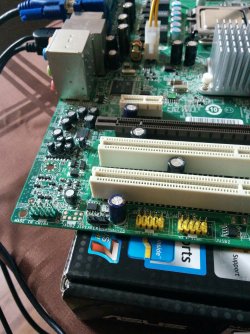
Yea it powers CPU fan plus other case Fan. Now I'm not to sure where to plug the other speaker into. There is a 3 pin connector labelled spdif02, and I assume it should go there but correct me if I'm wrong.
 

Attachments

  • IMG_20150729_105759.jpg
    IMG_20150729_105759.jpg
    853.1 KB · Views: 5

My Computer

Computer type
PC/Desktop
Computer Manufacturer/Model Number
Custom Build
OS
Microsoft Windows 7 Ultimate 64-bit 7601 Multiprocessor Free Service Pack 1
CPU
Intel(R) Core(TM) i5-2400 CPU @ 3.10GHz
Motherboard
ASUSTeK COMPUTER INC. P8H61-M LE/CSM
Memory
16.00 GB
Graphics Card(s)
NVIDIA GeForce GTX 660 Ti SC 3GB
Sound Card
(1) NVIDIA High Definition Audio (2) Realtek High Definiti
Monitor(s) Displays
21.5" HP
Screen Resolution
1600 x 900 x 32 bits (4294967296 colors) @ 60 Hz
Hard Drives
ST31000524AS ATA Device 7200
PSU
OCZ 650W Bronze Plus
Case
Zalman Z9 Plus
Mouse
Razer naga molten edition
Antivirus
Microsoft Security Essentials along with Malwarbytes
Browser
Chrome
Other Info
Love computers but wanting to learn more about troubleshooting and wanting to contribute to this community!
Nope, spdif is digital audio, check where the twisted colorful cables plugged into the motherboard.
 

My Computer

Computer type
PC/Desktop
Computer Manufacturer/Model Number
Custom Build
OS
Windows 7 Ultimate x64 SP1
CPU
AMD Phenom 2 1090T
Motherboard
Gigabyte GA-890FXA-UD5
Memory
2x8GB Kingston HyperX Fury Black 1600Mhz Unganged
Graphics Card(s)
MSI GTX 970 Gaming 4G
Sound Card
Realtek On-Board HD 7.1 Audio / Logitech G35
Monitor(s) Displays
3xAcer GD245HQ
Screen Resolution
1920x1080
Hard Drives
Samsung 850 Pro 512GB SSD - OS /
WD Caviar Black SATA 3 - 1 TBx2 - Dynamic RAID 0 /
WD Caviar Green SATA 2 - 640GBx2 - Dynamic RAID 0 /
WD Caviar Green SATA 2 - 640GB - Internal Backup /
Seagate Barracude SATA 3 - 3TB - External Backup/ Sync
PSU
HighPower 1000W
Case
Cooler Master HAF 932
Cooling
Noctua NH-D14
Keyboard
Logitech G19
Mouse
Logitech G500
Internet Speed
100/4 Mbit Cable (100GB quota)
Antivirus
ZoneAlarm Extreme Security / MBAM Pro / MBAE Free / SAS Free
Browser
IE 11 - Firefox - Chrome
Other Info
Logitech F710/ G27/ G940/ Z5500 // TrackIR 5 // Nvidia 3D Surround Vision
Those braided cables are fpanel stuff. Nothing really around it except for a 3 pin fan header. Could you link a pic? First time dealing with a mobo speaker :p

There is a connecter labeled j1394_1.

Is the mobo speaker connecter 2 pin or 4 pin?

Would it be in the Fdd1?
 

My Computer

Computer type
PC/Desktop
Computer Manufacturer/Model Number
Custom Build
OS
Microsoft Windows 7 Ultimate 64-bit 7601 Multiprocessor Free Service Pack 1
CPU
Intel(R) Core(TM) i5-2400 CPU @ 3.10GHz
Motherboard
ASUSTeK COMPUTER INC. P8H61-M LE/CSM
Memory
16.00 GB
Graphics Card(s)
NVIDIA GeForce GTX 660 Ti SC 3GB
Sound Card
(1) NVIDIA High Definition Audio (2) Realtek High Definiti
Monitor(s) Displays
21.5" HP
Screen Resolution
1600 x 900 x 32 bits (4294967296 colors) @ 60 Hz
Hard Drives
ST31000524AS ATA Device 7200
PSU
OCZ 650W Bronze Plus
Case
Zalman Z9 Plus
Mouse
Razer naga molten edition
Antivirus
Microsoft Security Essentials along with Malwarbytes
Browser
Chrome
Other Info
Love computers but wanting to learn more about troubleshooting and wanting to contribute to this community!
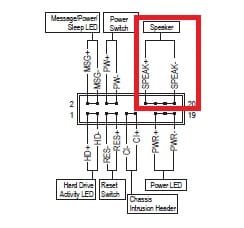
It should be 2 pin, may be inside front panel. Any labels around front panel connection?

Fdd = floppy disk drive
1394 = firewire

Edit: Should be 2 pin, but may be 4 pin long.

From another motherboard
pc speaker front panel.jpg
 

My Computer

Computer type
PC/Desktop
Computer Manufacturer/Model Number
Custom Build
OS
Windows 7 Ultimate x64 SP1
CPU
AMD Phenom 2 1090T
Motherboard
Gigabyte GA-890FXA-UD5
Memory
2x8GB Kingston HyperX Fury Black 1600Mhz Unganged
Graphics Card(s)
MSI GTX 970 Gaming 4G
Sound Card
Realtek On-Board HD 7.1 Audio / Logitech G35
Monitor(s) Displays
3xAcer GD245HQ
Screen Resolution
1920x1080
Hard Drives
Samsung 850 Pro 512GB SSD - OS /
WD Caviar Black SATA 3 - 1 TBx2 - Dynamic RAID 0 /
WD Caviar Green SATA 2 - 640GBx2 - Dynamic RAID 0 /
WD Caviar Green SATA 2 - 640GB - Internal Backup /
Seagate Barracude SATA 3 - 3TB - External Backup/ Sync
PSU
HighPower 1000W
Case
Cooler Master HAF 932
Cooling
Noctua NH-D14
Keyboard
Logitech G19
Mouse
Logitech G500
Internet Speed
100/4 Mbit Cable (100GB quota)
Antivirus
ZoneAlarm Extreme Security / MBAM Pro / MBAE Free / SAS Free
Browser
IE 11 - Firefox - Chrome
Other Info
Logitech F710/ G27/ G940/ Z5500 // TrackIR 5 // Nvidia 3D Surround Vision
Uhh not really any labels which makes this really hard. I'm gonna try to look up the mobo model and see if I can find a manual. All the fp wires together so I guess I'll also have to jumpstart the PC

Also looking at the front panel it seems that all pins were taken up by power, pwrled, and hdd light as well as another light for something.
 

My Computer

Computer type
PC/Desktop
Computer Manufacturer/Model Number
Custom Build
OS
Microsoft Windows 7 Ultimate 64-bit 7601 Multiprocessor Free Service Pack 1
CPU
Intel(R) Core(TM) i5-2400 CPU @ 3.10GHz
Motherboard
ASUSTeK COMPUTER INC. P8H61-M LE/CSM
Memory
16.00 GB
Graphics Card(s)
NVIDIA GeForce GTX 660 Ti SC 3GB
Sound Card
(1) NVIDIA High Definition Audio (2) Realtek High Definiti
Monitor(s) Displays
21.5" HP
Screen Resolution
1600 x 900 x 32 bits (4294967296 colors) @ 60 Hz
Hard Drives
ST31000524AS ATA Device 7200
PSU
OCZ 650W Bronze Plus
Case
Zalman Z9 Plus
Mouse
Razer naga molten edition
Antivirus
Microsoft Security Essentials along with Malwarbytes
Browser
Chrome
Other Info
Love computers but wanting to learn more about troubleshooting and wanting to contribute to this community!
Ok so the numbers on the sides are 1/2 on the left and 14/13 on the right. Not sure of that is of any help. Can't find a manual so just gonna have to trail and error. Now how would I start the machine :) not sure how to pull out the pins for the power switch.
 

My Computer

Computer type
PC/Desktop
Computer Manufacturer/Model Number
Custom Build
OS
Microsoft Windows 7 Ultimate 64-bit 7601 Multiprocessor Free Service Pack 1
CPU
Intel(R) Core(TM) i5-2400 CPU @ 3.10GHz
Motherboard
ASUSTeK COMPUTER INC. P8H61-M LE/CSM
Memory
16.00 GB
Graphics Card(s)
NVIDIA GeForce GTX 660 Ti SC 3GB
Sound Card
(1) NVIDIA High Definition Audio (2) Realtek High Definiti
Monitor(s) Displays
21.5" HP
Screen Resolution
1600 x 900 x 32 bits (4294967296 colors) @ 60 Hz
Hard Drives
ST31000524AS ATA Device 7200
PSU
OCZ 650W Bronze Plus
Case
Zalman Z9 Plus
Mouse
Razer naga molten edition
Antivirus
Microsoft Security Essentials along with Malwarbytes
Browser
Chrome
Other Info
Love computers but wanting to learn more about troubleshooting and wanting to contribute to this community!
hard to judge without a manual. You can short the power switch pins with a screwdriver.
 

My Computer

Computer type
PC/Desktop
Computer Manufacturer/Model Number
Custom Build
OS
Windows 7 Ultimate x64 SP1
CPU
AMD Phenom 2 1090T
Motherboard
Gigabyte GA-890FXA-UD5
Memory
2x8GB Kingston HyperX Fury Black 1600Mhz Unganged
Graphics Card(s)
MSI GTX 970 Gaming 4G
Sound Card
Realtek On-Board HD 7.1 Audio / Logitech G35
Monitor(s) Displays
3xAcer GD245HQ
Screen Resolution
1920x1080
Hard Drives
Samsung 850 Pro 512GB SSD - OS /
WD Caviar Black SATA 3 - 1 TBx2 - Dynamic RAID 0 /
WD Caviar Green SATA 2 - 640GBx2 - Dynamic RAID 0 /
WD Caviar Green SATA 2 - 640GB - Internal Backup /
Seagate Barracude SATA 3 - 3TB - External Backup/ Sync
PSU
HighPower 1000W
Case
Cooler Master HAF 932
Cooling
Noctua NH-D14
Keyboard
Logitech G19
Mouse
Logitech G500
Internet Speed
100/4 Mbit Cable (100GB quota)
Antivirus
ZoneAlarm Extreme Security / MBAM Pro / MBAE Free / SAS Free
Browser
IE 11 - Firefox - Chrome
Other Info
Logitech F710/ G27/ G940/ Z5500 // TrackIR 5 // Nvidia 3D Surround Vision
Alright managed to remove the pins from the power connector so it was easy to the on. Tried the speaker in the 4 different locations I could and it still gave me nothing. There should be a pic of the panel header in one of the older messages. If not I'll post one. Also is the speaker supposed to heat up even when giving off no sounds?
 

My Computer

Computer type
PC/Desktop
Computer Manufacturer/Model Number
Custom Build
OS
Microsoft Windows 7 Ultimate 64-bit 7601 Multiprocessor Free Service Pack 1
CPU
Intel(R) Core(TM) i5-2400 CPU @ 3.10GHz
Motherboard
ASUSTeK COMPUTER INC. P8H61-M LE/CSM
Memory
16.00 GB
Graphics Card(s)
NVIDIA GeForce GTX 660 Ti SC 3GB
Sound Card
(1) NVIDIA High Definition Audio (2) Realtek High Definiti
Monitor(s) Displays
21.5" HP
Screen Resolution
1600 x 900 x 32 bits (4294967296 colors) @ 60 Hz
Hard Drives
ST31000524AS ATA Device 7200
PSU
OCZ 650W Bronze Plus
Case
Zalman Z9 Plus
Mouse
Razer naga molten edition
Antivirus
Microsoft Security Essentials along with Malwarbytes
Browser
Chrome
Other Info
Love computers but wanting to learn more about troubleshooting and wanting to contribute to this community!
Try not to burn whatever may be left working :)
 

My Computer

Computer type
PC/Desktop
Computer Manufacturer/Model Number
Custom Build
OS
Windows 7 Ultimate x64 SP1
CPU
AMD Phenom 2 1090T
Motherboard
Gigabyte GA-890FXA-UD5
Memory
2x8GB Kingston HyperX Fury Black 1600Mhz Unganged
Graphics Card(s)
MSI GTX 970 Gaming 4G
Sound Card
Realtek On-Board HD 7.1 Audio / Logitech G35
Monitor(s) Displays
3xAcer GD245HQ
Screen Resolution
1920x1080
Hard Drives
Samsung 850 Pro 512GB SSD - OS /
WD Caviar Black SATA 3 - 1 TBx2 - Dynamic RAID 0 /
WD Caviar Green SATA 2 - 640GBx2 - Dynamic RAID 0 /
WD Caviar Green SATA 2 - 640GB - Internal Backup /
Seagate Barracude SATA 3 - 3TB - External Backup/ Sync
PSU
HighPower 1000W
Case
Cooler Master HAF 932
Cooling
Noctua NH-D14
Keyboard
Logitech G19
Mouse
Logitech G500
Internet Speed
100/4 Mbit Cable (100GB quota)
Antivirus
ZoneAlarm Extreme Security / MBAM Pro / MBAE Free / SAS Free
Browser
IE 11 - Firefox - Chrome
Other Info
Logitech F710/ G27/ G940/ Z5500 // TrackIR 5 // Nvidia 3D Surround Vision
Haha so I assume your saying it's dead :p Hmm I guess I'll hold on to the CPU, ram, and Psu. Assuming the mobo might be dead
 

My Computer

Computer type
PC/Desktop
Computer Manufacturer/Model Number
Custom Build
OS
Microsoft Windows 7 Ultimate 64-bit 7601 Multiprocessor Free Service Pack 1
CPU
Intel(R) Core(TM) i5-2400 CPU @ 3.10GHz
Motherboard
ASUSTeK COMPUTER INC. P8H61-M LE/CSM
Memory
16.00 GB
Graphics Card(s)
NVIDIA GeForce GTX 660 Ti SC 3GB
Sound Card
(1) NVIDIA High Definition Audio (2) Realtek High Definiti
Monitor(s) Displays
21.5" HP
Screen Resolution
1600 x 900 x 32 bits (4294967296 colors) @ 60 Hz
Hard Drives
ST31000524AS ATA Device 7200
PSU
OCZ 650W Bronze Plus
Case
Zalman Z9 Plus
Mouse
Razer naga molten edition
Antivirus
Microsoft Security Essentials along with Malwarbytes
Browser
Chrome
Other Info
Love computers but wanting to learn more about troubleshooting and wanting to contribute to this community!
Back
Top