Old Western Digital IDE not assigned drive letter but is recognized

mphsgal

New member
Local time
5:45 AM
Messages
3
Hi all, newbie here. Thanks for any advice and direction re: posting.

All I want to do is see what's on the old drive, specifically find out whether or not it has XP installed before I install it back into the tower it came from (a Compaq that has other problems not worth fixing if this IDE drive isn't bootable). If it has XP, fine - but it was set to slave.

I've connected the IDE drive, a Western Digital Protege (40GB), to my Win7 HP Pavilion Slimline via an Ultra "USB 2.0 to IDE/SATA cable adapter" with the jumper set to master as directed. I've tried plugging the drive in to both the front USB port and a back one. The drive spins up fine. I tried to boot from it on my HP and it won't do it.

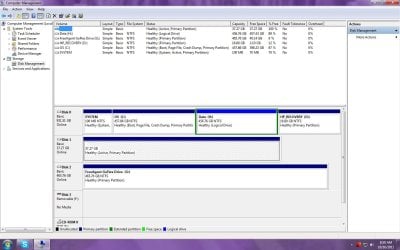
No matter where the USB cable is plugged in, the Protege is recognized by BIOS, appears to be shown in the Registry but with multiple entries/weird prefixes, and shows up in Disk Management as Disk 1 but without a drive letter. I can't assign a drive letter to it in DM - the only option not greyed out is Delete Volume:
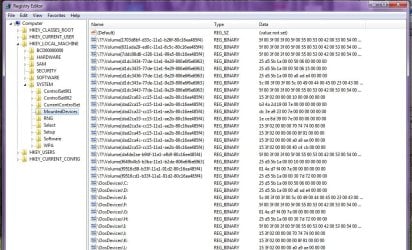
IDE_Drive_Shown_in_Registry.jpg


IDE_Drive_Shown_in_Disk_Management.jpg


In elevated command prompt, the disk does not show up via the "list volume" command.

So. I think I read somewhere (been searching for an answer for 3 hours now) that you can't change the drive letter when it contains an OS. Is this true? Is there a way for me to assign a drive letter/examine the files on this IDE drive?

Thanks again.
Lisa
 

My Computer My Computer

At a glance

Windows 7 Home Premium 32bitIntel Premium G6304GB DDR3Intel HD Graphics
Computer Manufacturer/Model Number
HP Pavilion Slimline
OS
Windows 7 Home Premium 32bit
CPU
Intel Premium G630
Memory
4GB DDR3
Graphics Card(s)
Intel HD Graphics
Hard Drives
1 TB
In my experience, when you're connecting a single drive this way, you generally do not have any jumpers set. You could try it that way to see if it makes any difference.

And no, it doesn't matter if any partitions on the drive contain an OS. I do this stuff all the time for the same reasons -- reusing an older drive that has an OS installed on it. I've not had problems assigning drive letters to the partitions on the drives.
 

My Computer My Computer

At a glance

Win7 Pro 32-bit, Win8 Pro 32-bitAMD Phenom II X6 1090T4GB ddr3 1300AMD HD 4290 onboard
Computer type
PC/Desktop
Computer Manufacturer/Model Number
Custom
OS
Win7 Pro 32-bit, Win8 Pro 32-bit
CPU
AMD Phenom II X6 1090T
Motherboard
Gigabyte
Memory
4GB ddr3 1300
Graphics Card(s)
AMD HD 4290 onboard
Sound Card
Builtin Realtek HD Audio
Monitor(s) Displays
Samsung 24" widescreen, LG 23" widescreen
Screen Resolution
1920x1200/1920x1080
Hard Drives
Kingston 256GB SSD
Keyboard
Logitech Illuminated Keyboard
Mouse
Logitech M705 wireless mouse
Antivirus
Norton Av 2013
Browser
IE v10
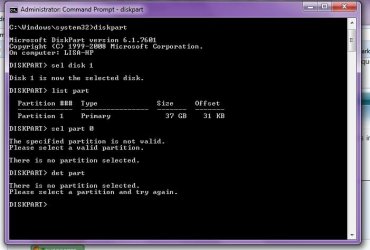
Disk 1 has 1 partition. It is 37GB large and is 100% free.... at least that's in display. But he doesn't know what file system type is!!

In elevated command prompt:
Code:
diskpart
sel  disk  1
list  part
sel  part  1
det  part
post output

btw: you can't assign a drive letter because win7 doesn't understand the file system
 
Last edited:

My Computer My Computer

At a glance

Microsoft Windows 7 Home Premium 64-bits 7601...Intel(R) Core(TM) i3 CPU M 370 @ 2.40GHz4,00 GBATI Mobility Radeon HD 5400 Series
Computer type
Laptop
Computer Manufacturer/Model Number
ACER ASPIRE 5742G
OS
Microsoft Windows 7 Home Premium 64-bits 7601 Multiprocessor Free Service Pack 1
CPU
Intel(R) Core(TM) i3 CPU M 370 @ 2.40GHz
Motherboard
Acer Aspire 5742G
Memory
4,00 GB
Graphics Card(s)
ATI Mobility Radeon HD 5400 Series
Sound Card
(1) AMD High Definition Audio Device (2) Realtek High Defi
Screen Resolution
1366 x 768 x 32 bits (4294967296 colors) @ 60 Hz
Hard Drives
WDC WD5000BEVT-22ZAT0
Prompt results

Disk 1 has 1 partition. It is 37GB large and is 100% free.... at least that's in display. But he doesn't know what file system type is!!

In elevated command prompt:
Code:
diskpart
sel  disk  1
list  part
sel  part  0
det  part
post output

btw: you can't assign a driver letter because win7 doesn't understand the file system

Here it is:

List_Part_Results.jpg

Thanks, thought it might be the file sys but it should be FAT32 on that drive...?
L

PS: Mark - no jumper is set, making the drive a master. Sorry for the confusion.
 
Last edited:

My Computer My Computer

At a glance

Windows 7 Home Premium 32bitIntel Premium G6304GB DDR3Intel HD Graphics
Computer Manufacturer/Model Number
HP Pavilion Slimline
OS
Windows 7 Home Premium 32bit
CPU
Intel Premium G630
Memory
4GB DDR3
Graphics Card(s)
Intel HD Graphics
Hard Drives
1 TB
Do

Code:
diskpart
sel  disk  1
sel  part  1
det  part
so part 1 instead of part 0
 

My Computer My Computer

At a glance

Microsoft Windows 7 Home Premium 64-bits 7601...Intel(R) Core(TM) i3 CPU M 370 @ 2.40GHz4,00 GBATI Mobility Radeon HD 5400 Series
Computer type
Laptop
Computer Manufacturer/Model Number
ACER ASPIRE 5742G
OS
Microsoft Windows 7 Home Premium 64-bits 7601 Multiprocessor Free Service Pack 1
CPU
Intel(R) Core(TM) i3 CPU M 370 @ 2.40GHz
Motherboard
Acer Aspire 5742G
Memory
4,00 GB
Graphics Card(s)
ATI Mobility Radeon HD 5400 Series
Sound Card
(1) AMD High Definition Audio Device (2) Realtek High Defi
Screen Resolution
1366 x 768 x 32 bits (4294967296 colors) @ 60 Hz
Hard Drives
WDC WD5000BEVT-22ZAT0
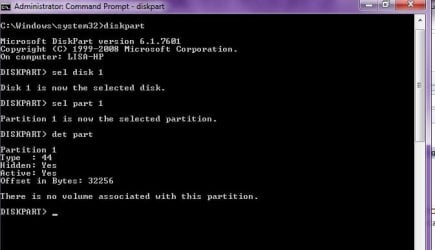
2nd try results diskpart

Do

Code:
diskpart
sel  disk  1
sel  part  1
det  part
so part 1 instead of part 0

Thanks - I should have caught that, LOL :doh:

List_Part_Results.jpg
 

My Computer My Computer

At a glance

Windows 7 Home Premium 32bitIntel Premium G6304GB DDR3Intel HD Graphics
Computer Manufacturer/Model Number
HP Pavilion Slimline
OS
Windows 7 Home Premium 32bit
CPU
Intel Premium G630
Memory
4GB DDR3
Graphics Card(s)
Intel HD Graphics
Hard Drives
1 TB
So type of partition is 44.

44 GoBack partition GoBack is a utility that records changes made to the disk, allowing you to view or go back to some earlier state. It takes over disk I/O like a Disk Manager would, and stores its logs in its own partition.

Source Partition types: List of partition identifiers for PCs

You ever used an utility called GoBack?
 

My Computer My Computer

At a glance

Microsoft Windows 7 Home Premium 64-bits 7601...Intel(R) Core(TM) i3 CPU M 370 @ 2.40GHz4,00 GBATI Mobility Radeon HD 5400 Series
Computer type
Laptop
Computer Manufacturer/Model Number
ACER ASPIRE 5742G
OS
Microsoft Windows 7 Home Premium 64-bits 7601 Multiprocessor Free Service Pack 1
CPU
Intel(R) Core(TM) i3 CPU M 370 @ 2.40GHz
Motherboard
Acer Aspire 5742G
Memory
4,00 GB
Graphics Card(s)
ATI Mobility Radeon HD 5400 Series
Sound Card
(1) AMD High Definition Audio Device (2) Realtek High Defi
Screen Resolution
1366 x 768 x 32 bits (4294967296 colors) @ 60 Hz
Hard Drives
WDC WD5000BEVT-22ZAT0
Solution: If you need to modify partitions on a hard disk that is being monitored by GoBack, you must first disable GoBack. To do this, go to GoBack�·s Main Menu, click Options, and then select Disable GoBack. Before you begin modifying your partitions, you must first reboot your computer. After you have rebooted and finished making partition modifications, you can then re-enable GoBack.

In some instances, however, disabling GoBack apparently isn't enough. GoBack seems to embed itself into the Master Boot Record of the source drive and it must be fully un-installed from the source drive BEFORE any copying can take place. (Once you have uninstalled GoBack, you must also reboot the machine.) It may also be necessary to do an FDISK /MBR to repair the master boot record. Once this is done, you should have no problems. If GoBack still has a lock on the partitions you will need to contact Adaptec to have the references removed correctly. After you have finished using your PowerQuest product to manipulate partitions, you may, of course, reinstall GoBack.
 

My Computer My Computer

At a glance

Microsoft Windows 7 Home Premium 64-bits 7601...Intel(R) Core(TM) i3 CPU M 370 @ 2.40GHz4,00 GBATI Mobility Radeon HD 5400 Series
Computer type
Laptop
Computer Manufacturer/Model Number
ACER ASPIRE 5742G
OS
Microsoft Windows 7 Home Premium 64-bits 7601 Multiprocessor Free Service Pack 1
CPU
Intel(R) Core(TM) i3 CPU M 370 @ 2.40GHz
Motherboard
Acer Aspire 5742G
Memory
4,00 GB
Graphics Card(s)
ATI Mobility Radeon HD 5400 Series
Sound Card
(1) AMD High Definition Audio Device (2) Realtek High Defi
Screen Resolution
1366 x 768 x 32 bits (4294967296 colors) @ 60 Hz
Hard Drives
WDC WD5000BEVT-22ZAT0
Back
Top