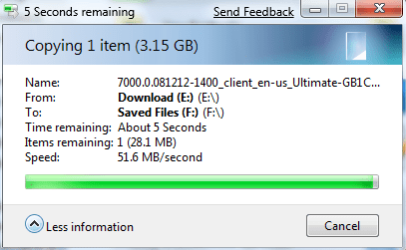
OMGoodness is this Beta Slow, copy= 855k per second?!??

apple3

New member
Local time
1:33 PM
Messages
50
ImageShack - Image Hosting :: 384bn5.png:mad:
Okay I was having some trouble when I was downloading but tonight when I copied and move some files, windows crawled and it was like using a computer when I was a child.

Is it becuase this is a beta and the sata drivers aren't mature?
There has to be something wrong with the drivers as it was never ever this slow in XP or Vista.

I started copying 360MB from one place to another, the window still says 6 minutes remaining.

I attached a picture so you can see it. I can't believe this. I love it except when it comes to this and if its this slow then this is bad if I try to do any audio work.
my.php

Does anyone have advice?

Thx


Now it slowed to 384K Even at that the first speed, my internet is faster (1.5MB) then windows is at copting....???????
Its imposible to work as you have to sit and wait 10+ seconds between clicks, even on the net trying to post this, drives a person crazy!!!:p


my.php
 

My Computer My Computer

At a glance

Windows 7D940 Intel Duo CoreOCZ PlatinumNvidia 7600 256 GT
Computer Manufacturer/Model Number
Intel
OS
Windows 7
CPU
D940 Intel Duo Core
Motherboard
Intel D945GTP
Memory
OCZ Platinum
Graphics Card(s)
Nvidia 7600 256 GT
Sound Card
On Board but use external Firewire
Monitor(s) Displays
Dual Samsung
Screen Resolution
1200x1078
Hard Drives
Several internal Sata
PSU
Generiz 550
Case
Can't remember but looks like a G4
Cooling
Intel Fan
Keyboard
Apple Keyboard
Mouse
Logitech
Internet Speed
1.5 Mega Bytes per second (cable) 15000 mbits
I have not had this problem, but... reboot? =P
 

My Computer My Computer

At a glance

Windows 7 build 7000 x86Intel E68504GB DDR2XFX 8800GT 512
OS
Windows 7 build 7000 x86
CPU
Intel E6850
Motherboard
ASUS Maximus II Formula
Memory
4GB DDR2
Graphics Card(s)
XFX 8800GT 512
Sound Card
PCI-E X-Fi (Bundled with MB)
Monitor(s) Displays
SyncMaster 223BW
Screen Resolution
1680x1050
Hard Drives
Raptor 10k 150GB
Maxtor 300GB
WD 300GB
PSU
Chill Innovation 700W
Case
Cosmos 1000
Keyboard
G15 Gaming
Mouse
G9
Internet Speed
6/2Mbit
I copied a 15GB file from my Vista HDD and it took about 5 minutes and I noticed no change in speed on anything else, sounds like you have a driver issue.
 

My Computer My Computer

At a glance

Windows 7 Ultimate Vista Ultimate x64Core 2 Duo E8500 3.16Ghz @ 3.8Ghz2x2Gigs Patriot PC2-6400 LLInno3D GeForce GTX260 216 SP
Computer Manufacturer/Model Number
Home Brew
OS
Windows 7 Ultimate Vista Ultimate x64
CPU
Core 2 Duo E8500 3.16Ghz @ 3.8Ghz
Motherboard
eVGA 750i FTW
Memory
2x2Gigs Patriot PC2-6400 LL
Graphics Card(s)
Inno3D GeForce GTX260 216 SP
Monitor(s) Displays
ASUS VW222U 22" 2ms Response time
Screen Resolution
1680x1050
Hard Drives
SATA 150GB
SATA II 250GB
USB IDE 750GB Ext.
PSU
HYTEC 600W & Thermaltake 650W Toughpower Power Exp
Case
Thermaltake Armor LCS (Liquid Cooling System)
Cooling
Liquid Cooling System
Keyboard
Logitech G15 Gaming Keyboard
Mouse
Logitech G9 Gaming Mouse
It works fine here as well, but I'm using the AHCI mode for my HDDs. if you're using your HDD in AHCI mode, try to update the controler driver to the latest version of the Intel Matrix Storage Manager drivers. The Microsoft AHCI drivers that come with W7 used to freeze the copy box for a couple of seconds on my computer... maybe it's causing a different problem (the slow copy speed) with your configuration.


use the "-noIMSMgui -noITMgui -nomon" switches when you install them if you don't want to install the junk that's only needed for the RAID configuration, or just extract the drivers with the
"-a -p C:\Intel" switches if you want to update the controler manually. (just create a shortcut of the install .exe and add the switches in the target box after the pathtofile/install.exe, if you don't know how to do it)
 

Attachments

  • Copy.png
    Copy.png
    14.6 KB · Views: 27
Last edited:

My Computer My Computer

At a glance

Windows 7 x64
OS
Windows 7 x64
It works fine here as well, but I'm using the AHCI mode for my HDDs. if you're using your HDD in AHCI mode, try to update the controler driver to the latest version of the Intel Matrix Storage Manager drivers. The Microsoft AHCI drivers that come with W7 used to freeze the copy box for a couple of seconds on my computer... maybe it's causing a different problem (the slow copy speed) with your configuration.


use the "-noIMSMgui -noITMgui -nomon" switches when you install them if you don't want to install the junk that's only needed for the RAID configuration, or just extract the drivers with the
"-a -p C:\Intel" switches if you want to update the controler manually. (just create a shortcut of the install .exe and add the switches in the target box after the pathtofile/install.exe, if you don't know how to do it)


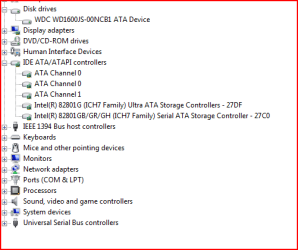
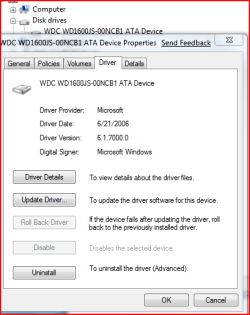
So, here are links to my software update, (MOTHERBOARD)...and picture of my device manager....

So am unclear what to download (I also went to Western Digital and there was nothing to download except software to see if the HD is failing...).

And I am very unclear on what I am supposed to do, change, or download, sorry.

Link to motherboard software (nothing there I could see except RAID stuff)

Download Search Results!

image of control panel/device manager and links to intel updates (above)
as well as control panel and hard drive drivers images. ..

thx
 

Attachments

  • Harddriveandcontrollers.PNG
    Harddriveandcontrollers.PNG
    9.6 KB · Views: 42
  • Harddrive.PNG
    Harddrive.PNG
    14.5 KB · Views: 46

My Computer My Computer

At a glance

Windows 7D940 Intel Duo CoreOCZ PlatinumNvidia 7600 256 GT
Computer Manufacturer/Model Number
Intel
OS
Windows 7
CPU
D940 Intel Duo Core
Motherboard
Intel D945GTP
Memory
OCZ Platinum
Graphics Card(s)
Nvidia 7600 256 GT
Sound Card
On Board but use external Firewire
Monitor(s) Displays
Dual Samsung
Screen Resolution
1200x1078
Hard Drives
Several internal Sata
PSU
Generiz 550
Case
Can't remember but looks like a G4
Cooling
Intel Fan
Keyboard
Apple Keyboard
Mouse
Logitech
Internet Speed
1.5 Mega Bytes per second (cable) 15000 mbits
It works fine here as well, but I'm using the AHCI mode for my HDDs. if you're using your HDD in AHCI mode, try to update the controler driver to the latest version of the Intel Matrix Storage Manager drivers. The Microsoft AHCI drivers that come with W7 used to freeze the copy box for a couple of seconds on my computer... maybe it's causing a different problem (the slow copy speed) with your configuration.


use the "-noIMSMgui -noITMgui -nomon" switches when you install them if you don't want to install the junk that's only needed for the RAID configuration, or just extract the drivers with the
"-a -p C:\Intel" switches if you want to update the controler manually. (just create a shortcut of the install .exe and add the switches in the target box after the pathtofile/install.exe, if you don't know how to do it)

I think I need to post again and ask specific. :sarc:

How do I use the AHCI? How do I check to see what mode I am using?

Then I guess I need to know how to extract the switches that you are talking about as if you can get 56 MB, my system is obviously set up wrong.

Thx
 

My Computer My Computer

At a glance

Windows 7D940 Intel Duo CoreOCZ PlatinumNvidia 7600 256 GT
Computer Manufacturer/Model Number
Intel
OS
Windows 7
CPU
D940 Intel Duo Core
Motherboard
Intel D945GTP
Memory
OCZ Platinum
Graphics Card(s)
Nvidia 7600 256 GT
Sound Card
On Board but use external Firewire
Monitor(s) Displays
Dual Samsung
Screen Resolution
1200x1078
Hard Drives
Several internal Sata
PSU
Generiz 550
Case
Can't remember but looks like a G4
Cooling
Intel Fan
Keyboard
Apple Keyboard
Mouse
Logitech
Internet Speed
1.5 Mega Bytes per second (cable) 15000 mbits
UPDATE:

I updated the bios then went in and changed it from IDE to ACHI and when I did, it would reboot and start the REPAIR START console, run for a few minutes then suggest SYSTEM RESTORE, I clicked okay and it kept going in a loop and did this several times never being able to boot so back to IDE and I could get into windows.

Strange thing is Windows defaulted at 800x800 resolution every time and I had to reset my display resolution.

I guess now that I have the ACHI option in BIOS I need to figure out (help please) how to use this setting and boot to windows without reinstalling windows. I also never got an answer from this persons post on how to do what this person suggested and would gladly appreciate help in doing so as clearly the IDE set up in bios must be the problem, then again, I'm sure that IDE wasn't less than 1MB per second just a few years ago, so maybe there is something else going on?!?!?!?!?!?


Advice appreciated.
THX
 

My Computer My Computer

At a glance

Windows 7D940 Intel Duo CoreOCZ PlatinumNvidia 7600 256 GT
Computer Manufacturer/Model Number
Intel
OS
Windows 7
CPU
D940 Intel Duo Core
Motherboard
Intel D945GTP
Memory
OCZ Platinum
Graphics Card(s)
Nvidia 7600 256 GT
Sound Card
On Board but use external Firewire
Monitor(s) Displays
Dual Samsung
Screen Resolution
1200x1078
Hard Drives
Several internal Sata
PSU
Generiz 550
Case
Can't remember but looks like a G4
Cooling
Intel Fan
Keyboard
Apple Keyboard
Mouse
Logitech
Internet Speed
1.5 Mega Bytes per second (cable) 15000 mbits
Alas, another update but maybe I found a bug? ? ?

I did another copy and this time (still running in IDE) and it was 46MB per second.

The bug seems to be two fold..

When I was getting the super duper party pooper slow speed, it was from one user to the public folder so someone might want to try that as it wasn't slow on desktop.

The other bug is switching between users, it never does, it just hangs and hangs, so I guess maybe that can be tested by someone else and the only thing left is to find out why I should (if possible to do without reformat) switch to ACHI vs IDE.

Thx
 

My Computer My Computer

At a glance

Windows 7D940 Intel Duo CoreOCZ PlatinumNvidia 7600 256 GT
Computer Manufacturer/Model Number
Intel
OS
Windows 7
CPU
D940 Intel Duo Core
Motherboard
Intel D945GTP
Memory
OCZ Platinum
Graphics Card(s)
Nvidia 7600 256 GT
Sound Card
On Board but use external Firewire
Monitor(s) Displays
Dual Samsung
Screen Resolution
1200x1078
Hard Drives
Several internal Sata
PSU
Generiz 550
Case
Can't remember but looks like a G4
Cooling
Intel Fan
Keyboard
Apple Keyboard
Mouse
Logitech
Internet Speed
1.5 Mega Bytes per second (cable) 15000 mbits
Yes, it's surely a bug if you were able to copy files at a normal speed after messing around and repair your install

Yes, it's surely a bug if you were able to copy files at a normal speed after messing around and repairing your install.

AHCI mode enables the SATA features like NCQ and hot plug, while IDE mode doesn't but offer the same speed. If your hard drive doesn't support NCQ and you don't plan on hot plugging hard drives (installing HDD while the system is running). here if you want to read about AHCI mode and SATA.
Advanced Host Controller Interface - Wikipedia, the free encyclopedia
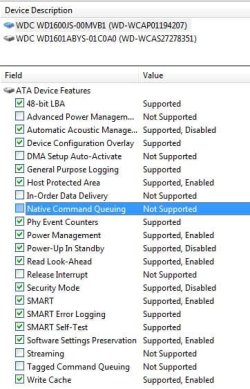
I have several mode on my p965/ICH9R motherboard. Compatible IDE and Enhanced IDE, if it's the same for your motherboard and the ICH7 chipset, pick Enhanced IDE. Your Hard drive doesn't support NCQ, so it's pointless to use AHCI mode. I use the same... and I'm very sorry for the very late reply. I need to start subscribing to threads..

In case of you're wondering, your Hard drive doesn't support NCQ (I have the same HDD) and I'm very sorry for the very late reply. I need to start subscribing to threads.. :(
 

Attachments

  • Untitled-1.jpg
    Untitled-1.jpg
    41.2 KB · Views: 129

My Computer My Computer

At a glance

Windows 7 x64
OS
Windows 7 x64
Back
Top