On Start up windows 7 show desktop icons twice

artinusa

New member
Member
VIP
Local time
3:43 AM
Messages
229
Not sure whats happening..I have a home network set up When I boot up I get a longish black screen then it boots First I get all the icons quickly and then it refreshes seemingly and I get white folders that then get filled in with icons of programs loaded on computer..takes a little while to show second screen..its seems to have become progressively worse over the months..I have many programs. Does the start loaded program make any difference to these screens. Is there more than one start up screen and I am missing how to control this issue...I am only admin no other profiles I think..smile anyone help please
 

My Computer My Computer

At a glance

Windows 7 64 bit
Computer type
PC/Desktop
Computer Manufacturer/Model Number
Compaq Presario
OS
Windows 7 64 bit

My Computer My Computer

At a glance

Win7U 64 RTMQ95508GB GskillASUS|EAH4850/HTDI/1GD3/A
OS
Win7U 64 RTM
CPU
Q9550
Motherboard
GA-EP45-UD3R
Memory
8GB Gskill
Graphics Card(s)
ASUS|EAH4850/HTDI/1GD3/A
Sound Card
xfi Plat
Monitor(s) Displays
Dell 2405fpw
Screen Resolution
1920x1200
Hard Drives
Seagate & WD sata Drives
PSU
Antec
Case
Antec
Keyboard
MS Natural Ergonomic 4000
Mouse
Logitech MX610 USB Cordless
James Colbert: Thanks for the prompt reply..sadly it did not work and in fact my boot up time after the changes of re-indexing was much much longer than even before I did the re-indext..not that this could effect it but strange eh.. I get a screen full of 'full program with full coloured' icons and then the change to white folder icons and are then sort of 'filled' one by one by program related icons.... When I had XP years ago I recall there not being enough virtual ram would cause this sort of problem ...could this be the case here..how can I tell and know..
 

My Computer My Computer

At a glance

Windows 7 64 bit
Computer type
PC/Desktop
Computer Manufacturer/Model Number
Compaq Presario
OS
Windows 7 64 bit

My Computer My Computer

At a glance

Win7U 64 RTMQ95508GB GskillASUS|EAH4850/HTDI/1GD3/A
OS
Win7U 64 RTM
CPU
Q9550
Motherboard
GA-EP45-UD3R
Memory
8GB Gskill
Graphics Card(s)
ASUS|EAH4850/HTDI/1GD3/A
Sound Card
xfi Plat
Monitor(s) Displays
Dell 2405fpw
Screen Resolution
1920x1200
Hard Drives
Seagate & WD sata Drives
PSU
Antec
Case
Antec
Keyboard
MS Natural Ergonomic 4000
Mouse
Logitech MX610 USB Cordless
Sorry for delay James..I did as you suggested checked profiles etc..

still got the same problem..and many more right now..lost use of USB drives after a windows update..
 
Last edited:

My Computer My Computer

At a glance

Windows 7 64 bit
Computer type
PC/Desktop
Computer Manufacturer/Model Number
Compaq Presario
OS
Windows 7 64 bit
Double boot

I am having the same issue as artinusa. The computer boots, i get a black screen for an extended period, all the icons start appearing as white boxes and then fill in. Once they are filled in the screen blinks out and back on and the icons come back a second time as white boxes that fill in one at a time. This makes every reboot time consuming and a real pain. HELP!
 

My Computer My Computer

At a glance

32
OS
32
Bigk825

If you ever solve it please let me or 7 forum know.. thanks
 

My Computer My Computer

At a glance

Windows 7 64 bit
Computer type
PC/Desktop
Computer Manufacturer/Model Number
Compaq Presario
OS
Windows 7 64 bit
Any solution to this?
 

My Computer My Computer

At a glance

Windows 7 Ultimate x6i5 2670QM2x4GB RAM Kingston HyperX Memory DDR3 1600 MH...Nvidia GeForce GTX 560M
Computer Manufacturer/Model Number
Sager NP8130
OS
Windows 7 Ultimate x6
CPU
i5 2670QM
Memory
2x4GB RAM Kingston HyperX Memory DDR3 1600 MHz Sticks
Graphics Card(s)
Nvidia GeForce GTX 560M
Sound Card
Realtek HD Audio (Built-in)
Screen Resolution
1920x1080
Hard Drives
128GB Crucial M4 SSD
500GB Seagate 7200RPM HDD
Internet Speed
12Mbps down/4Mbps up
I resolved this problem on my wifes HP laptop by doing the following,
click on the folder beside the Start button,
found the location of the desktop that is in use by doing a right click on Desktop,
then do a RIGHT click on Properties, mine showed(C:\Users\Jenny\Desktop),
then go into C:\Users and do a search on Desktop,
then delete all Desktop that are not related to the Desktop name you found above, mine was(C:\Users\Jenny\Desktop).
If you have more that one user able to log onto your PC, DO NOT delete the other users Desktops.......
 

My Computer My Computer

At a glance

Windows 7 32 bitamd2gigunknown
Computer Manufacturer/Model Number
HP 4525s
OS
Windows 7 32 bit
CPU
amd
Motherboard
unknown
Memory
2gig
Graphics Card(s)
unknown
Sound Card
unknown
Monitor(s) Displays
unknown
Hard Drives
unknown
PSU
unknown
Case
unknown
Cooling
unknown
The solution to this is to uninstall Microsoft Security Essentials, as simple as that :)
 

My Computer My Computer

At a glance

Windows 7 Ultimate x6i5 2670QM2x4GB RAM Kingston HyperX Memory DDR3 1600 MH...Nvidia GeForce GTX 560M
Computer Manufacturer/Model Number
Sager NP8130
OS
Windows 7 Ultimate x6
CPU
i5 2670QM
Memory
2x4GB RAM Kingston HyperX Memory DDR3 1600 MHz Sticks
Graphics Card(s)
Nvidia GeForce GTX 560M
Sound Card
Realtek HD Audio (Built-in)
Screen Resolution
1920x1080
Hard Drives
128GB Crucial M4 SSD
500GB Seagate 7200RPM HDD
Internet Speed
12Mbps down/4Mbps up
To Kevindd992002, on June 16, 2012 you posted, "Any solution to this?" If you found an answer that worked for you why didn't you posted it before my post so others could try it? Your solution would not work for my wife's laptop because MSE was not installed. I hope one of our solutions help users in the future.
 

My Computer My Computer

At a glance

Windows 7 32 bitamd2gigunknown
Computer Manufacturer/Model Number
HP 4525s
OS
Windows 7 32 bit
CPU
amd
Motherboard
unknown
Memory
2gig
Graphics Card(s)
unknown
Sound Card
unknown
Monitor(s) Displays
unknown
Hard Drives
unknown
PSU
unknown
Case
unknown
Cooling
unknown
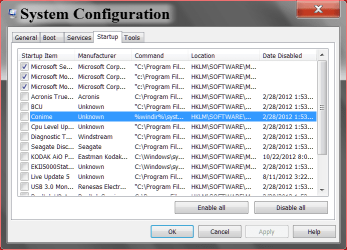
Millions of people use MSE and don't have this problem so I don't think it's MSE. My understanding you have one account and one desktop. I'm thinking that you might have a bunch of things starting up at boot and your desktop is fighting for resources at boot. Go to msconfig/startup and take a look. I have 3 checked; my security and blueray mouse and keyboard.
today 10 22.PNG

Just a idea that might work. Wow this is a old thread.
 

My Computer My Computer

At a glance

Windows 10 Pro. 64/ version 1709 Windows 7 Pr...Intel i7-6800K @ 4.3Corsair Platinum 16 gig @2400EVGA GTX 1070 OC
Computer type
PC/Desktop
Computer Manufacturer/Model Number
Home made Desktop
OS
Windows 10 Pro. 64/ version 1709 Windows 7 Pro/64
CPU
Intel i7-6800K @ 4.3
Motherboard
ASUS X-99 Deluxe II
Memory
Corsair Platinum 16 gig @2400
Graphics Card(s)
EVGA GTX 1070 OC
Monitor(s) Displays
Asus 27" LED LCD/VE278Q
Screen Resolution
1920-1080 or 1280-720 HDMI
Hard Drives
INTEL SSD 730-240 Gb Sata 3.0/
PSU
EVGA Platium 1200W
Case
Phanteks Luxe Tempered Glass 8 fans/ one radiator
Cooling
XSPC/ Water Cooled CPU
Keyboard
Das 4 Professional
Mouse
Logitech M705/MX Anywhere 2-S
Internet Speed
100 mbits
Antivirus
Microsoft Security Essentials/ Malwarebytes Premium 3.0/ SAS
Browser
I.E. 11 default/Firefox/ ISP Time Warner Cable/Spectrum
Other Info
LG BluRay Burner/
Sound system-KLipsch-THX/
Icy Dock ssd Hot Swap bays.
To Kevindd992002, on June 16, 2012 you posted, "Any solution to this?" If you found an answer that worked for you why didn't you posted it before my post so others could try it? Your solution would not work for my wife's laptop because MSE was not installed. I hope one of our solutions help users in the future.

Because I forgot and am really not active here, sorry. That worked for me and other 5 computers in our family.


Millions of people use MSE and don't have this problem so I don't think it's MSE. My understanding you have one account and one desktop. I'm thinking that you might have a bunch of things starting up at boot and your desktop is fighting for resources at boot. Go to msconfig/startup and take a look. I have 3 checked; my security and blueray mouse and keyboard.
View attachment 237949

Just a idea that might work. Wow this is a old thread.

Googling this problem would show lots of hits pertaining to MSE as the culprit, though. I swear by MSE before until this.
 

My Computer My Computer

At a glance

Windows 7 Ultimate x6i5 2670QM2x4GB RAM Kingston HyperX Memory DDR3 1600 MH...Nvidia GeForce GTX 560M
Computer Manufacturer/Model Number
Sager NP8130
OS
Windows 7 Ultimate x6
CPU
i5 2670QM
Memory
2x4GB RAM Kingston HyperX Memory DDR3 1600 MHz Sticks
Graphics Card(s)
Nvidia GeForce GTX 560M
Sound Card
Realtek HD Audio (Built-in)
Screen Resolution
1920x1080
Hard Drives
128GB Crucial M4 SSD
500GB Seagate 7200RPM HDD
Internet Speed
12Mbps down/4Mbps up
I resolved this problem on my wifes HP laptop by doing the following,
click on the folder beside the Start button,
found the location of the desktop that is in use by doing a right click on Desktop,
then do a RIGHT click on Properties, mine showed(C:\Users\Jenny\Desktop),
then go into C:\Users and do a search on Desktop,
then delete all Desktop that are not related to the Desktop name you found above, mine was(C:\Users\Jenny\Desktop).
If you have more that one user able to log onto your PC, DO NOT delete the other users Desktops.......

Worked 100% cheers
 

My Computer My Computer

At a glance

Win7 / Backtrack 4Atom1G
Computer Manufacturer/Model Number
eeepc100h
OS
Win7 / Backtrack 4
CPU
Atom
Memory
1G
Back
Top