onboard hdmi audio not working

ateam201

New member
Local time
8:09 PM
Messages
6
hello i searched the forum but i iddn't see anyone fix the error so i just upgraded my hard drive and did a fresh install of 64 bit win 7 and everythnig went good except no audio out of hdmi. thats the only cable hooked up to my tv and the whole time i did the installation and got to teh desktop no audio whent to nvidia got the newest nforce drivers 15.37 i believe and installed it and restarted and everything but it selected spdif for audio and said hdmi is not connected but hdmi is the only cable connected to the tv and video works find 1080p but no audio. i have 64 bits windows and the video card i have is aonboard geforce 8200 and it is capable of audio pass through because it worked in windows xp so i know its not hardware isssue suggestions or comments are welcome
 

My Computer

Computer Manufacturer/Model Number
abit
OS
windows 7 64 bit
CPU
amd 7750 kuma processor
Motherboard
abit an786s atx motherboard
Memory
4 gigs 1066 ocz ram
Graphics Card(s)
nvidia geforce 8200 on board
Sound Card
realtek hd audio on board
Monitor(s) Displays
42 inch sharp aquos
Hard Drives
1 tb western digital caviar black
PSU
corsair 600 watt
Case
some cheap china made crap
Cooling
two fans

My Computer

Computer type
PC/Desktop
Computer Manufacturer/Model Number
Me
OS
Win 7 Ultimate x64
CPU
FX-8350 @ 4.6 GHz so far
Motherboard
Asus M5A97 EVO
Memory
ADATA XPG V1 Series Black 8GB DDR3 1600
Graphics Card(s)
Sapphire R9 270x Dual-X
Sound Card
Xonar DGX w/ Corsair Vengence 1300
Monitor(s) Displays
Acer S232HL Abid
Screen Resolution
1920x1080
Hard Drives
120 GB OCZ Vertex 3
500 GB Seagate 7200.12
PSU
Antec Earthwatts 650W Green
Case
Antec Three Hundred
Cooling
Cooler Master 212 EVO
Keyboard
Logitech G510
Mouse
Logitech G500s
Internet Speed
35000/3000
the realtek drivers are installed but no sound is coming out of the nvidia hdmii see it in control panel i can select all of them except nvidia hdmi says its not connected.
 

My Computer

Computer Manufacturer/Model Number
abit
OS
windows 7 64 bit
CPU
amd 7750 kuma processor
Motherboard
abit an786s atx motherboard
Memory
4 gigs 1066 ocz ram
Graphics Card(s)
nvidia geforce 8200 on board
Sound Card
realtek hd audio on board
Monitor(s) Displays
42 inch sharp aquos
Hard Drives
1 tb western digital caviar black
PSU
corsair 600 watt
Case
some cheap china made crap
Cooling
two fans
screenshot of audio panel in cp

this is how it looks sorry tried to edit but i couldn't do that
 

Attachments

  • aduio.jpg
    aduio.jpg
    26.8 KB · Views: 584

My Computer

Computer Manufacturer/Model Number
abit
OS
windows 7 64 bit
CPU
amd 7750 kuma processor
Motherboard
abit an786s atx motherboard
Memory
4 gigs 1066 ocz ram
Graphics Card(s)
nvidia geforce 8200 on board
Sound Card
realtek hd audio on board
Monitor(s) Displays
42 inch sharp aquos
Hard Drives
1 tb western digital caviar black
PSU
corsair 600 watt
Case
some cheap china made crap
Cooling
two fans
I kind of in a similar situation. I have realtek with nvidia 9400 GT with HDMI output. Initially I did not even see the HDMI in the list of audio devices. I went into BIOS and disabled the onboard audio, let it boot up competely and shutdown and restarted again after enabling the onboard audio. When it came up something triggered the HDMI audio device to be discovered, but still no audio through HDMI. I fiddled with TV audio setting as well but no avail.
I am planning to re-install nvidia drivers again to see if it makes any difference.

EDIT: reinstall of nvidia drivers did not help.
 
Last edited:

My Computer

OS
windows 7
this is how i got it work fresh install of windows then i did the realtek drivers then i downloaded the latest nvidia drivers and it started working new problem arised though once i put the system in standby its just totally messes up the audio like it stuters or something just can't hear ****.
 

My Computer

Computer Manufacturer/Model Number
abit
OS
windows 7 64 bit
CPU
amd 7750 kuma processor
Motherboard
abit an786s atx motherboard
Memory
4 gigs 1066 ocz ram
Graphics Card(s)
nvidia geforce 8200 on board
Sound Card
realtek hd audio on board
Monitor(s) Displays
42 inch sharp aquos
Hard Drives
1 tb western digital caviar black
PSU
corsair 600 watt
Case
some cheap china made crap
Cooling
two fans
the hdmi output should be enabled..
if you still having stuttering problems now, uninstall sound devices from device manager then let windows automaticly install them for you after rebooting,
then just make sure the hdmi output is enabled

this is how i got it work fresh install of windows then i did the realtek drivers then i downloaded the latest nvidia drivers and it started working new problem arised though once i put the system in standby its just totally messes up the audio like it stuters or something just can't hear ****.
if your using hdtv just hdmi output need to be enabled

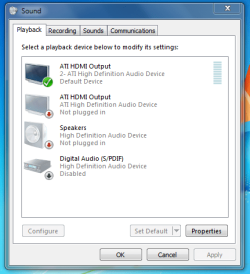
heres what my sound cp looks like

Capture.PNG

im using graphics card with hdmi but also have it on motherboard ,just one output needs to be enabled if you want sound through HDTV
 

My Computer

OS
7 RTM 64bit
CPU
AMD Phenom 965 B3
Motherboard
ASUS M3A79-T DELUXE
Memory
Corsair 4GB (2x2GB) DDR2 800MHz/PC2-6400 XMS2 Memory Kit CL5
Graphics Card(s)
PowerColour HD 5770 CF 16x-16x
Monitor(s) Displays
32"
Screen Resolution
1920-1080
Hard Drives
Hitachi

1tb 7200rpm
PSU
Be Quiet Straight Power 650wat
Case
Asus TA-M series
Cooling
CoolIT Eco ALC Water Cooling System
Keyboard
Microsoft wireless Keyboard
Mouse
Microsoft wireless mouse
Back
Top