Onboard Realtec Sound Recording

web

New member
Member
VIP
Local time
11:58 PM
Messages
350
my on-board realtec sound cant record live streaming sound the only recording devices to chose from are line-in or microphone I've got the latest realtec (V6.0.1.6971) driver installed, the board is a maximus vi formula
was going fit my old sound card until I realised its PCI card and not PCIE I don't think that wool work ? and if not can u by PCIE sound cards
 

My Computer My Computer

Computer type
PC/Desktop
Computer Manufacturer/Model Number
Antec 300
OS
Windows 7 Ultimate 64bit + Windows 10 pro 64bit duel boot
CPU
i7-4770k cpu @ 350GHz FC LGA1150
Motherboard
Asus Maximus VI Formula
Memory
32GB ballistik DDR3 1866 pc3-14900 cl9 1.5v w.X
Graphics Card(s)
Geforce GTX 1050 Ti Windforce 2x OC GDDR5
Sound Card
SupremeFX audio 8-channel on board
Monitor(s) Displays
AOC 12269Vwm x 2
Screen Resolution
1920 x 1080
Hard Drives
loads raid this that operating system on SSD
PSU
650 watt corsair erm still next upgrade
Case
antec 300
Cooling
Noctua NH-D14
Keyboard
CM Storm QuickFire Cherry MX Blue
Mouse
5500 dpi
Internet Speed
virgin 70mb
Antivirus
Kaspersky 2016
Other Info
Self build
Go to the Sound Panel, Recording section. RIGHT click in an empty space in that panel and then LEFT click to Show "Disabled" and "Disconnected" devices. In most cases this will now show the Stereo Mix and it can be enabled and set as default recording device.
 

My Computer My Computer

Computer type
PC/Desktop
Computer Manufacturer/Model Number
My Own Build
OS
Windows 10 64 bit
CPU
Intel i7 6700K
Motherboard
ASUS ROG Maximus VIII Hero
Memory
16GB Corsair Dominator
Graphics Card(s)
Intel CPU Graphics
Sound Card
RealTek
Monitor(s) Displays
27" Dell S2719dgf
Screen Resolution
2560X1440
Hard Drives
1 TB Samsung 850 EVO SSD for Win 10 Pro
500GB Samsung 850 EVO SSD for Win 10 Insider
2 TB drive for backup
PSU
EVGA Supernova 750G2
Case
BeQuiet Silent Base 600
Cooling
Deepcool Captain 120EX
Keyboard
Microsoft Wireless 2000
Mouse
Microsoft wireless
Internet Speed
100 MB/sec (Cable)
Antivirus
Microsoft Defender and Malwarebytes
Browser
Edge/Firefox
Other Info
Cakewalk (Sonar) by BandLab and Studio One 4.1 Pro recording studio software. MOTU 896Mk3 Hybrid recording interface, Frontier Tranzport wireless control unit, Behringer X-Touch Control Surface.
Five USB connected optical drives for CD Audio production using Nero BurningROM
Go to the Sound Panel, Recording section. RIGHT click in an empty space in that panel and then LEFT click to Show "Disabled" and "Disconnected" devices. In most cases this will now show the Stereo Mix and it can be enabled and set as default recording device.
sorry really cant do this or don't understand
 

My Computer My Computer

Computer type
PC/Desktop
Computer Manufacturer/Model Number
Antec 300
OS
Windows 7 Ultimate 64bit + Windows 10 pro 64bit duel boot
CPU
i7-4770k cpu @ 350GHz FC LGA1150
Motherboard
Asus Maximus VI Formula
Memory
32GB ballistik DDR3 1866 pc3-14900 cl9 1.5v w.X
Graphics Card(s)
Geforce GTX 1050 Ti Windforce 2x OC GDDR5
Sound Card
SupremeFX audio 8-channel on board
Monitor(s) Displays
AOC 12269Vwm x 2
Screen Resolution
1920 x 1080
Hard Drives
loads raid this that operating system on SSD
PSU
650 watt corsair erm still next upgrade
Case
antec 300
Cooling
Noctua NH-D14
Keyboard
CM Storm QuickFire Cherry MX Blue
Mouse
5500 dpi
Internet Speed
virgin 70mb
Antivirus
Kaspersky 2016
Other Info
Self build
Can you find your Windows Control Panel?

Can you find the "sound" icon in the Control Panel? If so, poke it with the mouse.

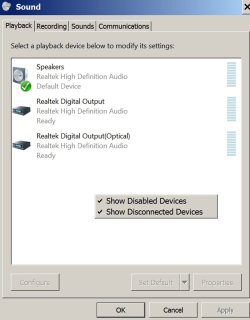
That should bring up a picture like shown below.

Right click with the mouse anywhere in the white space in that Window.

That should bring up the choices for "show disabled devices" and "show disconnected devices".

Place a checkmark beside them like you see in this picture.

Do that for both the "playback" and "recording" tabs.
 

Attachments

  • Untitled-1.jpg
    Untitled-1.jpg
    75.6 KB · Views: 1

My Computer My Computer

Computer type
PC/Desktop
Computer Manufacturer/Model Number
Ignatz Special; 4 speed manual gearbox; factory air conditioning; one of one
OS
Windows 7 Home Premium SP1, 64-bit
CPU
Intel Skylake i5-6600K, not overclocked
Motherboard
AsRock Z170M Extreme 4, micro ATX
Memory
8 GB HyperX DDR4-2666 (2 x 4 GB)
Graphics Card(s)
none; graphics are integrated on CPU
Sound Card
onboard: Realtek ALC1150; external: USB Behringer UF0-202
Monitor(s) Displays
Dell S2340M 23 inch IPS
Screen Resolution
1600 x 900
Hard Drives
System: Crucial MX100 series SSD, 128 GB;
Data: Samsung Spinpoint 103SJ, 1 TB;
Backup: WD Caviar Green WD30EZRX-00D8PB0, 3 TB
PSU
Rosewill SilentNight 500 watt fanless, semi-modular
Case
Antec Solo II
Cooling
Noctua NH-U12S; Noctua F12 intake, Noctua S12A exhaust
Keyboard
Microsoft 200 6JH-00001 USB
Mouse
Dell or Microsoft optical wired; USB
Antivirus
Microsoft Security Essentials and Malwarebytes Premium
Browser
Pale Moon
Other Info
All fans PWM; speeds at idle: CPU circa 500 rpm; intake circa 600 rpm; exhaust circa 600 rpm; CPU temps 27 idle and 47 C load in a warm room (27 C/81 F) when running Intel Extreme Tuning Utility stress test.
Thanks, for posting that info. I've been under the weather and haven't been on to check my threads.

Except. that needs to be done in the Recording section, not the Playback section. Trying to get the Stere Mixer to show up so the user can set that as the default recording device, so he can record streaming audio.

Jack
 

My Computer My Computer

Computer type
PC/Desktop
Computer Manufacturer/Model Number
My Own Build
OS
Windows 10 64 bit
CPU
Intel i7 6700K
Motherboard
ASUS ROG Maximus VIII Hero
Memory
16GB Corsair Dominator
Graphics Card(s)
Intel CPU Graphics
Sound Card
RealTek
Monitor(s) Displays
27" Dell S2719dgf
Screen Resolution
2560X1440
Hard Drives
1 TB Samsung 850 EVO SSD for Win 10 Pro
500GB Samsung 850 EVO SSD for Win 10 Insider
2 TB drive for backup
PSU
EVGA Supernova 750G2
Case
BeQuiet Silent Base 600
Cooling
Deepcool Captain 120EX
Keyboard
Microsoft Wireless 2000
Mouse
Microsoft wireless
Internet Speed
100 MB/sec (Cable)
Antivirus
Microsoft Defender and Malwarebytes
Browser
Edge/Firefox
Other Info
Cakewalk (Sonar) by BandLab and Studio One 4.1 Pro recording studio software. MOTU 896Mk3 Hybrid recording interface, Frontier Tranzport wireless control unit, Behringer X-Touch Control Surface.
Five USB connected optical drives for CD Audio production using Nero BurningROM
Thanks, for posting that info. I've been under the weather and haven't been on to check my threads.

Except. that needs to be done in the Recording section, not the Playback section. Trying to get the Stere Mixer to show up so the user can set that as the default recording device, so he can record streaming audio.

Jack

thanks all and Fireberd but yes need to record live streaming cant believe, a very dear, and supposable high end motherboard cant perform this simple task, with on-board sound

also I ask again I have seen sound cards that are 1 x16 ...... but can u get them PCIE ? whatever x16 4 8 16
 

My Computer My Computer

Computer type
PC/Desktop
Computer Manufacturer/Model Number
Antec 300
OS
Windows 7 Ultimate 64bit + Windows 10 pro 64bit duel boot
CPU
i7-4770k cpu @ 350GHz FC LGA1150
Motherboard
Asus Maximus VI Formula
Memory
32GB ballistik DDR3 1866 pc3-14900 cl9 1.5v w.X
Graphics Card(s)
Geforce GTX 1050 Ti Windforce 2x OC GDDR5
Sound Card
SupremeFX audio 8-channel on board
Monitor(s) Displays
AOC 12269Vwm x 2
Screen Resolution
1920 x 1080
Hard Drives
loads raid this that operating system on SSD
PSU
650 watt corsair erm still next upgrade
Case
antec 300
Cooling
Noctua NH-D14
Keyboard
CM Storm QuickFire Cherry MX Blue
Mouse
5500 dpi
Internet Speed
virgin 70mb
Antivirus
Kaspersky 2016
Other Info
Self build
If "stereo mix" is still unavailable after doing as above, you are down to a few choices:

1: buy a new motherboard known to support stereo mix via the onboard sound

2: buy a new internal sound card known to support stereo mix.

3: buy an external USB sound card. I've used one of these successfully--a Behringer. About $35

4: run cables from microphone to speakers. It's a workaround that may work.

5: pound Google looking for old or altered drivers, perhaps for Vista. Install in compatibility mode and any other mode you can possibly think of. Lots of hair-pulling and trial and error. May or may not work.

You are at the mercy of available drivers. No doubt it's a deliberate policy by MS, sound card manufacturers, and certain powers-that-be that want to make it difficult for you to record "what you hear".

My Realtec onboard sound DOES work for stereo mix (Gigabyte motherboard), so it's always possible you just haven't configured things properly.
 
Last edited:

My Computer My Computer

Computer type
PC/Desktop
Computer Manufacturer/Model Number
Ignatz Special; 4 speed manual gearbox; factory air conditioning; one of one
OS
Windows 7 Home Premium SP1, 64-bit
CPU
Intel Skylake i5-6600K, not overclocked
Motherboard
AsRock Z170M Extreme 4, micro ATX
Memory
8 GB HyperX DDR4-2666 (2 x 4 GB)
Graphics Card(s)
none; graphics are integrated on CPU
Sound Card
onboard: Realtek ALC1150; external: USB Behringer UF0-202
Monitor(s) Displays
Dell S2340M 23 inch IPS
Screen Resolution
1600 x 900
Hard Drives
System: Crucial MX100 series SSD, 128 GB;
Data: Samsung Spinpoint 103SJ, 1 TB;
Backup: WD Caviar Green WD30EZRX-00D8PB0, 3 TB
PSU
Rosewill SilentNight 500 watt fanless, semi-modular
Case
Antec Solo II
Cooling
Noctua NH-U12S; Noctua F12 intake, Noctua S12A exhaust
Keyboard
Microsoft 200 6JH-00001 USB
Mouse
Dell or Microsoft optical wired; USB
Antivirus
Microsoft Security Essentials and Malwarebytes Premium
Browser
Pale Moon
Other Info
All fans PWM; speeds at idle: CPU circa 500 rpm; intake circa 600 rpm; exhaust circa 600 rpm; CPU temps 27 idle and 47 C load in a warm room (27 C/81 F) when running Intel Extreme Tuning Utility stress test.
I have two newer PC's and both have RealTek and both have the Stereo Mix.
One is a Gigabyte Z77X UD5H and the other is an ASUS P8Z77 LE Plus
 

My Computer My Computer

Computer type
PC/Desktop
Computer Manufacturer/Model Number
My Own Build
OS
Windows 10 64 bit
CPU
Intel i7 6700K
Motherboard
ASUS ROG Maximus VIII Hero
Memory
16GB Corsair Dominator
Graphics Card(s)
Intel CPU Graphics
Sound Card
RealTek
Monitor(s) Displays
27" Dell S2719dgf
Screen Resolution
2560X1440
Hard Drives
1 TB Samsung 850 EVO SSD for Win 10 Pro
500GB Samsung 850 EVO SSD for Win 10 Insider
2 TB drive for backup
PSU
EVGA Supernova 750G2
Case
BeQuiet Silent Base 600
Cooling
Deepcool Captain 120EX
Keyboard
Microsoft Wireless 2000
Mouse
Microsoft wireless
Internet Speed
100 MB/sec (Cable)
Antivirus
Microsoft Defender and Malwarebytes
Browser
Edge/Firefox
Other Info
Cakewalk (Sonar) by BandLab and Studio One 4.1 Pro recording studio software. MOTU 896Mk3 Hybrid recording interface, Frontier Tranzport wireless control unit, Behringer X-Touch Control Surface.
Five USB connected optical drives for CD Audio production using Nero BurningROM
Go to the Sound Panel, Recording section. RIGHT click in an empty space in that panel and then LEFT click to Show "Disabled" and "Disconnected" devices. In most cases this will now show the Stereo Mix and it can be enabled and set as default recording device.

Thanks u where right, me just been thick it would seem! all working stereo mix up and running thanks again
 

My Computer My Computer

Computer type
PC/Desktop
Computer Manufacturer/Model Number
Antec 300
OS
Windows 7 Ultimate 64bit + Windows 10 pro 64bit duel boot
CPU
i7-4770k cpu @ 350GHz FC LGA1150
Motherboard
Asus Maximus VI Formula
Memory
32GB ballistik DDR3 1866 pc3-14900 cl9 1.5v w.X
Graphics Card(s)
Geforce GTX 1050 Ti Windforce 2x OC GDDR5
Sound Card
SupremeFX audio 8-channel on board
Monitor(s) Displays
AOC 12269Vwm x 2
Screen Resolution
1920 x 1080
Hard Drives
loads raid this that operating system on SSD
PSU
650 watt corsair erm still next upgrade
Case
antec 300
Cooling
Noctua NH-D14
Keyboard
CM Storm QuickFire Cherry MX Blue
Mouse
5500 dpi
Internet Speed
virgin 70mb
Antivirus
Kaspersky 2016
Other Info
Self build
I figured it was there. Good going..
 

My Computer My Computer

Computer type
PC/Desktop
Computer Manufacturer/Model Number
My Own Build
OS
Windows 10 64 bit
CPU
Intel i7 6700K
Motherboard
ASUS ROG Maximus VIII Hero
Memory
16GB Corsair Dominator
Graphics Card(s)
Intel CPU Graphics
Sound Card
RealTek
Monitor(s) Displays
27" Dell S2719dgf
Screen Resolution
2560X1440
Hard Drives
1 TB Samsung 850 EVO SSD for Win 10 Pro
500GB Samsung 850 EVO SSD for Win 10 Insider
2 TB drive for backup
PSU
EVGA Supernova 750G2
Case
BeQuiet Silent Base 600
Cooling
Deepcool Captain 120EX
Keyboard
Microsoft Wireless 2000
Mouse
Microsoft wireless
Internet Speed
100 MB/sec (Cable)
Antivirus
Microsoft Defender and Malwarebytes
Browser
Edge/Firefox
Other Info
Cakewalk (Sonar) by BandLab and Studio One 4.1 Pro recording studio software. MOTU 896Mk3 Hybrid recording interface, Frontier Tranzport wireless control unit, Behringer X-Touch Control Surface.
Five USB connected optical drives for CD Audio production using Nero BurningROM
Back
Top