- Local time
- 10:39 PM
- Messages
- 150
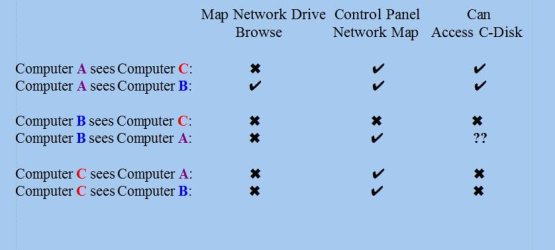
In brief, without overloading this thread with too much detail, three computers (all W7) are on LAN. Computers A and B see each other on the Network map and can open each other's files. They both can see computer C and its files. But computer C cannot see A nor B on the map nor open their files.
They all have "Turn on File sharing" set in Advanced Sharing Settings. All three are defined on the same Work Network. Tried suspending Avast but that did not change anything. All three computers can access Internet.
Everything worked OK before I had to change PCI Express cards on two of the machines this week.
I'm not expecting solutions without providing more details - I'm just looking for suggestions as to where to I should look.
They all have "Turn on File sharing" set in Advanced Sharing Settings. All three are defined on the same Work Network. Tried suspending Avast but that did not change anything. All three computers can access Internet.
Everything worked OK before I had to change PCI Express cards on two of the machines this week.
I'm not expecting solutions without providing more details - I'm just looking for suggestions as to where to I should look.
My Computers
System One System Two
-
- Computer type
- PC/Desktop
- Computer Manufacturer/Model Number
- Dell XPS 8300
- OS
- W7 Pro 64
- Memory
- 8G
- Sound Card
- RealTek High Definition Audio
- Monitor(s) Displays
- Asus
- Hard Drives
- WD Elements, Samsung Story Station, Samsung EVO 860 / 870
- Mouse
- Logitech M310
- Antivirus
- Avast, Malwarebytes, SUPERAntiSpyware
- Browser
- Firefox, Avast Secure Browser
-
- Computer type
- Laptop
- System Manufacturer/Model Number
- HP
- OS
- Win10
- Keyboard
- external
- Mouse
- wireless
- Browser
- Firefox, Avast
- Antivirus
- Avast / Malwarebytes / Superantispyware