
One computer's files not seen

NewW7User

Member
Member
VIP
Local time
6:07 PM
Messages
150
In brief, without overloading this thread with too much detail, three computers (all W7) are on LAN. Computers A and B see each other on the Network map and can open each other's files. They both can see computer C and its files. But computer C cannot see A nor B on the map nor open their files.

They all have "Turn on File sharing" set in Advanced Sharing Settings. All three are defined on the same Work Network. Tried suspending Avast but that did not change anything. All three computers can access Internet.

Everything worked OK before I had to change PCI Express cards on two of the machines this week.

I'm not expecting solutions without providing more details - I'm just looking for suggestions as to where to I should look.
 

My Computers

System One System Two

  • Computer type
    PC/Desktop
    Computer Manufacturer/Model Number
    Dell XPS 8300
    OS
    W7 Pro 64
    Memory
    8G
    Sound Card
    RealTek High Definition Audio
    Monitor(s) Displays
    Asus
    Hard Drives
    WD Elements, Samsung Story Station, Samsung EVO 860 / 870
    Mouse
    Logitech M310
    Antivirus
    Avast, Malwarebytes, SUPERAntiSpyware
    Browser
    Firefox, Avast Secure Browser
  • Computer type
    Laptop
    System Manufacturer/Model Number
    HP
    OS
    Win10
    Keyboard
    external
    Mouse
    wireless
    Browser
    Firefox, Avast
    Antivirus
    Avast / Malwarebytes / Superantispyware
I'm dumb as a post, what are PCI Express cards? And, try this strange idea: Boot/load Computer C. Then boot/load computers A and B. FastStart is off, correct? My two laptops are Windows 7 Professional, there are times when one does not see the other, when one drops out suddenly from being seen by the other. I have never found out why yet.
 

My Computer

Computer type
PC/Desktop
Computer Manufacturer/Model Number
Antec desktop; Acer Aspire laptops
OS
Windows 7 Professional 64-bit
CPU
Desktop i5; Acers i5 & i7
Memory
desktop 16GB; 1 Acer 8GB & 1 Acer 16GB
Hard Drives
1TB split into 2 equal partitions [OS and data] usable by RJS
Internet Speed
AT&T DSL
Browser
FF, GChrome, msIE
Other Info
Windows 7 Firewall, Emsisoft AM/AV, MSE [scan-only], SpywareBlaster, Ruiware/BillP combine
PCI Express cards are network adapters on the motherboard into which one connects the RJ45 cable. I just tried PINGing and they all ping each other. After shutting down all I will try your suggestion.

What is FastStart?
 

My Computers

System One System Two

  • Computer type
    PC/Desktop
    Computer Manufacturer/Model Number
    Dell XPS 8300
    OS
    W7 Pro 64
    Memory
    8G
    Sound Card
    RealTek High Definition Audio
    Monitor(s) Displays
    Asus
    Hard Drives
    WD Elements, Samsung Story Station, Samsung EVO 860 / 870
    Mouse
    Logitech M310
    Antivirus
    Avast, Malwarebytes, SUPERAntiSpyware
    Browser
    Firefox, Avast Secure Browser
  • Computer type
    Laptop
    System Manufacturer/Model Number
    HP
    OS
    Win10
    Keyboard
    external
    Mouse
    wireless
    Browser
    Firefox, Avast
    Antivirus
    Avast / Malwarebytes / Superantispyware
FastStart is in some BIOS menus, disregard, that was a rabbit hole, probably not applicable here.
 

My Computer

Computer type
PC/Desktop
Computer Manufacturer/Model Number
Antec desktop; Acer Aspire laptops
OS
Windows 7 Professional 64-bit
CPU
Desktop i5; Acers i5 & i7
Memory
desktop 16GB; 1 Acer 8GB & 1 Acer 16GB
Hard Drives
1TB split into 2 equal partitions [OS and data] usable by RJS
Internet Speed
AT&T DSL
Browser
FF, GChrome, msIE
Other Info
Windows 7 Firewall, Emsisoft AM/AV, MSE [scan-only], SpywareBlaster, Ruiware/BillP combine
I've attached a chart to better show what each machine sees.

Because I was having problems with computer C I installed TrendNet USB->Network adapter on it. The RJ45 cable is connected to that and not to the PCI Express adapter. That apparently helped Computer A to mostly see computer C (see attached chart).

I ran NetBScanner on each machine with odd results (I'm omitting the printer IP address here).Three IP addresses show up in Computer B results with no one designated Master Browser. Computer A results show four IP addresses - two IP addresses for Computer C: the "live" TrendNet adapter and the not-connected PCI Express adapter - yet the latter is listed as Master Browser.

The computer C results show six IP addresses - two for each computer. It also shows the non-connected PCI Express adapter as the Master Browser.

I don't know what all of this means and would appreciate help. I also am not sure what Master Browser means. I looked at the Administrative Tools --> Services --> Computer Browser setting (someone suggested I do that) and it is set to Startup Type = Manual on each machine but they are all "Started").

P.S. I just noticed that while all three computers are on WORKGROUP, the network names on Computer B and Computer C are the same, but the network name on computer A is different. Given that Computer A can access the C-Disk on Computer C, I don't want to play with its network name unless that is the cause (which seems unlikely).
 

Attachments

  • Chart-1.jpg
    Chart-1.jpg
    24.7 KB · Views: 1

My Computers

System One System Two

  • Computer type
    PC/Desktop
    Computer Manufacturer/Model Number
    Dell XPS 8300
    OS
    W7 Pro 64
    Memory
    8G
    Sound Card
    RealTek High Definition Audio
    Monitor(s) Displays
    Asus
    Hard Drives
    WD Elements, Samsung Story Station, Samsung EVO 860 / 870
    Mouse
    Logitech M310
    Antivirus
    Avast, Malwarebytes, SUPERAntiSpyware
    Browser
    Firefox, Avast Secure Browser
  • Computer type
    Laptop
    System Manufacturer/Model Number
    HP
    OS
    Win10
    Keyboard
    external
    Mouse
    wireless
    Browser
    Firefox, Avast
    Antivirus
    Avast / Malwarebytes / Superantispyware
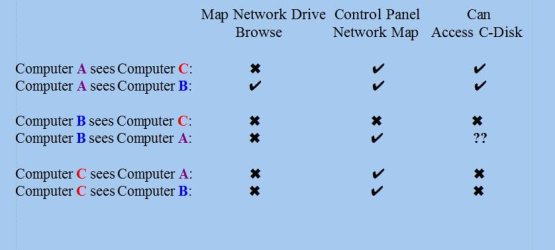
When windows looks for a pc its doesnt actually look it asks the master browser for a list so if there is no master browser it wont work normally another pc will take over the role. 2 pcs with the same name will screw everything up.


Unless you have cable and wifi on ech pc it should only show one ip. We need to see the printout from the scanner so we can see whats going on
All pcs on a private have an ip range 192.168.1.1 so there is no danger posting it as these ip cant be accessed from the interent
 

My Computer

Computer type
PC/Desktop
OS
win 8 32 bit
I see what I posted was confusing. They don't have the same computer name - I was referring to the same workgroup name. Which maybe they should all be the same not just two of them the same.

Having the two IP addresses is I expect because the PCI Express card is on the machine and it's remembered that it had been connected with an IP address, even though the RJ45 cable now is connected only to the Trendnet USB adapter. The IP addresses are dynamic not static - perhaps that's adding a complication.

I'll run the scanner again today and post the results.
 

My Computers

System One System Two

  • Computer type
    PC/Desktop
    Computer Manufacturer/Model Number
    Dell XPS 8300
    OS
    W7 Pro 64
    Memory
    8G
    Sound Card
    RealTek High Definition Audio
    Monitor(s) Displays
    Asus
    Hard Drives
    WD Elements, Samsung Story Station, Samsung EVO 860 / 870
    Mouse
    Logitech M310
    Antivirus
    Avast, Malwarebytes, SUPERAntiSpyware
    Browser
    Firefox, Avast Secure Browser
  • Computer type
    Laptop
    System Manufacturer/Model Number
    HP
    OS
    Win10
    Keyboard
    external
    Mouse
    wireless
    Browser
    Firefox, Avast
    Antivirus
    Avast / Malwarebytes / Superantispyware
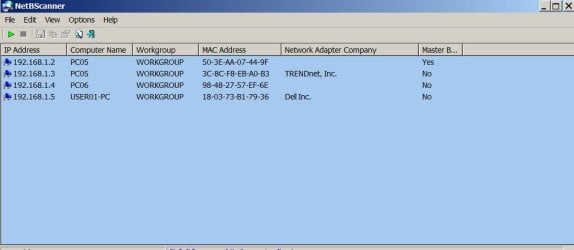
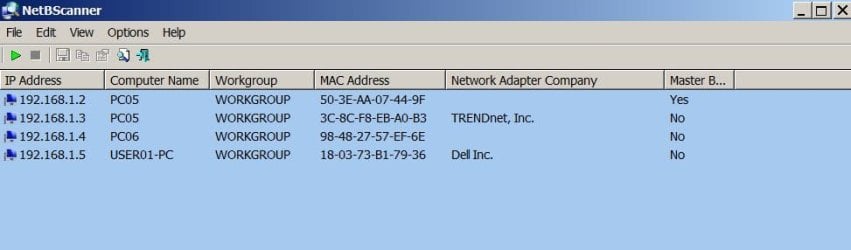
Three NetBScanner results, one from each computer, attached and are identical. In chart, PC5 = Computer C; PC6 = Computer B; PC7 = Computer A. RJ45 cable connected to TrendNet adapter.
 

Attachments

  • PC5 Results 4-19.jpg
    PC5 Results 4-19.jpg
    30.9 KB · Views: 0
  • PC6 Results 4-19.jpg
    PC6 Results 4-19.jpg
    33.7 KB · Views: 0
  • PC7 Results 4-19.jpg
    PC7 Results 4-19.jpg
    27.8 KB · Views: 0

My Computers

System One System Two

  • Computer type
    PC/Desktop
    Computer Manufacturer/Model Number
    Dell XPS 8300
    OS
    W7 Pro 64
    Memory
    8G
    Sound Card
    RealTek High Definition Audio
    Monitor(s) Displays
    Asus
    Hard Drives
    WD Elements, Samsung Story Station, Samsung EVO 860 / 870
    Mouse
    Logitech M310
    Antivirus
    Avast, Malwarebytes, SUPERAntiSpyware
    Browser
    Firefox, Avast Secure Browser
  • Computer type
    Laptop
    System Manufacturer/Model Number
    HP
    OS
    Win10
    Keyboard
    external
    Mouse
    wireless
    Browser
    Firefox, Avast
    Antivirus
    Avast / Malwarebytes / Superantispyware
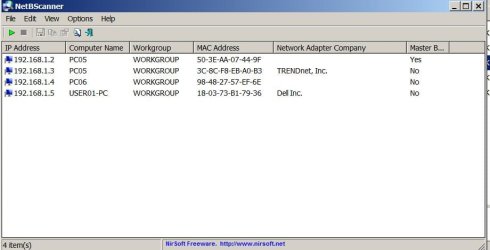
The pco5 192.168.1.2 is master browser as such everything will ask that for info on computers if its not connected it will be the problem you can use ipconfig /release to remove it then see who become MB
 

My Computer

Computer type
PC/Desktop
OS
win 8 32 bit
As my user name implies, I'm not very experienced with what is going on here and am not steeped in LAN experience/knowledge.
If I do ICONFIG Release, I expect the machine will lose all connectivity. Frankly I'm afraid of being back where I was two days ago with no connectivity from any computer to PC5.

If I then do "Renew", as nothing is connected to the "1.2" PCIE adapter, only to the Trendnet, and it sees the PCIE adapter there, won't I be back to where I am now? Or worse, without any computer seeing PC5, which is what I had before I installed the TrendNet adapter. What I have now is far from great but at least I have a one-way connection to PC5 from PC7.

Sorry if I sound nervous about this - it's because I am :eek:
 

My Computers

System One System Two

  • Computer type
    PC/Desktop
    Computer Manufacturer/Model Number
    Dell XPS 8300
    OS
    W7 Pro 64
    Memory
    8G
    Sound Card
    RealTek High Definition Audio
    Monitor(s) Displays
    Asus
    Hard Drives
    WD Elements, Samsung Story Station, Samsung EVO 860 / 870
    Mouse
    Logitech M310
    Antivirus
    Avast, Malwarebytes, SUPERAntiSpyware
    Browser
    Firefox, Avast Secure Browser
  • Computer type
    Laptop
    System Manufacturer/Model Number
    HP
    OS
    Win10
    Keyboard
    external
    Mouse
    wireless
    Browser
    Firefox, Avast
    Antivirus
    Avast / Malwarebytes / Superantispyware
In network setting right click on the adapter and disable
 

My Computer

Computer type
PC/Desktop
OS
win 8 32 bit
I removed the PCI Express RJ45 cable, started up PC05 first before the other machines, using only the TrendNet USB adapter/RJ45 cable on PC05 and now the LAN is working properly. Thank you samuria for your help - and your patience.
 

My Computers

System One System Two

  • Computer type
    PC/Desktop
    Computer Manufacturer/Model Number
    Dell XPS 8300
    OS
    W7 Pro 64
    Memory
    8G
    Sound Card
    RealTek High Definition Audio
    Monitor(s) Displays
    Asus
    Hard Drives
    WD Elements, Samsung Story Station, Samsung EVO 860 / 870
    Mouse
    Logitech M310
    Antivirus
    Avast, Malwarebytes, SUPERAntiSpyware
    Browser
    Firefox, Avast Secure Browser
  • Computer type
    Laptop
    System Manufacturer/Model Number
    HP
    OS
    Win10
    Keyboard
    external
    Mouse
    wireless
    Browser
    Firefox, Avast
    Antivirus
    Avast / Malwarebytes / Superantispyware
Back
Top