
- Local time
- 10:41 AM
- Messages
- 76
Hello
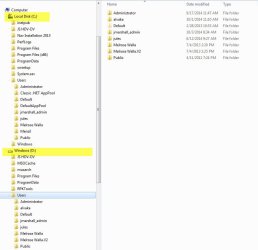
The computer has a C drive and a D drive both with almost the same folders and files.
I want to delete/format D drive however it is the Program Files and Program Files (x86) and the Windows 7 OS.
On D drive Program Files (x86) is missing.
On Start all the application’s ‘properties’ reference c:\program files(x86) thus my conclusion C drive is the drive I need to keep.
What I found in any application I open - if I have to do a save as that save is directed to D:\Libraries. In fact all the saves are in D:\Libraries; the C:\Libraries are mostly unpopulated. What I did in preparation to format D drive was move all the assets from documents/photos/videos/audios from D libraries to C libraries.
I write this because of my uncertainty – I am interested in saving all the data from D and then formatting D knowing that C is healthy with a working OS and Programs Files.
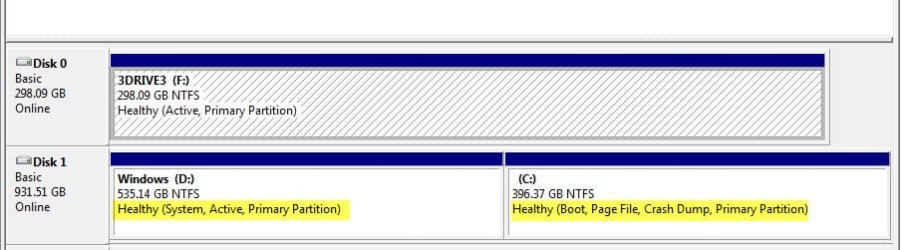
Let me know if I am safe to format D. Here are two images showing information on C and D drives.
To test boot I used EasyBCD / Drive C booted fine; Drive D attempted to launch Windows 7 ; and simply reboot taking me to the boot menu.
Let me know if I can remove D drive / I only need one clean system and one clean boot.
Thanks!
The computer has a C drive and a D drive both with almost the same folders and files.
I want to delete/format D drive however it is the Program Files and Program Files (x86) and the Windows 7 OS.
On D drive Program Files (x86) is missing.
On Start all the application’s ‘properties’ reference c:\program files(x86) thus my conclusion C drive is the drive I need to keep.
What I found in any application I open - if I have to do a save as that save is directed to D:\Libraries. In fact all the saves are in D:\Libraries; the C:\Libraries are mostly unpopulated. What I did in preparation to format D drive was move all the assets from documents/photos/videos/audios from D libraries to C libraries.
I write this because of my uncertainty – I am interested in saving all the data from D and then formatting D knowing that C is healthy with a working OS and Programs Files.
Let me know if I am safe to format D. Here are two images showing information on C and D drives.
To test boot I used EasyBCD / Drive C booted fine; Drive D attempted to launch Windows 7 ; and simply reboot taking me to the boot menu.
Let me know if I can remove D drive / I only need one clean system and one clean boot.
Thanks!
Attachments
My Computer
At a glance
Microsoft Windows 7 Professional 64-bit 7601 ...Intel(R) Xeon(R) CPU 5150 @ 2.66GHz32.00 GB(1) LogMeIn Mirror Driver (2) NVIDIA Quadro F...
- Computer type
- PC/Desktop
- OS
- Microsoft Windows 7 Professional 64-bit 7601 Multiprocessor Free Service Pack 1
- CPU
- Intel(R) Xeon(R) CPU 5150 @ 2.66GHz
- Motherboard
- Hewlett-Packard 0A08h
- Memory
- 32.00 GB
- Graphics Card(s)
- (1) LogMeIn Mirror Driver (2) NVIDIA Quadro FX 1500
- Sound Card
- High Definition Audio Device
- Screen Resolution
- 1280 x 800 x 32 bits (4294967296 colors) @ 74 Hz
- Hard Drives
- (1) (2) (3)

